
A feature-rich logging utility that provides colorized console output with customizable formatting

Project description
Pretty Pie Log
A feature-rich, thread-safe Python logging utility that provides colorized console output with customizable formatting, JSON details support, and function execution tracking.




Installation
pip install pretty-pie-log
Features
- Colorized Output: Customizable colors for different log levels and components, including
timestamp,file path, anddetails. - Thread-Safe: Built-in thread safety for reliable logging in multi-threaded applications.
- Timezone Support: Configurable timezone for timestamp display (default: UTC).
- Automatic Path Detection: Detects relative file paths based on the project root.
- Error Trace Integration: Optionally include full error trace details for exceptions.
- Function Execution Tracking: Decorator for logging function entry, exit, arguments, and results with configurable log levels.
- File Logging: Configurable rotating file logging with size limits and backup files.
- Customizable Formatting: Adjust padding for timestamps, log levels, file paths, and other components.
- Enhanced Log Details Serialization: Handles non-serializable objects in logs by converting them into readable formats.
- Default Colors and Settings: New fields for default log colors and detailed customization.
- Global Context Support: For request tracing and correlation.
Quick Start
from pretty_pie_log import PieLogger, PieLogLevel

# Create a logger instance
logger = PieLogger(
    logger_name="my_app",
    timezone="America/New_York",  # Optional: Set specific timezone
    minimum_log_level=PieLogLevel.INFO,  # Optional: Set minimum log level
    log_to_file=True,  # Optional: Enable file logging
)

# Basic logging methods
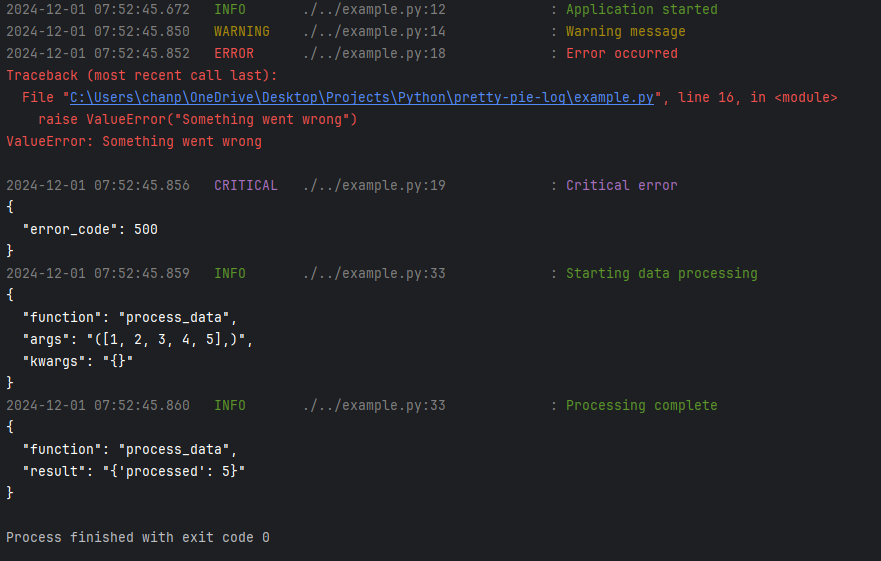
logger.info("Application started")
logger.debug("Debug message", details={"user_id": 123})
logger.warning("Warning message")
try:
    raise ValueError("Something went wrong")
except ValueError:
    logger.error("Error occurred", print_exception=True)  # Includes error trace
logger.critical("Critical error", details={"error_code": 500})


# Function execution tracking
@logger.log_execution(
    start_message="Starting data processing",
    end_message="Processing complete",
    print_args_at_start=True,
    print_result_at_end=True
)
def process_data(data):
    return {"processed": len(data)}


process_data([1, 2, 3, 4, 5])
Output
Detailed Configuration
Logger Initialization
The logger is highly customizable with numerous options:
from pretty_pie_log import PieLogger, PieLogLevel
from colorama import Fore

logger = PieLogger(
    logger_name="my_app",  # Unique identifier for the logger

    # Optional Timezone and Formatting Parameters
    timezone="America/New_York",  # Defaults to UTC if not specified
    timestamp_padding=25,  # Width of timestamp field
    log_level_padding=10,  # Width of log level field
    file_path_padding=30,  # Width of file path field

    # Optional Color Configuration
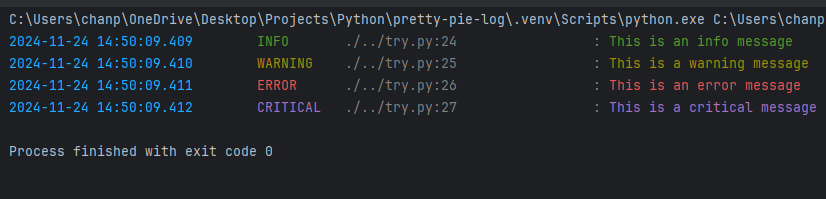
    debug_log_color=Fore.CYAN,
    info_log_color=Fore.GREEN,
    warning_log_color=Fore.YELLOW,
    error_log_color=Fore.RED,
    critical_log_color=Fore.MAGENTA,
    timestamp_log_color=Fore.WHITE,
    file_path_log_color=Fore.WHITE,
    details_log_color=Fore.LIGHTWHITE_EX,

    # Enhanced Logging Options
    colorful=True,  # Enable/disable colored output
    default_log_color=Fore.WHITE,  # Fallback color when colorful is False
    details_indent=2,  # JSON indentation spaces
    minimum_log_level=PieLogLevel.INFO,  # Minimum logging level

    # Rotating File Logging
    log_to_file=True,  # Enable/disable file logging
    log_directory="logs",  # Directory for log files
    log_file_size_limit=32 * 1024 * 1024,  # Max log file size (32 MB)
    max_backup_files=10,  # Number of backup log files to keep

    # Global Context Options
    global_context=False  # Enable/disable global context logging
)
Output using the above configuration
Logging Methods
All logging methods support the following parameters:
logger.info(
    message="Main log message",  # Required: Main text of the log
    details={"key": "value"},  # Optional: Additional data to include (now supports any data type)
    print_exception=True,  # Optional: Include stack trace if an exception occurred
    colorful=False  # Optional: Override global color settings for this log
)
Enhanced details Parameter
The details parameter, which previously supported only dict, now supports any data type, making it more
versatile for structured and unstructured data logging.
- Supported Data Types:
dict: Ideal for key-value pairs or structured data (e.g.,{"user_id": 123, "status": "active"})list/tuple: For sequences of data (e.g.,[1, 2, 3])set: For unique collections (e.g.,{"item1", "item2"})str,int,float,bool: Simple data typesNone: To explicitly log the absence of details- Custom Objects: Non-serializable objects will automatically be converted into readable strings.
Example Usage
# Logging structured data
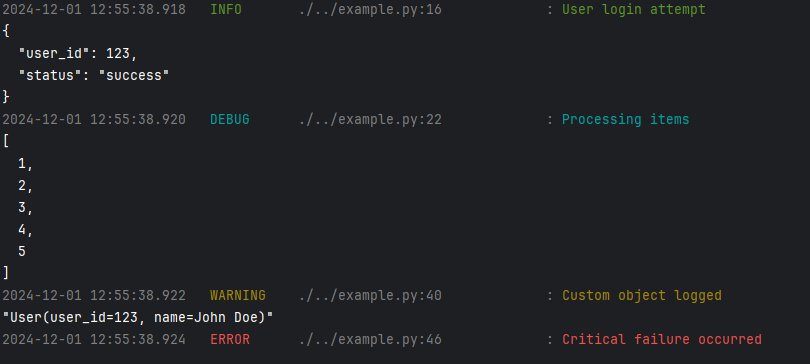
logger.info(
    message="User login attempt",
    details={"user_id": 123, "status": "success"}
)

# Logging a list of items
logger.debug(
    message="Processing items",
    details=[1, 2, 3, 4, 5]
)


# Logging a custom object
class User:
    def __init__(self, user_id, name):
        self.user_id = user_id
        self.name = name

    def __str__(self):
        return f"User(user_id={self.user_id}, name={self.name})"


user = User(123, "John Doe")

logger.warning(
    message="Custom object logged",
    details=user
)

# Logging without additional details
logger.error(
    message="Critical failure occurred",
    details=None
)
Output:
Automatic Serialization
If the details contain non-serializable objects (e.g., custom classes), the logger will automatically convert them
into strings, ensuring the logs remain readable without raising serialization errors.
For example:
class ComplexObject:
    pass


logger.debug(
    message="Logging complex object",
    details=ComplexObject()
)
Console Output
2024-11-30 10:52:00.125   DEBUG      ./../example.py:17             : Logging complex object
"<__main__.ComplexObject object at 0x0000020FD4484A90>"
This enhancement ensures compatibility with diverse use cases while maintaining structured logging capabilities.
Log Levels
The package provides five standard log levels:
PieLogLevel.DEBUG(10)PieLogLevel.INFO(20)PieLogLevel.WARNING(30)PieLogLevel.ERROR(40)PieLogLevel.CRITICAL(50)
Function Execution Tracking
The log_execution decorator provides detailed monitoring of function execution:
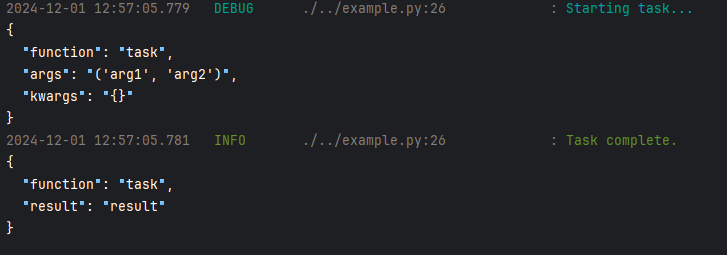
@logger.log_execution(
    start_message="Starting task...",  # Optional: Custom start message
    end_message="Task complete.",  # Optional: Custom end message
    print_args_at_start=True,  # Log function arguments
    print_result_at_end=True,  # Log function return values
    start_message_log_level=PieLogLevel.DEBUG,  # Customizable log levels
    end_message_log_level=PieLogLevel.INFO
)
def task(arg1, arg2):
    return "result"
Console Output
Dependencies
- Python 3.7+
- colorama
- pytz
Contributing
Contributions are welcome! Submit your ideas or pull requests.
License
Usage
Basic Usage
from pretty_pie_log import PieLogger, PieLogLevel

# Initialize logger
logger = PieLogger(
    logger_name="my_app",
    timezone="UTC",
    minimum_log_level=PieLogLevel.INFO
)

# Log messages
logger.debug("Debug message")
logger.info("Info message")
logger.warning("Warning message")
logger.error("Error message")
logger.critical("Critical message")
Context Management
The logger supports global context for request tracing and correlation. When enabled, the context will be included in all log messages.
# Initialize logger with context enabled
logger = PieLogger(
    logger_name="my_app",
    global_context=True  # Enable context logging
)

# Add context information
logger.add_context("request_id", "12345")
logger.add_context("user_id", "user123")

# Log messages will include the context
logger.info("Processing request")

# Remove specific context
logger.remove_context("user_id")

# Clear all context
logger.clear_context()
Function Execution Logging
@logger.log_execution(
    start_message="Starting task...",  # Optional: Custom start message
    end_message="Task complete.",  # Optional: Custom end message
    print_args_at_start=True,  # Log function arguments
    print_result_at_end=True,  # Log function return values
    start_message_log_level=PieLogLevel.DEBUG,  # Customizable log levels
    end_message_log_level=PieLogLevel.INFO
)
def task(arg1, arg2):
    return "result"
Console Output
Release history Release notifications | RSS feed


Download files
Download the file for your platform. If you're not sure which to choose, learn more about installing packages.
Source Distribution
Built Distribution
Filter files by name, interpreter, ABI, and platform.
If you're not sure about the file name format, learn more about wheel file names.
Copy a direct link to the current filters
File details
Details for the file pretty_pie_log-0.3.14.tar.gz.
File metadata
- Download URL: pretty_pie_log-0.3.14.tar.gz
- Upload date:
- Size: 13.9 kB
- Tags: Source
- Uploaded using Trusted Publishing? No
- Uploaded via: twine/6.1.0 CPython/3.11.9
File hashes
| Algorithm | Hash digest | |
|---|---|---|
| SHA256 |
9f28ed8852ef3bfde33bea3213eb9a9cb41a6448a16fa884044cbc7cbfba3ecb
|
|
| MD5 |
74fc9ffe90dc7f08357645422c36b661
|
|
| BLAKE2b-256 |
243ca686ebdc3e0a6ad3f96b3bb3b13944c767ed6ef8ea67f3115f8b683153a7
|
File details
Details for the file pretty_pie_log-0.3.14-py3-none-any.whl.
File metadata
- Download URL: pretty_pie_log-0.3.14-py3-none-any.whl
- Upload date:
- Size: 11.4 kB
- Tags: Python 3
- Uploaded using Trusted Publishing? No
- Uploaded via: twine/6.1.0 CPython/3.11.9
File hashes
| Algorithm | Hash digest | |
|---|---|---|
| SHA256 |
bc0c53eb63b41ac455305c21b2aca35110cd09b2ab1581665c2a33e8c21f9ad8
|
|
| MD5 |
2baabdb348c84af1e971f3df3f92d755
|
|
| BLAKE2b-256 |
46687a5be7ddaba6e0887a68f7034eea606cda42ffb263f12c12f6acf51e6ad9
|






