
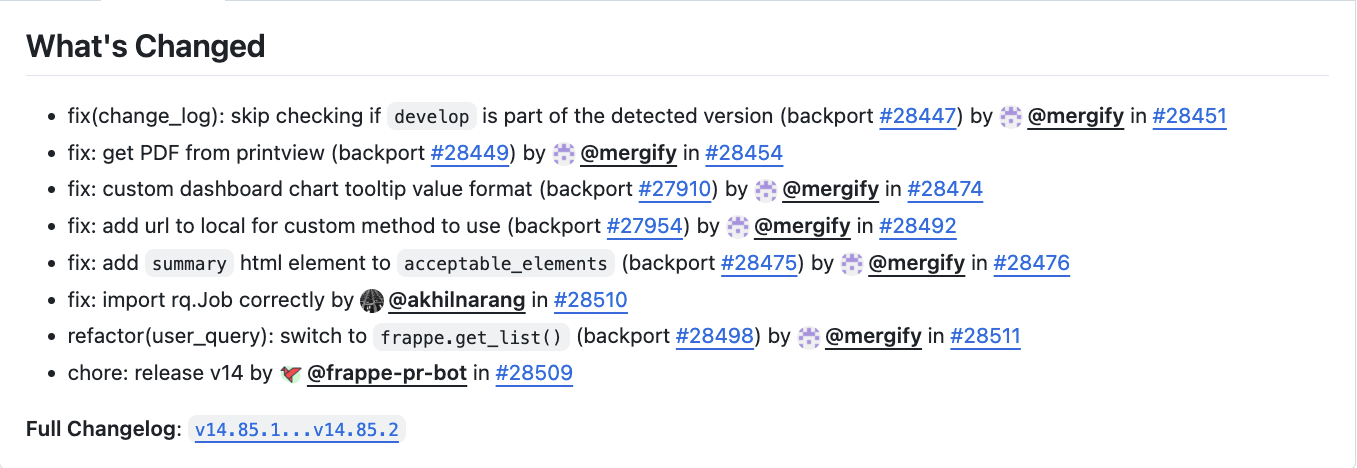
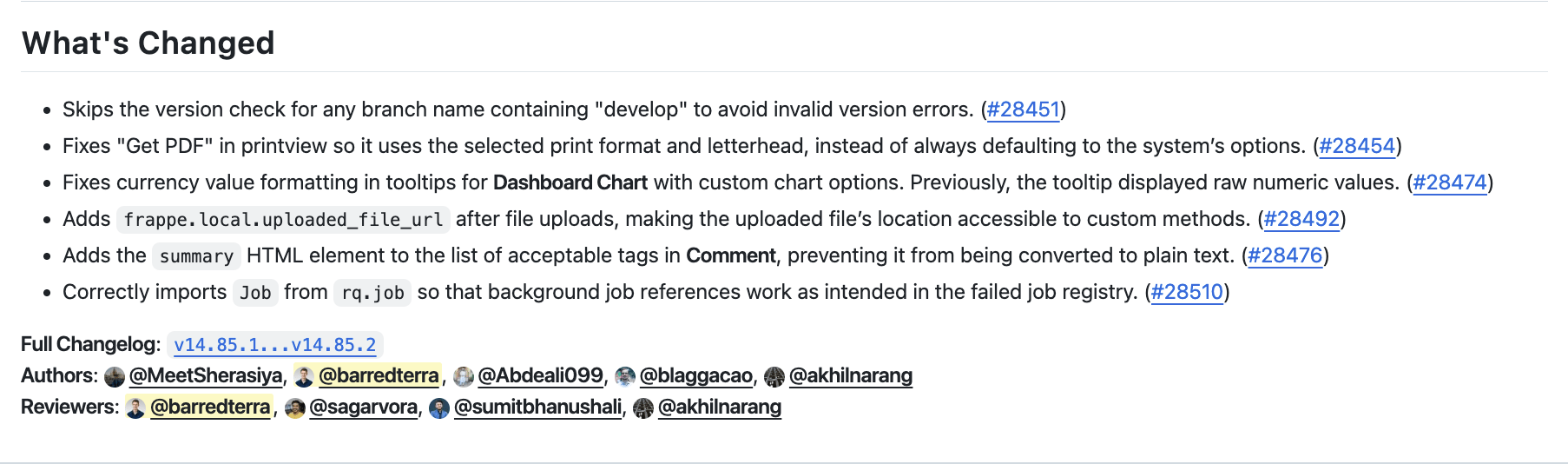
Turn GitHub's auto-generated release notes into human-readable sentences.
Go from this:
To this:
Features
- AI-Powered Summaries - Converts technical PR titles into clear, user-friendly sentences
- Smart Filtering - Automatically excludes non-user-facing changes (chore, ci, refactor, test, style)
- Revert Detection - Automatically filters out PRs that were reverted within the same release
- Backport Intelligence - Reuses summaries from original PRs for backports, maintaining consistency
- Author & Reviewer Attribution - Credits human contributors while excluding bots
- Intelligent Caching - Stores generated summaries to avoid redundant API calls and reduce costs
- Grouped Release Notes - Optional grouping by conventional commit type (Features, Bug Fixes, Performance, etc.)
- Multi-Mode Architecture - Use as CLI tool, Python library, or REST API backend
- Rich Context - Incorporates PR descriptions, linked issues, and code diffs for accurate summaries
- Interactive Setup - Guided configuration with validation and migration from legacy formats
Configuration
Interactive Setup (Recommended)
The easiest way to configure the tool is using the interactive setup command:
pretty-release-notes setup
This will:
- Guide you through all configuration options with helpful prompts
- Show sane defaults for each setting
- Create the config file at
~/.pretty-release-notes/config.toml
First-time migration from .env? Use the --migrate-env flag:
pretty-release-notes setup --migrate-env
This will read your existing .env file and suggest those values as defaults.
Manual Setup
Alternatively, copy config.toml.example to ~/.pretty-release-notes/config.toml and fill in your credentials:
# Create config directory
mkdir -p ~/.pretty-release-notes

# Copy example config
cp config.toml.example ~/.pretty-release-notes/config.toml

# Edit with your credentials
nano ~/.pretty-release-notes/config.toml
Configuration Format
The configuration file uses TOML format with sections for GitHub credentials, LLM settings, database caching, and filters. The canonical section name is [llm], while the legacy [openai] section is still accepted for backward compatibility. Prefer fully qualified provider:model values such as openai:gpt-4.1; unqualified model names are still accepted and default to OpenAI for backward compatibility. You can also set reasoning_effort to none, low, medium, high, or xhigh for supported models/providers. See config.toml.example for the complete structure and all available options.
You can override the config location using the --config-path flag.
Installation
# Clone the repository
git clone https://github.com/barredterra/pretty_release_notes
cd pretty_release_notes

# Create virtual environment and install
python -m venv env
source env/bin/activate
pip install -e .
Usage
CLI
After installation, you can use the CLI in several ways:
# View all commands
pretty-release-notes --help

# Generate release notes
pretty-release-notes generate erpnext v15.38.4  # using owner from config.toml
pretty-release-notes generate --owner alyf-de banking v0.0.1

# Use a custom config file
pretty-release-notes generate --config-path /path/to/config.toml erpnext v15.38.4

# Specify custom comparison range
pretty-release-notes generate erpnext v15.38.4 --previous-tag v15.38.0

# Override reasoning effort for a single run
pretty-release-notes generate erpnext v15.38.4 --reasoning-effort high
Example output:
---- Original ----
## What's Changed
* fix: list view and form status not same for purchase order (backport #43690) (backport #43692) by @mergify in https://github.com/frappe/erpnext/pull/43706


**Full Changelog**: https://github.com/frappe/erpnext/compare/v15.38.3...v15.38.4

---- Modified ----
## What's Changed
* Removes unnecessary decimal precision checks for _per_received_ and _per_billed_ fields in **Purchase Order**, so the list view status and form status remain consistent. https://github.com/frappe/erpnext/pull/43706


**Full Changelog**: https://github.com/frappe/erpnext/compare/v15.38.3...v15.38.4
**Authors**: @rohitwaghchaure
Library Usage
You can also use pretty_release_notes as a Python library in your own projects:
from pretty_release_notes import ReleaseNotesBuilder

# Build a client with configuration
client = (
    ReleaseNotesBuilder()
    .with_github_token("ghp_your_token")
    .with_llm(
        "sk_your_key",
        model="openai:gpt-4.1",  # or model="anthropic:claude-sonnet-4-5"
        reasoning_effort="medium",
    )
    .with_database("sqlite")
    .with_filters(
        exclude_types={"chore", "ci", "refactor"},
        exclude_labels={"skip-release-notes"},
    )
    .build()
)

# Generate release notes
notes = client.generate_release_notes(
    owner="frappe",
    repo="erpnext",
    tag="v15.38.4",
    previous_tag_name="v15.38.0",  # Optional: custom comparison range
)
print(notes)

# Optionally update on GitHub
client.update_github_release("frappe", "erpnext", "v15.38.4", notes)
For more examples, see examples/library_usage.py.
Web API
The tool can also be run as a REST API server for integration with web frontends.
Starting the Server
First, install the web dependencies:
source env/bin/activate
pip install -e .[web]
Then start the server:
# Using uvicorn directly
python -m uvicorn pretty_release_notes.web.app:app --host 0.0.0.0 --port 8000

# Or using the provided server script
python -m pretty_release_notes.web.server
The API will be available at http://localhost:8000 with interactive documentation at http://localhost:8000/docs.
API Endpoints
Health Check
curl http://localhost:8000/health
Create Release Notes Job
curl -X POST http://localhost:8000/generate \
  -H "Content-Type: application/json" \
  -d '{
    "owner": "frappe",
    "repo": "erpnext",
    "tag": "v15.38.4",
    "previous_tag_name": "v15.38.0",
    "github_token": "ghp_your_token_here",
    "llm_key": "sk-your_key_here",
    "llm_model": "openai:gpt-4.1",
    "reasoning_effort": "medium",
    "exclude_types": ["chore", "ci", "refactor"],
    "exclude_labels": ["skip-release-notes"],
    "exclude_authors": ["dependabot[bot]"],
    "no_read": false,
    "no_write": false
  }'
Legacy openai_key, openai_model, and openai_reasoning_effort request fields are still accepted for backward compatibility. Use no_database to skip both cache reads and writes.
Response:
{
  "job_id": "550e8400-e29b-41d4-a716-446655440000",
  "status": "pending",
  "created_at": "2025-01-19T10:30:00.000000"
}
Check Job Status
curl http://localhost:8000/jobs/{job_id}
Response:
{
  "job_id": "550e8400-e29b-41d4-a716-446655440000",
  "status": "completed",
  "created_at": "2025-01-19T10:30:00.000000",
  "completed_at": "2025-01-19T10:30:15.000000",
  "result": "## What's Changed\n* Fixed bug...",
  "progress": [
    {
      "timestamp": "2025-01-19T10:30:05.000000",
      "type": "success",
      "message": "Downloaded PRs in 0.42 seconds."
    }
  ],
  "error": null
}
Automated Polling
Run release note generation automatically whenever a new release is published. Add the repos you want to watch to your config:
[poll]
repos = ["frappe/erpnext", "frappe/frappe"]
Then set it up:
# Seed state with current releases (so existing ones aren't reprocessed)
pretty-release-notes poll --seed

# Install a cron job that polls every 15 minutes
pretty-release-notes poll --install-cron
You can also run a single poll cycle manually:
pretty-release-notes poll
The poll command uses the same config, database, and filters as generate. Processed releases are tracked in ~/.pretty-release-notes/processed_releases.json.
Authors and Reviewers
The authors and reviewers of the PRs are added to the release notes.
- An author who reviewed or merged their own PR or backport is not a reviewer.
- A non-author who reviewed or merged someone else's PR is a reviewer.
- The author of the original PR is also the author of the backport.
Backports
We try to use the same message for backports as for the original PR. For this, we look for (backport #<number>) at the end of the PR title and check if we have existing messages for that PR in our database. If we do, we use the message for the original PR. If we don't, we create a new message for the backport.
This means that backports of backports are currently not supported / will get a new message. To get the same message, PRs must be a direct backport of the original PR.
Contributing
See CONTRIBUTING.md for development setup, testing, code quality tools, and commit conventions.
1 maintainer

Metadata
1 maintainer
Release files for pretty-release-notes 1.4.1
For a detailed explanation of source distributions (sdists) and built distributions (wheels), please see the package formats documentation.
Source distribution (sdist)
| File | Size | Uploaded | |
|---|---|---|---|
| pretty_release_notes-1.4.1.tar.gz | 58.7 kB | Details |
Built distribution (wheel)
| File | Interpreter | ABI | Platform | Reset |
|---|---|---|---|---|
| pretty_release_notes-1.4.1-py3-none-any.whl | Python 3 | none | any | Details |
Total release size: 103.4 kB
Release files / pretty_release_notes-1.4.1.tar.gz
| Download URL | pretty_release_notes-1.4.1.tar.gz |
|---|---|
| Size | 58.7 kB |
| Tags | Source |
|
SHA-256 checksum How to use checksums |
f891f018bb294609405e6116d23e528094ca821b4eb4cd682059a1f075371830
|
|
BLAKE2b-256 checksum How to use checksums |
d4ec0be8f66f55fc5cafdc400544b1867004c109102ca878a9688afd8691d6dc
|
| Upload date | |
|
Uploaded using Trusted Publishing? What is trusted publishing? |
No |
| Uploaded via |
twine/7.0.0 CPython/3.14.4
|
Release files / pretty_release_notes-1.4.1-py3-none-any.whl
| Download URL | pretty_release_notes-1.4.1-py3-none-any.whl |
|---|---|
| Size | 44.7 kB |
| Tags | Python 3 |
|
SHA-256 checksum How to use checksums |
ca87fdd6ca3d20c67478aa57a1245d11be8410baed3c057066fff728c9ec784b
|
|
BLAKE2b-256 checksum How to use checksums |
2606b5a8f361fa791d2072facc2f019d410c8c76e2b98bfe3dcd1fde3bece9e8
|
| Upload date | |
|
Uploaded using Trusted Publishing? What is trusted publishing? |
No |
| Uploaded via |
twine/7.0.0 CPython/3.14.4
|














