
Pretty Confusion Matrix
🤔 Why pretty confusion matrix?
- We can make confusion matrix by using matplotlib.
- However it is not so pretty. I want to make confusion matrix prettier.
- Also, it is not easy to use. It is easy to draw confusion matrix.
Design Contributors
- 황동호(Dongho Hwang, hhdh12@naver.com)
- 김다한(Dahan Kim, dahan0811@gmail.com)
Code Contributors
- 고준서(Junseo Ko, Korkite, sta06167@naver.com)
📥 How to Install?
pip install prettycm
🗞 Full Code Example
from prettycm import confusion_matrix
from prettycm import palette

# Define confusion matrix
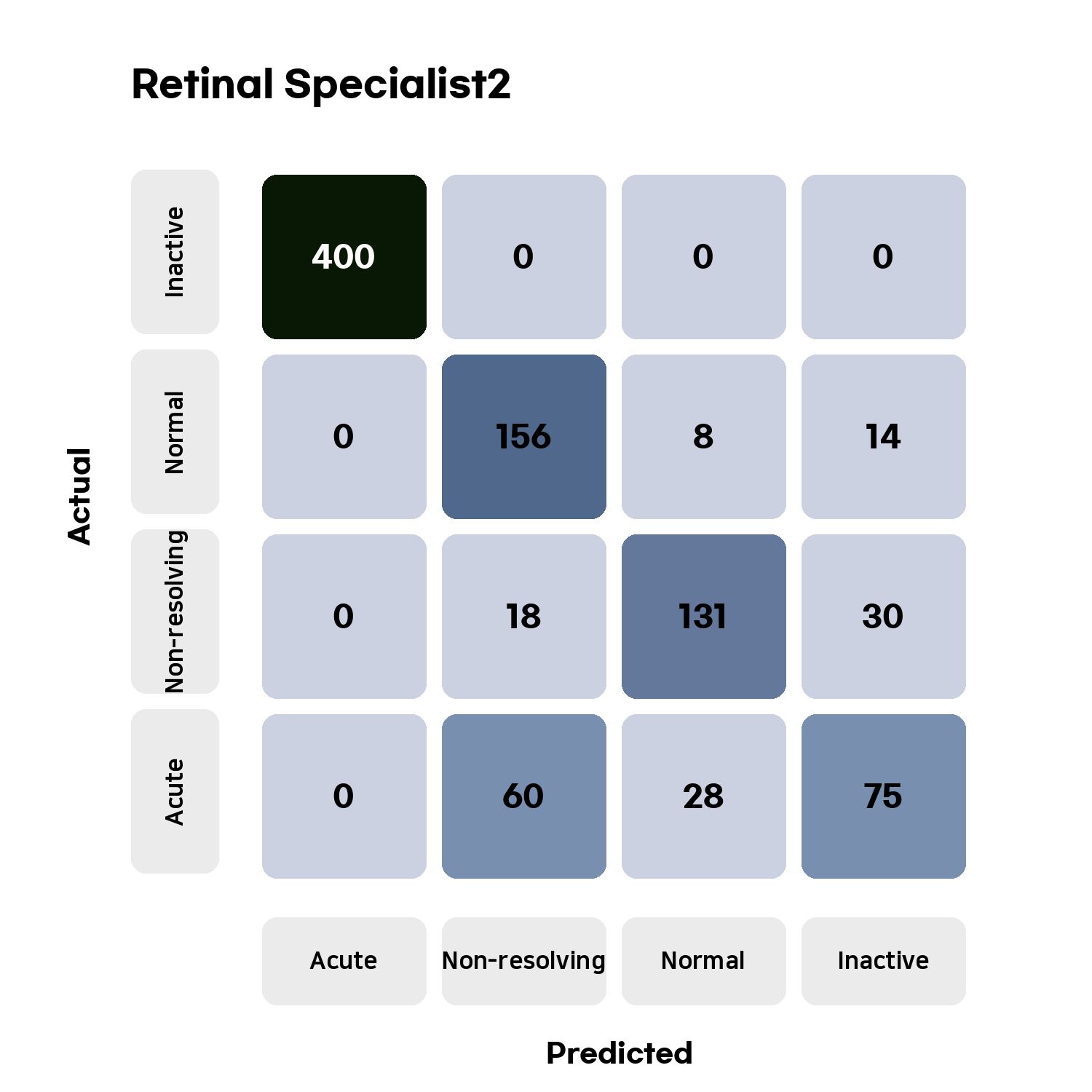
cm = confusion_matrix([[400,0,0,0],[0,156,8,14],[0,18,131,30],[0,60,28,75]])
cm.set_classname(["Acute", "Non-resolving","Normal","Inactive"])
cm.set_title("Retinal Specialist2")

# Define Palette and draw
pset = palette()
pset.draw(cm, "place_to_save.png")
📦 Result of generated confusion matrix
📰 How to Use?
1. import package from prettycm
from prettycm import confusion_matrix
from prettycm import palette
2. build confusion matrix object
cm = confusion_matrix([[400,0,0,0],[0,156,8,14],[0,18,131,30],[0,60,28,75]])
cm.set_classname(["Acute", "Non-resolving","Normal","Inactive"]) # You can set the class name.
cm.set_title("Retinal Specialist2") # You can set the title.
- the input of the confusion_matrix must be two-dimensional array
- Python list or numpy array are both allowed
- You can set the name of the class and title.
3. define palette object
pset = palette(size=5, color="blue")
- size = the quality and size of output confusion matrix image
- color = the color of confusion matrix. (Now only blue is supported)
- Both parameters are not needed. size 5, color blue is defaultly set.
4. draw confusion matrix and save
pset.draw(confusion_matrix=cm, path="place_to_save.png")
- confusion_matrix: put confusion matrix object
- path: path to save
Done
5. Generate Confusion matrix object by confusion_matrix_by_cal
- You can also generate confusion matrix object by y_pred, y_true.
6. Special Printer of Confusion Matrix
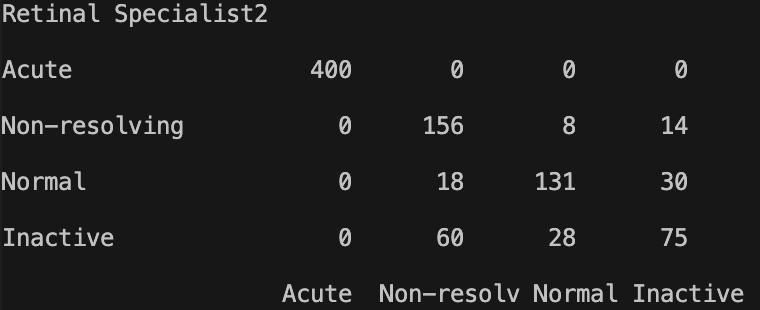
print(cm)
- When you print confusion_matrix object, than python will print the confusion matrix like below
7. Custom Your own color presets
from prettycm import palette
from prettycm.presets import preset_meta

class custom_green(preset_meta):
    def __init__(self, max_num):
        colors_rgb = [(204,244,202),(10,30,12)]
        super().__init__(max_num,colors_rgb)

pset = palette(size=5, color=custom_green)
- You can customize your own color preset
- Make your own class and inherit prettycm.presets.preset_meta
- And You have to write custom object same as this.
- colors_rgb consists of two 'tuple', which is brightest color RGB and darkest color RGB.
- Other colors will automatically be calculated by preset_meta object.
📆 Update Plans
1. More color presets
- Blue (👍 Best)
- Red
- Green
- Purple
- Custom Preset
2. Confusion matrix concat
- Concat two confusion matrix
3. Pallet Function
- Text Size control
- Cleaning the code
🙏🏻 PLEASE Contribute to this project
- Pull requests after you modify code.
- Make more color presets.
1 maintainer

Metadata
1 maintainer
Release files for prettycm 1.2.8
For a detailed explanation of source distributions (sdists) and built distributions (wheels), please see the package formats documentation.
Source distribution (sdist)
| File | Size | Uploaded | Provenance | |
|---|---|---|---|---|
| prettycm-1.2.8.tar.gz | 1.2 MB | Without provenance | Details |
Built distribution (wheel)
| File | Interpreter | ABI | Platform | Reset |
|---|---|---|---|---|
| prettycm-1.2.8-py3-none-any.whl | Python 3 | none | any | Details |
Total release size: 2.5 MB
Release files / prettycm-1.2.8.tar.gz
| Download URL | prettycm-1.2.8.tar.gz |
|---|---|
| Size | 1.2 MB |
| Tags | Source |
|
SHA-256 checksum How to use checksums |
19a86d036e26d4626938c3bedc72e2459e1af94060d7f0d00f6660fd22388ac1
|
|
BLAKE2b-256 checksum How to use checksums |
75c1a0486077b7d7af427a40a8a478c049190dbcbe80bfe78fb19f508401097b
|
| Upload date | |
|
Uploaded using Trusted Publishing? What is trusted publishing? |
No |
| Uploaded via |
twine/3.8.0 pkginfo/1.8.2 readme-renderer/32.0 requests/2.27.1 requests-toolbelt/0.9.1 urllib3/1.26.8 tqdm/4.62.3 importlib-metadata/4.11.1 keyring/23.5.0 rfc3986/2.0.0 colorama/0.4.4 CPython/3.8.9
|
Release files / prettycm-1.2.8-py3-none-any.whl
| Download URL | prettycm-1.2.8-py3-none-any.whl |
|---|---|
| Size | 1.2 MB |
| Tags | Python 3 |
|
SHA-256 checksum How to use checksums |
a53fe189b386a4449145a63ab737c522a4a49c1297c64e9d8f8f8a99d149d2a4
|
|
BLAKE2b-256 checksum How to use checksums |
2897aa1514d0810afb6e52009b8b44bceceed54af4532916755efa26b306ba1b
|
| Upload date | |
|
Uploaded using Trusted Publishing? What is trusted publishing? |
No |
| Uploaded via |
twine/3.8.0 pkginfo/1.8.2 readme-renderer/32.0 requests/2.27.1 requests-toolbelt/0.9.1 urllib3/1.26.8 tqdm/4.62.3 importlib-metadata/4.11.1 keyring/23.5.0 rfc3986/2.0.0 colorama/0.4.4 CPython/3.8.9
|
Security for prettycm 1.2.8
Provenance
Provenance describes where a file came from. On PyPI, provenance is shared via attestations, which provide a verifiable record of the build or publishing details. View details, limitations and caveats.
No provenance found
None of the files in this release were uploaded with provenance metadata.
A note on package security
PyPI is a repository for distributing packages, not a service for auditing them. While third-party security researchers and our staff do their best to detect and remove malicious packages, PyPI cannot guarantee the quality, security or suitability of any given package.
To learn more about protecting yourself from malicious actors, visit our package security documentation.














