
Beautiful, production-ready Python logging with colors and JSON output

Project description
prettylogx
Beautiful, production-ready Python logging — zero external dependencies.



Make your Python logs beautiful and readable in 3 lines of code.
No config files. No heavy dependencies. Just install and go.
Install
pip install prettylogx
Use
from prettylogx import setup_logger

logger = setup_logger("my-app")

logger.info("Server started")
logger.warning("Database is slow")
logger.error("Payment failed")
That's it. Your logs now look like this:
12:30:45  INFO      my-app            Server started
12:30:45  WARNING   my-app            Database is slow
12:30:45  ERROR     my-app            Payment failed
Each level prints in its own color — green, yellow, red, magenta.
More Examples
Switch to JSON logs (for production)
logger = setup_logger("my-app", json_logs=True)

logger.info("Server started")
{"timestamp": "2024-01-15T10:30:45Z", "level": "INFO", "logger": "my-app", "message": "Server started", "module": "app", "function": "main", "line": 5}
Show DEBUG level logs
logger = setup_logger("my-app", level="DEBUG")

logger.debug("Connecting to DB...")
logger.info("Connected")
Trace a request ID across all log lines
from prettylogx import setup_logger, set_request_id, clear_request_id

logger = setup_logger("api")

set_request_id("req-abc123")

logger.info("Validating input")    # → [req-abc123] Validating input
logger.info("Querying database")   # → [req-abc123] Querying database
logger.info("Returning 200 OK")    # → [req-abc123] Returning 200 OK

clear_request_id()
Log exceptions with full traceback
try:
    result = 1 / 0
except ZeroDivisionError:
    logger.exception("Something went wrong")
12:30:45  ERROR     my-app            Something went wrong
  - - - - - - - - - - - - - - - - - - - - - - - - - - - - - -
    Traceback (most recent call last):
      File "app.py", line 3, in <module>
        result = 1 / 0
    ZeroDivisionError: division by zero
  - - - - - - - - - - - - - - - - - - - - - - - - - - - - - -
Custom log levels
logger.verbose("Very detailed info")         # below DEBUG
logger.success("Order processed!")           # between INFO and WARNING
All Options
setup_logger(
    name="my-app",       # name shown in every log line
    level="INFO",        # DEBUG / INFO / WARNING / ERROR / CRITICAL
    json_logs=False,     # True = JSON output for production
    show_time=True,      # show timestamp
    show_file=False,     # show filename and line number
    use_colors=True,     # False = plain text, no ANSI codes
)
Before vs After
Without prettylogx — raw Python logging:
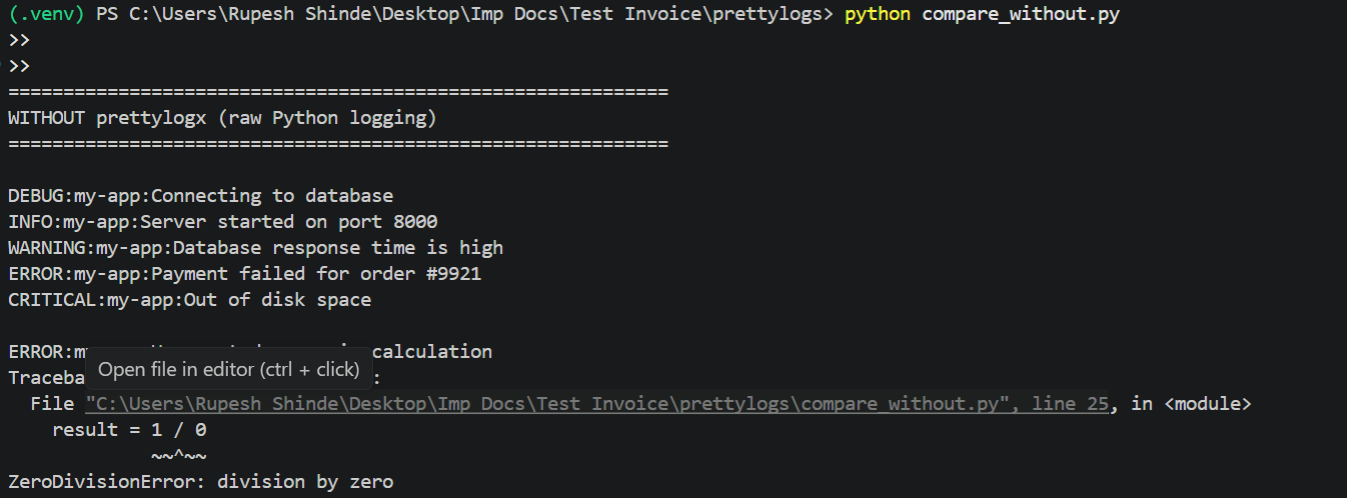
No colors. No alignment. Hard to scan. Every line looks the same.
With prettylogx — beautiful, readable logs:
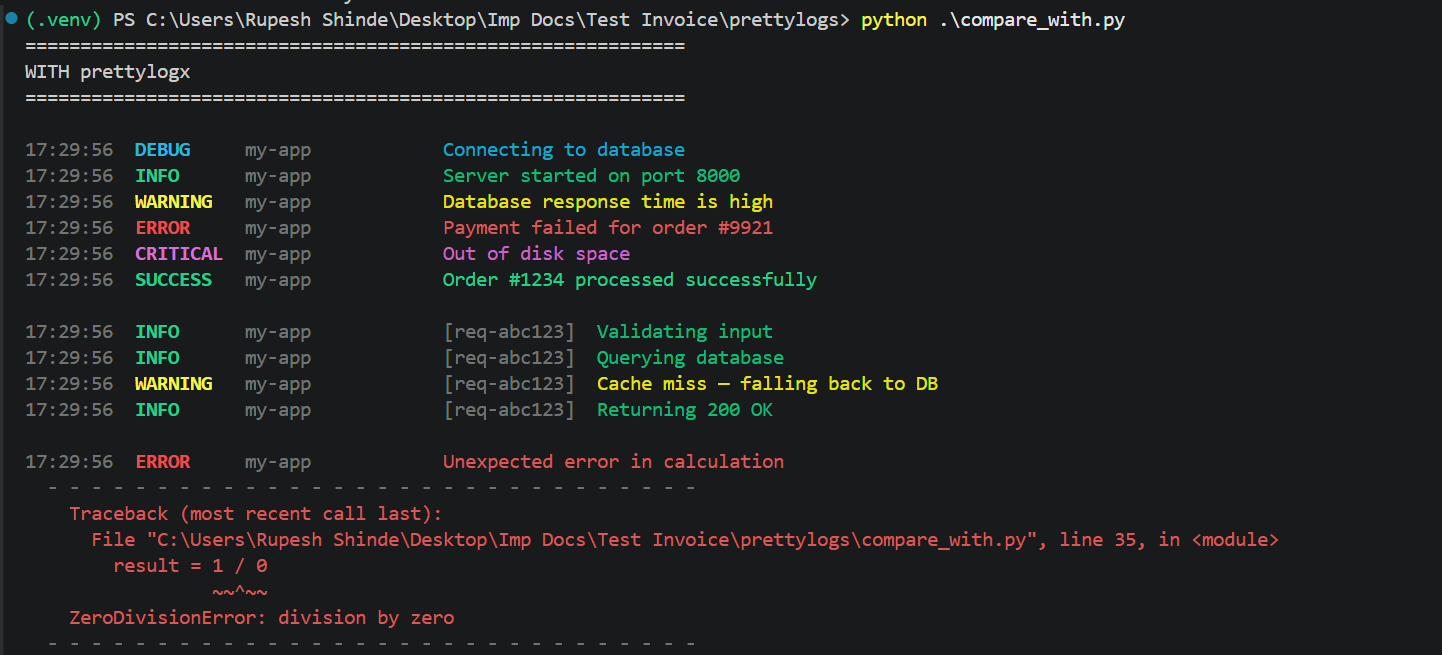
Colors per level. Fixed columns. Request ID tracing. Clean exception blocks.
Why prettylogx?
Raw logging |
prettylogx | |
|---|---|---|
| Colored output | No | Yes |
| JSON logs | No | Yes |
| Request ID tracing | Manual | Built-in |
| Clean exceptions | No | Yes |
| One-line setup | No | Yes |
| Zero dependencies | Yes | Yes |
Roadmap
- File handler — write to rotating log files
- Async support via
contextvars - Middleware for FastAPI / Flask / Django
License
MIT — free to use in personal and commercial projects.
Made by Rupesh Shinde


Download files
Download the file for your platform. If you're not sure which to choose, learn more about installing packages.
Source Distribution
Built Distribution
Filter files by name, interpreter, ABI, and platform.
If you're not sure about the file name format, learn more about wheel file names.
Copy a direct link to the current filters
File details
Details for the file prettylogx-0.1.3.tar.gz.
File metadata
- Download URL: prettylogx-0.1.3.tar.gz
- Upload date:
- Size: 11.4 kB
- Tags: Source
- Uploaded using Trusted Publishing? No
- Uploaded via: twine/6.2.0 CPython/3.11.9
File hashes
| Algorithm | Hash digest | |
|---|---|---|
| SHA256 |
cf45fdbf99a9ba12348bb48737d489adc3b3466b06060c88063b9a2f73b0f3ef
|
|
| MD5 |
0357defd87d69a8d362ba910382b0855
|
|
| BLAKE2b-256 |
3e80e5cdd11c713363f98f66a641ba405c52125e70722b06fa20c4716ece5ddf
|
File details
Details for the file prettylogx-0.1.3-py3-none-any.whl.
File metadata
- Download URL: prettylogx-0.1.3-py3-none-any.whl
- Upload date:
- Size: 9.7 kB
- Tags: Python 3
- Uploaded using Trusted Publishing? No
- Uploaded via: twine/6.2.0 CPython/3.11.9
File hashes
| Algorithm | Hash digest | |
|---|---|---|
| SHA256 |
b7bf7da072a5b56e5b681c8690397cb58da7107eaa7ac4b4406dfaa224953a3a
|
|
| MD5 |
8411a4c951d7394b9902679c70ac371b
|
|
| BLAKE2b-256 |
415c453e560c0a2e9d35a7d1f024106ac8aef1de4d92c075999b760b3a8efd4a
|






