
Pretty terminal utilities wrapped around rich: colorful progress bars, dict-to-table printing, and more.

Project description
prettyterm
Pretty terminal utilities wrapped around Rich: colorful progress bars, dict-to-table printing, TTY-aware logging, and more.
Installation
pip install prettyterm
Features
track() - tqdm-like Progress Bar
A clean, colorful progress bar wrapper around Rich's progress module. Drop-in replacement for tqdm with enhanced formatting.
Features:
- Progress bar with completion percentage
- Elapsed and remaining time
- Iteration speed (it/s)
- Dynamic postfix updates (string or dict)
- Auto-detects sequence length
from prettyterm import track

# Basic usage
for i in track(range(100), desc="Processing"):
    # Your code here
    pass

# With dynamic postfix
pbar = track(range(100), desc="Epoch 3")
for i in pbar:
    pbar.set_postfix({"loss": f"{0.5}", "acc": f"{95}%"})
Output:

print_table() - Pretty Dictionary Tables
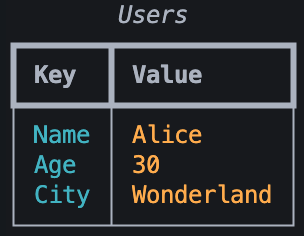
Display dictionaries as colorful, formatted tables. Great for configuration display, stats output, or debugging.
Features:
- Automatic column sizing
- Color-coded columns (cyan keys, orange values)
- Optional table title
- Optional row dividers
from prettyterm import print_table

data = {
    "Name": "Alice",
    "Age": 30,
    "City": "Wonderland",
    "Role": "Developer"
}

print_table(data, title="User Info", show_lines=True)
Output:
setup_logging() and get_logger() - Unified Logging with SUCCESS Level
Configure console and file logging explicitly, then get a standard logger with a custom SUCCESS level between INFO and WARNING. Importing prettyterm does not change the root logger.
Features:
- Automatic color only for an eligible interactive TTY
- Plain redirected console and UTF-8 file output with no ANSI escapes
- Console-only, file-only, or combined handlers
- Custom
SUCCESSlevel (green on colored consoles and namedSUCCESSin plain output) - Idempotent reconfiguration without removing application-owned handlers
- Clean, piped format:
timestamp │ level │ name │ message
import logging

from prettyterm import get_logger, setup_logging

# Explicit setup; color="auto" is the default.
setup_logging(logging.INFO)

logger = get_logger("my_app")

logger.debug("Detailed debug info")
logger.info("Application started")
logger.success("Operation completed!")  # Custom level
logger.warning("Resource usage high")
logger.error("Connection failed")
logger.critical("System shutting down")
color="auto" enables console colors only when stderr is an interactive TTY. Redirected output, NO_COLOR, and TERM=dumb use the plain formatter. Use color=True or color=False for an explicit override.
Output:

Log Colors:
DEBUG- CyanINFO- WhiteSUCCESS- Green (custom)WARNING- YellowERROR- RedCRITICAL- Red on white
Console and file logging:
File handlers are always UTF-8 and plain, even when the console is colored. file_level=None inherits log_level; set it explicitly when the file should capture more detail than the console.
import logging

from prettyterm import get_logger, setup_logging

setup_logging(
    logging.INFO,
    log_file="app.log",
    file_level=logging.DEBUG,
)

logger = get_logger("my_app")
logger.debug("Written to app.log only")
logger.success("Visible as SUCCESS in the console and app.log")
File-only logging:
from prettyterm import get_logger, setup_logging

setup_logging(console=False, log_file="worker.log")

logger = get_logger("worker")
logger.info("Running without a console handler")
logger.success("Written plainly as SUCCESS with no ANSI escapes")
Calling setup_logging() again closes and replaces only handlers previously installed by PrettyTerm. Handlers installed by the consuming application are preserved.
Migrating to 0.3.0:
Version 0.3.0 intentionally removes setup_colored_logging() and import-time root logger configuration. Applications must import setup_logging and call it explicitly before expecting PrettyTerm handlers. There is no compatibility alias.
Development
# Install the project and locked development tools
uv sync --group dev

# Test, format-check, lint, type-check, and build
uv run pytest -q
uv run ruff format --check .
uv run ruff check .
uv run mypy
uv build

# Run examples
uv run python src/prettyterm/pbar.py
uv run python src/prettyterm/table.py
uv run python src/prettyterm/logger.py
License
MIT


Download files
Download the file for your platform. If you're not sure which to choose, learn more about installing packages.
Source Distribution
Built Distribution
Filter files by name, interpreter, ABI, and platform.
If you're not sure about the file name format, learn more about wheel file names.
Copy a direct link to the current filters
File details
Details for the file prettyterm-0.3.0.tar.gz.
File metadata
- Download URL: prettyterm-0.3.0.tar.gz
- Upload date:
- Size: 196.6 kB
- Tags: Source
- Uploaded using Trusted Publishing? No
- Uploaded via: twine/6.2.0 CPython/3.12.12
File hashes
| Algorithm | Hash digest | |
|---|---|---|
| SHA256 |
18b2f26b0ce7541b4aa9e25ff4d0bb822983c60e31951cf5a2fa5c37e2c071dd
|
|
| MD5 |
94426e33ef08f945cddcbfb5bd562202
|
|
| BLAKE2b-256 |
48bd4286e2574553fbbeba644efd923686c4888f858ac373a63df6dbb06695e4
|
File details
Details for the file prettyterm-0.3.0-py3-none-any.whl.
File metadata
- Download URL: prettyterm-0.3.0-py3-none-any.whl
- Upload date:
- Size: 8.8 kB
- Tags: Python 3
- Uploaded using Trusted Publishing? No
- Uploaded via: twine/6.2.0 CPython/3.12.12
File hashes
| Algorithm | Hash digest | |
|---|---|---|
| SHA256 |
bf2e9b453889d97bc3ea50f6f7be9512fc0658551661151314bc4e9635845124
|
|
| MD5 |
174f8a47c97ad3eedd7c2fdbd256d0e3
|
|
| BLAKE2b-256 |
218cfbaaa9eec12c6fd8e18515c7e4f09a89dcebaa610d407bd101aa4eeec2e4
|






