
Console I/O Helper - Print Awesome. Make It Prime.

Project description
😎 Prime Printer 👀
Console I/O Helper - Print Awesome. Make It Prime 🚀

Easy Usage, Easy handling, BIG Improvement for your needs 🎯
Easy Installation -> https://pypi.org/project/prime-printer/
pip install prime_printer
⚡Quick Look⚡
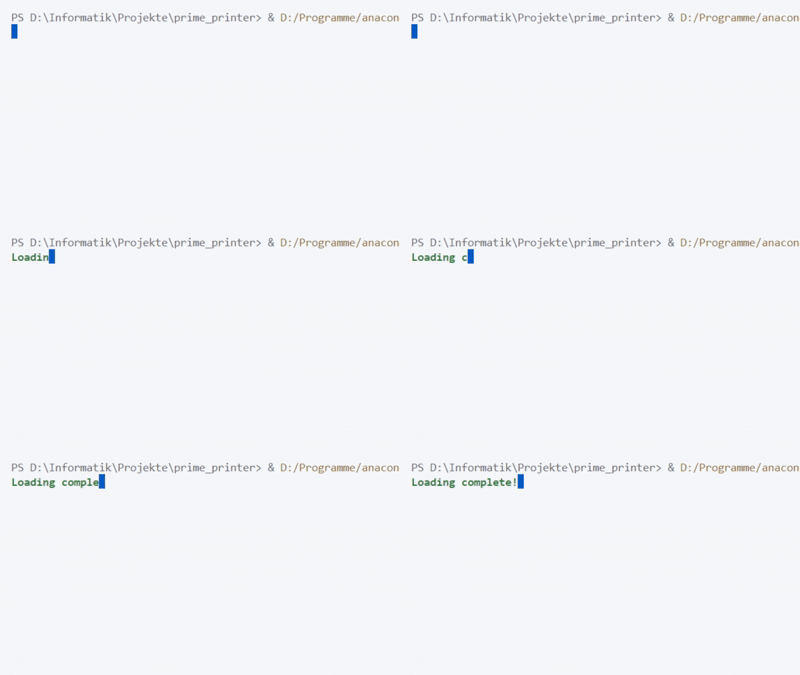
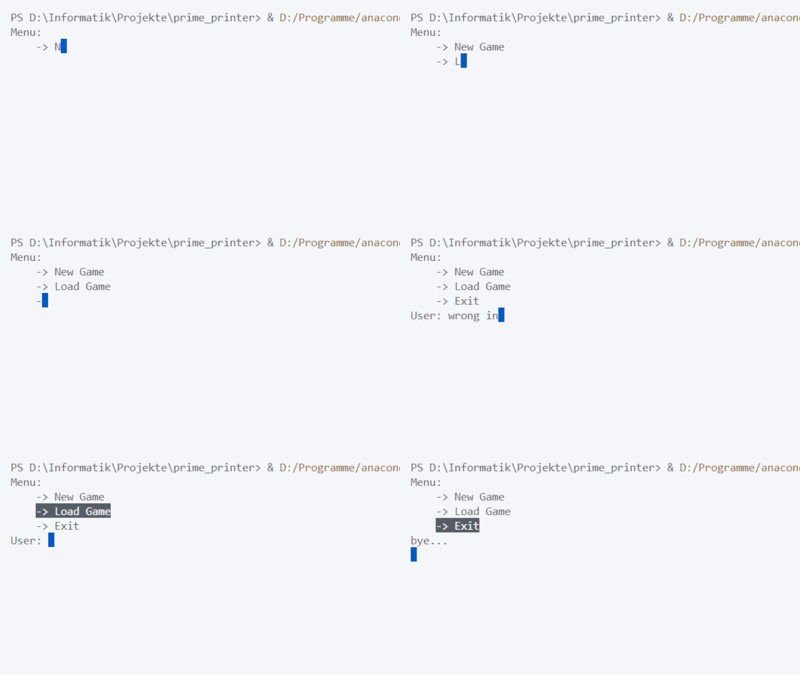
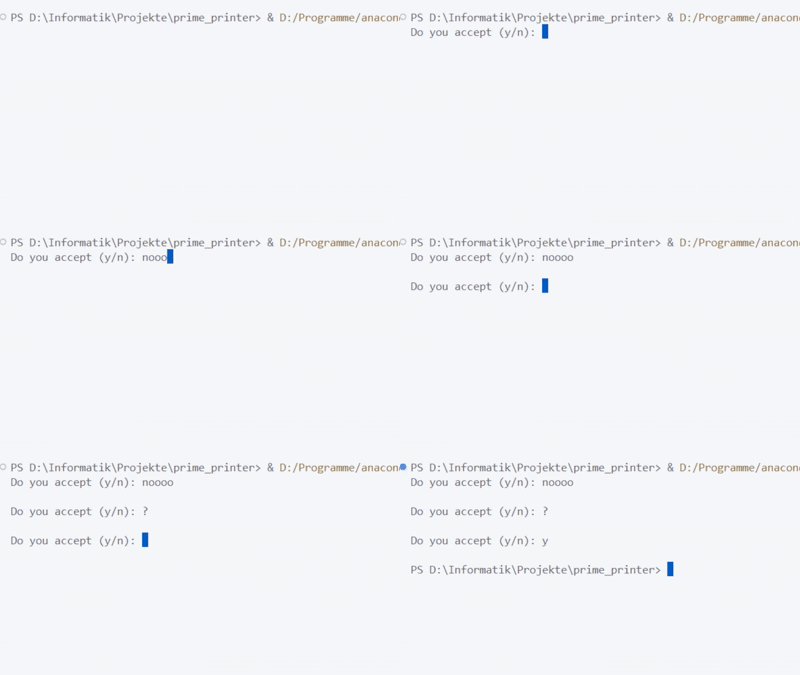
🖨️ Printing with Delay, Type-Sound, Control, Conditions and Stylings:
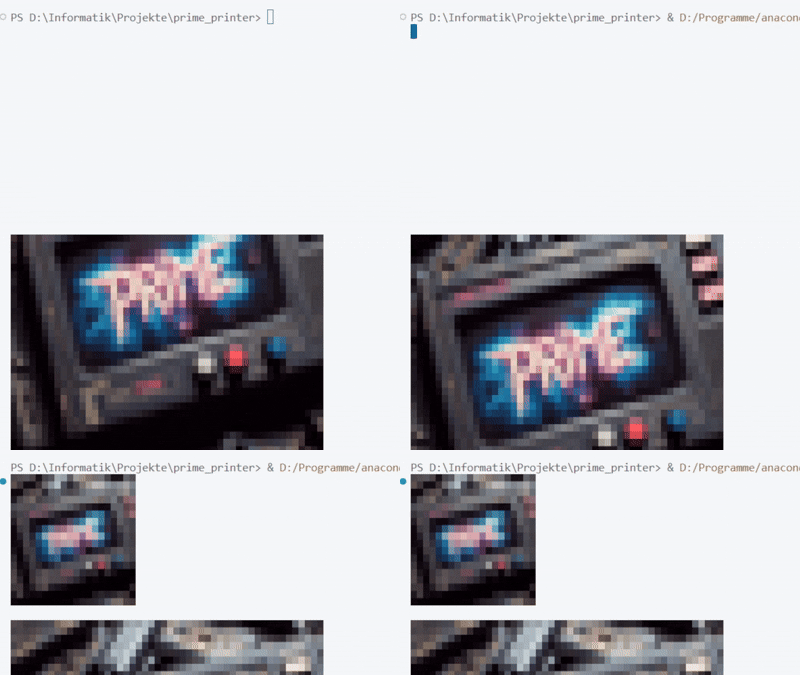
🖼️ Print Images:
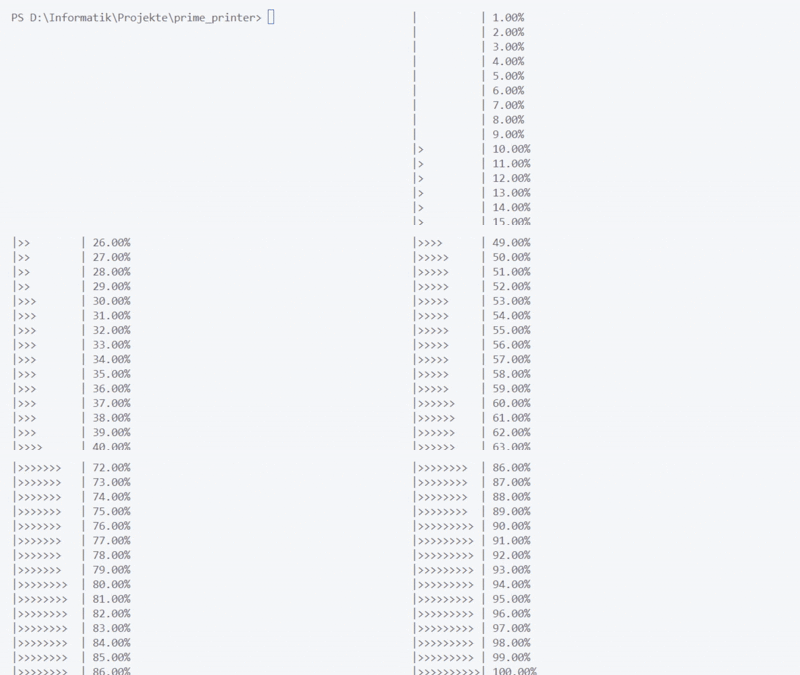
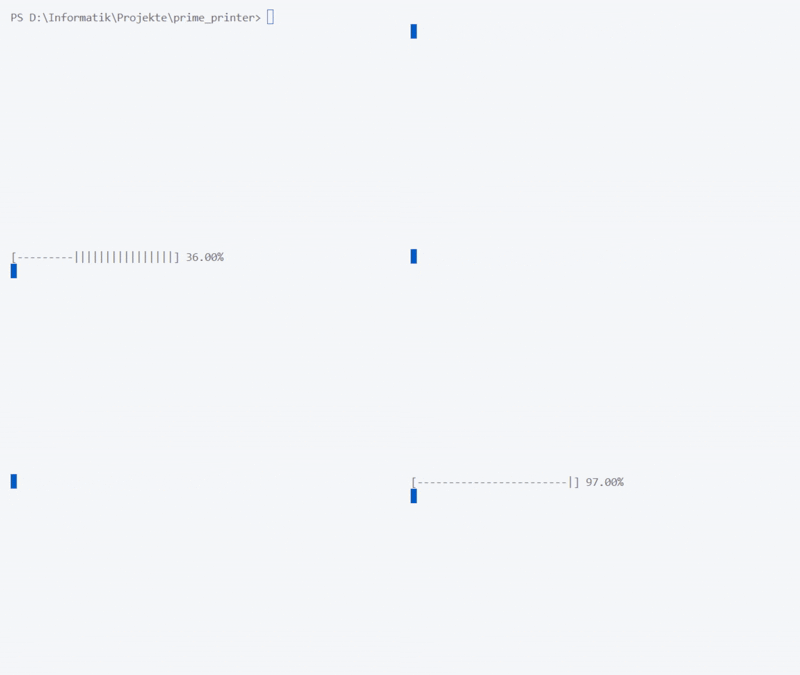
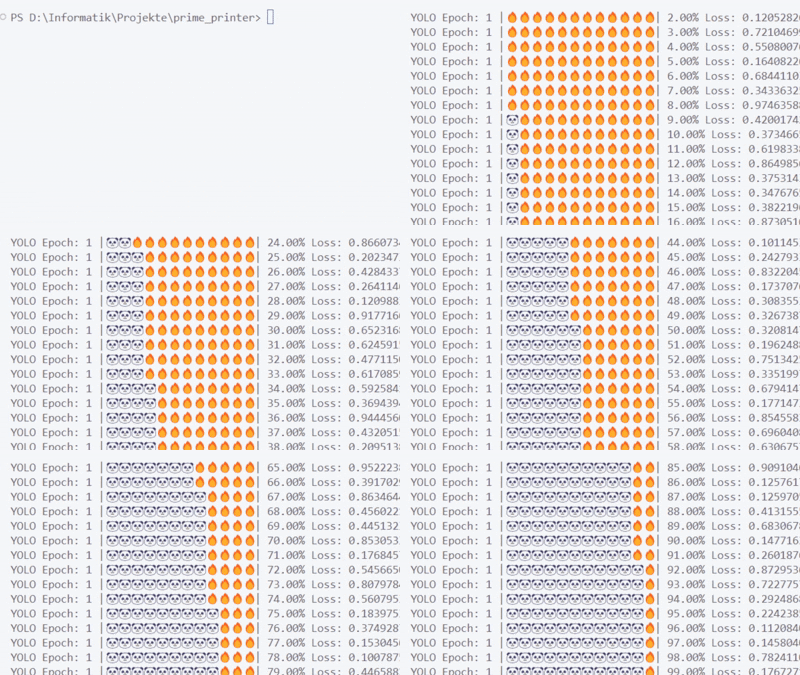
⏳ Print your Process:
Detailed Features of this Console IO Helper
🧐
There are also some examples on the bottom of the core file.
Note: Works with Windows and Linux.
Constants
All constants are available with:
import prime_printer as prime

my_awesome_txt = prime.BOLD + "AWESOME" + prime.END
-
Colors: These constants represent foreground colors used for text styling in the terminal. (all RGB colors are available with the rgb_to_python function)
PURPLE,CYAN,DARKCYAN,BLUE,GREEN,YELLOW,MAGENTA,RED,WHITE,BLACK
-
Background Colors: These constants represent background colors used for text styling.
BACKGROUND_BLACK,BACKGROUND_RED,BACKGROUND_GREEN,BACKGROUND_YELLOW,BACKGROUND_BLUE,BACKGROUND_MAGENTA,BACKGROUND_CYAN,BACKGROUND_WHITE
-
Styles: Constants for various text styles.
BOLD,UNDERLINE,REVERSED,HEADER
-
Cursor Navigation: These are functions for moving the cursor around the terminal.
UP(n),DOWN(n),RIGHT(n),LEFT(n),NEXT_LINE(n),PREV_LINE(n),SET_COLUMN(n),SET_POSITION(n, m)
-
Clearing: Functions to clear the screen or parts of the screen.
CLEAR_SCREEN(n),CLEAR_LINE(n)
-
Reset: The constant for resetting any formatting.
END
-
Sounds: A list of sounds stored in the specified directory, typically for use during typing or other user interactions.
PATH_TO_SOUND,SOUNDS
-
Emojis: A set of predefined emoji constants.
EMOJI_SMILE,EMOJI_HEART,EMOJI_THUMBS_UP, etc.
-
Helpful Lists:
NUMBERS: List of digits"0"to"9".ALPHABET: List of lowercase alphabetic characters"a"to"z".CHINESE_SIGNS: List of common Chinese characters.GREEK_ALPHABET: List of uppercase and lowercase Greek alphabet characters.COMMON_SIGNS: A list of common punctuation marks and symbols.
-
Common User Input List: This is a comprehensive list for user input, combining emojis, numbers, the alphabet, Chinese signs, Greek letters, and common signs.
COMMON_USER_INPUT_LISTincludes: emojis, numbers, alphabet, Chinese characters, Greek alphabet, and common symbols like punctuation marks and signs.
Functions
awesome_print
awesome_print(txt:str, *features: tuple, should_cut_str_in_chars: boll = True, should_play_sound: bool = False, should_add_backspace_at_end: bool = True, print_delay: float = None, print_delay_min: float = None, print_delay_max: float = None)
Print text to the console with optional typing effects, sounds, styling, and custom delays — just like a cinematic terminal scene.
import prime_printer as prime

prime.awesome_print("Loading complete!", prime.BOLD, prime.GREEN, should_play_sound=True, print_delay_min=0.05, print_delay_max=0.1)
---> Parameters <---
| Name | Type | Default | Description |
|---|---|---|---|
txt |
str |
required | The text to print. |
*features |
str |
() |
Optional text styling (e.g., "BOLD", "RED", "ITALIC"). |
should_cut_str_in_chars |
bool |
True |
Decides to cut the input text in parts to process, or not. |
should_play_sound |
bool |
False |
Whether to play a typing sound per character. |
should_add_backspace_at_end |
bool |
True |
Whether to add a backspace/newline at the end of the printed text. |
print_delay |
float |
None |
Fixed delay between each character. If None, uses random delay range. |
print_delay_min |
float |
None |
Minimum random delay (used only if print_delay is None). |
print_delay_max |
float |
None |
Maximum random delay (used only if print_delay is None). |
---> Sounds <---
Typing sounds play only if should_play_sound=True and the delay isn't too short (e.g. > 0.1s). A final sound plays at the end for fast modes.
add_special_effect
add_special_effect(txt: str, *features: str) -> str
Applies special styling effects (like color or emphasis) to a given string using terminal control codes or tags.
import prime_printer as prime

styled = prime.add_special_effect("Warning!", prime.RED, prime.BOLD)
print(styled)
---> Parameters <---
| Name | Type | Description |
|---|---|---|
txt |
str |
The original text to which you want to apply styles. |
*features |
str |
One or more style codes (e.g. "BOLD", "RED", "ITALIC"). |
---> Behavior <---
- If a single tuple of styles is passed (e.g.
(prime.BOLD, prime.GREEN)), it's automatically unpacked. - Styles are applied in order, wrapping the entire string each time.
- Automatically resets the styling at the end using
END.
img_to_str
img_to_str(img_path: str, width: int = 60, is_256color: bool = False, is_truecolor: bool = True, is_unicode: bool = True) -> str
Converts an image into a stylized text-based string for beautiful console prints using ANSI color codes and optional Unicode blocks.
import prime_printer as prime

print(prime.img_to_str("./logo.png", width=80, is_256color=True))
---> Parameters <---
| Name | Type | Default | Description |
|---|---|---|---|
img_path |
str |
required | Path to the image file to load. |
width |
int |
60 |
Target width of the output in characters. |
is_256color |
bool |
False |
Whether to use 256-color ANSI mode (for better compatibility). |
is_truecolor |
bool |
True |
Enables truecolor (24-bit) output if the terminal supports it. |
is_unicode |
bool |
True |
Uses Unicode blocks for improved resolution and clarity. |
---> Returns <---
str: The converted image as a string that can be directly printed in the terminal.
You can use print_image if you want to print your image directly.
print_image
print_image(img_path: str, width: int = 60, is_256color: bool = False, is_truecolor: bool = True, is_unicode: bool = True) -> None
Prints an image directly to the terminal using colored text blocks — a quick and stylish way to preview images in your console.
import prime_printer as prime

prime.print_image("logo.png", width=80)
---> Parameters <---
| Name | Type | Default | Description |
|---|---|---|---|
img_path |
str |
required | Path to the image file to be rendered. |
width |
int |
60 |
Desired width of the image in character columns. |
is_256color |
bool |
False |
Enables 256-color ANSI mode (fallback for limited terminals). |
is_truecolor |
bool |
True |
Enables truecolor (24-bit color) output if supported. |
is_unicode |
bool |
True |
Enables Unicode rendering for higher pixel fidelity. |
Internally uses
img_to_str()to convert and print.
print_progress_bar
print_progress_bar(total, progress, should_clear=False, left_bar_char="|", right_bar_char="|", progress_char="#", empty_char=" ", size=100, should_print=True) -> str
Displays a customizable progress bar in the console, ideal for visual feedback in loops, tasks, or animations.
import prime_printer as prime

for i in range(101):
    prime.print_progress_bar(total=100, progress=i)
    time.sleep(0.05)
---> Parameters <---
| Name | Type | Default | Description |
|---|---|---|---|
total |
int / float |
required | Total number representing 100% of the progress. |
progress |
int / float |
required | Current progress value. |
should_clear |
bool |
False |
Whether to clear the console before printing. |
left_bar_char |
str |
`" | "` |
right_bar_char |
str |
`" | "` |
progress_char |
str |
"#" |
Character representing the completed progress. |
empty_char |
str |
" " |
Character representing the remaining portion. |
front_message |
str |
"" |
Message for the progress bar. |
back_message |
str |
"" |
Message behind the progress bar. |
size |
int |
100 |
Total width of the progress bar in characters. |
should_print |
bool |
True |
If True, prints the bar. If False, returns the string only. |
---> Returns <---
str: The generated progress bar string (printed ifshould_print=True).
clear
clear() -> None
Clears the entire console screen and resets the cursor position to the top-left corner. Useful for animations, live updates, or a clean UI.
import prime_printer as prime

prime.clear()
---> Parameters <---
None
---> Behavior <---
- Uses ANSI escape sequences to clear the screen (
CLEAR_SCREEN(2)) and reset cursor (SET_POSITION(0, 0)). - Prints the escape string directly to apply the effect.
get_input
get_input(message='User: ', end_chars=['\n', '\r'], back_chars=['\u0008', '\b'], should_play_sound=False, *features) -> str
Custom interactive input function with support for live console feedback, styled text, backspace handling, conditions and optional typing sounds.
import prime_printer as prime

name = prime.get_input("Enter your name: ", should_play_sound=True, RED, BOLD)
A bit more advanced are conditions, if the user-input have to pass a given format. Here 2 examples:
import prime_printer as prime

is_int = lambda x: True if all([x in ['0', '1', '2', '3', '4', '5', '6', '7', '8', '9'] for char in x]) else False
name = prime.get_input("Enter a number: ", condition=is_int)
import prime_printer as prime

name = prime.get_input("Do you accept (y/n): ", condition=lambda x: True if x.lower() in ['y', 'n'] else False)
---> Parameters <---
| Parameter | Type | Default | Description |
|---|---|---|---|
message |
str |
'User: ' |
Prompt message shown to the user. |
get_input |
bool |
True |
Lower user input during the return. |
end_chars |
List[str] |
['\n', '\r'] |
Characters that indicate input completion. |
back_chars |
List[str] |
['\u0008', '\b'] |
Characters that represent backspace (deletes last input). |
should_play_sound |
bool |
False |
Whether to play typing sounds during input. |
condition |
Call(x) |
lambda x: True |
A condition function that the input must pass, else it will ask again. |
*features |
str (variadic) |
None | Optional style features for the input (e.g., BOLD, RED). |
Let me know if you need further adjustments or more information!
---> Returns <---
str— The full user input as a string (with carriage returns removed).
---> Features <---
- Styled real-time typing
- Backspace-aware input
- Optional typewriter-like sound
- Designed for terminal-based UIs or games
- Conditions (like int or y/n)
get_char
get_char
This function allows you to capture a single character of user input from the console, based on the platform.
---> Parameters <---
- No parameters are required for this function.
---> Description <---
- On Linux, it uses
termiosandttyto configure raw input, reading a single character directly from the console without waiting for the Enter key. - On Windows, it uses
msvcrt.getch()to capture the character input.
---> Returns <---
- A single character (
str) representing the current key pressed by the user.
rgb_to_python
rgb_to_python(r:int, g:int, b:int) -> str
Converts RGB color values to an ANSI escape sequence for 24-bit colors (truecolor) that can be used to color text in the terminal.
---> Parameters <---
| Parameter | Type | Description |
|---|---|---|
r |
int |
The red component of the color (0 to 255). |
g |
int |
The green component of the color (0 to 255). |
b |
int |
The blue component of the color (0 to 255). |
background_color |
int |
Whether to convert to background color or front color. (Defaults to False) |
---> Returns <---
- str: The ANSI escape sequence corresponding to the RGB value, in the format
\033[38;2;r;g;bfor setting the foreground color.
play_sound
play_sound(path_to_sound_file)
This function initializes the pygame mixer, loads a sound file from the specified path, and plays it asynchronously on both Windows and Linux systems.
import prime_printer as prime

path = "sounds/typing_sound.wav"
prime.play_sound(path)
In this example, the function will load and play the typing_sound.wav file located in the sounds directory.
Parameters
| Parameter | Type | Description |
|---|---|---|
path_to_sound_file |
str |
The file path to the sound file to be played. It should be a valid path to a .wav file. |
Release history Release notifications | RSS feed


Download files
Download the file for your platform. If you're not sure which to choose, learn more about installing packages.
Source Distribution
File details
Details for the file prime_printer-0.0.5.tar.gz.
File metadata
- Download URL: prime_printer-0.0.5.tar.gz
- Upload date:
- Size: 2.6 MB
- Tags: Source
- Uploaded using Trusted Publishing? No
- Uploaded via: twine/4.0.2 CPython/3.12.1
File hashes
| Algorithm | Hash digest | |
|---|---|---|
| SHA256 |
32b812a0f2487aa57b53c135e54f46700f32c5a3c2aba55f4e890b52c7c28312
|
|
| MD5 |
ea7b9390476154b07f693e77257a1c9f
|
|
| BLAKE2b-256 |
3ea78c97efdbecb826daa99318828eb7ab883b8d205072cde5cc131409fe7b4d
|






