
Pydantic Config
A Pydantic-driven CLI with TOML / YAML / JSON config file support.
from pydantic_config import cli, BaseConfig

class Config(BaseConfig):
    lr: float = 1e-4
    batch_size: int = 32

config = cli(Config)
Install
uv add git+https://github.com/PrimeIntellect-ai/pydantic-config
For TOML support:
uv add "prime-pydantic-config[toml] @ git+https://github.com/PrimeIntellect-ai/pydantic-config"
For all formats (TOML + YAML):
uv add "prime-pydantic-config[all] @ git+https://github.com/PrimeIntellect-ai/pydantic-config"
Features
Every example below uses examples/train.py, a dummy
training config that exercises the patterns common in prime-rl-style
training scripts.
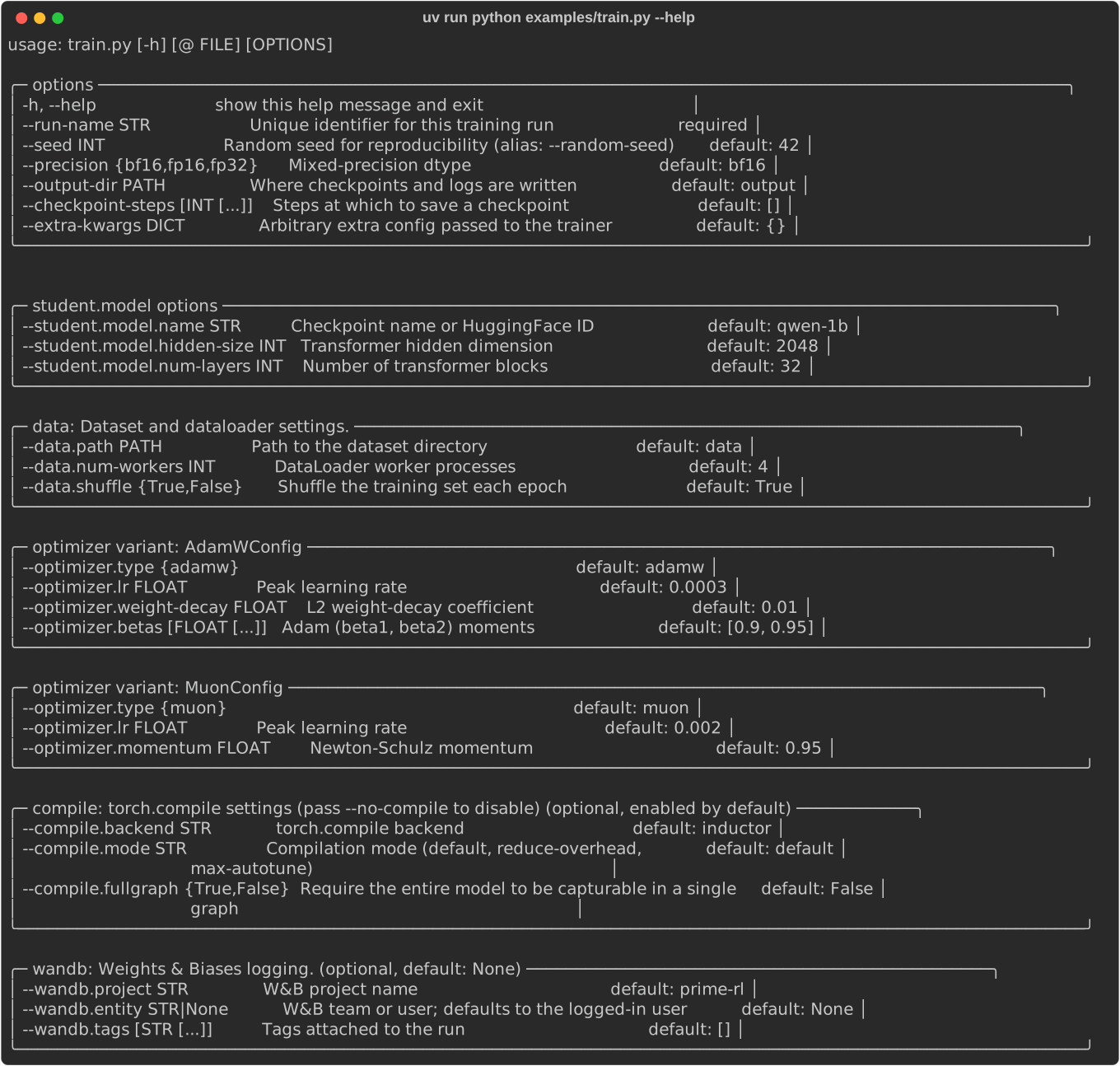
Help output
--help is auto-generated from the model. Each BaseModel field becomes its
own panel; discriminated-union variants get a panel each; Optional[BaseModel]
fields are annotated (optional, default: None). Descriptions are sourced from
Field(description=...) or a PEP 224 attribute docstring below the field.
uv run python examples/train.py --help
Config files via @
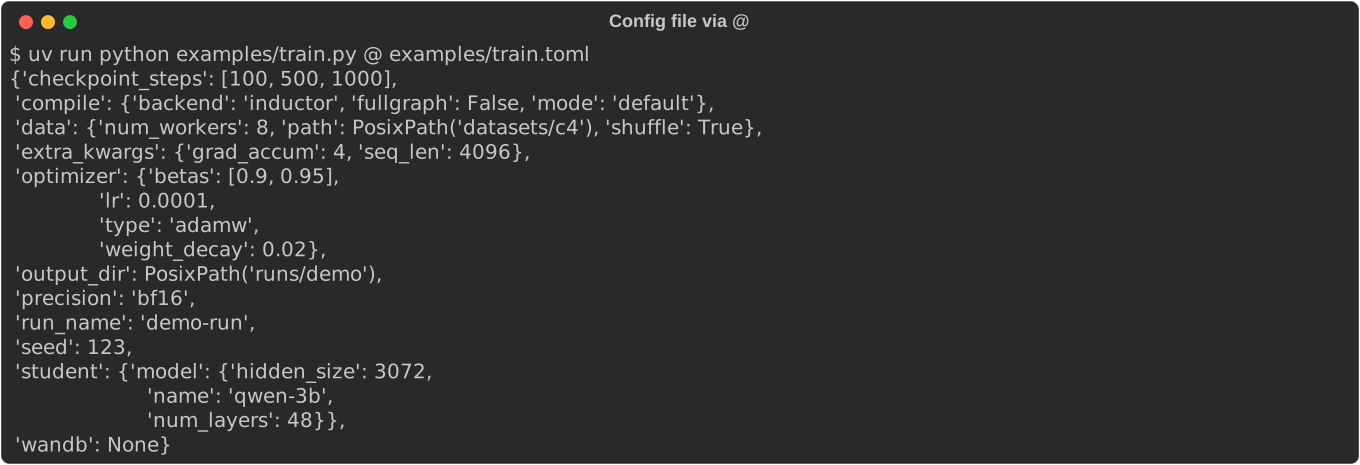
Load a whole config from a TOML, YAML, or JSON file. CLI args layered on top
always win — same precedence as default < file < CLI.
uv run python examples/train.py @ examples/train.toml
uv run python examples/train.py @ examples/train.yaml
uv run python examples/train.py @ examples/train.toml --seed 0 --no-model.compile
Required fields
A field without a default must be passed. The error is rendered as a boxed message naming the missing CLI flag, not a raw pydantic traceback.
uv run python examples/train.py # errors: --run-name is required

Nested config groups
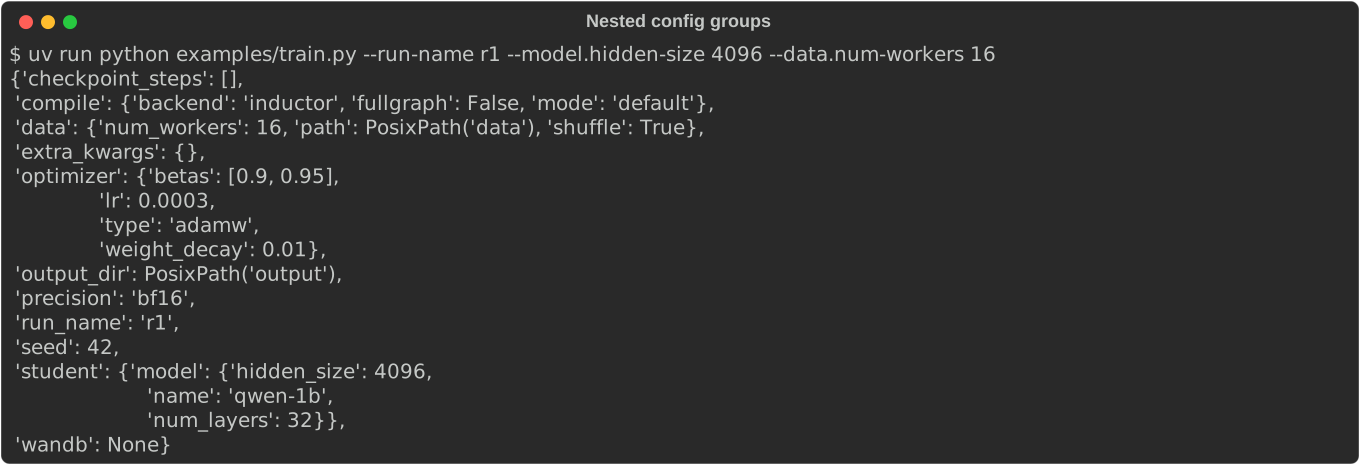
Sub-configs are addressed via dotted paths. Field names are kebab-cased on the CLI; pydantic still validates against the snake_case attribute.
uv run python examples/train.py --run-name r1 --model.hidden-size 4096 --data.num-workers 16
Bool flags and --no- negation
Bare --flag sets a bool to True; --no-flag sets it to False. Works on
nested fields too.
uv run python examples/train.py --run-name r1 --no-compile.fullgraph --no-data.shuffle

Lists
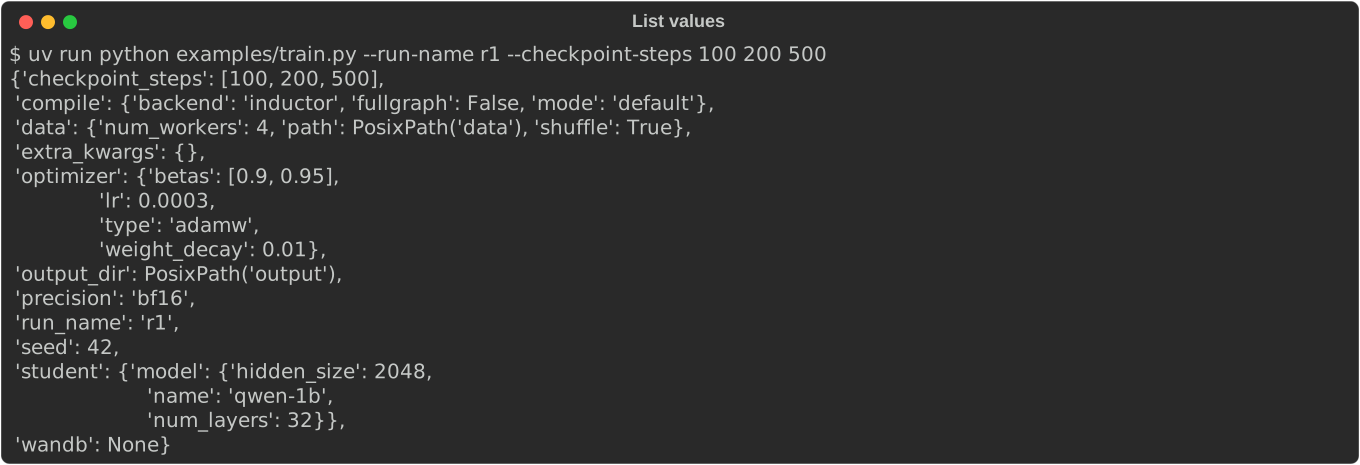
Lists accept either space-separated values or a JSON literal. Negative numbers
(e.g. -1e-3) are values, not flags.
uv run python examples/train.py --run-name r1 --checkpoint-steps 100 200 500
uv run python examples/train.py --run-name r1 --checkpoint-steps '[100, 200, 500]'
Dicts
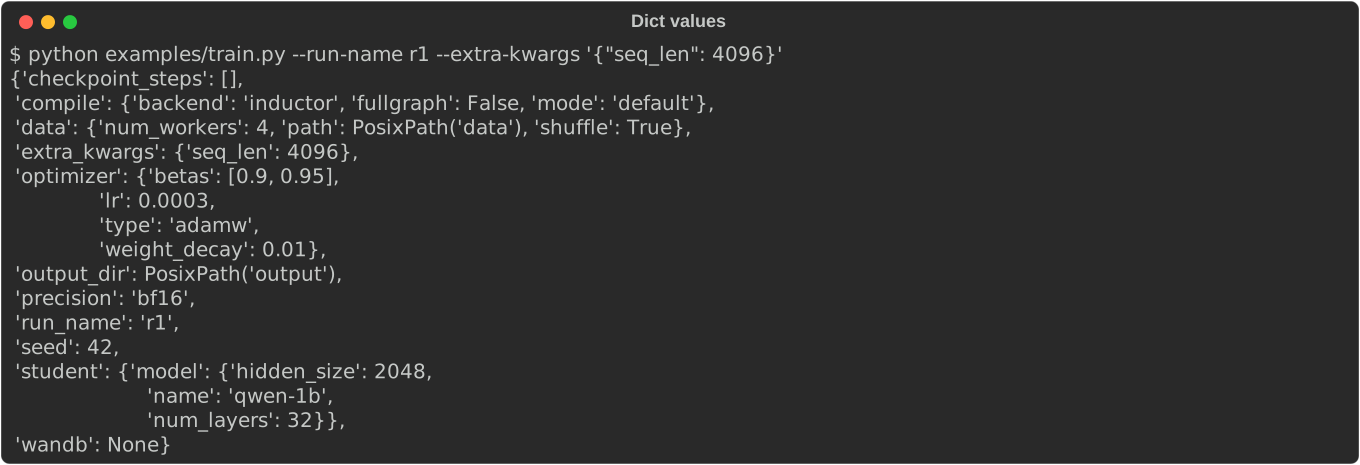
Dict fields take a JSON literal on the CLI. A TOML/YAML dict and a CLI dict deep-merge — CLI keys win on conflict but don't wipe the file's keys.
uv run python examples/train.py --run-name r1 --extra-kwargs '{"seq_len": 4096}'
Optional sub-configs
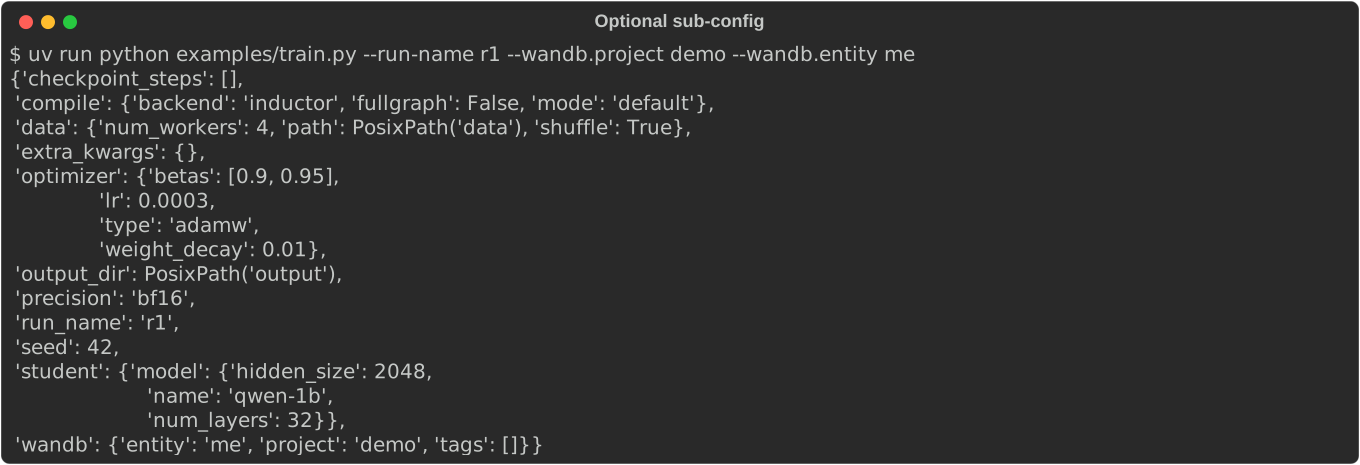
A field typed WandbConfig | None = None is off by default. The bare flag
turns it on with defaults; a sub-field flag both activates the sub-config and
overrides the field.
uv run python examples/train.py --run-name r1 --wandb                                 # enable with defaults
uv run python examples/train.py --run-name r1 --wandb.project demo --wandb.entity me  # enable + override
uv run python examples/train.py --run-name r1 --wandb @ examples/wandb.toml           # enable from a file
Disabling an optional sub-config
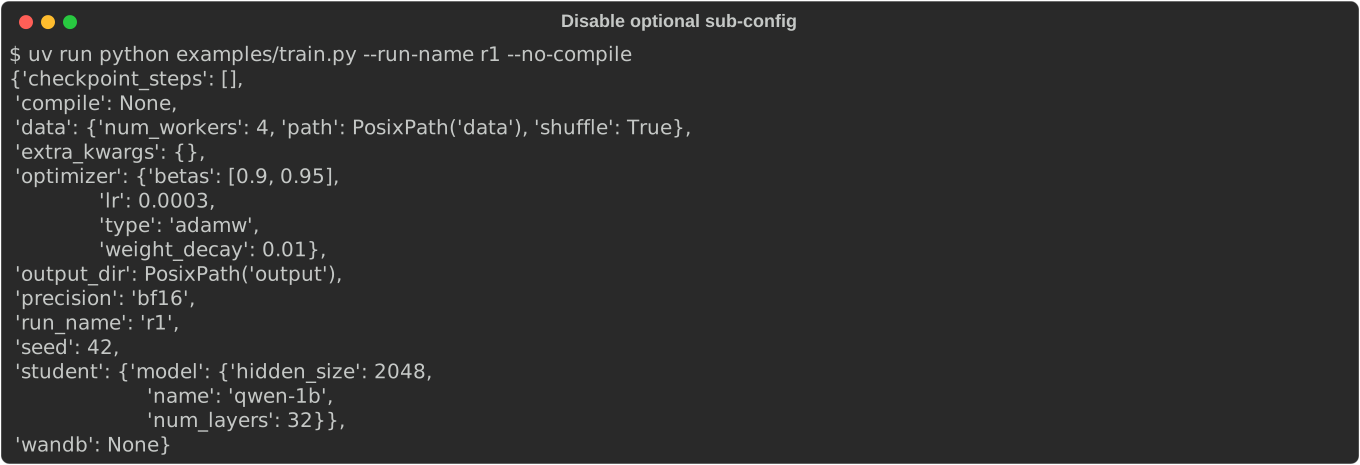
A field typed CompileConfig | None = CompileConfig() is on by default.
--no-compile disables it; --compile None does the same. Sub-fields can
still be overridden without disabling: --compile.mode max-autotune.
In TOML, write compile = "None" to disable.
uv run python examples/train.py --run-name r1 --no-compile                              # disable
uv run python examples/train.py --run-name r1 --compile.mode max-autotune               # override sub-field
uv run python examples/train.py --run-name r1 --wandb @ examples/wandb.toml --no-wandb  # file enables, CLI disables
Discriminated unions
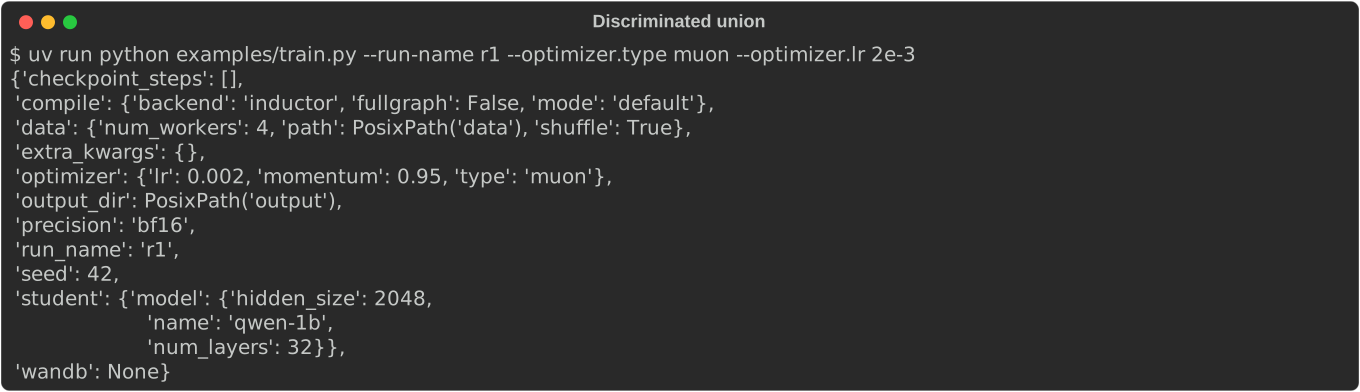
Multi-variant fields (e.g. optimizer: AdamWConfig | MuonConfig) are switched
by the type tag. Each variant renders its own help panel. The default
variant's type is auto-injected, so partial overrides keep the same variant.
uv run python examples/train.py --run-name r1 --optimizer.weight-decay 0.05               # stay on default (adamw)
uv run python examples/train.py --run-name r1 --optimizer.type muon --optimizer.lr 2e-3   # switch to muon
uv run python examples/train.py --run-name r1 --optimizer @ examples/optimizer.toml       # load a variant from a file
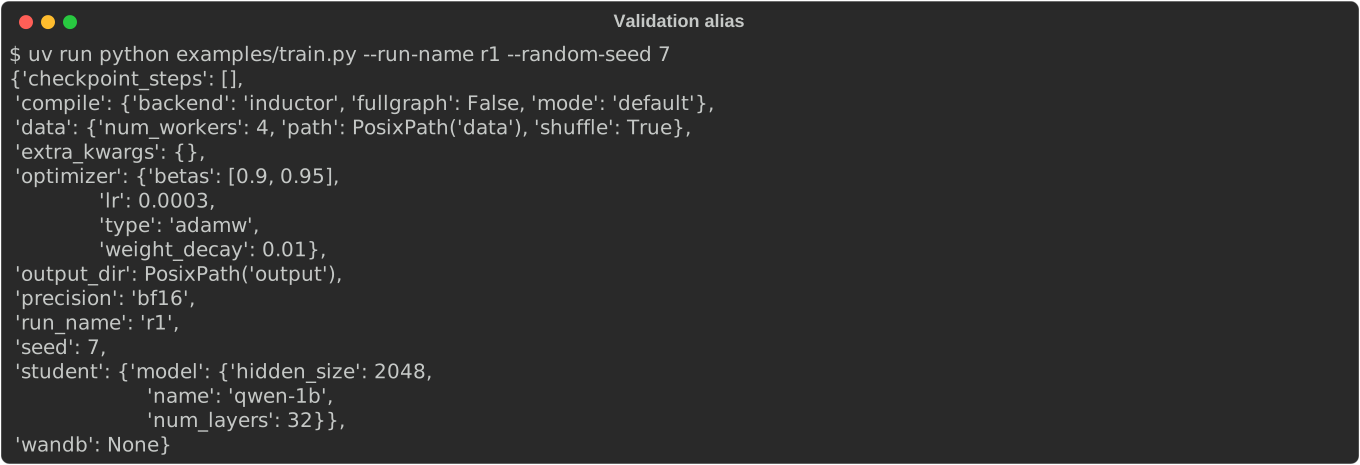
Validation aliases
Field(validation_alias=AliasChoices("seed", "random_seed")) makes both names
accepted on the CLI and in config files. The library normalizes either form to
the canonical key before validation, so mixing TOML + CLI under different
names is safe (CLI still wins on conflict).
uv run python examples/train.py --run-name r1 --random-seed 7      # CLI alias
uv run python examples/train.py @ examples/train.toml              # TOML uses random_seed
uv run python examples/train.py @ examples/train.toml --seed 99    # TOML alias + CLI canonical override
Single-dash short flags
A single-character validation alias is also exposed as a -x short flag, so
you can type -s 0 instead of --seed 0. The short flag appears in --help as
-s, --seed (just like -h, --help) and accepts the same -s 0 / -s=0 forms.
Multi-character aliases stay long-only — --random-seed works but -random-seed
does not.
seed: int = Field(42, validation_alias=AliasChoices("seed", "random_seed", "s"))
uv run python examples/train.py --run-name r1 -s 0        # short flag
uv run python examples/train.py --run-name r1 -s=0        # attached value
uv run python examples/train.py --run-name r1 --seed 0    # long form still works
Legacy key remapping via before-validators
When a config key is renamed (e.g. model.* → student.model.*), a
model_validator(mode="before") can remap the old key so existing TOML files
and CLI flags keep working. Unknown CLI flags are passed through to the
validator instead of being rejected, so both the old and new paths work
transparently.
class Config(BaseConfig):
    student: StudentConfig = StudentConfig()

    @model_validator(mode="before")
    @classmethod
    def _migrate_model_to_student(cls, data):
        if isinstance(data, dict) and "model" in data and "student" not in data:
            data["student"] = {"model": data.pop("model")}
        return data
uv run python examples/train.py --run-name r1 --model.name qwen-7b            # legacy CLI path
uv run python examples/train.py --run-name r1 --student.model.name qwen-7b    # new CLI path
uv run python examples/train.py @ examples/train.toml                         # TOML uses legacy [model]
Field and model descriptions
Field descriptions shown in --help can be set via Field(description=...)
or a PEP 224 attribute docstring (a string literal directly after the field).
Sub-config panel titles pick up the class docstring of the inner BaseModel,
or the field-level description/docstring if one is set. This lets --help
communicate what each config group is for without extra boilerplate.
class DataConfig(BaseConfig):
    """Dataset and dataloader settings."""      # → shows in the panel title

    num_workers: int = 4
    """DataLoader worker processes"""           # → shows next to --data.num-workers
--flag=value form
Both --flag value and --flag=value are accepted.
uv run python examples/train.py --run-name=r1 --seed=7
--plain and --no-wide
--plain disables ANSI colors; --no-wide caps panel width at 80 columns.
Both can also be set via environment variables (PYDANTIC_CONFIG_PLAIN,
PYDANTIC_CONFIG_WIDE) or as explicit cli() keyword arguments (which take
highest precedence).
uv run python examples/train.py --plain --help               # no colors
uv run python examples/train.py --no-wide --help              # panels capped at 80 columns
PYDANTIC_CONFIG_PLAIN=1 uv run python examples/train.py       # env var
Pydantic validators
Built-in field constraints (gt, ge, lt, le) and custom validators
(@field_validator, @model_validator(mode="after")) work as expected.
Validation errors are rendered with the offending CLI flag.
class AdamWConfig(BaseConfig):
    lr: float = Field(3e-4, gt=0)                     # built-in: must be > 0

class ModelConfig(BaseConfig):
    hidden_size: int = Field(2048, gt=0)
    num_layers: int = Field(32, gt=0)

    @model_validator(mode="after")                     # custom cross-field check
    def _check(self):
        if self.hidden_size % self.num_layers != 0:
            raise ValueError("hidden_size must be divisible by num_layers")
        return self

class Config(BaseConfig):
    checkpoint_steps: list[int] = []

    @field_validator("checkpoint_steps")               # custom field validator
    @classmethod
    def _sorted(cls, v):
        if v != sorted(v):
            raise ValueError(f"must be in ascending order, got {v}")
        return v
uv run python examples/train.py --run-name r1 --optimizer.lr 0                       # gt=0 rejects zero
uv run python examples/train.py --run-name r1 --data.num-workers -1                  # ge=0 rejects negative
uv run python examples/train.py --run-name r1 --model.hidden-size 100 --model.num-layers 7  # after validator
uv run python examples/train.py --run-name r1 --checkpoint-steps 500 100 200         # field validator
Validation errors point at the CLI flag
Pydantic's ValidationError is wrapped so the user sees the offending flag
inline, not a raw pydantic_core traceback.
uv run python examples/train.py --run-name r1 --seed nope

Unknown flags get a suggestion
Typos are caught with a difflib-powered "did you mean" hint.
uv run python examples/train.py --run-name r1 --seedz 5 # -> did you mean --seed?

Config file not found
uv run python examples/train.py @ nonexistent.toml

Development
uv sync --extra all
uv run pytest
1 maintainer

Metadata
1 maintainer
Release files for prime-pydantic-config 0.4.3
For a detailed explanation of source distributions (sdists) and built distributions (wheels), please see the package formats documentation.
Source distribution (sdist)
| File | Size | Uploaded | Provenance | Actions |
|---|---|---|---|---|
| prime_pydantic_config-0.4.3.tar.gz | 76.9 kB | Without provenance | Details for prime_pydantic_config-0.4.3.tar.gz |
Built distribution (wheel)
| File | Interpreter | ABI | Platform | Actions Reset |
|---|---|---|---|---|
| prime_pydantic_config-0.4.3-py3-none-any.whl | Python 3 | none | any | Details for prime_pydantic_config-0.4.3-py3-none-any.whl |
Total release size: 104.8 kB
Release files / prime_pydantic_config-0.4.3.tar.gz
| Download URL | prime_pydantic_config-0.4.3.tar.gz |
|---|---|
| Size | 76.9 kB |
| Tags | Source |
|
SHA-256 checksum How to use checksums |
1f0a6bd78c69e21da389bbd0e1177ca5440888488708a625e355d98712d4374d
|
|
BLAKE2b-256 checksum How to use checksums |
75eb9c00634759016565e6359376f76817987c13ea25bb121aab638268c64e28
|
| Upload date | |
|
Uploaded using Trusted Publishing? What is trusted publishing? |
Yes |
| Uploaded via |
uv/0.12.5 {"installer":{"name":"uv","version":"0.12.5","subcommand":["publish"]},"python":null,"implementation":{"name":null,"version":null},"distro":{"name":"Ubuntu","version":"24.04","id":"noble","libc":null},"system":{"name":null,"release":null},"cpu":null,"openssl_version":null,"setuptools_version":null,"rustc_version":null,"ci":true}
|
Release files / prime_pydantic_config-0.4.3-py3-none-any.whl
| Download URL | prime_pydantic_config-0.4.3-py3-none-any.whl |
|---|---|
| Size | 27.9 kB |
| Tags | Python 3 |
|
SHA-256 checksum How to use checksums |
13e8a0c39d0f88c3f75eb1df74a56198d1e907670e63e4918558a2e852b4e015
|
|
BLAKE2b-256 checksum How to use checksums |
abec1d43ce0cd6b981a9381457e3b8f136cc8c7527fe13b3cb45c3b874a7cd49
|
| Upload date | |
|
Uploaded using Trusted Publishing? What is trusted publishing? |
Yes |
| Uploaded via |
uv/0.12.5 {"installer":{"name":"uv","version":"0.12.5","subcommand":["publish"]},"python":null,"implementation":{"name":null,"version":null},"distro":{"name":"Ubuntu","version":"24.04","id":"noble","libc":null},"system":{"name":null,"release":null},"cpu":null,"openssl_version":null,"setuptools_version":null,"rustc_version":null,"ci":true}
|
Security for prime-pydantic-config 0.4.3
Provenance
Provenance describes where a file came from. On PyPI, provenance is shared via attestations, which provide a verifiable record of the build or publishing details. View details, limitations and caveats.
No provenance found
None of the files in this release were uploaded with provenance metadata.
A note on package security
PyPI is a repository for distributing packages, not a service for auditing them. While third-party security researchers and our staff do their best to detect and remove malicious packages, PyPI cannot guarantee the quality, security or suitability of any given package.
To learn more about protecting yourself from malicious actors, visit our package security documentation.














