
Vault v0.1.0

Secure Agentic Trading of RWA and Tokens on Robinhood Chain
A desktop custody and authorization layer for AI agents, by Primer.
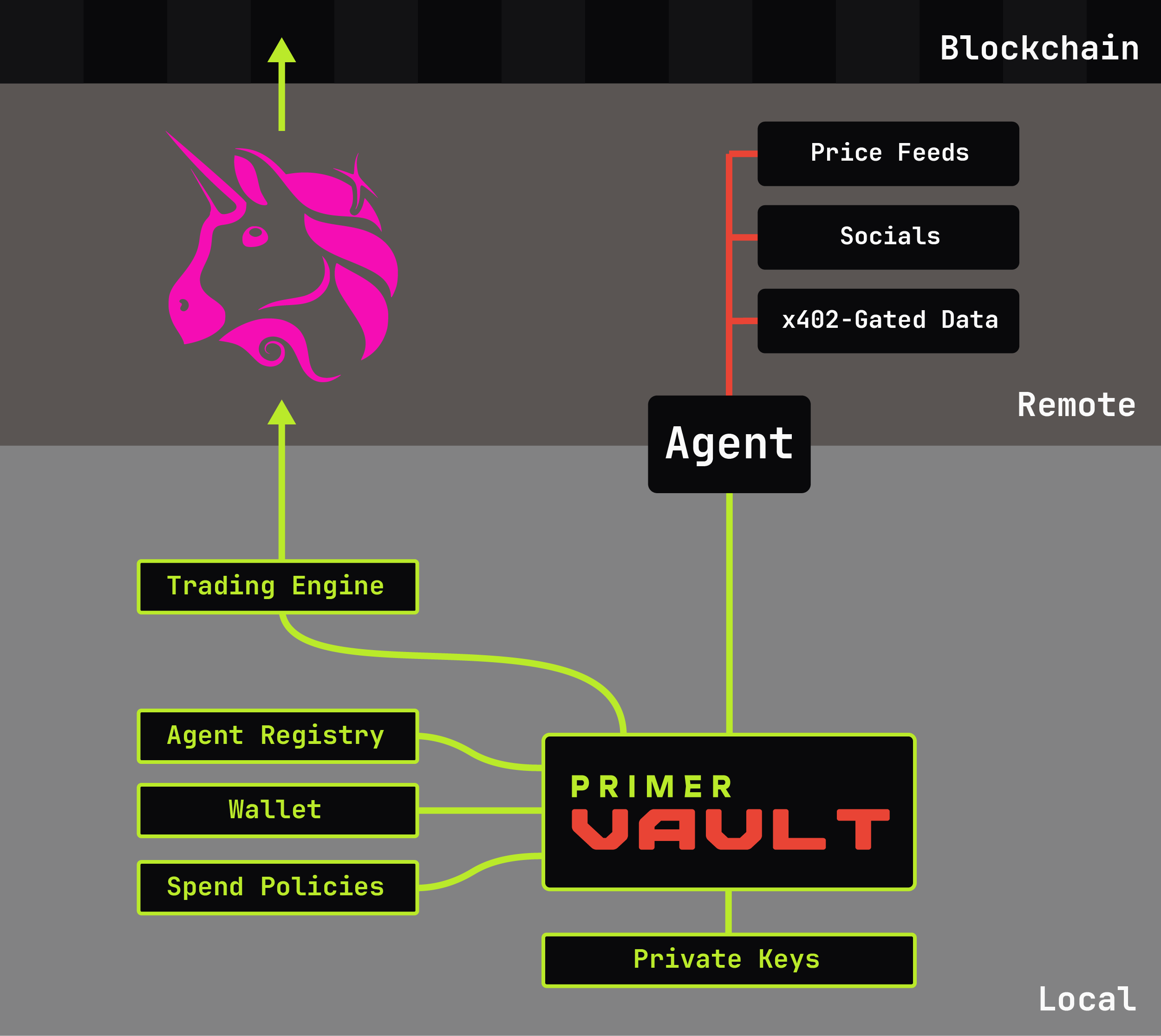
Vault lets you delegate on-chain actions to AI agents without sharing private keys. It supports two authorization lanes:
- x402 Payments — Agents request signatures for paywalled services; Vault enforces spending policies and signs EIP-712 authorizations. Contains the full MultiClaw engine for AP2 protocol support.
- DeFi Trading — Agents submit swap requests; Vault re-quotes independently, enforces trading limits, and executes on-chain (currently Uniswap v3 on Robinhood Chain).
Both lanes share the same agent identity, policy system, and approval workflow. The agent never sees private keys.
The Problem
AI agents need to transact on-chain, but giving an agent your private key is dangerous. No amount of prompting is guaranteed to constrain a free-willed agent. Vault sits between your agents and your wallet, enforcing policies and requiring human approval when needed.
Quick Start
# Download and run (no install needed)
# https://github.com/primer-systems/vault/releases

# Or install from source
pip install primer-vault[gui]   # Full desktop GUI
pip install primer-vault        # CLI only

# Run
primer-vault                    # GUI mode (default)
primer-vault --cli              # Interactive terminal
primer-vault --headless         # Daemon mode (no GUI)
Features
Agent Management
Agents are isolated identities with unique credentials. Each agent has:
- Short ID — Human-readable identifier (e.g.,
XK7M2P) - Auth Token — HMAC-SHA256 secret or Bearer token
- Policy — Assigned spending/trading rules
- Wallet Address — Signs from a specific address
# Create and commission an agent
primer-vault agent register MyAgent --auth hmac
primer-vault agent commission MyAgent standard-policy 0x742d35...

# Generate intent mandate (AP2 verifiable credential)
primer-vault agent mandate MyAgent --upload
Policy System
Policies define what agents can do. Two independent lanes:
x402 Payments:
- Daily spending limit (USDG)
- Per-request cap
- Auto-approve threshold
- Domain allowlist/blocklist
- Network restrictions
Trading:
- Per-trade max (USD)
- Daily volume limit
- Auto-approve threshold
- Max slippage tolerance
- Min ETH reserve (for gas)
primer-vault policy create standard \
  --day 100 --txn 50 --auto 5 \
  --trading --trade-max 100 --trade-daily 500

# Trading-only policy (no x402 payments)
primer-vault policy create trader --no-x402 --trading --trade-max 100
Wallet Security
HD wallet support with strong encryption:
- BIP-39 — 12 or 24-word seed phrases
- BIP-44 — Standard derivation paths
- Argon2id — Memory-hard key derivation (64MB, 3 iterations)
- AES-256-GCM — Authenticated encryption
Private keys never leave the wallet in plaintext. Signing happens internally.
primer-vault wallet create main
primer-vault seed create --words 24
primer-vault address create
Approval Workflow
Requests below threshold → auto-approved. Above threshold → human approval dialog.
- GUI shows modal dialog with full details
- CLI uses
pending/approve/rejectcommands - Headless mode supports remote approval via Admin API
x402 Payment Signing (MultiClaw Engine)
Vault contains the full MultiClaw engine for x402 payment authorization. Agents hit paywalls, request signatures from Vault, and retry with payment headers.
How It Works
Agent hits paywall → 402 + Payment-Required header
                            ↓
              Agent calls POST /sign with header
                            ↓
         Vault checks policy (daily limit, domain, etc.)
                            ↓
        Auto-approve OR human approval dialog in app
                            ↓
              Vault signs EIP-712 authorization
                            ↓
         Agent retries request with payment header
                            ↓
            Merchant settles via x402 Facilitator
                            ↓
         Agent reports settlement via POST /callback
                            ↓
              Vault verifies on-chain, stores receipt
Any agent framework can integrate via HTTP to localhost:4663. Bearer tokens for simplicity, HMAC-SHA256 for production security.
Protocol Support
- v1 — X-PAYMENT header (base64-encoded JSON)
- v2 — PAYMENT-REQUIRED header with
x402Versionfield - A2A x402 — Direct JSON payloads (agent-to-agent)
Intent Mandates
Agents can have signed Intent Mandates — AP2 verifiable credentials documenting:
- Agent identity (code + auth key fingerprint)
- Spending limits and networks
- Issuing wallet signature
Mandates are published to the AP2 Registry. Merchants query by agent code to verify authorization before accepting payment.
Transaction Receipts
Every payment is logged with AP2-formatted receipts:
{
  "type": "AP2Receipt",
  "version": "ap2.primer/v0.1",
  "intent": {
    "agentCode": "XK7M2P",
    "policyName": "standard",
    "approvalMethod": "human"
  },
  "authorization": {
    "walletAddress": "0x742d35Cc6634C0532925a3b844Bc9e7595f...",
    "signedAt": "2025-01-15T14:32:01Z"
  },
  "payment": {
    "amount": "1.50",
    "currency": "USDC",
    "recipient": "0x8ba1f109551bD432803012645Ac136ddd64...",
    "network": "eip155:8453"
  },
  "settlement": {
    "txHash": "0x3a1b2c3d4e5f...",
    "status": "verified",
    "blockNumber": 12847293
  }
}
DeFi Trading
Agents can submit swap requests to Vault. Vault re-quotes the pool independently, validates against trading policy, and executes or escalates.
Supported Operations
- Uniswap v3 swaps — Single-pool exactInputSingle
- Native ETH — Use
"ETH"or address(0) as token_in/token_out - Wrap/Unwrap — ETH ↔ WETH conversion (1:1, no pool)
Trade Request
trade = {
    "token_in": "0x5fc5360D0400a0Fd4f2af552ADD042D716F1d168",  # USDG
    "token_out": "ETH",                                        # Native ETH
    "amount_in": "10",                                         # Human units
    "fee_tier": 500,                                           # Pool fee bps
    "max_slippage_bps": 100,                                   # 1%
}
# POST to ${PRIMER_VAULT_URL}/trade
Trading Policy
Trading is controlled separately from x402 payments:
| Field | Description |
|---|---|
enabled |
Global on/off for trading |
per_trade_max_usd |
Max notional per swap |
daily_volume_limit_usd |
Daily volume cap |
auto_approve_below_usd |
Manual approval threshold |
max_slippage_percent |
Reject trades exceeding this |
min_reserve_eth |
Keep ETH for gas |
Native ETH Support
Agents can trade with native ETH directly:
# ETH as input (router auto-wraps)
{"token_in": "ETH", "token_out": USDG, "amount_in": "0.01", "fee_tier": 500}

# ETH as output (swap + unwrap atomically)
{"token_in": USDG, "token_out": "ETH", "amount_in": "10", "fee_tier": 500}

# Explicit wrap/unwrap (1:1, no pool)
{"token_in": "ETH", "token_out": WETH, "amount_in": "0.1", "fee_tier": 0}
Network
| Network | Chain ID | USDG | WETH |
|---|---|---|---|
| Robinhood Chain | 4663 | 0x5fc5360D0400a0Fd4f2af552ADD042D716F1d168 |
0x0Bd7D308f8E1639FAb988df18A8011f41EAcAD73 |
Deployment Modes
GUI Mode (Default)
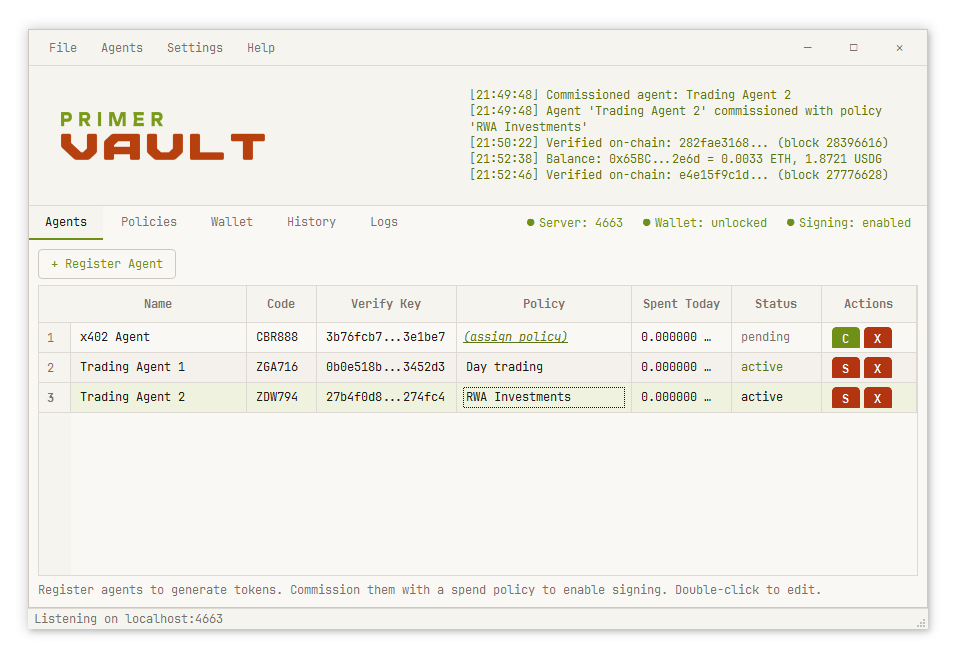
Desktop application with tabs for agents, policies, wallet, and history.
primer-vault
Features:
- Interactive approval dialogs
- Real-time activity log
- Built-in terminal console (File → Console)
- System tray integration
CLI Mode
Interactive terminal or single commands for scripting.
# Interactive REPL
primer-vault --cli

# Single commands
primer-vault agent list
primer-vault wallet status
primer-vault policy create test --day 100

# Scriptable with flags
primer-vault wallet create main --password "secret" --yes
Headless Mode
Daemon with no GUI — agent API only.
primer-vault --headless \
  --agent-port 4663 \
  --admin-port 4664 \
  --wallet main \
  --password "secret" \
  --allow-lan
Admin API Security
By default, the Admin API (port 4664) operates in GUI-only mode. This means:
- Only the embedded GUI can access admin endpoints (create agents, modify policies, etc.)
- CLI and headless modes will receive HTTP 403 with a clear error message
- This protects against local malware that could otherwise create agents and obtain tokens
To enable CLI or headless access, change the setting in GUI → Settings → Security → Admin API Mode.
| Mode | Who can access Admin API |
|---|---|
| GUI Only (default) | Only the embedded GUI |
| Open | Any local process on port 4664 |
Single Instance
When GUI mode is running, CLI commands connect to the same instance via Admin API (port 4664). Changes in terminal appear live in GUI.
Architecture
┌─────────────────────────────────────────────────────────┐
│ CORE LAYER (framework-independent)                      │
│  • Vault coordinator (single source of truth)           │
│  • Services (SigningService, TradingService)            │
│  • Models (Agent, Policy, Transaction)                  │
│  • Wallet crypto (HD wallets, AES-256-GCM encryption)   │
└─────────────────────────────────────────────────────────┘
                          ▲
                          │ (direct calls or HTTP)
          ┌───────────────┼───────────────┐
          │               │               │
┌─────────▼─────┐  ┌──────▼──────┐  ┌────▼────────┐
│  GUI Mode     │  │  CLI Mode   │  │  Headless   │
│  (PyQt6)      │  │  (terminal) │  │  (daemon)   │
└───────────────┘  └─────────────┘  └─────────────┘
Data Directory
Data is stored in platform-standard locations:
| Platform | Location |
|---|---|
| Windows | %APPDATA%\Primer\Vault |
| macOS | ~/Library/Application Support/Primer/Vault |
| Linux | ~/.local/share/Primer/Vault |
<data_dir>/
├── wallets/
│   └── *.wallet          # Encrypted wallet files
├── agents.json           # Agent registry
├── policies.json         # Spend/trading policies
├── transactions.json     # Payment & trade history
├── settings.json         # Configuration
└── wallet_path.txt       # Last unlocked wallet
Technical Details
- Wallet Security: AES-256-GCM encryption, Argon2id key derivation (64MB, 3 iterations)
- Payment Signing: EIP-712 structured data, EIP-3009
transferWithAuthorization - Trading: Uniswap v3 SwapRouter02, multicall for atomic operations
- Networks: Robinhood Chain (4663), Base (8453), Ethereum (1), testnets
- Protocol Support: HTTP x402 v1/v2, A2A x402 (direct JSON)
- Auth Modes: Bearer tokens (simple) or HMAC-SHA256 (production)
CLI Reference
Agent Commands
agent list                                    # List all agents
agent show <name|ID>                          # Display agent details
agent register <name> [--auth hmac|bearer]    # Create new agent
agent commission <agent> <policy> <address>   # Assign policy and wallet
agent mandate <agent> [--upload]              # Generate intent mandate
agent suspend <name|ID>                       # Disable agent
agent activate <name|ID>                      # Re-enable agent
agent delete <name|ID>                        # Remove agent
Policy Commands
policy list                                   # List all policies
policy show <name>                            # Display policy
policy create <name> [options]                # Create policy
policy edit <name> [options]                  # Modify policy
policy delete <name>                          # Remove policy

# Payment options:
#   --day N          Daily limit in USDG (default: 100)
#   --txn N          Per-transaction max (default: 10)
#   --auto N         Auto-approve threshold
#   --x402 / --no-x402  Enable/disable x402 payments
#   --networks N,N   Allowed chain IDs (comma-separated)

# Trading options:
#   --trading        Enable trading
#   --trade-max N    Per-trade max in USD (default: 100)
#   --trade-daily N  Daily volume limit (default: 500)
#   --trade-auto N   Auto-approve threshold
#   --min-eth N      Min ETH reserve for gas (default: 0.0001)
#   --max-slip N     Max slippage percent (default: 3.0)
Wallet Commands
wallet status                    # Show lock status
wallet create <name>             # Create new wallet
wallet open <name>               # Unlock wallet
wallet lock                      # Lock wallet
wallet delete                    # Remove wallet

seed list                        # List seeds
seed create [--words 12|24]      # Generate seed
seed import [phrase]             # Import seed

address list                     # List addresses
address create [seed] [index]    # Derive address
address import <key>             # Import private key
address balance [address]        # Check balance
Approval Commands
pending                          # List pending requests
approve <request_id>             # Approve request
reject <request_id> [reason]     # Reject request

trade pending                    # List pending trades
trade approve <id>               # Execute trade
trade reject <id> [reason]       # Reject trade
History Commands
history [limit]                  # List transactions
history show <id>                # Show details
history receipt <id>             # Get AP2 receipt
history verify <id>              # Verify on-chain
history export [file]            # Export CSV
Links
Development
git clone https://github.com/primer-systems/vault.git
cd primer_vault
pip install -e ".[dev,gui]"

# Run tests
pytest tests/ -v

# Run from source
primer-vault                    # GUI
primer-vault --cli              # CLI
primer-vault --headless         # Daemon
Changelog
See CHANGELOG.md for the full release history.
1 maintainer

Download files
Download the file for your platform. If you're not sure which to choose, learn more about installing packages.
Source Distribution
Built Distribution
Filter files by name, interpreter, ABI, and platform.
If you're not sure about the file name format, learn more about wheel file names.
Copy a direct link to the current filters
File details
Details for the file primer_vault-0.1.0.tar.gz.
File metadata
- Download URL: primer_vault-0.1.0.tar.gz
- Upload date:
- Size: 635.3 kB
- Tags: Source
- Uploaded using Trusted Publishing? No
- Uploaded via: twine/7.0.0 CPython/3.13.7
File hashes
| Algorithm | Hash digest | |
|---|---|---|
| SHA256 |
9efc7b1579b7a79b1933e27ca676a745c242b9134124315192870c0c406a17c0
|
|
| MD5 |
4dee9610e45d02704cffa760d7926bd6
|
|
| BLAKE2b-256 |
5b872278a820c24b5d0720b1073c1a2e555e34beb0c7d14ecc0f6c1f5de46b5b
|
File details
Details for the file primer_vault-0.1.0-py3-none-any.whl.
File metadata
- Download URL: primer_vault-0.1.0-py3-none-any.whl
- Upload date:
- Size: 385.7 kB
- Tags: Python 3
- Uploaded using Trusted Publishing? No
- Uploaded via: twine/7.0.0 CPython/3.13.7
File hashes
| Algorithm | Hash digest | |
|---|---|---|
| SHA256 |
1599c7ad511e87ca52f0beb9fc1881e6d545c8bf2faa0efd9eb1b09750af851c
|
|
| MD5 |
91c8c46e98673a53e01a7ab8550a3c71
|
|
| BLAKE2b-256 |
6f4d7ad4c9dbd1230946a2fa49fbd3d800284b2d3c7047369905f96d5c895f6b
|







