
HTTP client that can impersonate web browsers, mimicking their headers and `TLS/JA3/JA4/HTTP2` fingerprints

Project description





🪞PRIMP
🪞PRIMP = Python Requests IMPersonate
The fastest python HTTP client that can impersonate web browsers.
Provides precompiled wheels:
- 🐧 linux:
amd64,aarch64,armv7(⚠️aarch64 and armv7 builds aremanylinux_2_34compatible -ubuntu>=22.04,debian>=12); - 🐧 musllinux:
amd64,aarch64; - 🪟 windows:
amd64; - 🍏 macos:
amd64,aarch64.
Table of Contents
Installation
pip install -U primp
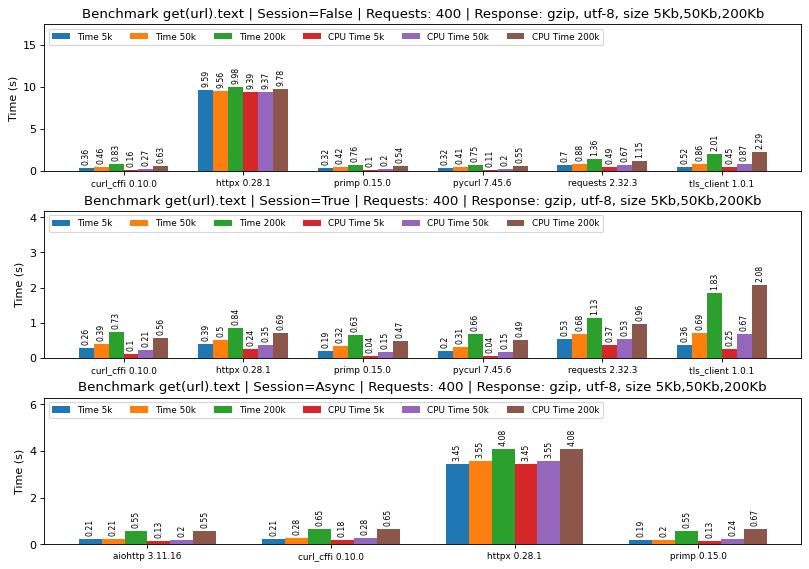
Benchmark
Usage
I. Client
HTTP client that can impersonate web browsers.
class Client:
    """Initializes an HTTP client that can impersonate web browsers.

    Args:
        auth (tuple[str, str| None] | None): Username and password for basic authentication. Default is None.
        auth_bearer (str | None): Bearer token for authentication. Default is None.
        params (dict[str, str] | None): Default query parameters to include in all requests. Default is None.
        headers (dict[str, str] | None): Default headers to send with requests. If `impersonate` is set, this will be ignored.
        cookies (dict[str, str] | None): - Map of cookies to send with requests as the `Cookie` header.
        timeout (float | None): HTTP request timeout in seconds. Default is 30.
        cookie_store (bool | None): Enable a persistent cookie store. Received cookies will be preserved and included
            in additional requests. Default is True.
        referer (bool | None): Enable or disable automatic setting of the `Referer` header. Default is True.
        proxy (str | None): Proxy URL for HTTP requests. Example: "socks5://127.0.0.1:9150". Default is None.
        impersonate (str | None): Entity to impersonate. Example: "chrome_124". Default is None.
            Chrome: "chrome_100","chrome_101","chrome_104","chrome_105","chrome_106","chrome_107","chrome_108",
                "chrome_109","chrome_114","chrome_116","chrome_117","chrome_118","chrome_119","chrome_120",
                "chrome_123","chrome_124","chrome_126","chrome_127","chrome_128","chrome_129","chrome_130",
                "chrome_131"
            Safari: "safari_ios_16.5","safari_ios_17.2","safari_ios_17.4.1","safari_ios_18.1.1",
                "safari_15.3","safari_15.5","safari_15.6.1","safari_16","safari_16.5","safari_17.0",
                "safari_17.2.1","safari_17.4.1","safari_17.5","safari_18","safari_18.2","safari_ipad_18"
            OkHttp: "okhttp_3.9","okhttp_3.11","okhttp_3.13","okhttp_3.14","okhttp_4.9","okhttp_4.10","okhttp_5"
            Edge: "edge_101","edge_122","edge_127","edge_131"
            Firefox: "firefox_109","firefox_117","firefox_128","firefox_133"
        follow_redirects (bool | None): Whether to follow redirects. Default is True.
        max_redirects (int | None): Maximum redirects to follow. Default 20. Applies if `follow_redirects` is True.
        verify (bool | None): Verify SSL certificates. Default is True.
        ca_cert_file (str | None): Path to CA certificate store. Default is None.
        https_only` (bool | None): Restrict the Client to be used with HTTPS only requests. Default is `false`.
        http2_only` (bool | None): If true - use only HTTP/2; if false - use only HTTP/1. Default is `false`.

    """
Client methods
The Client class provides a set of methods for making HTTP requests: get, head, options, delete, post, put, patch, each of which internally utilizes the request() method for execution. The parameters for these methods closely resemble those in httpx.
def get(
    url: str,
    params: dict[str, str] | None = None,
    headers: dict[str, str] | None = None,
    cookies: dict[str, str] | None = None,
    auth: tuple[str, str| None] | None = None,
    auth_bearer: str | None = None,
    timeout: float | None = 30,
):
    """Performs a GET request to the specified URL.

    Args:
        url (str): The URL to which the request will be made.
        params (dict[str, str] | None): A map of query parameters to append to the URL. Default is None.
        headers (dict[str, str] | None): A map of HTTP headers to send with the request. Default is None.
        cookies (dict[str, str] | None): - An optional map of cookies to send with requests as the `Cookie` header.
        auth (tuple[str, str| None] | None): A tuple containing the username and an optional password
            for basic authentication. Default is None.
        auth_bearer (str | None): A string representing the bearer token for bearer token authentication. Default is None.
        timeout (float | None): The timeout for the request in seconds. Default is 30.

    """
def post(
    url: str,
    params: dict[str, str] | None = None,
    headers: dict[str, str] | None = None,
    cookies: dict[str, str] | None = None,
    content: bytes | None = None,
    data: dict[str, Any] | None = None,
    json: Any | None = None,
    files: dict[str, str] | None = None,
    auth: tuple[str, str| None] | None = None,
    auth_bearer: str | None = None,
    timeout: float | None = 30,
):
    """Performs a POST request to the specified URL.

    Args:
        url (str): The URL to which the request will be made.
        params (dict[str, str] | None): A map of query parameters to append to the URL. Default is None.
        headers (dict[str, str] | None): A map of HTTP headers to send with the request. Default is None.
        cookies (dict[str, str] | None): - An optional map of cookies to send with requests as the `Cookie` header.
        content (bytes | None): The content to send in the request body as bytes. Default is None.
        data (dict[str, Any] | None): The form data to send in the request body. Default is None.
        json (Any | None): A JSON serializable object to send in the request body. Default is None.
        files (dict[str, str] | None): A map of file fields to file paths to be sent as multipart/form-data. Default is None.
        auth (tuple[str, str| None] | None): A tuple containing the username and an optional password
            for basic authentication. Default is None.
        auth_bearer (str | None): A string representing the bearer token for bearer token authentication. Default is None.
        timeout (float | None): The timeout for the request in seconds. Default is 30.

    """
Response object
resp.content
resp.cookies
resp.encoding
resp.headers
resp.json()
resp.status_code
resp.text
resp.text_markdown  # html is converted to markdown text
resp.text_plain  # html is converted to plain text
resp.text_rich  # html is converted to rich text
resp.url
Devices
-
Chrome:
chrome_100,chrome_101,chrome_104,chrome_105,chrome_106,chrome_107,chrome_108,chrome_109,chrome_114,chrome_116,chrome_117,chrome_118,chrome_119,chrome_120,chrome_123,chrome_124,chrome_126,chrome_127,chrome_128,chrome_129,chrome_130,chrome_131 -
Edge:
edge_101,edge_122,edge_127,edge_131 -
Safari:
safari_ios_17.2,safari_ios_17.4.1,safari_ios_16.5,safari_ios_18.1.1,safari_15.3,safari_15.5,safari_15.6.1,safari_16,safari_16.5,safari_17.0,safari_17.2.1,safari_17.4.1,safari_17.5,safari_18,safari_18.2,safari_ipad_18 -
OkHttp:
okhttp_3.9,okhttp_3.11,okhttp_3.13,okhttp_3.14,okhttp_4.9,okhttp_4.10,okhttp_5 -
Firefox:
firefox_109,firefox_117,firefox_128,firefox_133
Examples
import primp

# Impersonate
client = primp.Client(impersonate="chrome_131")  # chrome_131

# GET request
resp = client.get("https://tls.peet.ws/api/all")
print(resp.json())

# GET request with passing params and setting timeout
params = {"param1": "value1", "param2": "value2"}
resp = client.post(url="https://httpbin.org/anything", params=params, timeout=10)
print(r.text)

# POST Binary Request Data
content = b"some_data"
resp = client.post(url="https://httpbin.org/anything", content=content)
print(r.text)

# POST Form Encoded Data
data = {"key1": "value1", "key2": "value2"}
resp = client.post(url="https://httpbin.org/anything", data=data)
print(r.text)

# POST JSON Encoded Data
json = {"key1": "value1", "key2": "value2"}
resp = client.post(url="https://httpbin.org/anything", json=json)
print(r.text)

# POST Multipart-Encoded Files
files = {'file1': '/home/root/file1.txt', 'file2': 'home/root/file2.txt'}
r = client.post("https://httpbin.org/post", files=files)
print(r.text)

# Authentication using user/password
auth = ("user", "password")
resp = client.post(url="https://httpbin.org/anything", auth=auth)
print(r.text)

# Authentication using auth bearer
auth_bearer = "bearerXXXXXXXXXXXXXXXXXXXX"
resp = client.post(url="https://httpbin.org/anything", auth_bearer=auth_bearer)
print(r.text)

# Using proxy or env var PRIMP_PROXY
resp = primp.Client(proxy="http://127.0.0.1:8080").get("https://tls.peet.ws/api/all")
print(resp.json())
export PRIMP_PROXY="socks5://127.0.0.1:1080"
resp = primp.Client().get("https://tls.peet.ws/api/all")
print(resp.json())

# Using custom CA certificate store: env var PRIMP_CA_BUNDLE
#(Primp built with the Mozilla's latest trusted root certificates, so maybe it's not necessary)
resp = primp.Client(ca_cert_file="/cert/cacert.pem").get("https://tls.peet.ws/api/all")
print(resp.json())
resp = primp.Client(ca_cert_file=certifi.where()).get("https://tls.peet.ws/api/all")
print(resp.json())
export PRIMP_CA_BUNDLE="/home/user/Downloads/cert.pem"
resp = primp.Client().get("https://tls.peet.ws/api/all")
print(resp.json())

# You can also use convenience functions that use a default Client instance under the hood:
# primp.get() | primp.head() | primp.options() | primp.delete() | primp.post() | primp.patch() | primp.put()
# These functions can accept the `impersonate` parameter:
resp = primp.get("https://httpbin.org/anything", impersonate="chrome_131")
print(r.text)
II. AsyncClient
TODO
Release history Release notifications | RSS feed


Download files
Download the file for your platform. If you're not sure which to choose, learn more about installing packages.
Source Distribution
Built Distributions
Filter files by name, interpreter, ABI, and platform.
If you're not sure about the file name format, learn more about wheel file names.
Copy a direct link to the current filters
File details
Details for the file primp-0.10.1.tar.gz.
File metadata
- Download URL: primp-0.10.1.tar.gz
- Upload date:
- Size: 85.2 kB
- Tags: Source
- Uploaded using Trusted Publishing? No
- Uploaded via: maturin/1.8.1
File hashes
| Algorithm | Hash digest | |
|---|---|---|
| SHA256 |
1fab598cb7d9c1e509747c0ac4352b75268849c6c67262cdb5a603d373ddb2bb
|
|
| MD5 |
64817a12acb9c258b9cb5d71cbb3dc30
|
|
| BLAKE2b-256 |
7c3a6f26826abf7225678fc5e8eb27d1df99bf14ba1563840d1424c2ffcc5934
|
File details
Details for the file primp-0.10.1-cp38-abi3-win_amd64.whl.
File metadata
- Download URL: primp-0.10.1-cp38-abi3-win_amd64.whl
- Upload date:
- Size: 3.2 MB
- Tags: CPython 3.8+, Windows x86-64
- Uploaded using Trusted Publishing? No
- Uploaded via: maturin/1.8.1
File hashes
| Algorithm | Hash digest | |
|---|---|---|
| SHA256 |
b4b11310f7723d858ff810e7c056c87bdec8b9867f804972ae59153bc387ff2c
|
|
| MD5 |
1a475767d09e4fa122bdba4d36fcc775
|
|
| BLAKE2b-256 |
f01974fb024f85c71b3a45f2b88e859b12beea2db4a687ea2a93f2dedb17273d
|
File details
Details for the file primp-0.10.1-cp38-abi3-musllinux_1_2_x86_64.whl.
File metadata
- Download URL: primp-0.10.1-cp38-abi3-musllinux_1_2_x86_64.whl
- Upload date:
- Size: 3.7 MB
- Tags: CPython 3.8+, musllinux: musl 1.2+ x86-64
- Uploaded using Trusted Publishing? No
- Uploaded via: maturin/1.8.1
File hashes
| Algorithm | Hash digest | |
|---|---|---|
| SHA256 |
161d400d4786734377b64c3bc799a9055bf7537521647ca3ba80b8341e487bfe
|
|
| MD5 |
bd32c3a8d169e6a26c2d34e048aaac87
|
|
| BLAKE2b-256 |
6359da47d1d1507a8a86757bca2733a9e554039b345f1017d9ec3a82dd984078
|
File details
Details for the file primp-0.10.1-cp38-abi3-musllinux_1_2_aarch64.whl.
File metadata
- Download URL: primp-0.10.1-cp38-abi3-musllinux_1_2_aarch64.whl
- Upload date:
- Size: 3.5 MB
- Tags: CPython 3.8+, musllinux: musl 1.2+ ARM64
- Uploaded using Trusted Publishing? No
- Uploaded via: maturin/1.8.1
File hashes
| Algorithm | Hash digest | |
|---|---|---|
| SHA256 |
a7cf7fe0652538d83519feb302e23d36108149369a6a2d59bbcb8bcdc1768fb1
|
|
| MD5 |
324430d859941c76ea2ca804492dca7c
|
|
| BLAKE2b-256 |
8543a2fdfff83c69a6a22f28f6673fc246df59dee49c285dccdf248cc97befd8
|
File details
Details for the file primp-0.10.1-cp38-abi3-manylinux_2_34_armv7l.whl.
File metadata
- Download URL: primp-0.10.1-cp38-abi3-manylinux_2_34_armv7l.whl
- Upload date:
- Size: 3.1 MB
- Tags: CPython 3.8+, manylinux: glibc 2.34+ ARMv7l
- Uploaded using Trusted Publishing? No
- Uploaded via: maturin/1.8.1
File hashes
| Algorithm | Hash digest | |
|---|---|---|
| SHA256 |
3d2aa3a82ca4a72d13817bbd5d148f308f431d27207882ab4c3453cdd063ad9d
|
|
| MD5 |
aafa06079b72f75d4e82fe562e6ec791
|
|
| BLAKE2b-256 |
c71e1176eab646b31ba5c085c764346b1ba73f87099d9f7ff308c4385bab673b
|
File details
Details for the file primp-0.10.1-cp38-abi3-manylinux_2_34_aarch64.whl.
File metadata
- Download URL: primp-0.10.1-cp38-abi3-manylinux_2_34_aarch64.whl
- Upload date:
- Size: 3.3 MB
- Tags: CPython 3.8+, manylinux: glibc 2.34+ ARM64
- Uploaded using Trusted Publishing? No
- Uploaded via: maturin/1.8.1
File hashes
| Algorithm | Hash digest | |
|---|---|---|
| SHA256 |
6fe2a03c8d140b1077aabf4840b65978a3dbe1dbfbad240435c640e55e14d297
|
|
| MD5 |
6ac31586c19081b949a2a0611eb3127b
|
|
| BLAKE2b-256 |
0aa6a693893fb3a130194eb01c5b911f2e20f28c4b269200c76509494bcc7496
|
File details
Details for the file primp-0.10.1-cp38-abi3-manylinux_2_17_x86_64.manylinux2014_x86_64.whl.
File metadata
- Download URL: primp-0.10.1-cp38-abi3-manylinux_2_17_x86_64.manylinux2014_x86_64.whl
- Upload date:
- Size: 3.3 MB
- Tags: CPython 3.8+, manylinux: glibc 2.17+ x86-64
- Uploaded using Trusted Publishing? No
- Uploaded via: maturin/1.8.1
File hashes
| Algorithm | Hash digest | |
|---|---|---|
| SHA256 |
b1192bfeb6e6ddd9ce52e327138a1489b8fe3828250483da41728c0c96316f40
|
|
| MD5 |
2c56f48d6980bc740155d7f5cf481d4f
|
|
| BLAKE2b-256 |
6d05d3d9fe8d0e74448d1c5ba1909989683507cb94b895cfb63a3e200a83eff7
|
File details
Details for the file primp-0.10.1-cp38-abi3-macosx_11_0_arm64.whl.
File metadata
- Download URL: primp-0.10.1-cp38-abi3-macosx_11_0_arm64.whl
- Upload date:
- Size: 3.0 MB
- Tags: CPython 3.8+, macOS 11.0+ ARM64
- Uploaded using Trusted Publishing? No
- Uploaded via: maturin/1.8.1
File hashes
| Algorithm | Hash digest | |
|---|---|---|
| SHA256 |
97b7c216b3382a7cee55ab98622cd1ad364de9684be7a0607335705456ae24e1
|
|
| MD5 |
5e621be168057fd8dc8ca5ec1ccefefe
|
|
| BLAKE2b-256 |
daae2290ed2a023f84b419a95247bb8bca3a9bda4d62099c774711df1a44b4f0
|
File details
Details for the file primp-0.10.1-cp38-abi3-macosx_10_12_x86_64.whl.
File metadata
- Download URL: primp-0.10.1-cp38-abi3-macosx_10_12_x86_64.whl
- Upload date:
- Size: 3.3 MB
- Tags: CPython 3.8+, macOS 10.12+ x86-64
- Uploaded using Trusted Publishing? No
- Uploaded via: maturin/1.8.1
File hashes
| Algorithm | Hash digest | |
|---|---|---|
| SHA256 |
b90305c5fdaa63a049a62842d2a5357ad53eed04665bc6bb22c75d253cbe9a2e
|
|
| MD5 |
3545e1d27309c9c111dcae20f4b10f1b
|
|
| BLAKE2b-256 |
50facc4c434111a98bf8e4909e8d9a1bd54c5b8080bcb9cbf4839230819637ab
|






