




principle-viz is a Python package for Principles of Economics market analysis and diagrams.
It focuses on linear demand/supply models with clean module boundaries across solver logic, policy layers, welfare decomposition, and plotting.
Features
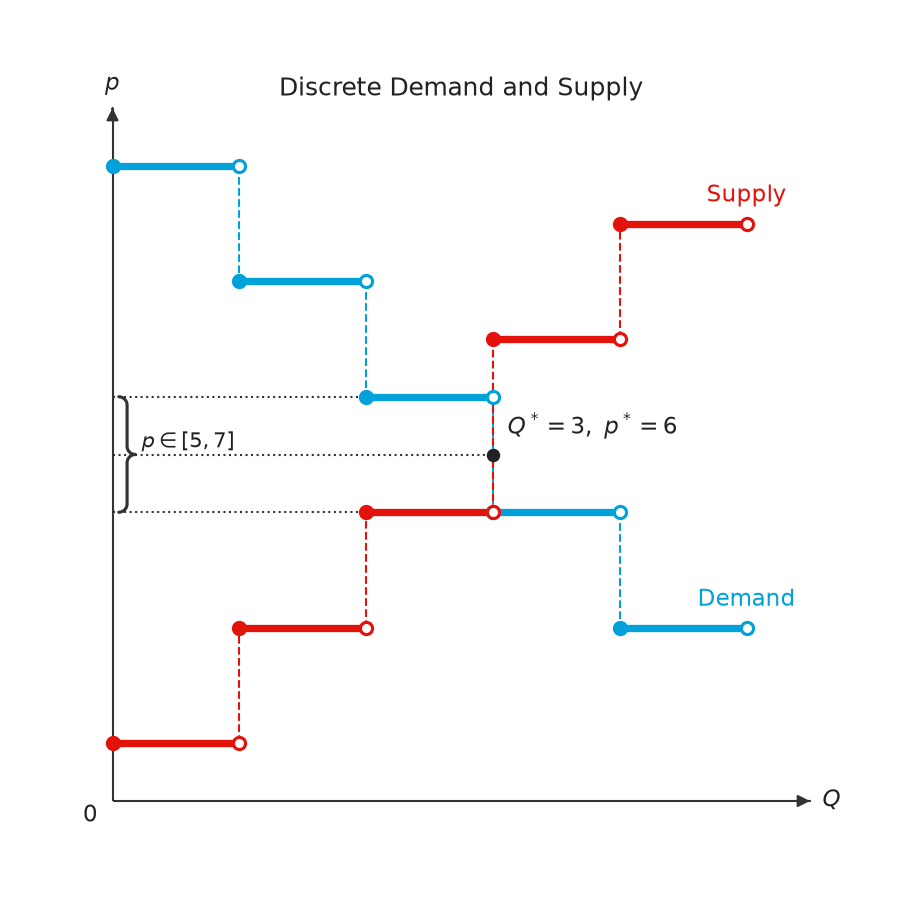
- Solve market equilibrium from linear demand and supply, or from discrete unit schedules
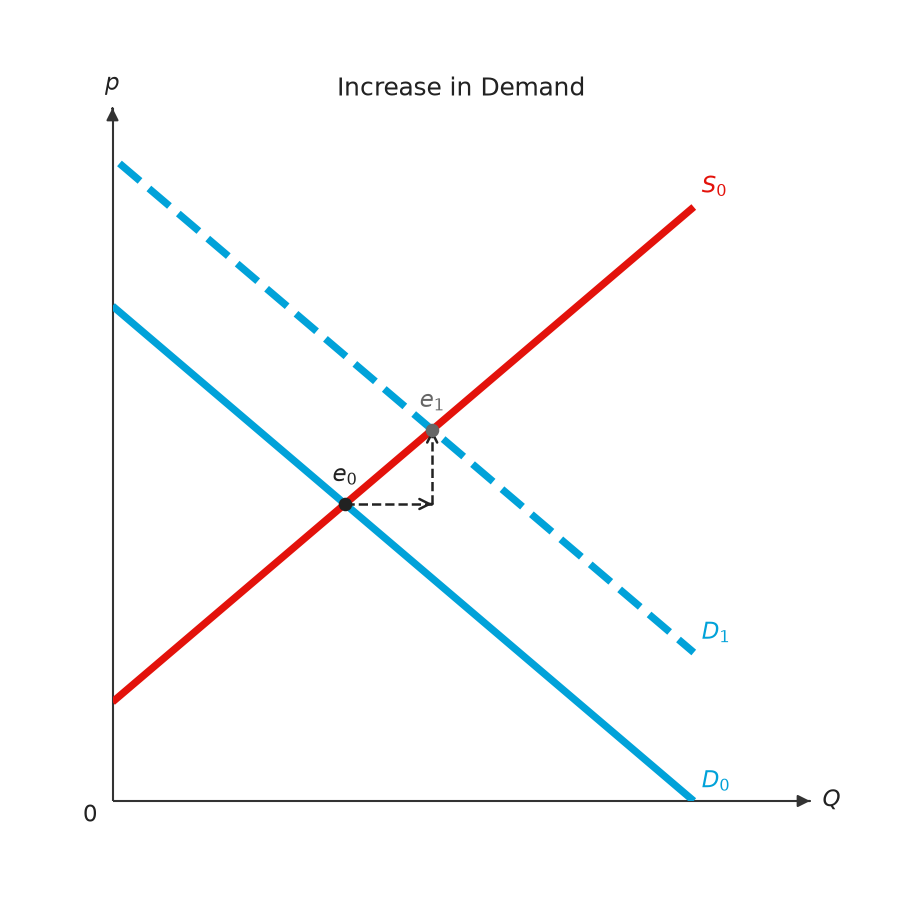
- Comparative statics: shifts of demand or supply, with the move from the old equilibrium to the new one
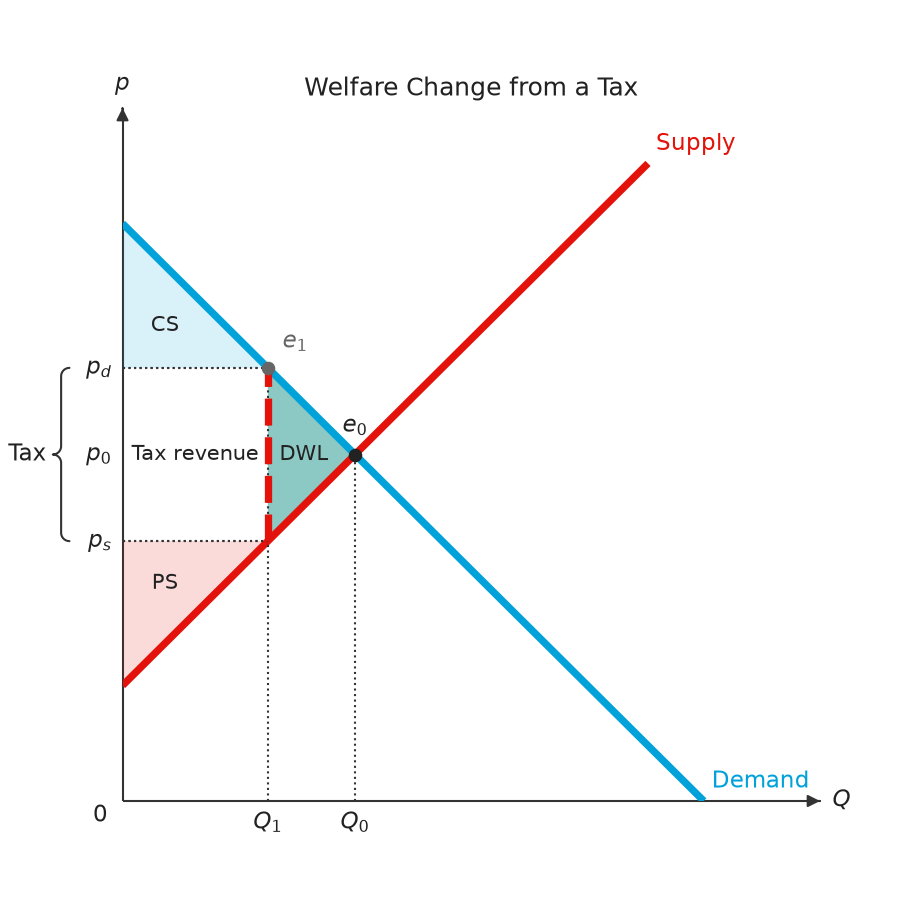
- Taxes (fixed, per-unit, ad valorem; legal incidence on buyers or sellers) and subsidies
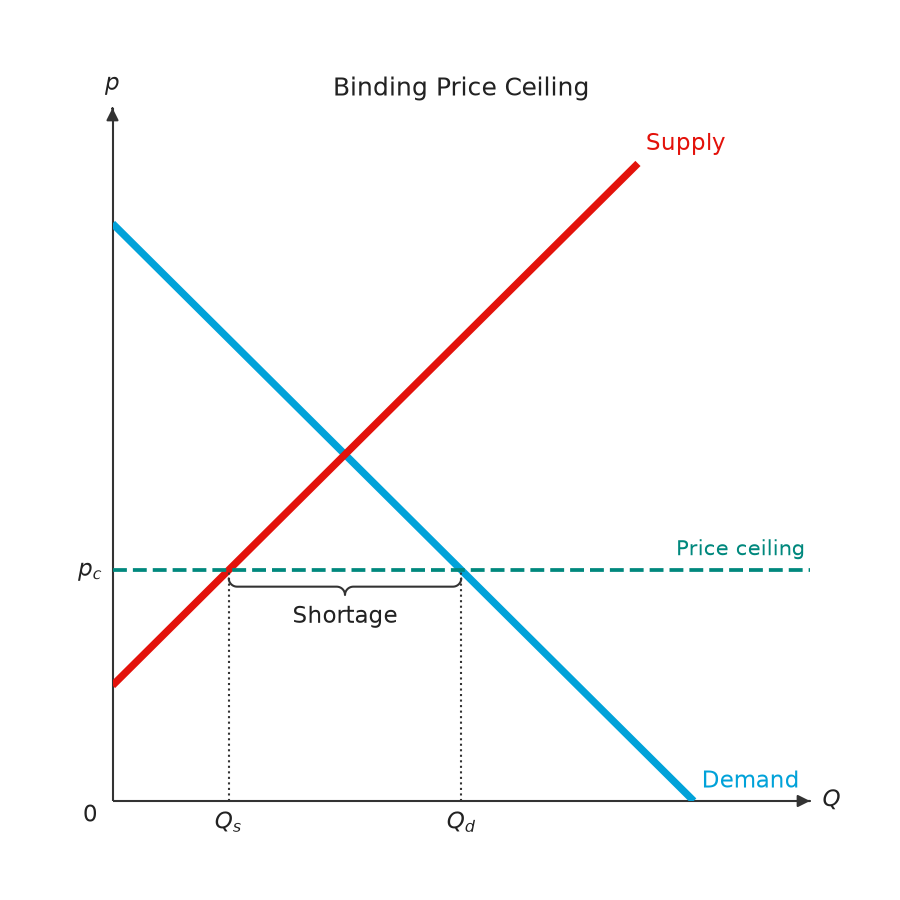
- Price ceilings, price floors and the minimum wage, with the shortage, surplus or unemployment braced on the policy line
- Welfare decomposition: consumer and producer surplus, tax revenue, deadweight loss
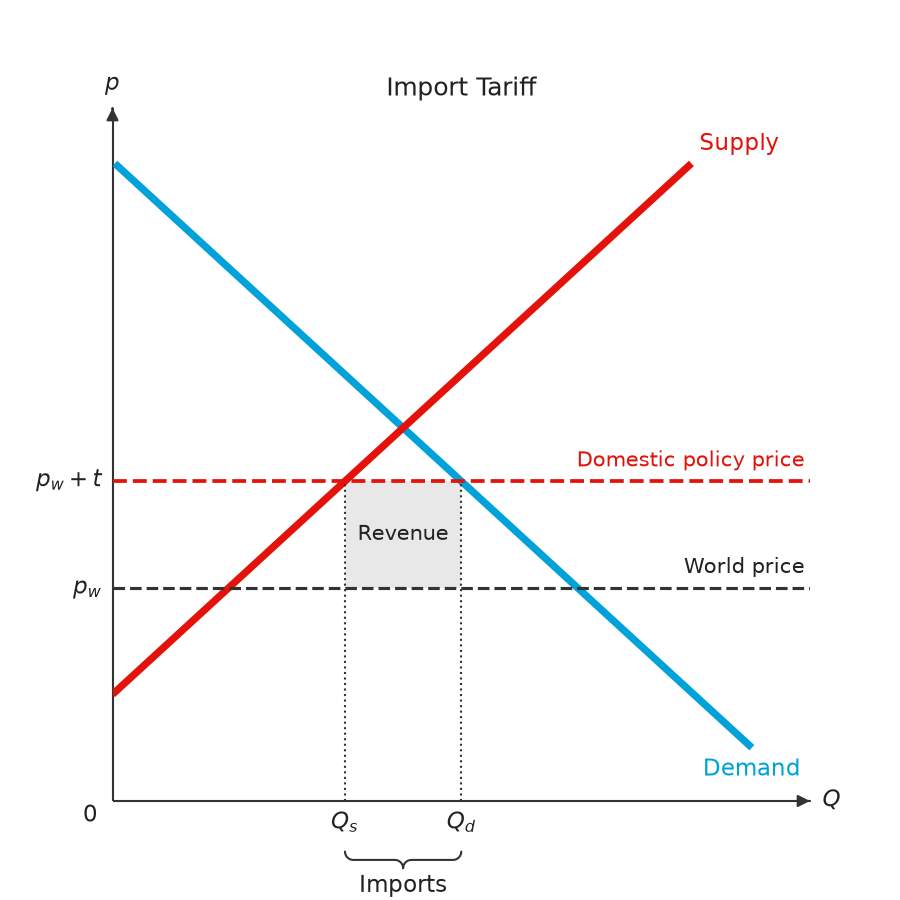
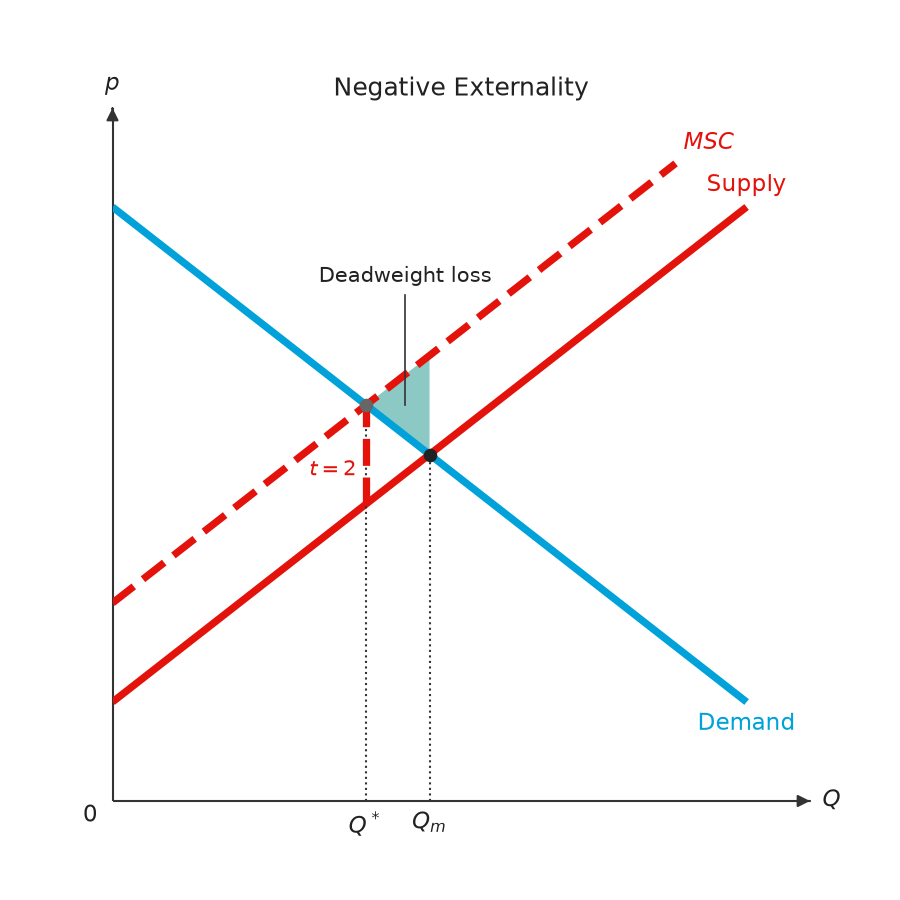
- International trade (free trade, tariffs, quotas), externalities, common resources, public goods, loanable funds, the PPF and elasticity
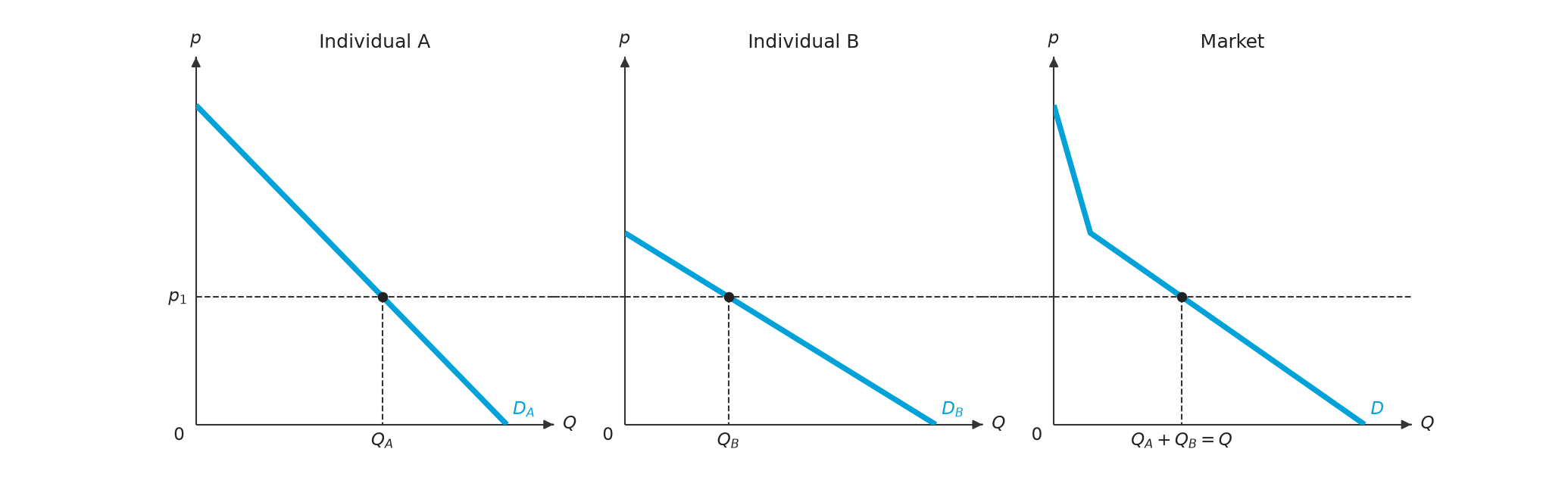
- Market demand and supply as the horizontal sum of individual curves or schedules
- Textbook-style figures built on MosaicKit: square plots, curves named directly instead of a legend, LaTeX labels, values marked on the axes, and labels placed so they cover nothing
- CLI workflows with JSON output
Installation
pip install principle-viz
For development:
git clone https://github.com/EconViz/principle-viz.git
cd principle-viz
uv sync
Quick Start
from principle_viz.core.line import Line
from principle_viz.core.equilibrium import solve_equilibrium
from principle_viz.plot.figure import MarketFigure

demand = Line.from_inverse(10.0, -1.0)
supply = Line.from_inverse(2.0, 1.0)
eq = solve_equilibrium(demand, supply)

fig = MarketFigure(x_max=12, y_max=12, title="Basic Equilibrium")
fig.add_curves(demand, supply, q_max=10)
fig.add_equilibrium(eq)
fig.finalize()
fig.save("basic_equilibrium.png")
fig.close()
Tax Example (Consumer vs Producer Incidence)
from principle_viz.core.line import Line
from principle_viz.plot.figure import MarketFigure
from principle_viz.policy.tax import TaxOn, TaxScenario, TaxType

demand = Line.from_inverse(10.0, -1.0)
supply = Line.from_inverse(0.0, 1.0)
scenario = TaxScenario(tax_type=TaxType.AD_VALOREM_TAX, amount=0.35, tax_on=TaxOn.CONSUMER)

fig = MarketFigure(x_max=12, y_max=12, title="Ad Valorem Tax")
fig.add_curves(demand, supply, q_max=10)
fig.add_tax_transform(demand, supply, scenario, q_max=10)
fig.finalize()
fig.save("tax_ad_valorem_consumer.png")
fig.close()
Price Controls
from principle_viz.core.controls import (
    PriceControlScenario,
    PriceControlType,
    evaluate_price_control,
)
from principle_viz.core.line import Line
from principle_viz.plot.figure import MarketFigure

demand = Line.from_inverse(10.0, -1.0)
supply = Line.from_inverse(2.0, 1.0)
ceiling = evaluate_price_control(
    demand, supply, PriceControlScenario(PriceControlType.CEILING, 4.0)
)

fig = MarketFigure(x_max=12, y_max=12, title="Binding Price Ceiling")
fig.add_curves(demand, supply, q_max=10)
fig.add_price_control(ceiling)  # "Shortage" braced below the ceiling line
fig.finalize()
fig.save("price_ceiling.png")
fig.close()
add_price_control(..., gap_brace="axis") braces the gap under the quantity axis instead; add_minimum_wage() draws the labor-market version.
Market Demand and Supply from Individuals
Individual curves sum horizontally into the market curve. Each buyer buys nothing above their choke price and each seller sells nothing below their minimum price, so the market curve is piecewise linear with a kink at each of those prices.
from principle_viz import (
    DiscreteDemand,
    demand_aggregation_figure,
    discrete_demand_aggregation_figure,
    market_demand,
    market_supply,
    solve_piecewise_equilibrium,
)
from principle_viz.core.line import Line

a = Line.from_inverse(10, -2)  # p = 10 - 2Q
b = Line.from_inverse(6, -0.5)  # p = 6 - 0.5Q
demand = market_demand((a, b))
demand.points  # ((0, 10), (2, 6), (17, 0)), kink at B's choke price
demand.q_at(4)  # 7 = Q_A + Q_B

supply = market_supply((Line.from_inverse(2, 1), Line.from_inverse(5, 0.5)), p_max=10)
solve_piecewise_equilibrium(demand, supply)  # exact on each segment

# Individual A | individual B | market, with guides at p_1 showing Q_A + Q_B = Q.
# link_price=True runs the p_1 line across all three panels.
demand_aggregation_figure({"A": a, "B": b}, price=4, link_price=True).save(
    "market_demand.png"
)

# Discrete: reservation prices combine into one market step schedule.
DiscreteDemand.combine(DiscreteDemand((10, 7, 4)), DiscreteDemand((8, 5, 2)))
discrete_demand_aggregation_figure(
    {"A": DiscreteDemand((10, 7, 4)), "B": DiscreteDemand((8, 5, 2))}, price=6
).save("discrete_market_demand.png")
supply_aggregation_figure and discrete_supply_aggregation_figure draw the supply side. Examples: examples/scripts/aggregation_*.py, output under examples/output/aggregation/.
Labels
Every built-in label has a stable id (figure.label_ids). A Label renames, hides or moves one:
from principle_viz import Label, MarketFigure

figure = MarketFigure(labels={"market.equilibrium": Label(top="4pt")})
figure.configure_label("market.supply", Label(right="8pt"))
figure.configure_label("market.demand", text="$D_0$", left="0.5em")
top, bottom, left and right move the label that far after it has been placed, so
principle-viz still picks the spot and you only fine-tune it. A length is a number of points or a
string with a unit: "10pt", "0.5em" (the label's font size) or "2mm"; top and bottom
combine, as do right and left. Label(offset=(dx, dy)) still places a label at an exact
offset in points instead of automatically; a nudge then moves it from there. Axis tick labels do
not take nudges.
Settings File
principle-viz reads econ-viz.toml, the settings file every EconViz package shares; mosaickit
reads and checks it. The top level sets the starting colour model (base), the fonts and the axis
and label colours; principle-viz's own settings live in the [principle] table, and the tables of
other packages, such as [utility], are skipped.
base = "default"     # a shared theme: manual, default, colorblind, monochrome, nord,
                     # paper or presentation

[font]
text = "serif"
math = "fonts/texgyrepagella-math.otf"

[fonts]
serif = ["fonts/NotoSerifTC-Regular.otf", "fonts/NotoSerifTC-Bold.otf"]

[color]
axis = "#1a1a1a"
label = "#1a1a1a"

[principle]
palette = "manual"   # colour model for principle-viz only; wins over base
language = "zh-TW"   # language of built-in figure text

[principle.color]    # any colour-model role, without "_color"
demand = "#8c8c8c"
supply = "#1a1a1a"

[principle.stroke]   # line widths in points
demand = 3.5

[principle.marker]
equilibrium = 6.5    # equilibrium dot diameter in points
from principle_viz import Config

Config.load("econ-viz.toml").use()  # figures made without theme= use it
Themes
The colour models are mosaickit's shared themes (mosaickit.themes), so base = "nord" means the
same look in every EconViz package. A theme gives a colour to each role, and
principle_viz.visuals.roles says which role each figure element takes:
| role | elements |
|---|---|
| ink | axis, label, baseline, arrow |
| primary | demand |
| secondary | supply |
| tertiary | shifted |
| intervention | tax, control |
| fill.light / fill.mid / fill.dark / fill.faint | cs / ps / dwl / tax_revenue |
The theme's line and marker scales multiply principle-viz's own line widths and equilibrium dot
(presentation draws them 1.5 and 1.3 times as large). PlotTheme.from_palette(name),
get_color_model(name) and palette=name take the same names; [principle.color] still sets one
element.
A theme= or palette= passed to a figure still wins. Relative paths are resolved against the
file's directory. A mistake raises mosaickit.ConfigurationError naming the file and the table,
e.g. econ-viz.toml: [principle.color] unknown key 'demnad'; did you mean 'demand'?.
CLI
principle-viz equilibrium \
  --demand-intercept 10 --demand-slope -1 \
  --supply-intercept 2 --supply-slope 1

principle-viz tax \
  --demand-intercept 10 --demand-slope -1 \
  --supply-intercept 2 --supply-slope 1 \
  --tax-type per_unit --amount 1 --tax-on producer
Examples
Run all examples:
uv run python examples/scripts/run_all.py
Generated images are grouped by topic under examples/output/: equilibrium/, discrete/, aggregation/, taxation/, subsidy/, price_controls/, welfare/, trade/, market_failures/, factor_capital_markets/, elasticity/ and ppf/.
Example Gallery
 |
 |
 |
 |
 |
 |
Development
uv run ruff check src tests examples/scripts
uv run pytest -q
uv build
PyPI Publishing
This repository is configured to publish from GitHub Actions using Trusted Publishing.
- Workflow:
.github/workflows/publish.yml - Trigger: push tag
v*(for examplev0.1.0) - Publisher:
pypa/gh-action-pypi-publish@release/v1withid-token: write
To release: bump the version in pyproject.toml and the CHANGELOG heading on a release/vX.Y.Z branch, merge it, then create the GitHub release vX.Y.Z; the tag push builds and publishes to PyPI.
Brand Assets
Brand SVG assets and banner are tracked in the docs branch so raw URLs stay stable:
- Banner:
docs/assets/banner.svg - Logo:
docs/assets/logo.svg
Documentation
- Visual language (in Chinese):
docs/visual-language.md - Contribution guide:
CONTRIBUTING.md - Changelog:
CHANGELOG.md
License
MIT
1 maintainer

Metadata
1 maintainer
Release files for principle-viz 0.12.1
For a detailed explanation of source distributions (sdists) and built distributions (wheels), please see the package formats documentation.
Source distribution (sdist)
| File | Size | Uploaded | Provenance | |
|---|---|---|---|---|
| principle_viz-0.12.1.tar.gz | 72.3 kB | With provenance | Details |
Built distribution (wheel)
| File | Interpreter | ABI | Platform | Reset |
|---|---|---|---|---|
| principle_viz-0.12.1-py3-none-any.whl | Python 3 | none | any | Details |
Total release size: 173.3 kB
Release files / principle_viz-0.12.1.tar.gz
| Download URL | principle_viz-0.12.1.tar.gz |
|---|---|
| Size | 72.3 kB |
| Tags | Source |
|
SHA-256 checksum How to use checksums |
7f13dcb3b254db610f4e09cd7f3837f5114bc368e5ade4a377d3764fc150e9fc
|
|
BLAKE2b-256 checksum How to use checksums |
0c40fef2edba981813527c7ddcd25c67c113efa10acfaa585271b50a1cda910f
|
| Upload date | |
|
Uploaded using Trusted Publishing? What is trusted publishing? |
Yes |
| Uploaded via |
twine/7.0.0 CPython/3.13.16
|
Provenance
Provenance describes where a file came from. On PyPI, provenance is shared via attestations, which provide a verifiable record of the build or publishing details. View details, limitations and caveats.


PyPI Publish Attestation
PyPI verified that this artifact, at this checksum, originated from the publisher listed below.
Signed by GitHub Actions, verified by PyPI on Oct 23, 2026.
Transparency logRelease files / principle_viz-0.12.1-py3-none-any.whl
| Download URL | principle_viz-0.12.1-py3-none-any.whl |
|---|---|
| Size | 101.1 kB |
| Tags | Python 3 |
|
SHA-256 checksum How to use checksums |
c2eb2ec59791c953f370d31f70566d039fe4024734418b33c133b4bce2ba6473
|
|
BLAKE2b-256 checksum How to use checksums |
db0852a24e8b9fa243b657dcf4624ab8c63cfb0c8db1da15907f3faec5d54af8
|
| Upload date | |
|
Uploaded using Trusted Publishing? What is trusted publishing? |
Yes |
| Uploaded via |
twine/7.0.0 CPython/3.13.16
|
Provenance
Provenance describes where a file came from. On PyPI, provenance is shared via attestations, which provide a verifiable record of the build or publishing details. View details, limitations and caveats.
PyPI Publish Attestation
PyPI verified that this artifact, at this checksum, originated from the publisher listed below.
Signed by GitHub Actions, verified by PyPI on Oct 23, 2026.
Transparency logSecurity for principle-viz 0.12.1
Provenance
Provenance describes where a file came from. On PyPI, provenance is shared via attestations, which provide a verifiable record of the build or publishing details. View details, limitations and caveats.
Full provenance
All 2 files in this release have been uploaded with provenance metadata.
Attestation for principle_viz-0.12.1.tar.gz
PyPI Publish Attestation
PyPI verified that this artifact, at this checksum, originated from the publisher listed below.
Signed by GitHub Actions, verified by PyPI on Oct 23, 2026.
Transparency logA note on package security
PyPI is a repository for distributing packages, not a service for auditing them. While third-party security researchers and our staff do their best to detect and remove malicious packages, PyPI cannot guarantee the quality, security or suitability of any given package.
To learn more about protecting yourself from malicious actors, visit our package security documentation.














