
Print Pretty Tree
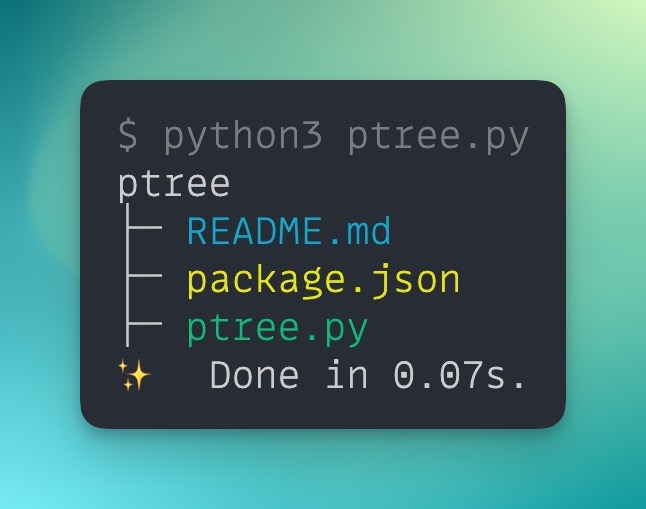
a.k.a. ptree is a simple Python script that displays the directory tree of the current working directory with color-coded output for easy file identification.
Installation
To install print-pretty-tree, you can use either pip or other package managers like npm, pnpm, or yarn.
Install using pip
If you have Python and pip installed:
pip install print-pretty-tree --user
Install using other package managers
If you have npm 5.2 or higher, we recommend using npx to run packages globally. This way, you don't need to install the package globally and can still use it as a tool.
npx print-pretty-tree
If you still want to install print-pretty-tree globally, on the command line, run the following command:
npm install -g print-pretty-tree
If you get an EACCES permissions error, you may need to reinstall npm with a version manager or manually change npm's default directory. For more information, see the npm docs here.
Usage
Once you have installed print-pretty-tree, you can run the script in any directory.
You can run any of the commands below in any directory, regardless of how you installed it.
pt

ptree

print-pretty-tree
The script excludes certain files and folders like node_modules and .git by default to make the output easier to manage. It will recursively display the directory structure in a visually pleasing way.
Customization
- To add more file types and colors to the output, you can modify the
FILE_TYPE_COLORSdictionary in the script. - You can also customize the excluded file patterns by modifying the
EXCLUDED_PATTERNSlist in the script.
Contributing
If you find any bugs or want to suggest new features, please feel free to contribute by submitting an issue or a pull request.
Contributors ✨
Thanks goes to these wonderful people (emoji key):

This project follows the all-contributors specification. Contributions of any kind welcome!
License
Licensed under the MIT license. See the LICENSE file for more information.
If you found this project interesting or helpful, please consider sponsoring me or following me on twitter

1 maintainer

Metadata
1 maintainer
Release files for print-pretty-tree 0.0.3
For a detailed explanation of source distributions (sdists) and built distributions (wheels), please see the package formats documentation.
Source distribution (sdist)
| File | Size | Uploaded | Provenance | |
|---|---|---|---|---|
| print-pretty-tree-0.0.3.tar.gz | 3.8 kB | Without provenance | Details |
Built distribution (wheel)
| File | Interpreter | ABI | Platform | Reset |
|---|---|---|---|---|
| print_pretty_tree-0.0.3-py3-none-any.whl | Python 3 | none | any | Details |
Total release size: 7.7 kB
Release files / print-pretty-tree-0.0.3.tar.gz
| Download URL | print-pretty-tree-0.0.3.tar.gz |
|---|---|
| Size | 3.8 kB |
| Tags | Source |
|
SHA-256 checksum How to use checksums |
0fcb6a95e95e48477be785480c7aa18033558b8cb5d8a462d4e71b735ec0efa2
|
|
BLAKE2b-256 checksum How to use checksums |
4ada5f02f4356ece3e1c20efb6928ca5d2060b01d6eb0b329529560e38995b2c
|
| Upload date | |
|
Uploaded using Trusted Publishing? What is trusted publishing? |
No |
| Uploaded via |
twine/4.0.2 CPython/3.10.10
|
Release files / print_pretty_tree-0.0.3-py3-none-any.whl
| Download URL | print_pretty_tree-0.0.3-py3-none-any.whl |
|---|---|
| Size | 3.9 kB |
| Tags | Python 3 |
|
SHA-256 checksum How to use checksums |
3974c1e453d7dbf921398f2178274beb10f87c32561b33c86849d2d31d0c38b0
|
|
BLAKE2b-256 checksum How to use checksums |
8aea67a612933e2c8c88af44b6159b12ded558eb951a7055856d19c16e142afd
|
| Upload date | |
|
Uploaded using Trusted Publishing? What is trusted publishing? |
No |
| Uploaded via |
twine/4.0.2 CPython/3.10.10
|
Security for print-pretty-tree 0.0.3
Provenance
Provenance describes where a file came from. On PyPI, provenance is shared via attestations, which provide a verifiable record of the build or publishing details. View details, limitations and caveats.
No provenance found
None of the files in this release were uploaded with provenance metadata.
A note on package security
PyPI is a repository for distributing packages, not a service for auditing them. While third-party security researchers and our staff do their best to detect and remove malicious packages, PyPI cannot guarantee the quality, security or suitability of any given package.
To learn more about protecting yourself from malicious actors, visit our package security documentation.














