
A Python utility for printing styled, aligned columns to the console.

Project description

PrintColumn V 0.11
A lightweight Python utility for printing styled, wrapped columns to the console. Supports text wrapping, color formatting, bold/italic styling, and customizable dividers — perfect for CLI tools, debugging output, or readable logs.


Overview
PrintColumn prints clean, customizable columns to the console. Designed for clarity and flexibility, it helps you format tabular text with style—perfect for CLI tools, logs, or readable summaries.
Features
- Custom Column Widths – Define exact widths for each column
- Text Wrapping – Automatically wraps text within column boundaries
- Text & Background Colors – Use HTML-safe color names for styling
- Bold & Italic Styling – Add emphasis with simple formatting options
- Custom Dividers – Configure column and row separators for visual clarity
Requirements
- printpop – Handles styled console output (colors, bold, italic)
Installation
pip install printcolumn
API Overview
initialize_column_printer( *args, col_widths: List[int] = None, col_text_colors: List[str] = None, col_back_colors: List[str] = None, col_bold: List[bool] = None, col_italic: List[bool] = None, col_divider_char: str = None, row_divider_char: str = None, width: int = None, bold: bool = None, italic: bool = None, text_color: str = None, back_color: str = None, ) -> None: Initializes a ColumnPrinter instance with default formatting.def print_column_row( *args, col_widths: List[int] = None, col_text_colors: List[str] = None, col_back_colors: List[str] = None, col_bold: List[bool] = None, col_italic: List[bool] = None, col_divider_char: str = None, row_divider_char: str = None, width: int = None, bold: bool = None, italic: bool = None, text_color: str = None, back_color: str = None, ) -> None: Prints a row of styled columns to the console.ColumnPrinter: Printer class. Instantiate with format values for subsequent calls to print_column_rowColors: Enum of available colors. Returns string name that can be passed as color arguments to print_column_rowget_colors()->List[str]: Returns list of supported colors
Usage Examples
from printcolumn import print_column_row
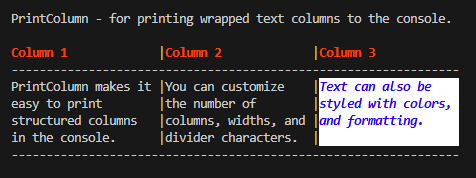
print("\nPrintColumn - for printing wrapped text columns to the console.\n")

# Prints a header row of three columns
ColumnPrinter().print_column_row(
    "Column 1", "Column 2", "Column 3",
    text_color="red",
    bold=True,
    col_divider_char=" |"
)

# holds text for three columns
basic_columns = [
    "PrintColumn makes it easy to print structured columns in the console.",
    "You can customize the number of columns, widths, and divider characters.",
    "Text can also be styled with colors, and formatting."
]

# prints a row with three columns
ColumnPrinter().print_column_row(
    *basic_columns,
    col_text_colors=["", "", "Blue"],
    col_back_colors=["", "", "White"],
    col_bold=[False, False, True],
    col_italic=[False, False, True],
    col_divider_char=" |"
)
Supported Colors
ColorPrinter includes support for over 140 HTML name safe colors
[
    "aliceblue", "antiquewhite", "aqua", "aquamarine", "azure", "bisque", "blanchedalmond", "blue", "blueviolet", "brown",
    "burlywood", "cadetblue", "chartreuse", "chocolate", "coral", "cornflowerblue", "cornsilk", "crimson", "cyan", "darkblue",
    "darkcyan", "darkgray", "darkgreen", "darkgrey", "darkkhaki", "darkmagenta", "darkolivegreen", "darkorange", "darkorchid", "darkred",
    "darksalmon", "darkseagreen", "darkslateblue", "darkslategray", "darkslategrey", "darkturquoise", "darkviolet", "deeppink", "deepskyblue", "dimgray",
    "dimgrey", "dodgerblue", "firebrick", "floralwhite", "forestgreen", "fuchsia", "gainsboro", "ghostwhite", "gold", "gray",
    "green", "greenyellow", "grey", "honeydew", "hotpink", "indianred", "indigo", "ivory", "khaki", "lavender",
    "lavenderblush", "lawngreen", "lemonchiffon", "lightblue", "lightcoral", "lightcyan", "lightgoldenrodyellow", "lightgray", "lightgreen", "lightgrey",
    "lightpink", "lightsalmon", "lightseagreen", "lightskyblue", "lightslategray", "lightslategrey", "lightsteelblue", "lightyellow", "lime", "limegreen",
    "linen", "magenta", "mediumaquamarine", "mediumblue", "mediumorchid", "mediumpurple", "mediumseagreen", "mediumslateblue", "mediumspringgreen", "mediumturquoise",
    "mediumvioletred", "midnightblue", "mintcream", "mistyrose", "moccasin", "navy", "oldlace", "olive", "olivedrab", "orange",
    "orangered", "orchid", "palegoldenrod", "palegreen", "paleturquoise", "palevioletred", "papayawhip", "peachpuff", "peru", "pink",
    "plum", "powderblue", "purple", "rebeccapurple", "red", "rosybrown", "royalblue", "saddlebrown", "salmon", "sandybrown",
    "seagreen", "seashell", "sienna", "silver", "skyblue", "slateblue", "slategray", "slategrey", "snow", "springgreen",
    "steelblue", "tan", "teal", "thistle", "tomato", "turquoise", "violet", "wheat", "white", "whitesmoke",
    "yellow", "yellowgreen"
]
Built-in demo:
python printcolumn
📁 Package Structure
printcolumn/
├── printcolumn/
│   ├── core.py             # Public functions and console test
│   ├── colors.py           #supported colors enum
│   ├── column_printer.py   # Core ANSI logic
│   ├── __init__.py         # Package init
├── assets/                # Folder for images, badges, or other static assets
│   ├── print_column_logo.png      # Logo
│   └── colorprinter_usage_output.png   # Console output
├── pyproject.toml
├── README.md   # Documentation
├── setup.cfg
└── setup.py
🤝 Contributing
Pull requests welcome! If you spot formatting quirks, want to add new named colors or extend features (like terminal detection or theme presets), feel free to collaborate.
To contribute:
Fork the repo
Add your changes with Google-style comments
Submit a pull request with a clear description
For style consistency, follow the Python Google Style Guide for functions and comments.
📄 License
This project is licensed under the MIT License.
👤 Author
Created by Ryan LaPine @rlapine — a technically skilled developer focused on clarity, maintainability, and audience-ready documentation. This class is part of a broader effort to build reusable, well-documented tools for data-driven projects.
📬 Contact
Feel free to reach out with questions or collaboration ideas:
📧 github.stunt845@passinbox.com
🔗 GitHub: @rlapine
Release history Release notifications | RSS feed

Download files
Download the file for your platform. If you're not sure which to choose, learn more about installing packages.
Source Distribution
Built Distribution
Filter files by name, interpreter, ABI, and platform.
If you're not sure about the file name format, learn more about wheel file names.
Copy a direct link to the current filters
File details
Details for the file printcolumn-0.1.1.tar.gz.
File metadata
- Download URL: printcolumn-0.1.1.tar.gz
- Upload date:
- Size: 2.0 MB
- Tags: Source
- Uploaded using Trusted Publishing? No
- Uploaded via: twine/6.1.0 CPython/3.13.4
File hashes
| Algorithm | Hash digest | |
|---|---|---|
| SHA256 |
15a475ce3769564a2a84e1fcdc1de0c5c094d2a940851dff75ed0183bc264659
|
|
| MD5 |
57c50fa7b2f0512ee673b2fc3b10dd62
|
|
| BLAKE2b-256 |
4296d8a404defd6803bf19555a60c31c6b1b64121668e17253a5fcc4b14291f0
|
File details
Details for the file printcolumn-0.1.1-py3-none-any.whl.
File metadata
- Download URL: printcolumn-0.1.1-py3-none-any.whl
- Upload date:
- Size: 11.4 kB
- Tags: Python 3
- Uploaded using Trusted Publishing? No
- Uploaded via: twine/6.1.0 CPython/3.13.4
File hashes
| Algorithm | Hash digest | |
|---|---|---|
| SHA256 |
99558e4ce6ae0d6e75e5543a4ebfb2b8f643e5c2e6c5855853c7ea94f2a1e4fe
|
|
| MD5 |
fb5a0e7d63deae7dd13c16ef51b8a464
|
|
| BLAKE2b-256 |
f483d5df0d7459ddaebdb784d01cb83cd95c2cc99cd0e41ee871659a0d37ef92
|






