
printprep
Prepare finished artwork for garment printing: cut it off its background without halos or holes, fit it to the print canvas without distortion, and measure the result instead of eyeballing it.



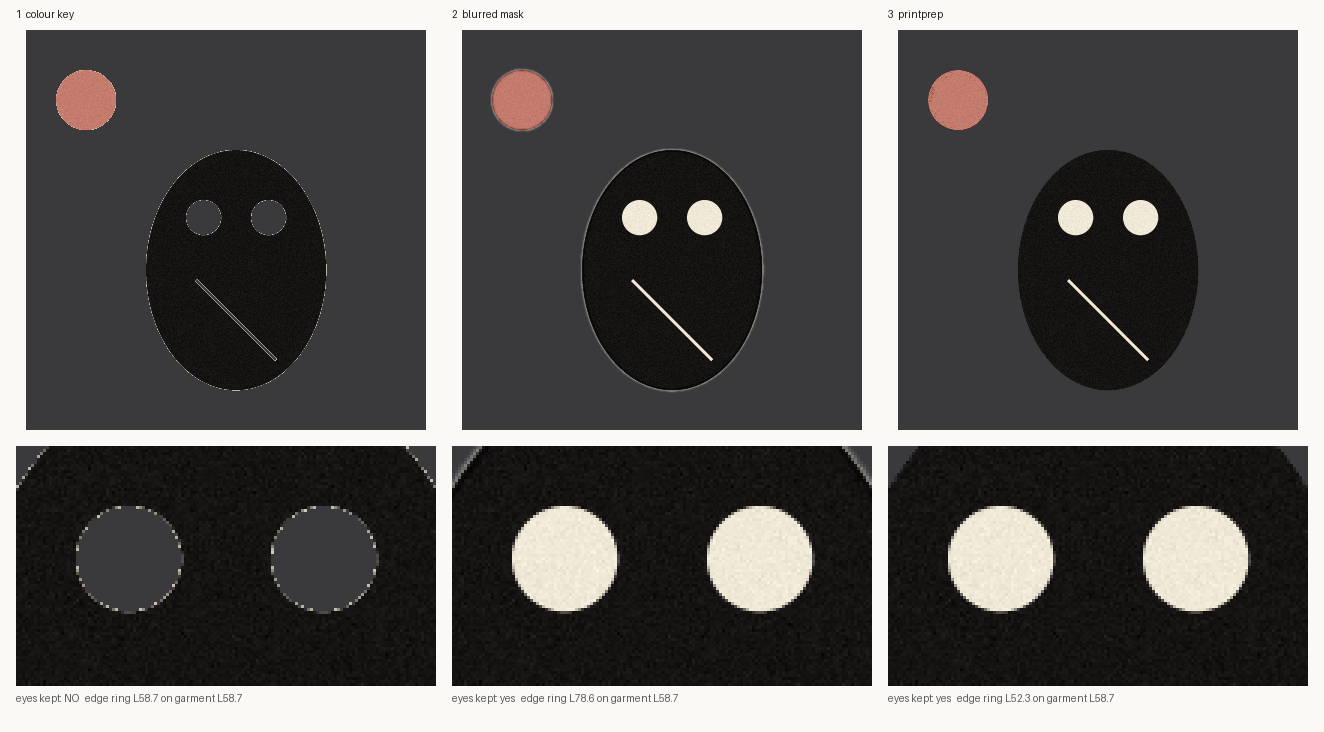
Left: a colour key deletes the eyes, because they are the same cream as the paper. Middle: a
blurred mask keeps them but rings every shape in pale paper colour. Right: printprep. Reproduce it
with python examples/halo_demo.py.
Why
Print-on-demand artwork usually arrives on a background: a scan on paper, a generated image on a flat colour, a poster with a border. Getting from there to a transparent 4500 x 5400 print file fails in a few specific, repeatable ways:
- Holes. The background colour also appears inside the design: the whites of an eye, a highlight, a hairline gap. A colour key makes them transparent and the shirt shows through.
- Halos. A softened cut edge still carries some of the background colour. It is invisible on the colour the artwork was drawn on, and a pale ring on every dark garment.
- Stretching. Resizing to a target width and height quietly distorts anything that is not already the canvas shape.
- Invisible failures. Many viewers draw transparency as black, so a design that was never cut out can look fine, and a clean one can look broken.
printprep is a small library and command line built around one rule for each of those.
| Measured on the demo artwork, composited on a dark garment (L58.7) | eyes kept | 1px edge ring |
|---|---|---|
| Colour key | no | L58.7, hard stair-stepped edge |
| Blurred connectivity mask | yes | L78.6, a visible pale fringe |
printprep.key_ground |
yes | L52.3, the edge takes on the ink |
Who it is for
Anyone with a folder of finished artwork and a print service at the other end: print-on-demand sellers, small garment shops, and the scripts that sit between a design tool and a Printify, Printful or DTG queue. It is a library and a command line, not an application - it expects to be called from your own pipeline, and it prints measurements rather than opinions.
It is not a background-removal model. There is no network call and no neural net; it works on artwork that sits on a plain, roughly uniform ground, which is what generated and scanned design artwork usually does.
Install
pip install git+https://github.com/daveatpressac-lab/printprep
Python 3.9 or newer, with numpy, scipy, OpenCV (headless) and Pillow. No network access, no models. Not on PyPI yet - see Status.
Quick start
from PIL import Image
from printprep import key_ground, fit_to_canvas, save_master, check_master, halo

art = Image.open("drawing_on_paper.png")

cut = key_ground(art)                    # transparent background, enclosed cream kept
print(cut.stats)                         # ground colour, % transparent, enclosed px kept
print(halo(cut.image))                   # edge ring vs a dark garment - lower is cleaner

master = fit_to_canvas(cut.image)        # 4500 x 5400, one scale, centred, 0.94 margin
print(master.aspect_drift)               # fraction stretched; 0.0 means not at all
save_master(master.image, "master.png")  # RGBA, 300 dpi

report = check_master(master.image)
print(report["passed"], report["problems"], report["warnings"])
Or from the command line:
printprep grain drawing_on_paper.png          # measure the paper's own texture first
printprep key   drawing_on_paper.png cut.png --grain 24 --tolerance 30
printprep halo  cut.png
printprep fit   cut.png master.png --canvas 4500x5400
printprep qc    master.png                    # exit code 1 if it fails
Every command prints its measurements as JSON on stdout, so printprep qc master.png | jq .problems
works. Anything you need to notice goes to stderr instead, where it cannot corrupt that JSON.
Exit codes are 0 done, 1 a qc master failed its gates, and 2 the command could not be
carried out - with the reason, not a traceback:
$ printprep key drawing_on_paper.png master.jpg
printprep: master.jpg cannot hold transparency, so the cut would be thrown away on save.
Use one of .png, .tga, .tif, .tiff, .webp - PNG is the usual choice for a print master.
What each part does
key_ground - cut by connectivity, soften by measured coverage
Only background reachable from the image border is removed, so background colour enclosed by the artwork stays as ink. Ground that a hairline gap connects to the outside does drain out, because that is background too.
The edge is where the care goes. An anti-aliased edge pixel's ink coverage is its distance from the background colour as a fraction of its own ink's distance, and one design can hold inks at very different distances: black line work and a pale pink fill. So the reference ink is taken locally, within a small window, and partial pixels are then unmultiplied so the background colour they carry is divided out. Coverage is only estimated in a narrow band along the outside edge; seams between two inks inside the artwork stay fully opaque.
Choose grain from measure_grain() rather than guessing: a little above the background's own
99.9th-percentile variation, and below the palest ink you need to keep.
fit_quadrilateral / cut_plate - fit the shape, not the pixels
For posters, framed panels and slabs, a threshold fails somewhere along a ragged printed edge or a
cast shadow. The outline is reduced to a four-point polygon with cv2.approxPolyDP, which
straightens ragged strips away and keeps shaded edges. A convex hull is avoided on purpose: if a
corner is missing from the mask, a hull bridges across and shears it off.
fit_to_canvas - one scale factor, always
Crops to the visible artwork, scales once by whichever axis runs out of room first, centres it, and
reports aspect_drift so a test can pin it near zero. That drift is the fractional change in
the aspect ratio, so < 0.005 means under half a per cent whatever shape the artwork is; rounding
the placed size to whole pixels is the only thing that moves it off zero.
check_master - gates, measured on alpha
- has a real alpha channel
- is the agreed canvas size
- corners are transparent
- artwork does not run into the canvas edge
- the artwork is actually cut out: at least 2% transparent inside its own bounding box, because canvas padding around an uncut rectangle says nothing
Some designs are rectangles on purpose. Don't lower the threshold for them; that blinds the check
for everything else. Grant that one image a PlateException with a stated reason, bound to a hash
of its pixels:
from printprep import PlateException, check_master

exc = PlateException.for_image(master, "poster design with a printed border")
check_master(master, plate_exception=exc)   # passes; the finding is kept as a warning
Change the picture and the exception stops applying.
fidelity - did the enlargement or trace keep the artwork?
Reports alpha_iou, colour_similarity, detail_ratio and a blended score. Read the detail
ratio on its own: in the test suite, a light blur keeps alpha at 1.0 and colour at 0.96, and still
scores 0.76 overall, while the detail ratio falls to 0.23. A single blended score would have passed
it.
choose_enlargement - vector trace or raster?
Raster by default, because a soft enlargement is recoverable and a destroyed trace is not. Vector is
advised only for large flat shapes: few colours, coarse edges, little mid-tone, measured after
contrast normalisation. Pass texture_dependent=True for stipple, halftone, grain or photographic
artwork to veto tracing outright. Even a vector verdict is advice: trace it, run fidelity, and
look.
Smaller helpers
sample_inktakes a lettering colour from the artwork itself, choosing its lightest ink for a pale design meant for dark garments instead of a mid grey that matches neither.midpoint_thresholdputs a luminance threshold between measured subject and background regions, and refuses outright when they overlap.
What it refuses
A wrong answer that looks right costs more than an error, so several inputs are turned away rather than processed into a plausible bad print file:
- artwork that is already cut out, handed back to
key_ground- the colour under a transparent pixel is undefined, so keying it again measures paint that was never printed - a
marginabove 1, which used to scale artwork past the canvas and shear off the overhang - a destination that cannot hold transparency, checked before the work is done
- subject and background luminance ranges that overlap, in
midpoint_threshold - an integer array whose values run past 255 and whose range printprep cannot know
16-bit greyscale scans are rescaled on the way in rather than refused. Pillow's own
convert("RGB") saturates those to a blank white page, which is exactly the kind of silent failure
this library exists to catch.
Status
Early, and honest about it. The rules here come from preparing real artwork for a working print-on-demand pipeline, where each one was added after a specific failure reached, or nearly reached, a garment proof. This package is a clean re-implementation of those rules for general use.
As a standalone project it is new: version 0.1.0, not yet released on PyPI, and no outside users that I know of. The API may still change before 1.0.
What is tested: 88 unit tests on synthetic artwork drawn in code, run on Linux, Windows and macOS against Python 3.9, 3.12 and 3.13. They cover holes, halos, grain specks, internal seams, ragged tilted panels, stretching, clipping, plate exceptions, the enlargement advice, high-bit-depth sources, extreme image shapes, every refusal above, and the command line end to end.
Known limits:
key_groundexpects a plain, roughly uniform background. For busy or shadowed backgrounds, build a mask yourself and usecut_plate(..., mask=...).- Pale ink on pale paper still fringes. When the ink is close to the ground colour there is little to measure coverage against. On the test case it leaves a 1px ring around L103 on an L59 garment - better than the blurred mask's L145, but not clean. Pinned by a test, so the limit is measured rather than assumed.
- Tracing itself is not included;
choose_enlargementadvises, andfidelitychecks whatever tracer you use. - Thresholds are in 8-bit RGB distance. High-bit-depth sources are converted on the way in.
cut_platerenders its mask at 4x to anti-alias the edge, so a full-size 4500 x 5400 plate needs roughly 400 MB of memory for that step.
Development
git clone https://github.com/daveatpressac-lab/printprep
cd printprep
python -m venv .venv
pip install -e ".[dev]"
python -m unittest discover -s tests -v
python examples/halo_demo.py
examples/halo_demo.py regenerates docs/halo_comparison.png and prints the numbers in the table
above. The artwork is drawn in code, so the figure is reproducible on any machine.
Reporting a problem, and contributing
Open an issue. The most useful report is a small synthetic image that reproduces the failure, or a description of the artwork that broke it: the ground colour, roughly what the design is, and what came out. Pull requests are welcome - see CONTRIBUTING.md for how the tests are laid out, and ROADMAP.md for what is likely next. Security reports go via SECURITY.md.
Licence
MIT. See LICENSE.
1 maintainer

Metadata
1 maintainer
Release files for printprep 0.1.0
For a detailed explanation of source distributions (sdists) and built distributions (wheels), please see the package formats documentation.
Source distribution (sdist)
| File | Size | Uploaded | |
|---|---|---|---|
| printprep-0.1.0.tar.gz | 44.1 kB | Details |
Built distribution (wheel)
| File | Interpreter | ABI | Platform | Reset |
|---|---|---|---|---|
| printprep-0.1.0-py3-none-any.whl | Python 3 | none | any | Details |
Total release size: 71.7 kB
Release files / printprep-0.1.0.tar.gz
| Download URL | printprep-0.1.0.tar.gz |
|---|---|
| Size | 44.1 kB |
| Tags | Source |
|
SHA-256 checksum How to use checksums |
5c7d76e8fff0eb7774509255618a208a7c180fb3f52090b2097ee6fd667a00a3
|
|
BLAKE2b-256 checksum How to use checksums |
a9d59affa35ed423aa6781126d63e2a66578d2e93024970b0077bbca32403c33
|
| Upload date | |
|
Uploaded using Trusted Publishing? What is trusted publishing? |
Yes |
| Uploaded via |
twine/7.0.0 CPython/3.13.14
|
Provenance
Provenance describes where a file came from. On PyPI, provenance is shared via attestations, which provide a verifiable record of the build or publishing details. View details, limitations and caveats.


PyPI Publish Attestation
PyPI verified that this artifact, at this checksum, originated from the publisher listed below.
Signed by GitHub Actions, verified by PyPI on Sep 21, 2026.
Transparency logRelease files / printprep-0.1.0-py3-none-any.whl
| Download URL | printprep-0.1.0-py3-none-any.whl |
|---|---|
| Size | 27.6 kB |
| Tags | Python 3 |
|
SHA-256 checksum How to use checksums |
f7946f34d21bcf59f02cb09b8953f94f14d208f8844d34bd17d9681c279791f3
|
|
BLAKE2b-256 checksum How to use checksums |
0a77c682da5182b2f6b7e4dce73de93ba54e6691963ee3429601e186bc0c6874
|
| Upload date | |
|
Uploaded using Trusted Publishing? What is trusted publishing? |
Yes |
| Uploaded via |
twine/7.0.0 CPython/3.13.14
|
Provenance
Provenance describes where a file came from. On PyPI, provenance is shared via attestations, which provide a verifiable record of the build or publishing details. View details, limitations and caveats.
PyPI Publish Attestation
PyPI verified that this artifact, at this checksum, originated from the publisher listed below.
Signed by GitHub Actions, verified by PyPI on Sep 21, 2026.
Transparency log












