
🎯 PriPlot - Interactive Task Priority Visualization
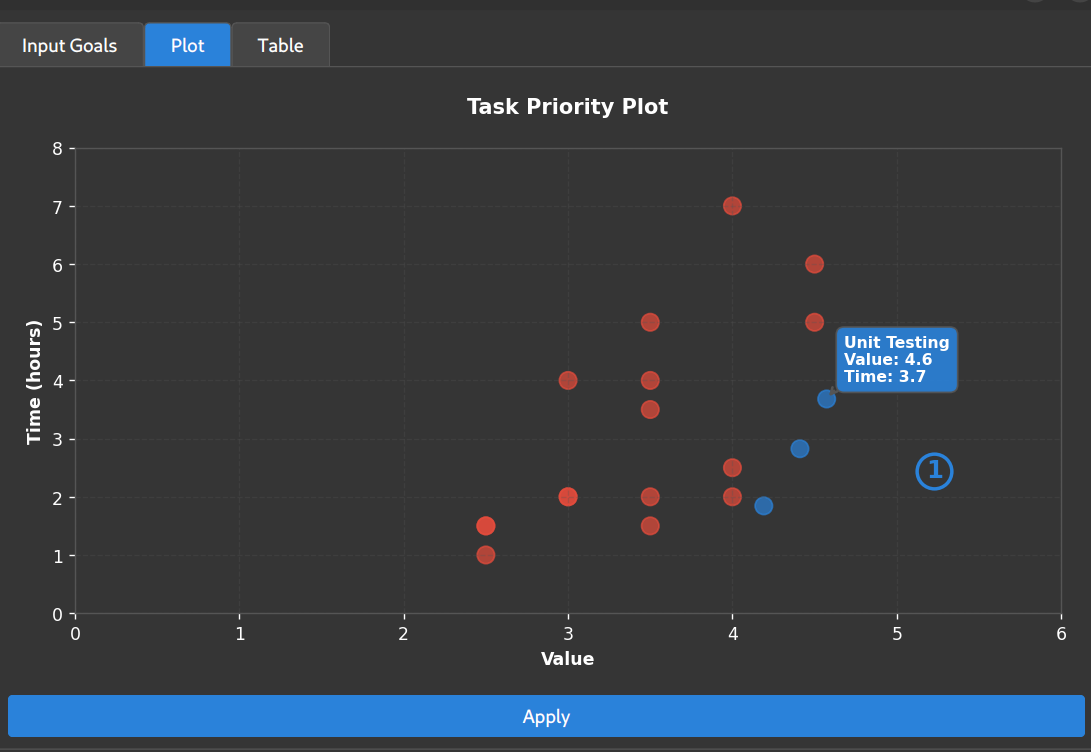



Transform your task management with interactive priority plotting
Features • Installation • Quick Start • Usage • Contributing
🌟 Overview
PriPlot is a modern, intuitive desktop application that revolutionizes how you prioritize tasks and goals. By visualizing tasks on an interactive Value vs. Time plot, you can instantly identify high-impact, low-effort opportunities and make data-driven decisions about where to focus your energy.
Why PriPlot?
- 📊 Visual Priority Matrix: See all your tasks plotted by value and time investment
- 🖱️ Interactive Drag & Drop: Easily adjust task priorities with your mouse
- 🎨 Modern Dark UI: Beautiful, professional interface that's easy on the eyes
- 📋 Bulk Import: Add multiple tasks from clipboard or use test data
- 📈 Smart Sorting: Automatically calculates and ranks tasks by priority score
- 📊 Export Ready: Export your prioritized tasks to Excel for sharing
- ⚡ Instant Feedback: Real-time priority calculations as you adjust values
✨ Features
🎯 Core Functionality
- Interactive Priority Plotting: Drag tasks around the value/time matrix
- Smart Priority Calculation: Automatic ranking based on value-to-time ratio
- Multi-Tab Interface: Separate views for input, plotting, and results
- Hover Tooltips: See task details without clicking
📊 Data Management
- Flexible Input: Add tasks one by one or import from clipboard
- Test Data Generator: Pre-loaded sample tasks for quick testing
- Excel Export: Professional spreadsheet output with priority rankings
- Real-time Updates: See priority changes instantly as you adjust positions
🎨 User Experience
- Modern Dark Theme: Professional appearance with excellent contrast
- Responsive Design: Smooth interactions and visual feedback
- Intuitive Controls: No learning curve - just drag and prioritize
- Cross-Platform: Works on Windows, macOS, and Linux
🚀 Installation
From PyPI (Recommended)
pip install priorityplot
From Source
git clone https://github.com/oyvinrog/priorityplot.git
cd priorityplot
pip install -e .
Requirements
- Python: 3.8 or higher
- Operating System: Windows, macOS, or Linux
- Dependencies: Automatically installed with pip
⚡ Quick Start
-
Install PriPlot:
pip install priorityplot
-
Launch the application:
priorityplot
-
Add your tasks in the "Input Goals" tab
-
Visualize and prioritize in the "Plot" tab by dragging tasks
-
Export your results from the "Table" tab
📖 Usage
Adding Tasks
Method 1: Manual Entry
- Open the "Input Goals" tab
- Type your task name
- Click "Add Goal"
- Repeat for all tasks
Method 2: Clipboard Import
- Copy a list of tasks (one per line) to your clipboard
- Click "Add Goals from Clipboard"
- All tasks will be imported automatically
Method 3: Test Data
- Click "Add Test Goals" to load sample tasks
- Perfect for exploring the application features
Interactive Prioritization
- Switch to the "Plot" tab after adding tasks
- Drag tasks around the plot:
- Right side: Higher value tasks
- Bottom: Lower time investment tasks
- Bottom-right: High-value, low-time (highest priority!)
- Hover over points to see task details
- Watch the priority scores update in real-time
Exporting Results
- Click "Apply" to generate the priority table
- Switch to the "Table" tab to see ranked results
- Click "Export to Excel" to save your prioritized task list
- Share with your team or use for planning
🎨 Interface Guide
Value Axis (X-axis)
- 1-2: Low value tasks
- 3-4: Medium value tasks
- 5-6: High value tasks
Time Axis (Y-axis)
- 1-2 hours: Quick tasks
- 3-4 hours: Medium effort
- 5+ hours: Major time investment
Priority Quadrants
- Top-Left: Low value, high time (avoid these!)
- Top-Right: High value, high time (plan carefully)
- Bottom-Left: Low value, low time (fill-in tasks)
- Bottom-Right: High value, low time (do these first!)
🛠️ Development
Setting Up Development Environment
git clone https://github.com/oyvinrog/priplot.git
cd priorityplot
python -m venv venv
source venv/bin/activate  # On Windows: venv\Scripts\activate
pip install -e .
Running from Source
python -m priorityplot.main
🤝 Contributing
We welcome contributions! Here's how you can help:
- Fork the repository
- Create a feature branch (
git checkout -b feature/amazing-feature) - Commit your changes (
git commit -m 'Add amazing feature') - Push to the branch (
git push origin feature/amazing-feature) - Open a Pull Request
Areas for Contribution
- 🐛 Bug fixes and improvements
- ✨ New features and enhancements
- 📚 Documentation improvements
- 🎨 UI/UX enhancements
- 🧪 Test coverage expansion
📄 License
This project is licensed under the MIT License - see the LICENSE file for details.
🙏 Acknowledgments
- Built with PyQt6 for the modern GUI
- Plotting powered by Matplotlib
- Data handling with NumPy and OpenPyXL
📞 Support
- 🐛 Bug Reports: GitHub Issues
- 💡 Feature Requests: GitHub Discussions
- 📧 Email: oyvinrog@example.com
Made with ❤️ for better productivity
⭐ Star this repo if you find it helpful!
1 maintainer

Metadata
1 maintainer
Release files for priorityplot 0.1.2
For a detailed explanation of source distributions (sdists) and built distributions (wheels), please see the package formats documentation.
Source distribution (sdist)
| File | Size | Uploaded | Provenance | |
|---|---|---|---|---|
| priorityplot-0.1.2.tar.gz | 57.5 kB | Without provenance | Details |
Built distribution (wheel)
| File | Interpreter | ABI | Platform | Reset |
|---|---|---|---|---|
| priorityplot-0.1.2-py3-none-any.whl | Python 3 | none | any | Details |
Total release size: 67.9 kB
Release files / priorityplot-0.1.2.tar.gz
| Download URL | priorityplot-0.1.2.tar.gz |
|---|---|
| Size | 57.5 kB |
| Tags | Source |
|
SHA-256 checksum How to use checksums |
44ad811604c7b8ec35ddc23b86f5fe932db5deee8b004ff74d2b660415166402
|
|
BLAKE2b-256 checksum How to use checksums |
42289222205fd22716d82f2d4c79672b7d688d4c900d412b1fa7f7440627781d
|
| Upload date | |
|
Uploaded using Trusted Publishing? What is trusted publishing? |
No |
| Uploaded via |
twine/6.1.0 CPython/3.12.3
|
Release files / priorityplot-0.1.2-py3-none-any.whl
| Download URL | priorityplot-0.1.2-py3-none-any.whl |
|---|---|
| Size | 10.4 kB |
| Tags | Python 3 |
|
SHA-256 checksum How to use checksums |
02cbe6e06744ef2ae1be3cd74081afc113e3f0b0657d39e17c194b26b1c57817
|
|
BLAKE2b-256 checksum How to use checksums |
c136695abafc2ff29a16943fc0cf2090782f434f0c8988d7107a14496048c586
|
| Upload date | |
|
Uploaded using Trusted Publishing? What is trusted publishing? |
No |
| Uploaded via |
twine/6.1.0 CPython/3.12.3
|
Security for priorityplot 0.1.2
Provenance
Provenance describes where a file came from. On PyPI, provenance is shared via attestations, which provide a verifiable record of the build or publishing details. View details, limitations and caveats.
No provenance found
None of the files in this release were uploaded with provenance metadata.
A note on package security
PyPI is a repository for distributing packages, not a service for auditing them. While third-party security researchers and our staff do their best to detect and remove malicious packages, PyPI cannot guarantee the quality, security or suitability of any given package.
To learn more about protecting yourself from malicious actors, visit our package security documentation.














