
Prism: One spec. Every platform.







Prism is a shared workflow and board for humans and agents. Product knowledge, questions, evidence, and delivery state live in the repository's wiki. Application template generation is an optional way to start a workspace.
It helps product and engineering teams:
- carry work through PO, design, and development using shared evidence and explicit handoffs
- connect coding agents through standard MCP and the same versioned Prism skills
- review and confirm supported human actions directly in the board
- optionally generate backend, web, Android, iOS, and AI agent service foundations
This repository contains Prism's CLI, workflow service, board, and application template. It is the maintainer repository, not a workspace for running product lifecycle actions.
Follow the quickstart to adopt the workflow in an existing repository or an empty workspace. The shared board guide has the details, and current status records what is verified and what is open.
Quickstart: a shared board for you and your agents
Prism runs on one computer. One local service per workspace serves the browser board and an MCP endpoint, so you and your coding agents work on the same wiki. Prism needs Python 3.10 or later; uv installs one when none is present. Install it from PyPI as prism-kit, which provides the prism command:
uv tool install prism-kit
prism --version
pipx install prism-kit and pip install prism-kit work as well. If prism is not found after uv tool install, run uv tool update-shell and open a new terminal. To upgrade later, run uv tool upgrade prism-kit.
Without a Python setup. With Node.js 22 or later, the npm launcher runs the same CLI; it fetches uv and the matching prism-kit on first use:
npx @mortitech/prism --version
npm install --global @mortitech/prism installs it as the prism command. The rest of this page writes prism <command>.
From source (contributors). Clone the repository and install it in editable mode:
git clone https://github.com/mo0rti/prism.git
cd prism
pip install -e .
Run the remaining steps in a separate workspace folder, not in this maintainer checkout and not in a cloud-synced folder such as OneDrive.
1. Add the workflow. Use an empty folder or an existing repository. Choose a display name and, if you want, an app: --app takes one of the generated app IDs (backend, web, mobile-android, mobile-ios, agent-service) and registers it without generating an application. Without --app the workspace has no apps, and prism app add registers one later (the workspace model covers apps, repositories and prism app list). The first command previews every file. The second asks you to confirm before it writes (--apply --yes skips the question for automation).
cd path/to/your-workspace
prism workflow install . --name "My workspace" --app backend
prism workflow install . --name "My workspace" --app backend --apply
For one wiki shared by apps that live in other repositories, use --knowledge-root instead of --app (knowledge root over several repositories).
2. Check readiness. The "Shared board" section lists what needs attention, each with a Fix: line. A warning that no grant exists yet is expected at this point.
prism doctor --workspace .
3. Register a person and an agent. Each command prints JSON whose token appears once. Keep tokens private and out of files and prompts. A grant without --write is read-only.
prism board grant "Product owner" --kind human --write --path .
prism board grant "Coding agent" --kind agent --write --path .
Put the agent's token in an environment variable before you start the agent host:
export PRISM_BOARD_TOKEN="<the agent's token>"      # macOS, Linux, Git Bash
$env:PRISM_BOARD_TOKEN = "<the agent's token>"      # PowerShell
4. Start the board.
prism board serve . --port 8765
It prints the board URL, the MCP endpoint (http://127.0.0.1:8765/mcp) and a hint for issuing another grant, then opens your browser (--no-open skips that). Sign in with the human token. Press Ctrl+C to stop. The service listens on loopback only.
5. Connect Claude Code and Codex. Both use their standard Streamable HTTP MCP configuration with that endpoint and PRISM_BOARD_TOKEN. The exact entries are in Connect an agent host. Give each host its own grant, and start the host from a shell where the variable is set. Agent hosts lists the tested versions, settings and known limitations.
6. Run a first journey.
- Ask the agent to run Prism's
setup-projectskill. Setup is an interview that writes the product context directly into the workspace, so it does not go through the board. - Create a folder named with today's date and a short slug, such as
knowledge/intake/pending/2026-10-06-my-first-feature/, and put your brief in it as a Markdown file, usingknowledge/intake/pending/PO_BRIEF_TEMPLATE.mdas a guide. Then ask the agent: "Use Prism's PO intake skill to refine the pending brief." The agent shows the exact file changes, you confirm them in the agent, and it applies them. A new feature appears on the board. Notes that are not a feature request, such as research, a plan or a roadmap statement, go through theingestskill the same way, into a topic, research, plan, direction or roadmap page;knowledge/wiki/index.mdlists every page andknowledge/wiki/status-board.mdis the feature status board. - In the board, move the feature with
po-handoff(drag its card or use its action control). Review the evidence and exact changes, acknowledge them and confirm. The board offers the same human action fordesign-startanddev-start. The remaining steps run through the agent's skills.
If a step fails, docs/troubleshooting.md lists the symptom, cause and fix for the common cases. The shared board guide covers every command, the MCP tools and recovery of interrupted operations, and SECURITY.md describes what the local service protects.
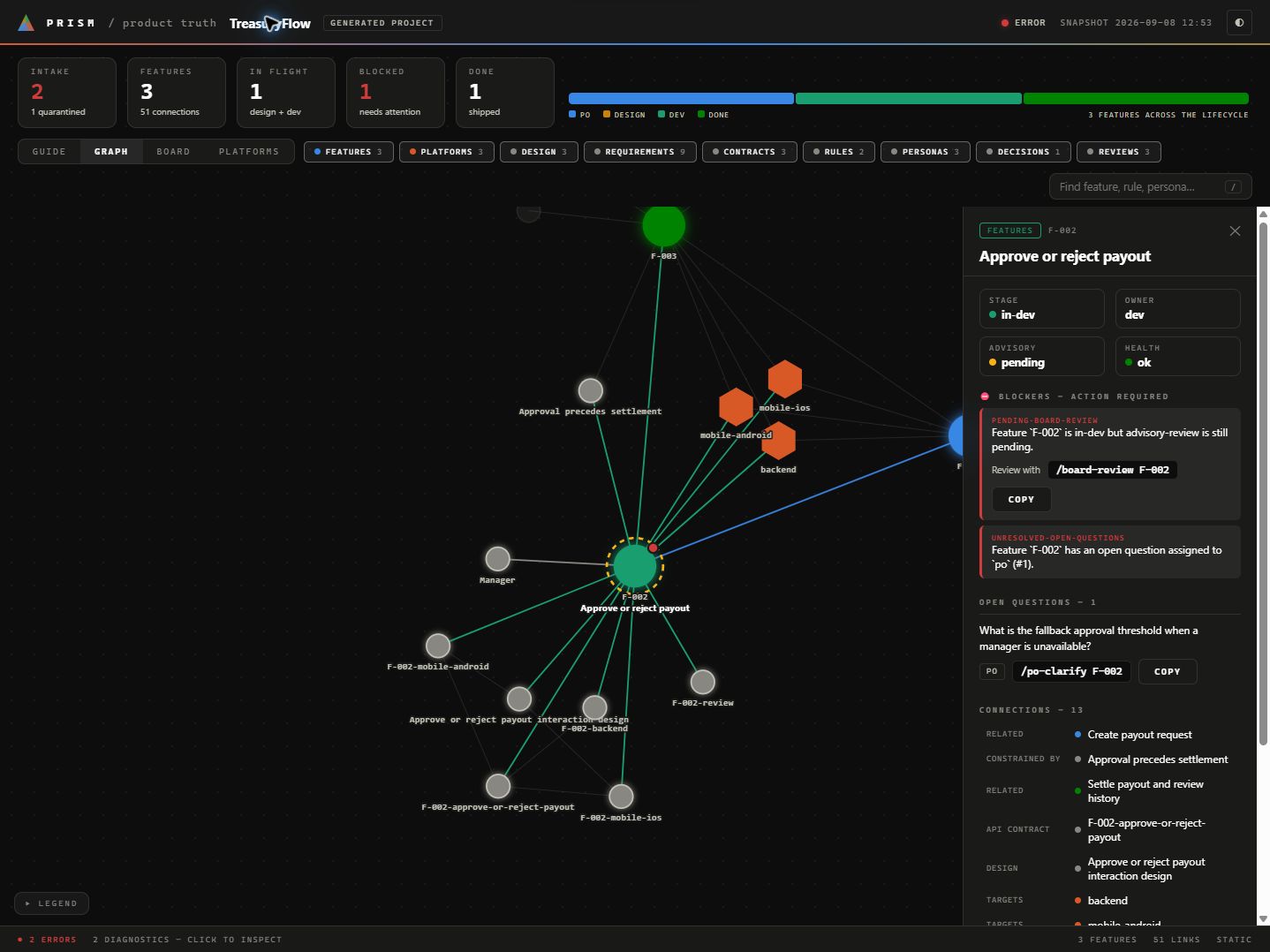
Graph view from the synthetic local TreasuryFlow fixture.
To explore a populated example first, follow the local wiki visualization guide. It builds a synthetic TreasuryFlow fixture that is safe to regenerate.
Optional: generate an application
Application generation is separate from the shared board. Run prism for the home screen, or prism new for the guided flow.
A Prism-generated repository can include:
- Backend: Spring Boot 4, Kotlin 2.2+, Java 21
- Web app (one or more, one per audience): Next.js + TypeScript with a local development sign-in and one authenticated read
- Android app (one or more): Kotlin + Jetpack Compose with a local development sign-in and one authenticated read
- iOS app (one or more): Swift + SwiftUI with a local development sign-in and one authenticated read
- Agent service (one or more): Python + FastAPI that assists and never advises, with a provider interface (a deterministic fake and a Claude adapter), one read-only tool that reads the backend with the user's own token, bearer-token verification against the backend's dev-identity key, and an evaluation harness
Every generated repository also includes:
- a living product wiki under
knowledge/wiki/ - generated AI context for Claude, Codex, and Cursor
- lifecycle commands for PO, design, dev, and advisory review
- project docs and workflow wiring
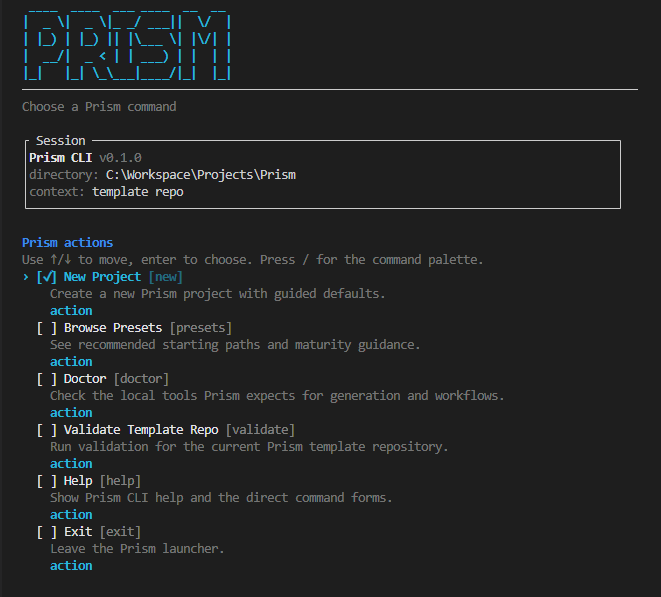
From the Prism home screen:
- choose
Doctorto check prerequisites - choose
New Projectto generate a sample repo - choose
Browse Presetsif you want to browse the recommended starting paths first
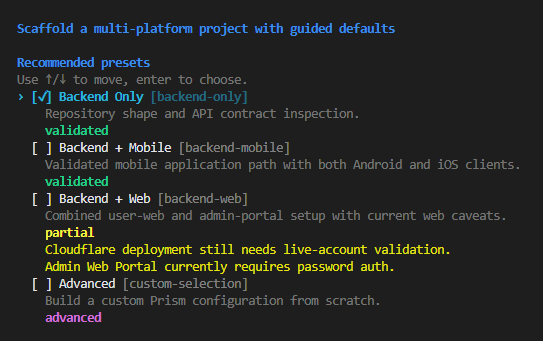
After generating a project:
- open the generated repository
- inspect
README.md,AGENTS.md,knowledge/wiki/SCHEMA.mdandknowledge/wiki/LIFECYCLE.md - initialize the workflow with:
- Claude Code:
/setup-project - Codex:
$setup-project - Cursor: ask the agent to run
setup-project
- Claude Code:
- register participants and start the board as in the quickstart above (
prism board grant, thenprism board serve .).prism newalready pins the workspace to the workflow, so the board accepts writes withoutprism workflow upgrade; that command is needed only after a newer Prism ships a new workflow.
For the full first-run path, read docs/getting-started.md.
Start Here By Goal
I want a board for humans and coding agents
Read the shared board guide, then the wiki workflow. The local service shares one workspace between the browser and standard MCP clients. The workspace model explains how a workspace declares its apps and repositories.
I want to generate a project and evaluate Prism
Read these first:
I already have a generated Prism project
Read these first:
README.mdinside the generated repositoryAGENTS.mdinside the generated repository- docs/generated-projects.md
- docs/wiki-workflow.md
I want to understand the Prism operating model
Read these in order:
I want to maintain or improve Prism itself
Start with:
Current Status
- The workflow, the shared board, the MCP tool contract and the human board actions are implemented and tested; the plan states their scope and contracts.
- Prism 0.6.1 is released:
prism-kiton PyPI and the GitHub release with checksums. - Application packs: the backend, Android, web and agent-service packs are verified locally and in CI, and the iOS pack is built and tested only by the macOS CI job. Generated workspaces ship no deployment: the
deploymentskill holds unverified worked examples for Azure Container Apps and Cloudflare. - Core acceptance uses disposable neutral workspaces. Sample behavior does not define the core workflow.
- Prism is released under the MIT license and published to PyPI as
prism-kit, with the@mortitech/prismlauncher on npm. The changelog lists what each version contains.
For the detailed status, read docs/current-status.md.
Learn More
For the full documentation index, read docs/README.md.
Related Repo Files
- AGENTS.md for Codex maintainer guidance in this repo
- CLAUDE.md for Claude maintainer guidance in this repo
License
Prism is released under the MIT license, copyright 2026 Mortitech. The vendored force-graph library keeps its own MIT license; see third-party notices.
1 maintainer

Metadata
1 maintainer
Release files for prism-kit 0.6.1
For a detailed explanation of source distributions (sdists) and built distributions (wheels), please see the package formats documentation.
Source distribution (sdist)
| File | Size | Uploaded | |
|---|---|---|---|
| prism_kit-0.6.1.tar.gz | 523.2 kB | Details |
Built distribution (wheel)
| File | Interpreter | ABI | Platform | Reset |
|---|---|---|---|---|
| prism_kit-0.6.1-py3-none-any.whl | Python 3 | none | any | Details |
Total release size: 1.1 MB
Release files / prism_kit-0.6.1.tar.gz
| Download URL | prism_kit-0.6.1.tar.gz |
|---|---|
| Size | 523.2 kB |
| Tags | Source |
|
SHA-256 checksum How to use checksums |
3ba913506aa338fefe81a40fdc2e3eb06e743a4e7a14c8060029e892e51a06f1
|
|
BLAKE2b-256 checksum How to use checksums |
9edd8c1bb32f61ea3cca963f992cf618c0316d441c5311da43f1ec23469aa33e
|
| Upload date | |
|
Uploaded using Trusted Publishing? What is trusted publishing? |
Yes |
| Uploaded via |
twine/7.0.0 CPython/3.13.14
|
Provenance
Provenance describes where a file came from. On PyPI, provenance is shared via attestations, which provide a verifiable record of the build or publishing details. View details, limitations and caveats.


PyPI Publish Attestation
PyPI verified that this artifact, at this checksum, originated from the publisher listed below.
Signed by GitHub Actions, verified by PyPI on Oct 8, 2026.
Transparency logRelease files / prism_kit-0.6.1-py3-none-any.whl
| Download URL | prism_kit-0.6.1-py3-none-any.whl |
|---|---|
| Size | 545.5 kB |
| Tags | Python 3 |
|
SHA-256 checksum How to use checksums |
63c044e77bb67b30cca6e6c1f69b5cb34ca3116d9d3f5aae34f1e8c04c62492c
|
|
BLAKE2b-256 checksum How to use checksums |
5f53e9224a1378f80ca93ae6d7db34cefa8c67e89a2542c889a29ed9eed9366f
|
| Upload date | |
|
Uploaded using Trusted Publishing? What is trusted publishing? |
Yes |
| Uploaded via |
twine/7.0.0 CPython/3.13.14
|
Provenance
Provenance describes where a file came from. On PyPI, provenance is shared via attestations, which provide a verifiable record of the build or publishing details. View details, limitations and caveats.
PyPI Publish Attestation
PyPI verified that this artifact, at this checksum, originated from the publisher listed below.
Signed by GitHub Actions, verified by PyPI on Oct 8, 2026.
Transparency log













