
Prism CV
One source, every CV.




Keep your whole career in one place and build every version of your CV from it: each language, academic and industry, and one tailored to each job. Edit an entry once and every version picks it up.
How it works
flowchart LR
    C["content/<br/>every entry, written once,<br/>languages side by side"]
    T["targets/x.yaml<br/>which entries, in what order,<br/>what is reworded"]
    B["PrismCV<br/>assembles one YAML per language"]
    R["RenderCV<br/>typesets it into PDF"]
    P["out/x/*.pdf"]

    C --> B
    T --> B
    B --> R --> P
RenderCV typesets one YAML file into a PDF. PrismCV assembles that file from your content and a target; all layout is RenderCV's.
Quick start
Requires Python 3.12+.
pip install prismcv
prismcv init my-cv                  # create a CV folder from a minimal template
cd my-cv
prismcv build --all                 # every target
prismcv build main --lang en        # one target, one language
prismcv build main --debug          # keep the generated RenderCV input
A CV folder holds cv.yaml, design.yaml, content/ and targets/. Run prismcv build inside one, or point to one with --root. PDFs go to out/<target>/.
prismcv init --example creates a full bilingual example instead, using every feature below.
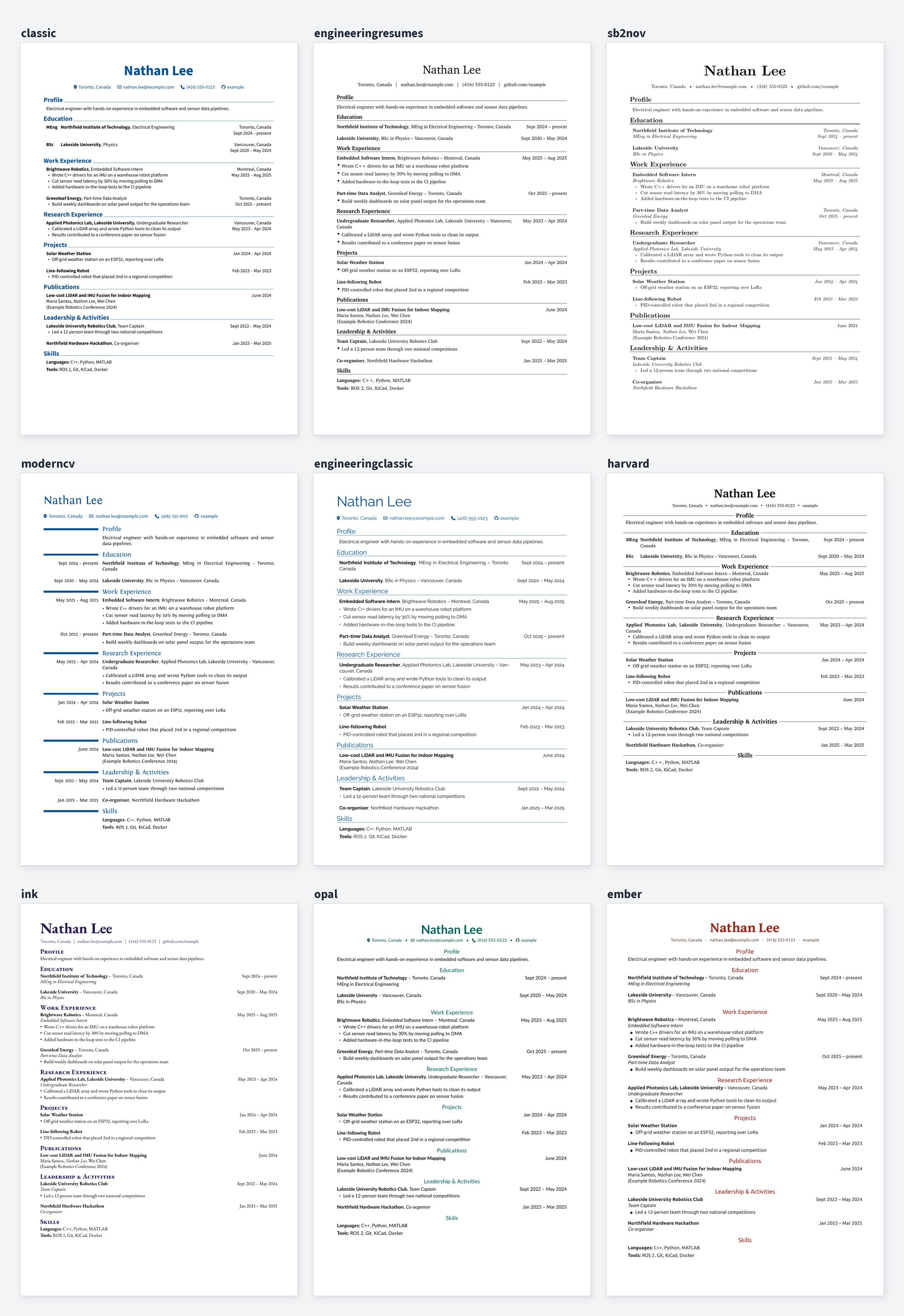
Themes
Set theme in design.yaml.
Content
cv.yaml holds your name and contact details and the section titles. Every file in content/ holds entries keyed by an id; how you split them into files is up to you. Fields use RenderCV's names.
Text that differs between languages maps language codes to text; anything else is written once. An excerpt from the example's content/experience.yaml:
brightwave-intern:
  company: { en: Brightwave Robotics, zh: 明波机器人 }
  location: { en: "Montreal, Canada", zh: 蒙特利尔 }
  start_date: 2025-05
  end_date: present
  highlights:
    - en: Wrote C++ drivers for an IMU
      zh: 编写惯性测量单元的 C++ 驱动
Use zh: null to leave a bullet out of one language. An id can also hold a list of entries (a group of skills), and an entry with only text is a paragraph (a profile).
Targets
Each file in targets/ is one version of the CV. langs defaults to every language, and max_pages warns when a PDF is longer. An excerpt from the example's target tailored to one job:
langs: [en]
max_pages: 1
sections:
  profile:
    - text: Engineer who enjoys turning messy sensor data into reliable pipelines.
  work:
    title: Experience
    entries:
      - brightwave-intern@data
      - greenleaf-analyst:
          highlights:
            - Rewritten bullet for this role only
An item is an id, an id with fields to override, or an entry written inline. A variant such as brightwave-intern@data lives in content/ and changes only the fields it lists, so it suits rewording you will reuse. title renames a section for this target.
Hide selected bullets
Give a bullet an id, then list it in a target item's hide override:
# content/experience.yaml
brightwave-intern:
  company: Brightwave Robotics
  position: Intern
  highlights:
    - id: drivers
      en: Wrote C++ drivers for an IMU
      zh: 编写惯性测量单元的 C++ 驱动
    - id: shared
      text: Improved reliability
    - en: Cut sensor read latency by 30%
      zh: 传感器读取延迟降低 30%

# targets/industry.yaml
sections:
  work:
    - brightwave-intern: { hide: [drivers], position: Engineer }
Ids are optional; existing syntax still works. text can hold shared text or a language mapping. Only bullets listed in hide are hidden, so new bullets appear by default; editing or reordering bullets does not change the selection.
Hiding takes effect after variant inheritance and field overrides. Ids must be non-empty strings and unique within an entry; hiding an id missing from the final highlights is a build error.
Languages
languages in design.yaml maps each code to a RenderCV locale. To add one, add it there, put any settings it needs under its code (a font, a date format), and add its text to the content you use; the build lists anything missing.
Use from Python
The command line is a thin layer over functions that work on plain dictionaries, so other programs can build CVs from data that is not in files:
from prismcv import CV, validate

cv = CV(cv_yaml, design_yaml, entries)       # the same data as a CV folder, as dictionaries
result = cv.assemble(target, "en")           # RenderCV input for one target and language
for issue in validate(result):               # RenderCV's own checks
    print(issue.source, issue.message)       # each problem points at the entry and field it came from
Development
pip install -e . --group dev
pytest
tests/golden/example.json holds the RenderCV input the example CV produces; a test fails if it changes. After an intended change, regenerate it with python tests/test_golden.py.
License
MIT License

Copyright (c) 2026 Andy Zhang

Permission is hereby granted, free of charge, to any person obtaining a copy
of this software and associated documentation files (the "Software"), to deal
in the Software without restriction, including without limitation the rights
to use, copy, modify, merge, publish, distribute, sublicense, and/or sell
copies of the Software, and to permit persons to whom the Software is
furnished to do so, subject to the following conditions:

The above copyright notice and this permission notice shall be included in all
copies or substantial portions of the Software.

THE SOFTWARE IS PROVIDED "AS IS", WITHOUT WARRANTY OF ANY KIND, EXPRESS OR
IMPLIED, INCLUDING BUT NOT LIMITED TO THE WARRANTIES OF MERCHANTABILITY,
FITNESS FOR A PARTICULAR PURPOSE AND NONINFRINGEMENT. IN NO EVENT SHALL THE
AUTHORS OR COPYRIGHT HOLDERS BE LIABLE FOR ANY CLAIM, DAMAGES OR OTHER
LIABILITY, WHETHER IN AN ACTION OF CONTRACT, TORT OR OTHERWISE, ARISING FROM,
OUT OF OR IN CONNECTION WITH THE SOFTWARE OR THE USE OR OTHER DEALINGS IN THE
SOFTWARE.
1 maintainer

Metadata
1 maintainer
Release files for prismcv 0.1.4
For a detailed explanation of source distributions (sdists) and built distributions (wheels), please see the package formats documentation.
Source distribution (sdist)
| File | Size | Uploaded | Provenance | |
|---|---|---|---|---|
| prismcv-0.1.4.tar.gz | 40.3 kB | Without provenance | Details |
Built distribution (wheel)
| File | Interpreter | ABI | Platform | Reset |
|---|---|---|---|---|
| prismcv-0.1.4-py3-none-any.whl | Python 3 | none | any | Details |
Total release size: 72.7 kB
Release files / prismcv-0.1.4.tar.gz
| Download URL | prismcv-0.1.4.tar.gz |
|---|---|
| Size | 40.3 kB |
| Tags | Source |
|
SHA-256 checksum How to use checksums |
8be498aaec4c5143a6c5c8cfccf4bfafa85ace90cf53112b2f6c7b4998c58628
|
|
BLAKE2b-256 checksum How to use checksums |
83bd1e10c350e8be2284e8e69254ff2dd1ae4c52eac26a238a12a9775f72f556
|
| Upload date | |
|
Uploaded using Trusted Publishing? What is trusted publishing? |
No |
| Uploaded via |
twine/7.0.0 CPython/3.14.8
|
Release files / prismcv-0.1.4-py3-none-any.whl
| Download URL | prismcv-0.1.4-py3-none-any.whl |
|---|---|
| Size | 32.4 kB |
| Tags | Python 3 |
|
SHA-256 checksum How to use checksums |
1d878d8e58425023b3fadb86681bcfcf22dcf5b61664f51ecfd6663e7c760cc4
|
|
BLAKE2b-256 checksum How to use checksums |
7b2bd1c603ad45b91f19e0bea3b95bcfe01444c112ec8016aaae16de18480168
|
| Upload date | |
|
Uploaded using Trusted Publishing? What is trusted publishing? |
No |
| Uploaded via |
twine/7.0.0 CPython/3.14.8
|
Security for prismcv 0.1.4
Provenance
Provenance describes where a file came from. On PyPI, provenance is shared via attestations, which provide a verifiable record of the build or publishing details. View details, limitations and caveats.
No provenance found
None of the files in this release were uploaded with provenance metadata.
A note on package security
PyPI is a repository for distributing packages, not a service for auditing them. While third-party security researchers and our staff do their best to detect and remove malicious packages, PyPI cannot guarantee the quality, security or suitability of any given package.
To learn more about protecting yourself from malicious actors, visit our package security documentation.














