
Privacy Flow Inspector




Which personal data leaves the browser, who receives it, and how?
Privacy Flow Inspector reads recorded web traffic (HAR files from Chrome, Firefox or Playwright) and reports every place where personal data is sent: in URLs, headers, cookies, JSON, forms, Base64 blobs or login tokens, including hashed forms that ad pixels use. It groups recipients into first and third parties, applies your policy and gives an APPROVE / REVIEW / REJECT decision for CI. It works offline. Reports contain no raw personal data, and it can export a redacted HAR that is safe to attach to a ticket.
Status: v0.2.0, an alpha release on PyPI and the GitHub Marketplace. Tested on Windows, Linux and macOS, including a demo that CI re-records with real Chromium on every run. Findings are technical evidence for a privacy review, not legal advice or a GDPR compliance verdict.
Part of a small software trust toolkit with Software Intake Gatekeeper: the Gatekeeper checks what is inside an app; this tool checks what the app sends out. Both use the same decision model, policy style and report formats.
Where it helps
| Who | Situation | What they get |
|---|---|---|
| QA and end-to-end tests | The Playwright suite runs on every pull request | The build fails if the test user's email reaches an analytics domain |
| Data protection officer | Before a release, a DPIA or a records-of-processing update | A data-flow map of which data categories go to which recipients |
| Healthcare and patient portals | Checking for health-data leaks | Alerts when diagnosis fields or German health-insurance numbers reach third parties |
| Marketing / tag-manager changes | A new pixel or session-replay script is added | Detection of hashed emails and Base64-wrapped form snapshots |
Quick start
Install from PyPI (Python 3.11+) and scan a HAR file:
python -m pip install privacy-flow-inspector

privacy-flow-inspector scan session.har --config pfi.toml `
  --json reports/report.json --sarif reports/report.sarif --markdown reports/summary.md `
  --redact-dir reports/redacted
Exit status: 0 the decision passed --fail-on (default reject), 1 the gate failed, 2 usage or
input error. privacy-flow-inspector rules lists the detectors.
Recording a HAR
| Tool | How |
|---|---|
| Chrome / Edge DevTools | Network panel, then Export HAR. The sanitized export leaves out cookies and Authorization; those then cannot be checked. |
| Firefox DevTools | Network panel, then Save All As HAR. |
| Playwright (Python) | browser.new_context(record_har_path="session.har", record_har_content="embed") |
| Playwright (Node) | browser.newContext({ recordHar: { path: "session.har", content: "embed" } }) |
Use content="embed": with omit or attach, Playwright leaves request bodies out of the HAR.
The inspector detects this and reports a blocking body-not-recorded gap instead of approving.
Try the fictional demo
examples/demo-shop is a deliberately leaky, fictional health shop. scripts/record_demo.py drives it with real Chromium and answers every request locally, so nothing leaves the machine. The recorded capture is committed as examples/recorded/demo-shop.har.
privacy-flow-inspector scan examples/recorded/demo-shop.har --config examples/pfi.toml
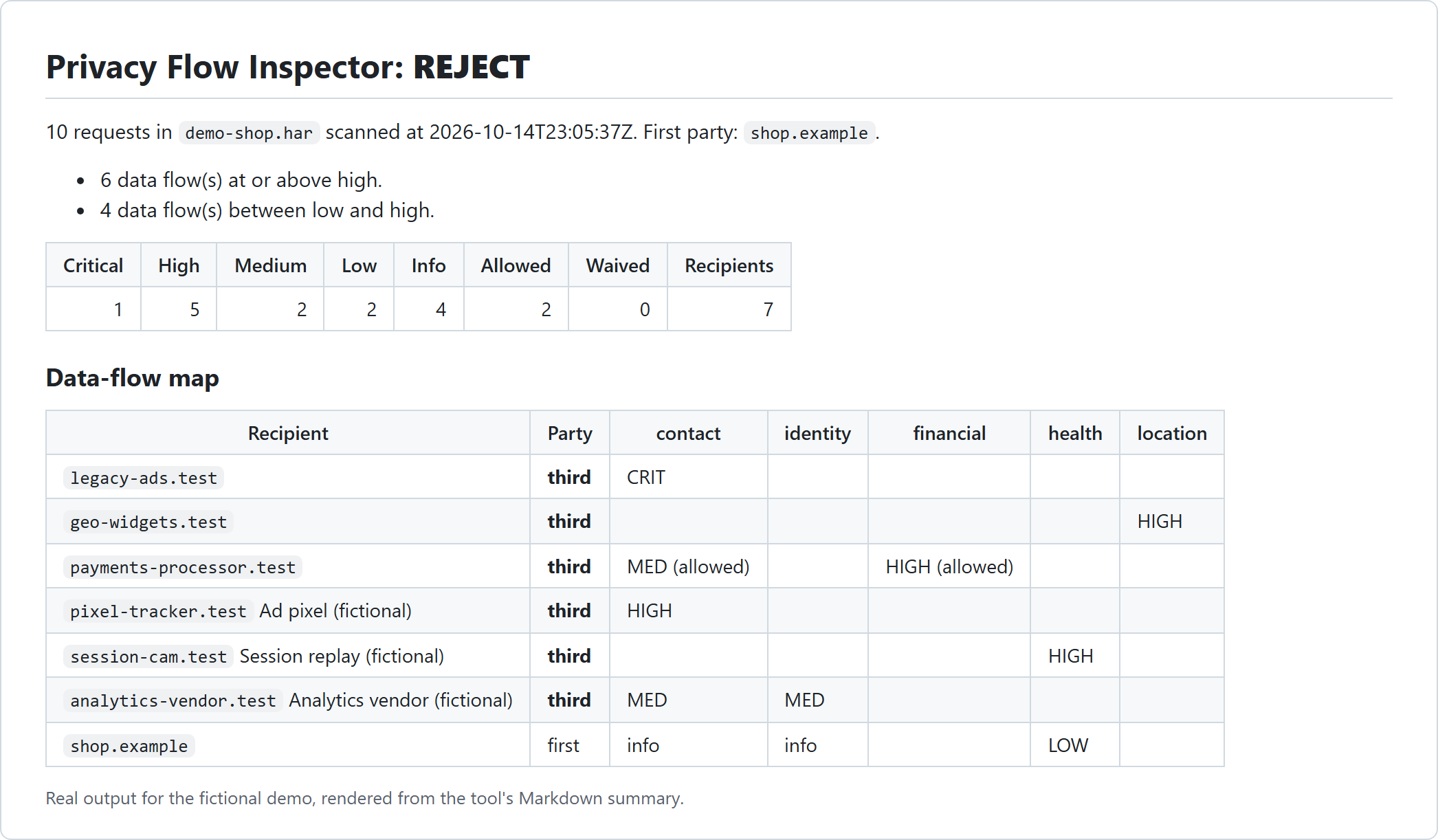
Real output:
Decision: REJECT
  - 6 data flow(s) at or above high.
  - 4 data flow(s) between low and high.
Requests: 10 | recipients: 7 (6 third-party) | personas: 3
Findings: critical 1, high 5, medium 2, low 2, info 4
  [CRITICAL] PFI-PERSONA          Test user email sent to legacy-ads.test via query
  [HIGH    ] PFI-PRECISE-LOCATION Precise location sent to geo-widgets.test via query
  [HIGH    ] PFI-IBAN             IBAN sent to payments-processor.test via body (allowed)
  [HIGH    ] PFI-PERSONA          Test user email sent to pixel-tracker.test via query
  [HIGH    ] PFI-PERSONA          Test user phone sent to pixel-tracker.test via query
  [HIGH    ] PFI-DE-KVNR          German health insurance number (KVNR) sent to session-cam.test via body
  [HIGH    ] PFI-HEALTH-FIELD     Health data field sent to session-cam.test via body
  [MEDIUM  ] PFI-PERSONA          Test user email sent to analytics-vendor.test via body
  ...
The Markdown summary contains a data-flow map:
| Recipient | Party | contact | identity | financial | health | location |
|---|---|---|---|---|---|---|
legacy-ads.test |
third | CRIT | ||||
geo-widgets.test |
third | HIGH | ||||
payments-processor.test |
third | MED (allowed) | HIGH (allowed) | |||
pixel-tracker.test Ad pixel (fictional) |
third | HIGH | ||||
session-cam.test Session replay (fictional) |
third | HIGH | ||||
analytics-vendor.test Analytics vendor (fictional) |
third | MED | MED | |||
shop.example |
first | info | info | LOW |
What the demo shows:
- Hashed email and phone sent to an ad pixel (
sha256(plain),sha256(digits)). - An email inside a nested page URL sent over plain HTTP: critical.
- A session-replay vendor receiving a Base64-wrapped form with a health-insurance number and an ICD-10 diagnosis: health data, a GDPR Article 9 special category.
- A payment processor marked allowed because the config lists it as a contracted processor.
- First-party traffic still shows up (as info/low) so reviewers see the whole picture.
How it works
flowchart LR
    H[HAR files] --> P[Bounded HAR parser]
    P --> X[Value extraction: URL, query, headers, cookies, JSON, form, multipart, Base64, JWT, nested URLs]
    X --> D1[Test-persona matching incl. hashes]
    X --> D2[Checked detectors]
    D1 & D2 --> R[Recipient: eTLD+1, first/third party]
    R --> S[Severity: category, party, channel, transport]
    S --> Pol[Policy: approved processors, expiring waivers]
    Pol --> Dec{APPROVE / REVIEW / REJECT}
    Dec --> O[JSON, SARIF, Markdown, redacted HAR]
Detectors
| Rule | Category | Evidence required |
|---|---|---|
PFI-PERSONA |
as configured | Exact test-persona value, or its lowercase, URL-encoded, Base64, MD5/SHA-1/SHA-256 or phone-digit form |
PFI-EMAIL |
contact | Email pattern (image names such as icon@2x.png excluded) |
PFI-PHONE |
contact | Whole value in E.164 format, or a phone-like number in a phone field |
PFI-IBAN |
financial | Country length and mod-97 checksum |
PFI-CARD |
financial | Known issuer prefix, matching length and Luhn checksum |
PFI-DE-TAX-ID |
government-id | Tax-ID field, ISO 7064 MOD 11,10 check digit and the official digit-repetition rules |
PFI-DE-KVNR |
health | German health insurance number with a valid check digit |
PFI-HEALTH-FIELD |
health | Non-empty value in a diagnosis, ICD, medication, symptom, allergy or similar field |
PFI-IDENTITY-FIELD |
identity | Name, birth-date or postal-address field |
PFI-PRECISE-LOCATION |
location | Latitude/longitude with four or more decimals (about 11 m) |
PFI-IP-ADDRESS |
online-identifier | Public IP in an IP field, or a whole-value IPv6 address |
PFI-THIRD-PARTY-CONNECTION (opt-in) |
online-identifier | Any request to a third party. The recipient always receives the visitor's IP address and browser details, even when the content holds no personal data (web fonts, CDN scripts) |
The test-persona detector gives the most reliable results. Use a dedicated test account in your end-to-end tests, list its values in the config, and every encoded or hashed copy is found with essentially no false positives.
Every report lists all third-party recipients and their request counts, including those that received no detected personal data. To gate on those connections too, enable the opt-in rule:
[detectors]
enabled = ["PFI-THIRD-PARTY-CONNECTION"]
Approve a recipient you have a legal basis for with an [[allow]] entry for the
online-identifier category.
Severity
Severity starts from the data category and then moves up or down:
| Step | Effect |
|---|---|
| Start | health, financial, government-id: high; contact, identity, location: medium; online identifier: low |
| Recipient is first party | two levels lower |
Value in a URL, path or Referer |
one level higher (URLs end up in logs and proxies) |
| Plain HTTP | one level higher |
For example, an email in a JSON body to your own HTTPS API is info. The same email in a third-party URL over HTTP is critical.
Configuration
See examples/pfi.toml:
version = 1

[gate]
reject_at = "high"
review_at = "low"

[first_party]
domains = ["shop.example"]

[[persona]]
label = "Test user email"
value = "jane.test@example.com"
category = "contact"

# Contracted processors (GDPR Art. 28) may receive the listed categories.
[[allow]]
recipient = "payments-processor.test"
categories = ["financial", "contact"]
reason = "Payment processor with a signed data processing agreement."

[[waivers]]
id = "PFI-IP-ADDRESS"
recipient = "cdn.example"
reason = "CDN logs are covered by the hosting contract; reviewed by the DPO."
expires = 2026-12-31
Unknown keys are rejected. Persona values must be invented test data, never real people.
Allowances and waivers need written reasons, and waivers expire. Without [first_party], the
first page's site is used and the report says so.
GitHub Action
name: Privacy flows
on: [pull_request]

permissions:
  contents: read
  security-events: write   # only for the SARIF upload

jobs:
  e2e-privacy:
    runs-on: ubuntu-latest
    steps:
      - uses: actions/checkout@v7
      # ... run your Playwright tests with recordHar content "embed" into test-results/ ...
      - name: Privacy Flow Inspector
        id: privacy
        uses: Sushant-Nemade/privacy-flow-inspector@v0
        with:
          har: test-results/**/*.har
          config: .github/pfi.toml
          fail-on: reject
      - name: Upload SARIF
        if: always() && steps.privacy.outputs.sarif != ''
        uses: github/codeql-action/upload-sarif@v4
        with:
          sarif_file: ${{ steps.privacy.outputs.sarif }}
          category: privacy-flow-inspector
| Input | Default | Description |
|---|---|---|
har |
(required) | HAR path or glob (** supported). No match is an error. |
config |
"" |
TOML config (first party, personas, allowances, waivers). |
fail-on |
reject |
reject, review or never. |
redact |
true |
Also write redacted HAR copies to the output directory. |
output-dir |
privacy-flow-reports |
Where report.json, report.sarif, summary.md and redacted/ go. |
Outputs: decision and sarif. The Markdown summary is added to the job summary. The action uses
hash-pinned dependencies in a private virtual environment, needs no token and makes no network
requests. Do not upload raw HAR files as workflow artifacts; upload the redacted copies instead.
Privacy by design
- Offline: no network access and no telemetry.
- No raw values in reports: each value appears only as a short mask (
ja********om) and a keyed fingerprint, so the same value can be correlated within one report without being revealed. - Redacted HAR export: detected values and their encoded forms are replaced,
Authorization,CookieandSet-Cookievalues are removed, and response bodies are dropped. The file is re-checked and not written if anything would remain. - Bounded parsing of untrusted input, and escaping of all capture-derived text in Markdown.
Verification
| Check | How |
|---|---|
| Real browser traffic | CI re-records the demo with Playwright Chromium on every run and requires exactly the expected data flows |
| Real website | A Chromium capture of the author's live portfolio site showed APPROVE with no findings, while the page loaded Google Fonts. That gap led to the third-party recipient list and the opt-in connection rule; after the fonts were self-hosted, the same check with the rule enabled shows APPROVE with zero third parties |
| Leak-free outputs | A test checks that no persona value, nor any of its encoded or hashed forms, appears in the JSON, SARIF, Markdown, text or redacted HAR |
| Checksums | Steuer-ID, IBAN and Luhn compared with python-stdnum on 100,000+ random numbers. The only difference is numbers with three identical digits in a row, which the official Steuer-ID rules forbid and stdnum does not check. KVNR uses the published example A123456780. |
| False positives | A corpus of common tracking values (timestamps, UUIDs, ETags, version numbers, private IPs, invalid checksums) must produce no findings |
| Action | Runs on Ubuntu, Windows and macOS against the demo: decision, SARIF paths, redacted copy, fail-on and the no-match error |
| Code quality | pytest, ruff, mypy --strict, build, twine and pip-audit on Python 3.11 and 3.13 |
Limitations
- Only what the HAR contains is checked. WebSocket messages, service-worker traffic and requests made before recording started may be missing.
- Binary or compressed payloads (protobuf, gzip in JSON) are not decoded.
- Field-name detectors depend on meaningful field names. The test-persona detector does not.
- Domains are grouped by registrable domain; a vendor serving from your own subdomain (CNAME
cloaking) looks first-party. Name it under
[labels]and review it. - A finding is evidence for a privacy review. Whether a flow is lawful depends on purpose, consent and contracts, which the tool cannot see.
Development
python -m pip install uv
uv sync --frozen --extra dev
uv run --frozen --extra dev pytest -q
uv run --frozen --extra dev playwright install chromium   # optional, for the recording test
$env:PFI_RECORD = "1"; uv run --frozen --extra dev pytest -q tests/test_record.py
License
MIT © 2026 Sushant Nemade. See SECURITY.md for vulnerability reporting. Recipient grouping uses publicsuffixlist (MPL-2.0) with the bundled Public Suffix List.
1 maintainer

Metadata
1 maintainer
Release files for privacy-flow-inspector 0.2.0
For a detailed explanation of source distributions (sdists) and built distributions (wheels), please see the package formats documentation.
Source distribution (sdist)
| File | Size | Uploaded | |
|---|---|---|---|
| privacy_flow_inspector-0.2.0.tar.gz | 49.4 kB | Details |
Built distribution (wheel)
| File | Interpreter | ABI | Platform | Reset |
|---|---|---|---|---|
| privacy_flow_inspector-0.2.0-py3-none-any.whl | Python 3 | none | any | Details |
Total release size: 86.4 kB
Release files / privacy_flow_inspector-0.2.0.tar.gz
| Download URL | privacy_flow_inspector-0.2.0.tar.gz |
|---|---|
| Size | 49.4 kB |
| Tags | Source |
|
SHA-256 checksum How to use checksums |
6aeb3629bc8d214344ba2f3025a031e6876521eafa62fcac1d13f43987b60343
|
|
BLAKE2b-256 checksum How to use checksums |
131bbe1abcb1fbb63e2358d82e775303bdf1fad9423cca38695f6138f27f354a
|
| Upload date | |
|
Uploaded using Trusted Publishing? What is trusted publishing? |
Yes |
| Uploaded via |
twine/7.0.0 CPython/3.13.14
|
Provenance
Provenance describes where a file came from. On PyPI, provenance is shared via attestations, which provide a verifiable record of the build or publishing details. View details, limitations and caveats.


PyPI Publish Attestation
PyPI verified that this artifact, at this checksum, originated from the publisher listed below.
Signed by GitHub Actions, verified by PyPI on Oct 14, 2026.
Transparency logRelease files / privacy_flow_inspector-0.2.0-py3-none-any.whl
| Download URL | privacy_flow_inspector-0.2.0-py3-none-any.whl |
|---|---|
| Size | 37.0 kB |
| Tags | Python 3 |
|
SHA-256 checksum How to use checksums |
615a810bf76bdaa66fed25605c4a6d003e35189557ea4adfbf96016552b81ff7
|
|
BLAKE2b-256 checksum How to use checksums |
1a697a5721566fd4bedcc2518a396d4cb7d0fa87ac99bce2ad6e2fbeba4f8f83
|
| Upload date | |
|
Uploaded using Trusted Publishing? What is trusted publishing? |
Yes |
| Uploaded via |
twine/7.0.0 CPython/3.13.14
|
Provenance
Provenance describes where a file came from. On PyPI, provenance is shared via attestations, which provide a verifiable record of the build or publishing details. View details, limitations and caveats.
PyPI Publish Attestation
PyPI verified that this artifact, at this checksum, originated from the publisher listed below.
Signed by GitHub Actions, verified by PyPI on Oct 14, 2026.
Transparency log













