
Local-first, read-only photo search sidecar with explainable hybrid search
Verified details
These details have been verified by PyPIProject links
GitHub Statistics
Maintainers

Project description
PrivateLens
The private search layer for photo folders you already own.





Find photos by meaning instead of scrolling. PrivateLens builds a local
search sidecar over your existing folders—without importing, moving, rewriting,
or managing the originals. Ask for "my driver license backup",
"receipt from Target", or "cat on the sofa" and get structured evidence for
why every result matched.
Think of it as ripgrep for a photo library: terminal-first, scriptable, and designed to stay beside the collection rather than become the collection.
| Search what you remember | Combine natural-language image similarity, OCR text, paths, dates, camera metadata, faces, and optional local captions. |
| Keep originals untouched | Index folders in place. PrivateLens never imports, moves, rewrites, or organizes source media. |
| See why it matched | Evidence cards expose the available semantic, text, metadata, detection, and recipe signals behind each result. |
| Stay local by default | SQLite, vectors, thumbnails, and inference stay on your machine unless you explicitly configure an integration or model download. |
| Use it like a Unix tool | Readable terminal output plus JSON and NDJSON contracts fit interactive search, shell pipelines, and local agents. |
Fast setup
macOS and Linux
git clone https://github.com/kenny2077/PrivateLens.git
cd PrivateLens
uv sync --python 3.11 --locked --extra full
source .venv/bin/activate
Then point PrivateLens at a folder you already have:
privatelens scan ~/Pictures
privatelens index --skip-face --skip-vlm --batch-size 1
privatelens search "Target receipt" --json
[!NOTE] Source photos stay in place and are opened read-only. The first indexing run may download model weights; cached runs perform inference locally. Run
privatelens quickstartfor the memory-conscious guided path.
Want to look before touching a real library? Generate a private-data-free demo:
privatelens demo --output-dir /tmp/privatelens-demo-photos
privatelens scan /tmp/privatelens-demo-photos
privatelens index --skip-face --skip-vlm --batch-size 1
privatelens search receipt --fast --json --limit 5
One query, multiple signals
$ privatelens search "Target receipt" --json --limit 1

receipt.jpg
├── semantic    image meaning matches “receipt”
├── OCR         “TARGET · TOTAL 23.20”
├── detection   receipt
└── metadata    captured 2025-04-18
PrivateLens fuses only the evidence available for each photo. Face detection and local VLM captions remain opt-in; the default indexing path uses CLIP and OCR.
30-Second Terminal Demo
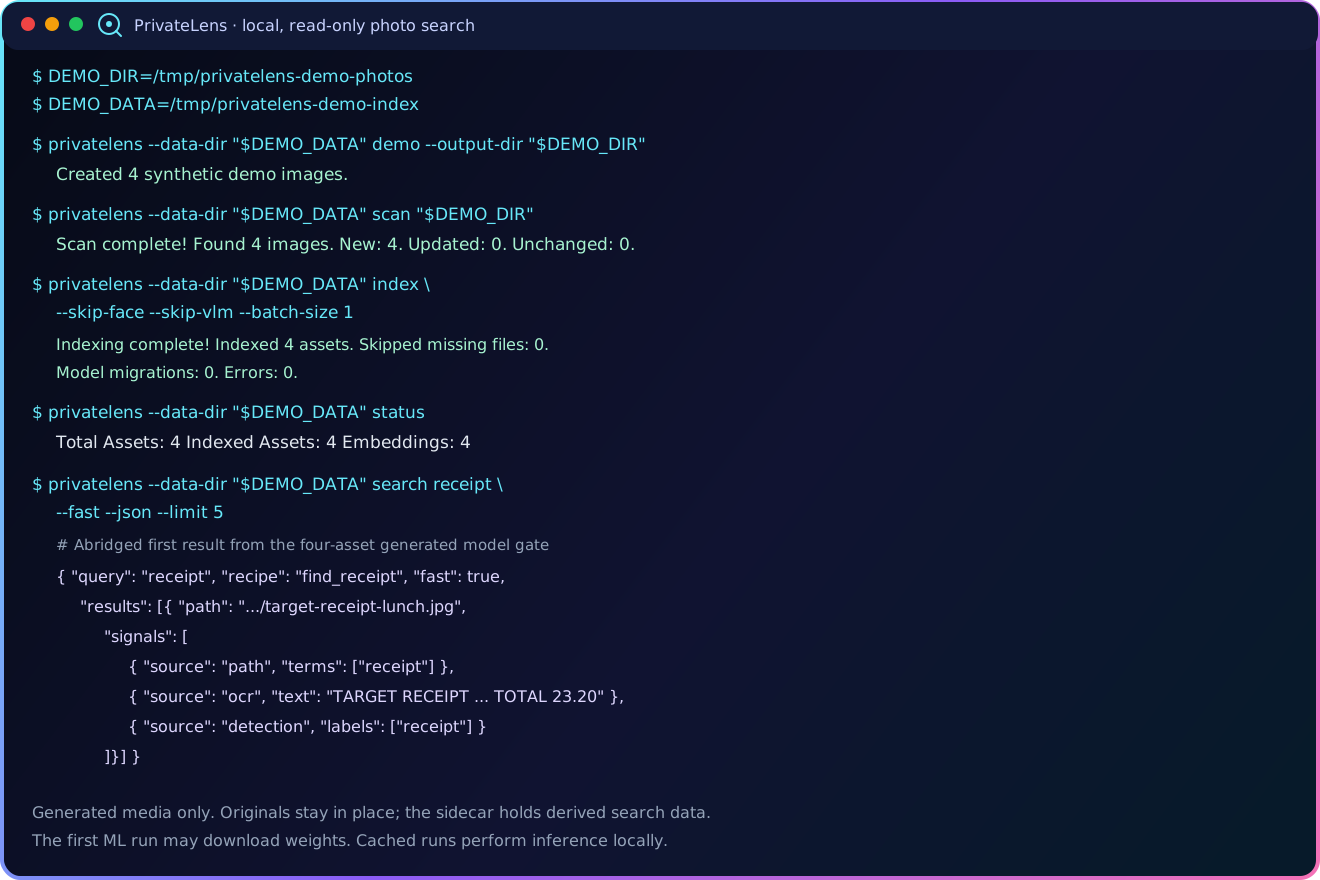
DEMO_DIR=/tmp/privatelens-demo-photos
DEMO_DATA=/tmp/privatelens-demo-index

privatelens --data-dir "$DEMO_DATA" demo --output-dir "$DEMO_DIR"
privatelens --data-dir "$DEMO_DATA" scan "$DEMO_DIR"
privatelens --data-dir "$DEMO_DATA" index --skip-face --skip-vlm --batch-size 1
privatelens --data-dir "$DEMO_DATA" status
privatelens --data-dir "$DEMO_DATA" search receipt --fast --json --limit 5
privatelens --data-dir "$DEMO_DATA" recipes --detail
The demo uses generated, non-private images and exercises the complete core
path: read-only scan, local CLIP/OCR indexing, structured receipt search, and
an evidence card with machine-readable timing. The first run may download model
weights; the terminal sequence itself is the 30-second path once those weights
are cached. A model-free path-only smoke remains available with
search receipt --type path --json.
Technical guide
The sections below preserve the release boundaries, platform matrix, complete command surface, benchmarks, privacy model, and deployment details behind the short product path above.
v1.0 status
This source is release-final for PrivateLens 1.0.0. Official PyPI, GitHub
Release, and GHCR artifacts are produced only from the v1.0.0 tag. Local
Apple Silicon gates include 185 tests, a 1,000-image reliability run, a
15-image local real-photo evaluation reported only in aggregate, and core/full
CPU Docker builds. Hosted checks pass Python 3.11–3.13 and an isolated wheel
consumer; the full CPU image also builds and passes HTTP health on Linux amd64
while running non-root with a read-only root filesystem.
The full Compose/Ollama flow remains a preview. CUDA and the desktop application are unsupported and are not shipped in 1.0.
Core principles
- Read-only originals — PrivateLens never imports, moves, rewrites, or manages source photos.
- Local-first inference — Search data and inference stay local unless you explicitly configure an integration or download a model.
- Multi-signal search — Combine semantic CLIP vectors, OCR, faces, captions, and metadata.
- Explainable results — Return the available evidence behind each match.
- CLI-first operation — Human-readable output and JSON/NDJSON modes support both interactive and scripted use.
Requirements and platform status
- Python 3.11, 3.12, or 3.13 for the core package.
- Python 3.11 for the verified
privatelens[full]stack and CPU container. Its locked RapidOCR runtime also resolves on Python 3.12, but the complete ML stack is not release-gated there in 1.0. uvfor a source checkout, orpipafter the PyPI release.- Ollama only if you enable optional VLM captioning or reranking.
- Free disk space for the SQLite sidecar, thumbnails, and model caches. Source photos remain in place.
| Environment | Status |
|---|---|
| macOS on Apple Silicon | Primary development environment; verified locally with memory-conscious settings |
| CPU Docker image | Core and full images build locally on arm64; the hosted full image builds and passes HTTP health on Linux amd64 while running non-root with a read-only root filesystem; the release workflow publishes the model-free 1.0.0-core image |
| Full Docker Compose + Ollama | Preview; full-stack validation is still pending |
| Linux x86_64 | Hosted Python 3.11–3.13 and full CPU-container gates pass on Linux; bare-metal installation is not separately validated |
| Windows WSL2 | Not validated for 1.0 |
| Native Windows | Not currently a supported target |
| NVIDIA acceleration | Unsupported; 1.0 ships no CUDA image, Compose file, extra, or helper script |
| Desktop application | Unsupported; no desktop binary is shipped in 1.0 |
Installation details
From a source checkout
Run these commands from the repository root:
uv sync --python 3.11 --locked --extra full
source .venv/bin/activate
For development tools as well, run
uv sync --python 3.11 --locked --all-extras. These project commands use the
locked CPU-only PyTorch source on Linux. See the
contribution guide.
From PyPI after the v1.0 tag
Use Python 3.11 for the complete, release-gated local indexing stack:
python3.11 -m venv .venv
source .venv/bin/activate
# Linux CPU-only install: prevent PyPI's CUDA-enabled PyTorch build.
python -m pip install torch torchvision --index-url https://download.pytorch.org/whl/cpu
python -m pip install "privatelens[full]"
On macOS and Windows, omit the separate PyTorch command because their PyPI wheels are already CPU-only. The Linux command uses PyTorch's official CPU wheel index; PrivateLens 1.0 does not ship a supported CUDA runtime.
On Python 3.12 or 3.13, install privatelens without an ML extra. The CLI/API
core is tested on both versions. The locked OCR runtime excludes Python 3.13,
and the complete ML stack is not release-gated on Python 3.12 in 1.0.
privatelens[full] installs the local CLIP, OCR, and face runtime used to build
a searchable index. privatelens without the extra is the lightweight CLI/API
core: it can scan folders, inspect an existing sidecar, and run non-ML search
modes, but it cannot run the normal CLIP/OCR indexing pass. Ollama and its VLM
weights remain separate. Read the
third-party model record
before enabling face or VLM features.
Command reference
# Print exact env, package, Ollama, model-cache, and verification commands
privatelens setup
privatelens setup --json

# See the Mac-safe first-run indexing workflow
privatelens quickstart

# Create a safe synthetic demo library
privatelens demo --output-dir /tmp/privatelens-demo-photos

# Optional: enable shell completion
privatelens completion zsh

# Scan a folder without moving photos
privatelens scan ~/Pictures
privatelens scan ~/Pictures --dry-run

# Index the core CLIP/OCR signals; face and VLM passes are opt-in
privatelens index --skip-face --skip-vlm --batch-size 1
privatelens index --dry-run

# Optional: keep the sidecar index current as files change
privatelens watch ~/Pictures

# Search with evidence and timing
privatelens search "driver license backup" --json
privatelens search "Target receipt" --json
privatelens search receipt --type path --json --limit 5
privatelens search --recipe find_receipt "Target"
privatelens search receipt --fast --json --limit 5
privatelens search receipt --open

# Inspect index status
privatelens status
privatelens status --json

# Preview and remove stale index records for photos that were moved/deleted
privatelens prune
privatelens prune --json --yes

# Privacy audit
privatelens doctor
privatelens doctor --json

# Face clustering
privatelens cluster --json

# Panic delete the index while keeping photos
privatelens purge
privatelens purge --json --yes
privatelens watch requires the full local ML pipeline because each debounced
change batch runs the canonical scan and index workflow. It skips face detection
and VLM captions by default for memory safety; opt in with --with-face or
--with-vlm. Use privatelens watch ~/Pictures --json for newline-delimited JSON
cycle and shutdown events suitable for process supervisors.
The regular index command also skips face detection and VLM captioning by
default. Enable them explicitly with --with-face / --with-vlm, or run the
separate --only-face / --only-vlm passes.
Configuration and local data
PrivateLens uses Pydantic settings and environment variables prefixed with
PRIVATELENS_. Copy the
example environment file
to .env only when you need to override a default. privatelens setup prints
the effective setup path and safe remediation commands.
By default, runtime data stays outside the repository:
| Data | Default location |
|---|---|
| SQLite index | ~/.privatelens/privatelens.db |
| Thumbnails | ~/.privatelens/thumbnails/ |
| Model cache | ~/.privatelens/models/ |
Use the global --data-dir option to isolate an index, as the demo does.
Configure PRIVATELENS_ENCRYPTION_KEY to encrypt only the auxiliary provenance
payload (type, confidence, and source) attached to newly detected sensitive
items. Sensitivity flags, sensitivity type/confidence columns, OCR text,
captions, embeddings, paths, thumbnails, and the SQLite database itself remain
plaintext inside the data directory. Protect that directory with
operating-system permissions and full-disk encryption.
Supported inputs
Folder discovery recognizes .jpg, .jpeg, .png, .gif, .bmp, .webp,
.heic, .heif, and .tiff images. HEIC/HEIF decoding is supplied by the
core pillow-heif dependency and is covered by a real encoded-file regression
test. Other formats still depend on Pillow decoder support. Video indexing is
not part of the current v1 scope.
Why PrivateLens
PrivateLens is not another photo manager. It is a search sidecar for folders and libraries you already own.
| Capability | PrivateLens | Immich | PhotoPrism | Caption/tag tools |
|---|---|---|---|---|
| Read-only sidecar over existing folders | Core design | Supports read-only external libraries | Can index originals in place | Varies |
| Primary product shape | CLI-first search sidecar | Photo-management server and clients | Photo-management application | Usually tagging or caption generation |
| Search recipes with evidence cards | Core workflow | Different search model; not evaluated here | Different search model; not evaluated here | Varies |
| Original-media management | Never imports, moves, or manages originals | Managed and external-library workflows | Index and import workflows | Varies |
| Machine-readable search output | JSON/NDJSON CLI contracts | Different interface; not evaluated here | Different interface; not evaluated here | Varies |
This comparison describes product shape, not a quality benchmark. Competitor capabilities change; the linked official documentation was checked on 2026-07-13. PrivateLens differentiates itself through structured, explainable CLI search without becoming the system of record for a photo library.
Search Quality Benchmark
PrivateLens ships a deterministic ten-case gate covering every built-in recipe:
privatelens benchmark
privatelens benchmark --json
| Metric | Current result | Release gate |
|---|---|---|
| Top-5 hit rate | 100% | At least 80% |
| Mean recall@5 | 100% | Reported |
| Mean reciprocal rank | 1.000 | Reported |
| Mean precision@5 | 0.220 | Reported |
The fixture executes real FTS, metadata, face-count, detection, recipe-filter, ranking, and evidence-card code against deterministic signal annotations. It deliberately does not measure CLIP or VLM model quality. The checked-in report is the search-quality v1 result.
Model Quality Benchmark
With the ML extras and local Ollama model installed, run the separate model-dependent gate:
privatelens benchmark-models
privatelens benchmark-models --json
privatelens benchmark-models --skip-vlm  # CLIP + OCR only
| Metric | Current result | Release gate |
|---|---|---|
| CLIP top-1 retrieval | 100% | 100% |
| OCR top-1 retrieval | 100% | 100% |
| VLM document classification | 100% | 100% |
| VLM caption term recall | 100% | 100% |
This gate generates four inspectable, non-private images for a receipt, driver license, travel screenshot, and whiteboard. It exercises the configured OpenCLIP model, RapidOCR, the real sqlite-vec/FTS retrieval paths, and the local Qwen VLM without reading the user's photo library. It is a reproducible model/integration smoke benchmark, not a broad real-world retrieval claim. The checked-in run is the model-quality v1 result.
v1.0 verification
| Gate | Result on 2026-07-14 | Boundary |
|---|---|---|
| Automated suite | 185 local tests plus lint, typing, bytecode, lock, and diff checks; hosted Linux x86_64 jobs pass on Python 3.11–3.13, including an isolated wheel consumer | Hosted jobs exercise the core across the matrix; the full ML stack is release-gated on Python 3.11 |
| Scale reliability | 1,000 generated images scanned, indexed, searched, and rerun idempotently | Deterministic extractor stand-ins; not a relevance benchmark |
| Real-photo retrieval | 15-image local evaluation: 91.7% hit@1, 100% hit@5, 95.8% MRR@5 | Aggregate metrics only; too small for a broad quality claim |
| CPU containers | Core and full images built locally on arm64; the hosted full image builds and passes non-root/read-only HTTP health on Linux amd64; the tag workflow publishes a model-free core image to GHCR | The complete Compose/Ollama flow remains preview-only; the full image is not redistributed because upstream OCR-model terms are unclear |
| Full-image runtime | Local CPU-only ML imports, HEIC decoding, and a 15/15 read-only scan; hosted service runs non-root with a read-only root filesystem | Hosted health is a service smoke, not a Compose/Ollama or model-quality gate |
No private filenames, OCR text, paths, or image contents are included in these reported metrics or in tracked release artifacts.
Docker CPU Quick Start
The core and full non-root CPU images build locally on arm64. The hosted full image also builds and passes non-root/read-only HTTP health on Linux amd64; locally it passes CPU-only ML imports, HEIC decoding, and a 15/15 scan from a read-only photo mount. The complete Compose workflow with Ollama is still a preview until its full scan/index/search gate passes.
The release -core image intentionally excludes ML packages and model files.
It can scan metadata, inspect an existing sidecar, and run non-ML searches.
The pull command below becomes available only after the signed v1.0.0 tag
publishes the GHCR artifact; until then, use the source-build command below.
docker pull ghcr.io/kenny2077/privatelens:1.0.0-core
docker run --detach --name privatelens \
  --publish 127.0.0.1:8000:8000 \
  --read-only --security-opt no-new-privileges:true \
  --tmpfs /tmp:rw,noexec,nosuid,size=256m \
  --mount type=bind,src="$HOME/Pictures",dst=/photos,readonly \
  --mount type=volume,src=privatelens-data,dst=/data \
  ghcr.io/kenny2077/privatelens:1.0.0-core

docker exec -it privatelens python -m privatelens.cli scan /photos
docker exec -it privatelens python -m privatelens.cli status --json
docker exec -it privatelens python -m privatelens.cli search receipt --type path --json
The full image remains build-verified but is not published because the exact license grant for RapidOCR's embedded Baidu-copyrighted ONNX models is unclear. To build it for local use after reviewing the third-party model record, use the preview Compose stack from a source checkout. Review the resolved mounts before starting it:
export PHOTOS_DIR="$HOME/Pictures"
# `privatelens setup` can add this key to .env; Compose reads .env automatically.
export PRIVATELENS_ENCRYPTION_KEY="$(python -c 'from cryptography.fernet import Fernet; print(Fernet.generate_key().decode())')"
docker compose config --quiet
docker compose up --build

# In another terminal, scan/index/search inside the container
docker exec -it privatelens python -m privatelens.cli scan /photos
docker exec -it privatelens python -m privatelens.cli index --skip-face --skip-vlm --batch-size 1
docker exec -it privatelens python -m privatelens.cli search receipt --json --limit 5
To reproduce the model-free release image from source:
PRIVATELENS_EXTRAS=core docker compose build privatelens
The application root filesystem is read-only. Only the named data, model-cache,
and thumbnail volumes plus /tmp are writable; source photos remain mounted
read-only at /photos.
Unsupported CUDA and desktop paths
PrivateLens 1.0 ships neither CUDA artifacts nor a desktop application. NVIDIA acceleration is deferred until it passes an end-to-end gate on the external GPU machine; there is no supported CUDA image, Compose file, dependency extra, or helper script. Use the verified CPU path above. The gaming-PC guide records the future promotion checklist without presenting an unverified quick start.
Architecture
PrivateLens is a sidecar indexer, not a photo manager. It reads your existing folders and builds a private searchable index.
Your Photos (read-only)
    ↓
File Scanner → EXIF → pHash fingerprint
    ↓
Vision Pipeline:
    - Derived thumbnails
    - CLIP embeddings (OpenCLIP)
    - OCR text (RapidOCR)
    - Face detection (InsightFace, opt-in)
    - VLM captions (Ollama, opt-in)
    - Document classification
    - Sensitive content detection
    ↓
Local Index (SQLite + sqlite-vec + FTS5)
    ↓
Hybrid Search Engine
    - Semantic (CLIP vector)
    - Text (OCR + captions FTS5)
    - Face (person clusters)
    - Metadata (path, explicit date, camera, dimensions/type)
    - Search recipes (pre-built query plans)
    ↓
Evidence Cards (why each result matched)
Search Recipes
Built-in search recipes for common retrieval tasks:
| Recipe | Trigger | Description |
|---|---|---|
find_id_photo |
"driver license", "passport" | Government IDs and licenses |
find_selfie |
"selfie" | Likely single-person selfies |
find_two_person |
"two people", "couple" | Photos with exactly two detected faces |
find_screenshot |
"screenshot" | Screenshots of apps/docs |
find_receipt |
"receipt", "invoice" | Receipts and expenses |
find_pet |
"my dog", "cat" | Pet photos |
find_document |
"whiteboard", "notes" | Documents and notes |
find_car |
"car", "dashboard" | Vehicle photos |
find_sensitive |
"bank card" | Sensitive documents |
find_memory |
"2024", "2024-03" | Photos in an explicit year/month/day range |
AnythingLLM Integration
PrivateLens can sync structured photo documents to your local AnythingLLM workspace for chat-based search:
privatelens sync-anythingllm
privatelens sync-anythingllm --json
This is an explicit export operation. Each exported document can contain the absolute source path, date, dimensions, media type, camera, GPS coordinates, sensitivity flag, captions, OCR text, identified person names/associations, and tags. It does not include original image bytes or raw face embeddings. Review the destination and payload before running it; PrivateLens does not guarantee how AnythingLLM presents or cites the exported document. With the default local-only guard, the AnythingLLM endpoint must resolve to a recognized local host.
Privacy Features
- Read-only originals: Scan and index operations do not move, rewrite, or delete source photos
- Local sidecar: The SQLite index, thumbnails, and model cache stay under the configured local data paths
- Local-only guard: App-managed VLM and AnythingLLM requests default-deny non-local endpoints; this is not a firewall and does not wrap package or model-library downloads
- Optional classification encryption: A Fernet key encrypts only auxiliary sensitive-item provenance; sensitivity flags/type/confidence and the rest of the sidecar remain plaintext
- Face-data control:
privatelens purge --faces-onlydeletes face rows, face vectors, and people clusters - Panic delete:
privatelens purgedeletes assets, paths/GPS metadata, search history, people, derived thumbnails, and every indexed signal while never deleting source photos - Safe maintenance:
privatelens prunepreviews missing-file records; add--yesto remove only those index records - Privacy audit:
privatelens doctor— verify local-only status
See the privacy guide for the threat model and operating guidance. Sensitive detection is heuristic; do not treat it as a data-loss prevention guarantee.
Limitations and v1.0 boundaries
- The checked-in four-image model benchmark is an integration gate, not a broad real-world retrieval claim. The separate 15-image local evaluation is also too small to support a broad quality claim; a larger labeled campaign remains future work.
- Normal CLI and API searches do not retain queries. Only an explicitly
interactive CLI
search --feedbackrun stores its plaintext query and result event; a selected result can receive a capped0.05boost on later searches. This is a small local ranking heuristic, not model training, and full purge deletes the stored events. - OCR, document, face, and sensitive-content detection can produce false positives and false negatives.
- PrivateLens does not provide full-database encryption, encrypted thumbnails, access control, multi-user isolation, or a cloud backup service.
- Video indexing is outside the current v1 scope.
- The full Compose/Ollama flow remains a preview. Hosted checks cover the core on Python 3.11–3.13, an isolated wheel consumer, and the full CPU image's build plus non-root/read-only HTTP-health smoke on Linux amd64; they do not validate bare-metal Linux, a multi-OS matrix, or Compose/Ollama.
- The
fullandmlextras are release-gated on Python 3.11. Their locked dependencies resolve on Python 3.12, but the complete ML stack is not tested there in 1.0; RapidOCR 1.4.4 excludes Python 3.13. - The tag workflow publishes the model-free
1.0.0-coreimage to GHCR. The full image remains a local build until the exact license grant for RapidOCR's embedded OCR models is clear. - CUDA, native Windows, and the desktop application are unsupported and are not shipped in 1.0.
- Optional model weights have licenses independent of the PrivateLens code.
In particular, the default InsightFace
buffalo_lweights are not covered by PrivateLens's MIT license. Read the third-party model record before enabling face recognition.
Troubleshooting
Start with machine-readable diagnostics:
privatelens setup --json
privatelens doctor --json
privatelens status --json
- If indexing reports missing CLIP or OCR packages, install the
fullextra; the lightweight core is not a complete indexing runtime. - On a memory-constrained host, run core, face, and VLM indexing as separate
commands.
--batch-sizecontrols commit cadence; it is not a model-memory cap. - If photos were moved or deleted, run
privatelens pruneto preview stale sidecar records before using--yes. - If native sqlite-vec cannot load,
privatelens doctorreports the active vector backend; the BLOB fallback remains available but should be benchmarked for your collection size. - Before Compose troubleshooting, run
docker compose config --quiet, then confirm the photos mount resolves to/photoswith read-only access.
When opening a bug report, use synthetic reproduction data and redact absolute paths, OCR text, face data, database contents, tokens, and encryption keys. See support policy.
Documentation
- Architecture
- Search recipes
- Privacy guide
- Unsupported CUDA validation guide
- Deep analysis and v1.0 roadmap
- Changelog
Security and responsible use
Report vulnerabilities through the private security process; never place private photos, OCR text, face embeddings, keys, or unredacted paths in a public issue. Face recognition may involve biometric data and additional legal or consent requirements in your jurisdiction.
PrivateLens code is MIT-licensed, but model packages and weights retain their own terms. Review the third-party model record before downloading or deploying them, especially for commercial use.
Support
PrivateLens is maintained on a best-effort basis with no guaranteed response time. Use the support policy to choose between setup help, a reproducible bug report, a feature request, and a private security report.
Contributing
The core package supports Python 3.11, 3.12, and 3.13; the full ML extra is release-gated on Python 3.11. See the changelog for release status and notable changes.
Contributions are welcome when they preserve the read-only sidecar boundary, include proportionate verification, and never add private media to the repository. Read the contribution guide and the Code of Conduct before opening a pull request.
License
PrivateLens source code is available under the MIT License. Dependencies, services, and model weights are not relicensed by PrivateLens; see the third-party model record.
Project details
Verified details
These details have been verified by PyPIProject links
GitHub Statistics
Maintainers
Release history Release notifications | RSS feed

Download files
Download the file for your platform. If you're not sure which to choose, learn more about installing packages.
Source Distribution
Built Distribution
Filter files by name, interpreter, ABI, and platform.
If you're not sure about the file name format, learn more about wheel file names.
Copy a direct link to the current filters
File details
Details for the file privatelens-1.0.0.tar.gz.
File metadata
- Download URL: privatelens-1.0.0.tar.gz
- Upload date:
- Size: 272.3 kB
- Tags: Source
- Uploaded using Trusted Publishing? Yes
- Uploaded via: twine/6.1.0 CPython/3.13.13
File hashes
| Algorithm | Hash digest | |
|---|---|---|
| SHA256 |
146daa69e97cf653e3d5d84ef7e39544dd089c1bfb83687a6308c8eeb0c122e9
|
|
| MD5 |
5df1e8bec5c814c37bf58d39005ab5ef
|
|
| BLAKE2b-256 |
e7d5b37004d1081bbac83ebe2594bc44fead16b6299bdeaab1e268c4c6edf946
|
Provenance
The following attestation bundles were made for privatelens-1.0.0.tar.gz:
Publisher:
release.yml on kenny2077/PrivateLens
-
Statement:
-
Statement type:
https://in-toto.io/Statement/v1 -
Predicate type:
https://docs.pypi.org/attestations/publish/v1 -
Subject name:
privatelens-1.0.0.tar.gz -
Subject digest:
146daa69e97cf653e3d5d84ef7e39544dd089c1bfb83687a6308c8eeb0c122e9 - Sigstore transparency entry: 2171321008
- Sigstore integration time:
-
Permalink:
kenny2077/PrivateLens@747fbe683542d18611f280c4535bc7d72eb374af -
Branch / Tag:
refs/tags/v1.0.0 - Owner: https://github.com/kenny2077
-
Access:
public
-
Token Issuer:
https://token.actions.githubusercontent.com -
Runner Environment:
github-hosted -
Publication workflow:
release.yml@747fbe683542d18611f280c4535bc7d72eb374af -
Trigger Event:
push
-
Statement type:
File details
Details for the file privatelens-1.0.0-py3-none-any.whl.
File metadata
- Download URL: privatelens-1.0.0-py3-none-any.whl
- Upload date:
- Size: 93.7 kB
- Tags: Python 3
- Uploaded using Trusted Publishing? Yes
- Uploaded via: twine/6.1.0 CPython/3.13.13
File hashes
| Algorithm | Hash digest | |
|---|---|---|
| SHA256 |
e868f50645704f170dd4fbda81dfdfbdac1ec79fd7010926a03664e292db8ff2
|
|
| MD5 |
a31c0c2765fbdcde4cb58f9151da54d7
|
|
| BLAKE2b-256 |
a1cdd913a4bdb92635d00dce87d956e1c40011eafc68b8712fd3550fca1b9dd1
|
Provenance
The following attestation bundles were made for privatelens-1.0.0-py3-none-any.whl:
Publisher:
release.yml on kenny2077/PrivateLens
-
Statement:
-
Statement type:
https://in-toto.io/Statement/v1 -
Predicate type:
https://docs.pypi.org/attestations/publish/v1 -
Subject name:
privatelens-1.0.0-py3-none-any.whl -
Subject digest:
e868f50645704f170dd4fbda81dfdfbdac1ec79fd7010926a03664e292db8ff2 - Sigstore transparency entry: 2171321014
- Sigstore integration time:
-
Permalink:
kenny2077/PrivateLens@747fbe683542d18611f280c4535bc7d72eb374af -
Branch / Tag:
refs/tags/v1.0.0 - Owner: https://github.com/kenny2077
-
Access:
public
-
Token Issuer:
https://token.actions.githubusercontent.com -
Runner Environment:
github-hosted -
Publication workflow:
release.yml@747fbe683542d18611f280c4535bc7d72eb374af -
Trigger Event:
push
-
Statement type:






