
Python Log Helper





Python Log Helper is a small class designed to simplify the use of the built-in Python Logging Module.
It has no dependencies, and should be compatible with most versions of Python 2.x and 3.x (though we still recommend a minimum of 3.4).
It was originally created by Chris (Someguy123) for use in personal Python projects, as well as for use in projects developed at Privex Inc.
If this project has helped you, consider grabbing a VPS or Dedicated Server from Privex - prices start at as little as 8 USD/mo (we take cryptocurrency!)
License
Python Log Helper was created by Privex Inc. of Belize City, and licensed under the X11/MIT License. See the file LICENSE for the license text.
TL;DR; license:
We offer no warranty. You can copy it, modify it, use it in projects with a different license, and even in commercial (paid for) software.
The most important rule is - you MUST keep the original license text visible (see LICENSE) in any copies.
Contributing
We're happy to accept pull requests, no matter how small.
Please make sure any changes you make meet these basic requirements:
- No additional dependencies. We want LogHelper to be lightweight and painless to install.
- Any code taken from other projects should be compatible with the MIT License
- This is a new project, and as such, supporting Python versions prior to 3.4 is very low priority.
- However, we're happy to accept PRs to improve compatibility with older versions of Python, as long as it doesn't:
- drastically increase the complexity of the code
- OR cause problems for those on newer versions of Python.
Installation
Download and install from PyPi using pip
Python 3
pip3 install privex-loghelper
Python 2
pip install privex-loghelper
(Alternative) Manual install from Git
Option 1 - Use pip to install straight from Github
pip3 install git+https://github.com/Privex/python-loghelper
Option 2 - Clone and install manually
# Clone the repository from Github
git clone https://github.com/Privex/python-loghelper
cd python-loghelper

# RECOMMENDED INSTALL METHOD
# Use pip to install the source code
pip3 install .

# ALTERNATIVE INSTALL METHOD
# If you don't have pip, or have issues with installing using it, then you can use setuptools instead.
python3 setup.py install
Usage
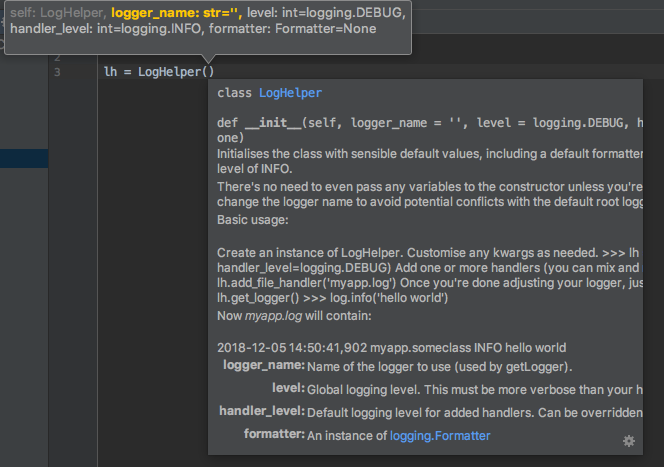
The code is very well documented, you can find out all usage documentation in LogHelper.py.
All functions are type annotated, with detailed pydoc block comments. If you're using a Python optimised IDE such as PyCharm it should offer code completion and help when using the package.
Basic usage
The most basic usage is to simply initialise the class with no parameters, and attach a file handler to send log output to a file.
# Import the class
from privex.loghelper import LogHelper
# The first param is logger_name - a hierarchical dot-separated name to organise loggers.
# If it's not specified, or is None, it will use the root logger (which will affect some
# third-party packages that don't have their own logging settings)
lh = LogHelper('mylogger')
# Log to a file called test.log in the current directory
lh.add_file_handler('test.log')
# Grab the logger instance
log = lh.get_logger()
# Now let's log 'hello world' to the file.
log.info('hello world')
After running the above, test.log should contain:
2018-12-05 22:05:18,915 root INFO hello world
Copying your logging config to other logger names
Third party packages often use their own logging instance names. To make it easy for you to copy your settings
to other instances, you can use the copy_logger(name) method.
# Set up logging for your app, log anything >=INFO
lh = LogHelper('myapp', handler_level=logging.INFO)
# Log to a file called test.log in the current directory (note: absolute path is better)
lh.add_file_handler('test.log')
# Now copy your logging level, handlers, and formatting to the logger privex.jsonrpc
lh.copy_logger('privex.jsonrpc')
# You can specify multiple logger names as positional arguments. All specified loggers will
# have their handlers replaced with yours, and have their logging level set to match.
lh.copy_logger('example.app', 'otherexample')
After copying your settings onto a named logger, all logging using that logger should use your specified handlers, and your log level.
This covers modules that access the logger via logging.getLogger('loggername'), as well as via Python Logging wrappers
such as privex-loghelper.
Splitting error and debug logs into different files
Something that can make it easier to sift through logs, is to split your normal debug logs from warnings and errors.
Using the standard logging module, this could take 10 lines of code, and is highly repetitive.
With the Python Log Helper, it's just a few lines.
# Import the class
from privex.loghelper import LogHelper
# Import logging to be able to specify the verbosity levels
import logging

# The global level (kwarg `level`) defaults to DEBUG, but the default handler level is only INFO.
# You can specify handler_level to change that.
# To help prevent conflicts from other python packages which use the root ('') logger, you should set a custom
# logger name.
lh = LogHelper(logger_name='my_app', handler_level=logging.DEBUG)

# Log messages that are DEBUG (default handler and global logging level) or higher to `debug.log`
lh.add_file_handler('debug.log')

# Log only WARNING or above to `error.log`
lh.add_file_handler('error.log', level=logging.WARNING)

# Grab the logger instance
log = lh.get_logger()

# To test that logs are being sent to the correct files, let's try an `info`, a `warning` and an `error` log message.
log.info('something normal is happening')
log.warning('something strange is happening')
log.error('something VERY BAD is happening')
After running the above Python script, you should see the following log files:
debug.log
2018-12-05 22:10:25,253 root         INFO        something normal is happening
2018-12-05 22:10:25,254 root         WARNING     something strange is happening
2018-12-05 22:10:25,256 root         ERROR       something VERY BAD is happening
error.log
2018-12-05 22:10:25,254 root         WARNING     something strange is happening
2018-12-05 22:10:25,256 root         ERROR       something VERY BAD is happening
As you can see, the debug.log saved all of the messages, while error.log only saved the warning and the error.
Log Rotation
You can also have painless log rotation, without the need for something like logrotated.
The LogHelper class has a function add_timed_file_handler which wraps logging.handler.TimedRotatingFileHandler.
Simply specify the type of interval (when) to rotate with, how often it should rotate (interval), and how many intervals you
would like to keep before deleting older ones (backups). Set backups to 0 if you don't want it to delete older logs.
For more information on interval, when and backups,
see the official logging docs
By default, logs are rotated once (interval=1) per day (when='D'), and removed after 14 days (backups=14).
# Import the class
from privex.loghelper import LogHelper
# Using sleep to simulate time passing
from time import sleep
lh = LogHelper()
# Log to a file called test.log in the current directory
# Rotate the log every minute, and only keep up to 60 minutes of logs
lh.add_timed_file_handler('test.log', when='M', interval=1, backups=60)
# Grab the logger instance
log = lh.get_logger()
# Now let's log 'hello world' to the file.
log.info('hello world')
log.info('hello world 2')
sleep(60)
log.info('hello world 3')
We can now see it's generated two timestamped logs, since the interval was set to 1 minute.
$ ls -l
    -rw-r--r--  1 user  users    58  5 Dec 22:58 test.log.2018-12-05_22-58
    -rw-r--r--  1 user  users    58  5 Dec 22:59 test.log.2018-12-05_22-59

$ cat test.log.2018-12-05_22-58
    2018-12-05 22:58:24,600 root         INFO     hello world
    2018-12-05 22:58:24,743 root         INFO     hello world 2

$ cat test.log.2018-12-05_22-59
    2018-12-05 22:59:25,512 root         INFO     hello world 3
Concurrent Log Rotation
For applications with concurrency like those built on modern Django, you may need to use ConcurrentLogHandler for the logs to work correctly, if you want to use this, you'll need to install the package with the concurrent extra like so:
pip3 install 'privex-loghelper[concurrent]'
Or if this doesn't work, install ConcurrentLogHandler by hand:
pip3 install ConcurrentLogHandler
Now you may pass concurrent=True to the add_timed_file_handler method, to use ConcurrentLogHandler instead of the standard one:
lh.add_timed_file_handler('test.log', when='M', interval=1, backups=60, concurrent=True)
Thanks for reading!
If this project has helped you, consider grabbing a VPS or Dedicated Server from Privex - prices start at as little as US$8/mo (we take cryptocurrency!)
1 maintainer

Metadata
1 maintainer
Release files for privex-loghelper 1.1.3
For a detailed explanation of source distributions (sdists) and built distributions (wheels), please see the package formats documentation.
Source distribution (sdist)
| File | Size | Uploaded | Provenance | |
|---|---|---|---|---|
| privex_loghelper-1.1.3.tar.gz | 13.3 kB | Without provenance | Details |
Built distribution (wheel)
| File | Interpreter | ABI | Platform | Reset |
|---|---|---|---|---|
| privex_loghelper-1.1.3-py3-none-any.whl | Python 3 | none | any | Details |
Total release size: 25.5 kB
Release files / privex_loghelper-1.1.3.tar.gz
| Download URL | privex_loghelper-1.1.3.tar.gz |
|---|---|
| Size | 13.3 kB |
| Tags | Source |
|
SHA-256 checksum How to use checksums |
6efacf93322d8ac3004e5bc7ab80f746413b42f4a0ed2be9e163aa44743dbc85
|
|
BLAKE2b-256 checksum How to use checksums |
7c3f4956b3ae146d7f20c4dd1c5d870923228b7fea0f327449ac4f08af6faf41
|
| Upload date | |
|
Uploaded using Trusted Publishing? What is trusted publishing? |
No |
| Uploaded via |
twine/3.4.2 importlib_metadata/4.8.1 pkginfo/1.7.1 requests/2.25.1 requests-toolbelt/0.9.1 tqdm/4.62.2 CPython/3.9.14
|
Release files / privex_loghelper-1.1.3-py3-none-any.whl
| Download URL | privex_loghelper-1.1.3-py3-none-any.whl |
|---|---|
| Size | 12.2 kB |
| Tags | Python 3 |
|
SHA-256 checksum How to use checksums |
ee925bae8f6a826851640903332916dc45412cb10d486aa8911de340e0e474e6
|
|
BLAKE2b-256 checksum How to use checksums |
251d53083b9ad0d3b382fd164394f427ffa715608a540015a4da770a493c5bc3
|
| Upload date | |
|
Uploaded using Trusted Publishing? What is trusted publishing? |
No |
| Uploaded via |
twine/3.4.2 importlib_metadata/4.8.1 pkginfo/1.7.1 requests/2.25.1 requests-toolbelt/0.9.1 tqdm/4.62.2 CPython/3.9.14
|
Security for privex-loghelper 1.1.3
Provenance
Provenance describes where a file came from. On PyPI, provenance is shared via attestations, which provide a verifiable record of the build or publishing details. View details, limitations and caveats.
No provenance found
None of the files in this release were uploaded with provenance metadata.
A note on package security
PyPI is a repository for distributing packages, not a service for auditing them. While third-party security researchers and our staff do their best to detect and remove malicious packages, PyPI cannot guarantee the quality, security or suitability of any given package.














