
A privacy-focused journal encryption tool

Project description
Privournal
Privoural (Private + Journal, Hehe) is a cool command-line journal encryptor! Write your journal anywhere like Notes, Notion, whatever - and then paste it into Privournal, and get back text that's unreadable to anyone. You can then paste that text back into your journaling app, only now even if anyone opens that app, the encrypted journals are unreadable :)
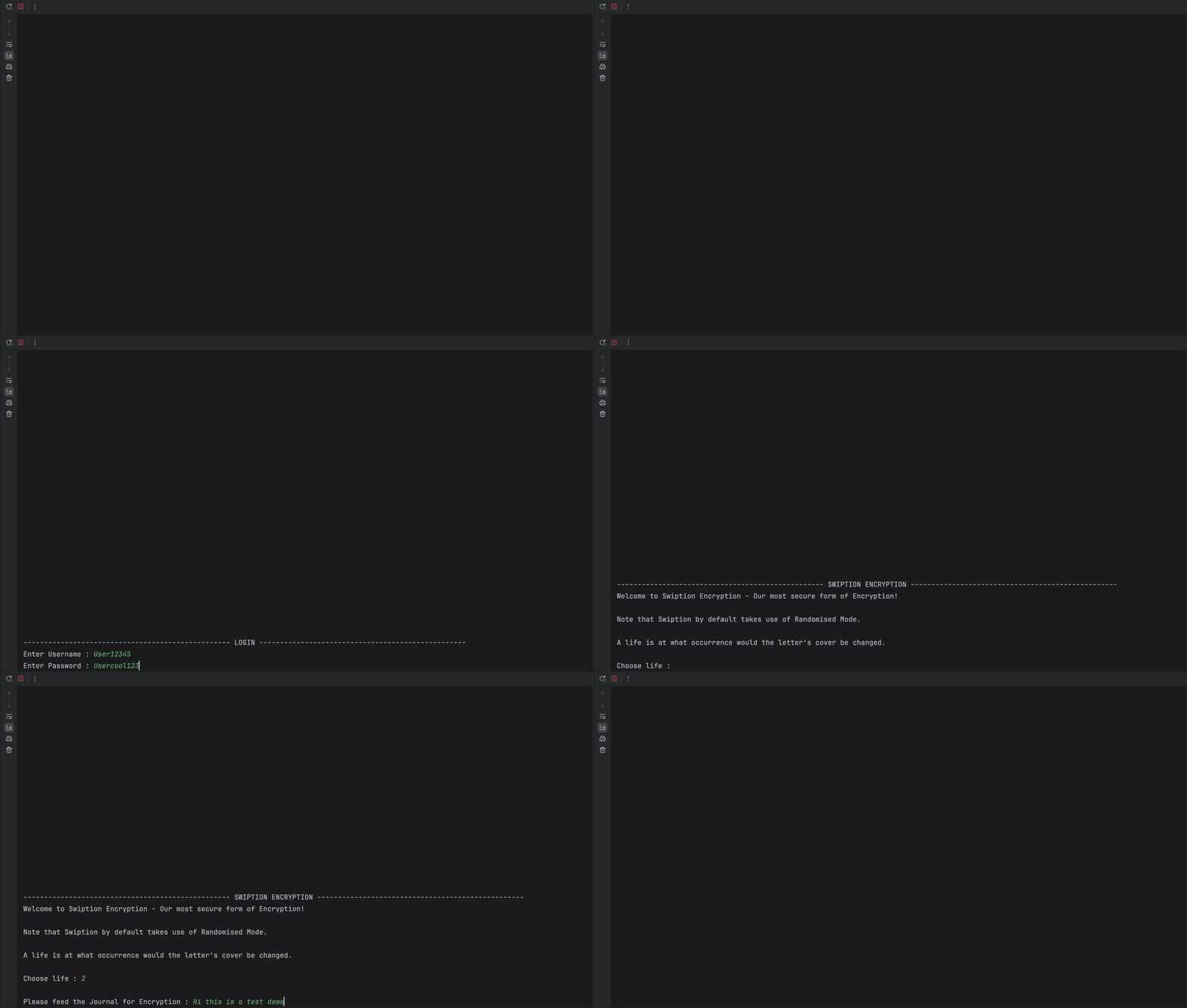
(This GIF displays the first fully functional version of Privournal 😇)
And if you wanna read it? No problem! Open terminal (No internet required) and decrypt the whole thing in under a minute using Privournal.
It's as easy as that, plus you can make an account on Privournal so that your encryption details can be stored on our database, making the process of decryption much smoother! And if you want to continue without an account - You absolutely can!
NOTE: PRIVOURNAL'S DATABASE STORES NO DATA EXCEPT ACCOUNT DETAILS AND ENCRYPTION KEYS, ECRYPTIONS AND DECRYPTIONS ARE PURELY DONE BY LOGIC AND ENCRYPTION KEY IN USER'S ACCOUNT.
Every time you encrypt, you will be given an Encryption Key that you need to copy and paste somewhere handy. However for users with an account - the Encryption Key is automatically upoloaded to the database and there's no need to store it seperately.
While decrypting, if you don't have an account - you must paste the Encryption Key that was provided to you. For users with an account, the Encryption Key will be automatically fetched from the database once you choose which jounal you need to decrypt.
NOTE: Each letter's mapping is reffered to as a cover. For example, if A maps to 27 - then A's cover be 27. An Encryption Key is a dictionary containing the letters and thier covers.
Demo + Try it yourself!
I will also be uploading a commercial style demo video too, Hehe, it might help you see how the flow looks like in action. (It will be uploaded on Privournal's Youtube chaneel and don't worry i'll add the link here too!
For now,
See the demo video - https://asciinema.org/a/your_recording
Even better would be that you try it yourself! I'd really love that :) (Look at the PyPI section below!)
NOTE: Although if you want to run it completely locally, you absolutely can! Please scroll towards the end and find the guide on how to run it locally :)
Install via PyPI
Want to try Privournal yourself?
Just open the terminal and run these commands :)
pip install privournal
Then launch it using:
privournal
No need to clone the repository manually this way!
How did the idea stumble upon me?
For me, someone reading my journal is a legit nightmare. I journal on notes sometimes, and it's not just journals, sometimes it's random texts or even chats. So it's happened to me a lot that people open my notes app and start reading 😭
You might say - Manonit why don't you just lock the notes? Well atleast on apple devices, anyone can open the locked notes if they have their fingerprint on the device or the laptop password. (And obviously your laptop password isn't that secret 🥲)
This is where Privournal comes in - It instead converts your entry into ciphertext using a substitution scheme that you can control, so even if the encrypted text leaks, it's just numbers and symbols without the key (Which only you have).
Simplified Process at Glance :)
- Write your journal entry in any app you like.
- Paste the full text into Privournal.
- Choose an encryption mode (see below).
- Privournal returns the encrypted version — paste that back into your journal app instead of the plaintext.
- To read it later, run Privournal's decrypt flow with the same Key/Account.
No journal content is ever stored. If you make an account, only your encryption key (the cover mapping) is saved to the database — never the journal text itself. Without an account, you're responsible for saving your own encrypted text and remembering your cipher.
Encryption Modes
| Mode | How it works |
|---|---|
| Mark 1 | Each letter maps to a number, A–Z as 1 to 26, a–z as 27 to 52 |
| ASCII | Each letter maps to its raw ASCII code |
| Mark 2 | Reverse-order numbering (A=26, Z=1, From 26 to 1 and 52 to 27 |
| Mark 3 | Even/odd split — capitals get even numbers, lowercase get odd (From 1 to 52) |
| Mark 4 | Mirror-alphabet substitution (A=Z, B=Y, ...) |
| Custom Advanced Encryption | You manually assign every letter's cover - a number, symbol, another letter, or any combination |
| Randomised Advanced Encryption | Our code generates random covers (Like A = x08a792) that are assigned as every letter's cover |
The Swiption Feature!
The strongest and the most original encryption idea I had! Swiption - (Switch + Encryption, 🙃)
Instead of one fixed cover for each letter, Swiption lets a single letter rotate between multiple covers based on occurrence count. And Swiption by default only runs on Randomised Mode.
You control exactly when the rotation happens by choosing a "life" value! (Life is the number of occurances after which the cover will be switched to something else)
For example, "A" initially points to a207n4 and the life has been set to 4 by the user - Now this means that at every 4th occurance of "A" in your journal, the cover will be replaced!
Initially "A" could point to a207n4 and towards the end it could point to something entirely different! A dynamic Encryption :)
Accounts
Every time you encrypt, you will be given an Encryption Key that you need to copy and paste somewhere handy. However for users with an account - the Encryption Key is automatically upoloaded to the database and there's no need to store it seperately :)
While decrypting, if you don't have an account - you must paste the Encryption Key that was provided to you. For users with an account, the Encryption Key will be automatically fetched from the database once you choose which jounal you need to decrypt.
Technology behind it!
To be honest, I only know Python, that too intermediate level i'd say 😅
So i coded the whole thing in Python and had it connected with a MySQL backend for account storage (via mysql-connector and python-dotenv for credentials).
My highschool CS classes came in real handy!
Pure terminal app — no GUI yet :)
Also note that, the python-dotenv thing was smtg that was told to me by ChatGPT, I had no idea on how I can hide the Database credentials from the main code. (Like I said, pretty much ameture at coding 😭)
This was kinda important cuz the whole code was to be uploaded on GitHub and the Database's credentials needed to be secure for it contaied user records and stuff.
Running it locally!
git clone https://github.com/sermanoire/Privournal.git
cd Privournal
pip install mysql-connector-python python-dotenv
Create a .env file with your own MySQL credentials:
DB_HOST=localhost
DB_USER=your_user
DB_PASSWORD=your_password
DB_NAME=privournal
Then run:
python MainCode.py
(Account features require a running MySQL instance with user_records and journal_details tables. Encryption/decryption without an account works standalone.)
Small Caveats!
- The Decryption glitches if there are numbers or special symbols in the journal without any gap - Not huge glitches, just a few letters left encrypted. (Will be fixed in V2)
- Encrypted text must be copied whole, even the last trailing space and it should be inputted in a single line - just paste it whole is what I mean to say :)
- The banner was made by GPT, I tried making it myself but mine looked skinny and I was running low on time 😭
What's next!
- Introduce Swiption among Basic Encryption
- Password protection on Encryption Keys
- Eventually a real GUI, possibly a website, so Privournal doesn't live only in the terminal :)
- Privournal Extension that encrypts chat messages in real time and decrypts them when you tap on messages. (Biggest upgrade!)
Acknowledgements
- Built as part of Stardance, summer 2026.
- Uses mysql-connector-python.
- Uses python-dotenv (Thanks to GPT for telling me abt that!)
- Thanks to my brother too, he pointed out 2 major flaws that sneaked past my eyes.
- Thanks to the Python and MySQL documentation.
- Lastly thanks to me 🙄 (For fixing the errors for hours and writing a 800+ liner code Hehe)
Thank you so much for reading this far — I really really genuinely appreciate it A LOT. Have a nice day!
Release history Release notifications | RSS feed


Download files
Download the file for your platform. If you're not sure which to choose, learn more about installing packages.
Source Distribution
Built Distribution
Filter files by name, interpreter, ABI, and platform.
If you're not sure about the file name format, learn more about wheel file names.
Copy a direct link to the current filters
File details
Details for the file privournal-1.0.2.tar.gz.
File metadata
- Download URL: privournal-1.0.2.tar.gz
- Upload date:
- Size: 11.9 kB
- Tags: Source
- Uploaded using Trusted Publishing? No
- Uploaded via: twine/6.2.0 CPython/3.11.7
File hashes
| Algorithm | Hash digest | |
|---|---|---|
| SHA256 |
03184aed0e73be3beef10e3a48eaf1b4b838cb61096af4b012e9be908b3e4c37
|
|
| MD5 |
2aa316b637f5a6a88a47d14df9665e5b
|
|
| BLAKE2b-256 |
3dd059358aa883007344bce51b0112cc4c9f355db6d85b62dc84df9b6ed4fc37
|
File details
Details for the file privournal-1.0.2-py3-none-any.whl.
File metadata
- Download URL: privournal-1.0.2-py3-none-any.whl
- Upload date:
- Size: 12.2 kB
- Tags: Python 3
- Uploaded using Trusted Publishing? No
- Uploaded via: twine/6.2.0 CPython/3.11.7
File hashes
| Algorithm | Hash digest | |
|---|---|---|
| SHA256 |
4a5e0a16764c8b6f3b5ed5be79b04d46f4b22a59e231c7006d268b9bf6c8514f
|
|
| MD5 |
83e110c42ae2d082911177de7fa4a24f
|
|
| BLAKE2b-256 |
dd7f057b6ef4d609e7e5e40a0514cc8fef9646bbb65beb46078a26f021dfa084
|






