

Privyx
Keep secrets and personal data out of LLM prompts.





Documentation · Quickstart · Tutorials · Integrations
Privyx is a proxy between your tools and an AI provider. It replaces the API keys, passwords, email addresses, and other sensitive values it detects in a request with placeholders, and puts the originals back into the reply. The only thing that changes in your client is its base URL.

Quick start
Privyx needs Python 3.12 or newer.
pip install privyx
With a coding agent. privyx run starts a proxy, launches the tool through
it, and stops the proxy when the tool exits:
privyx run claude # Claude Code; also: codex, aider
With an application or any other client. Start the proxy, then change the client's base URL. The client keeps its own API key, which Privyx relays:
privyx proxy --upstream https://api.openai.com
export OPENAI_BASE_URL=http://localhost:8000/v1
For Anthropic: --upstream https://api.anthropic.com and
ANTHROPIC_BASE_URL=http://localhost:8000.
Without installing. See what would be masked in a text. Nothing is sent anywhere:
$ uvx privyx detect --transform "DB_PASSWORD=hunter2 deploy to 10.0.4.17, cc dana@acme.example"
    12:19    SECRET            'hunter2'
    30:39    IP_ADDRESS        '10.0.4.17'
    44:61    EMAIL             'dana@acme.example'

DB_PASSWORD=<PRIVYX_SECRET_1> deploy to <PRIVYX_IP_ADDRESS_2>, cc <PRIVYX_EMAIL_3>
The Quickstart walks
through each of these, and there is a Docker image:
ohp1x/privyx.
How it works
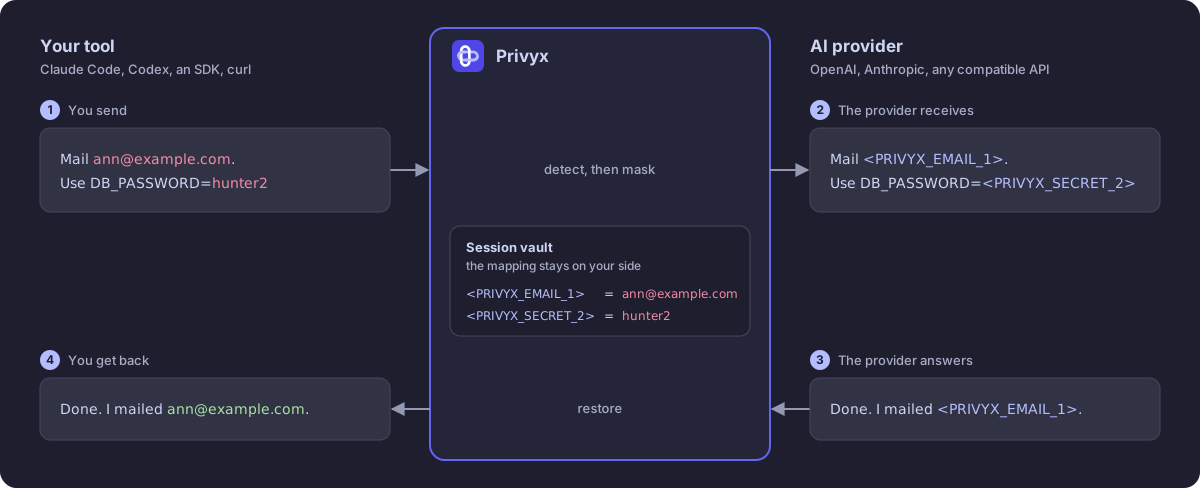
The model works with <PRIVYX_EMAIL_1>: it can reason about it, repeat it,
and hand it to a tool. The mapping back to the real value stays with Privyx.
More in How it works.
Who it is for
- You use a coding agent. Claude Code, Codex, or aider reads your
.env, your logs, and your git history, and sends them to a provider. Coding agents - You build an application. Your prompts carry your users' data. Keep it out of them with the OpenAI or Anthropic SDK, LangChain, LlamaIndex, LiteLLM, or the Vercel AI SDK. An app on the OpenAI or Anthropic SDK
- You run a gateway for a team. One proxy for everyone, with a shared vault, TLS, and an audit trail. A shared gateway for a team
- You want to mask files. Logs, JSON, and datasets, in a script or in CI, without a proxy. Files and logs in a pipeline
What it does
- Masks secrets and personal data. Built-in patterns cover email addresses, phone numbers, card numbers, IP addresses, API keys, tokens, private keys, and passwords. Add your own word lists and patterns, or a detector that understands names: Presidio or an LLM.
- Restores the reply. In batch and streaming responses, in reasoning text, and in tool-call arguments, so your tools receive real values.
- Drops in. It speaks OpenAI Chat Completions and Responses and Anthropic Messages, so SDKs, frameworks, and coding tools only need a base URL.
- Keeps sessions your way. One mapping per request, per client, or per conversation, in memory, SQLite, or Redis.
- Shows what it did. A PII-safe audit trail and Prometheus metrics count what was masked, without recording any of it.
- Fails closed. A request it cannot mask is not forwarded.
- Extends. Plugins add detectors, operators, policies, vaults, and providers.
What it does not do
Privyx reduces what a provider sees. It does not make a prompt safe by itself:
- Names, organizations, and project terms are only masked once you configure a word list or a detector for them.
- Only chat requests are masked. Other API paths, such as embeddings, are forwarded as the client sent them, unless you tell Privyx to refuse them.
- Images, audio, and other binary content are not inspected.
- The proxy has no authentication of its own. Keep it on
127.0.0.1, or put something in front of it that authenticates callers.
Limitations has the full list, and the threat model says what Privyx protects against.
Documentation
The documentation is at ohp1x.github.io/privyx:
- Quickstart and tutorials
- Guides to detection, masking, sessions, and deployment
- Integrations with providers and frameworks
- Reference for configuration, the CLI, and errors
- Troubleshooting and the FAQ
Its source is in docs/.
Project
Privyx is in its 0.1.x series; the
changelog lists what
each release changed.
- Questions and ideas: Discussions
- Bugs: Issues
- Security: report privately; see the security policy
- Contributing: CONTRIBUTING.md
License
1 maintainer

Metadata
1 maintainer
Release files for privyx 0.1.15
For a detailed explanation of source distributions (sdists) and built distributions (wheels), please see the package formats documentation.
Source distribution (sdist)
| File | Size | Uploaded | |
|---|---|---|---|
| privyx-0.1.15.tar.gz | 1.4 MB | Details |
Built distribution (wheel)
| File | Interpreter | ABI | Platform | Reset |
|---|---|---|---|---|
| privyx-0.1.15-py3-none-any.whl | Python 3 | none | any | Details |
Total release size: 1.6 MB
Release files / privyx-0.1.15.tar.gz
| Download URL | privyx-0.1.15.tar.gz |
|---|---|
| Size | 1.4 MB |
| Tags | Source |
|
SHA-256 checksum How to use checksums |
2f8829d2053a2dd1a96ed4ff554937153d892b7f2b4d6e25562cc6d104788653
|
|
BLAKE2b-256 checksum How to use checksums |
637f541ae670a6feed0e450d7e9f9dd2f3dfcdfa4477e88ee1eb559477a294b0
|
| Upload date | |
|
Uploaded using Trusted Publishing? What is trusted publishing? |
Yes |
| Uploaded via |
twine/7.0.0 CPython/3.13.14
|
Provenance
Provenance describes where a file came from. On PyPI, provenance is shared via attestations, which provide a verifiable record of the build or publishing details. View details, limitations and caveats.


PyPI Publish Attestation
PyPI verified that this artifact, at this checksum, originated from the publisher listed below.
Signed by GitHub Actions, verified by PyPI on Oct 3, 2026.
Transparency logRelease files / privyx-0.1.15-py3-none-any.whl
| Download URL | privyx-0.1.15-py3-none-any.whl |
|---|---|
| Size | 185.9 kB |
| Tags | Python 3 |
|
SHA-256 checksum How to use checksums |
57fe98f71903e0d0d6e77807880ee070e6b72b1e3939ef61ebb39480bdfcdfbd
|
|
BLAKE2b-256 checksum How to use checksums |
7011dece1075283d12505d86c026a224bd66b9f3b1b85d28b9d12fefbcee6aef
|
| Upload date | |
|
Uploaded using Trusted Publishing? What is trusted publishing? |
Yes |
| Uploaded via |
twine/7.0.0 CPython/3.13.14
|
Provenance
Provenance describes where a file came from. On PyPI, provenance is shared via attestations, which provide a verifiable record of the build or publishing details. View details, limitations and caveats.
PyPI Publish Attestation
PyPI verified that this artifact, at this checksum, originated from the publisher listed below.
Signed by GitHub Actions, verified by PyPI on Oct 3, 2026.
Transparency log













