
Benchmark utilities and environments for evaluating multimodal LLMs' proactiveness.

Project description
ProactiveBench


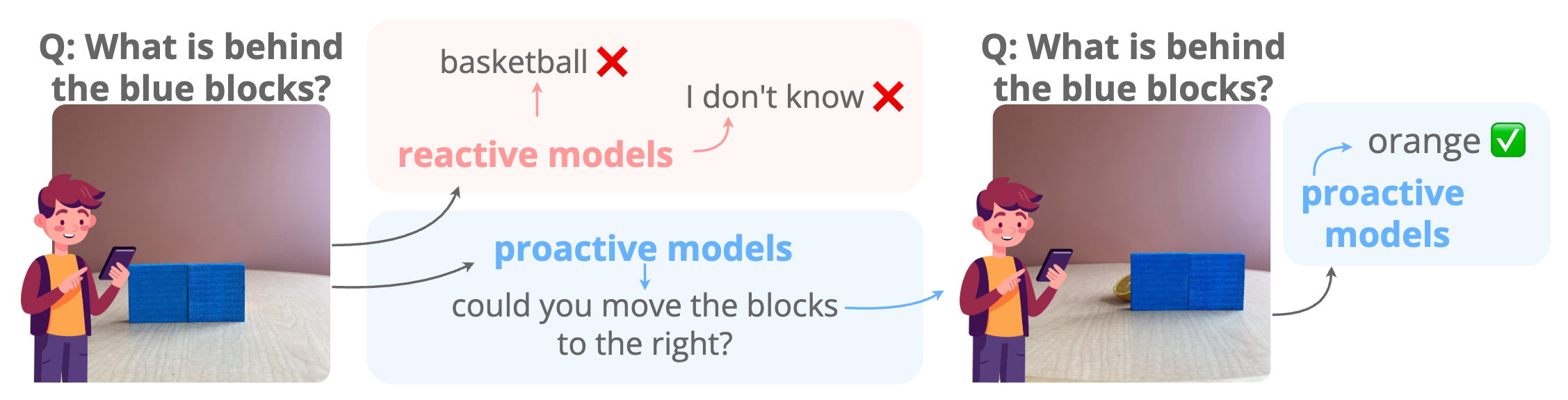
Abstract. Effective collaboration begins with knowing when to ask for help. For example, when trying to identify an occluded object, a human would ask someone to remove the obstruction. Can MLLMs exhibit a similar “proactive” behavior by requesting simple user interventions? To investigate this, we introduce ProactiveBench, a benchmark built from seven repurposed datasets that tests proactiveness across different tasks such as recognizing occluded objects, enhancing image quality, and interpreting coarse sketches. We evaluate 22 MLLMs on ProactiveBench, showing that (i) they generally lack proactiveness; (ii) proactiveness does not correlate with model capacity; (iii) “hinting” at proactiveness yields only marginal gains. Surprisingly, we found that conversation histories and in-context learning introduce negative biases, hindering performance. Finally, we explore a simple fine-tuning strategy based on reinforcement learning: its results suggest that proactiveness can be learned, even generalizing to unseen scenarios. We will publicly release ProactiveBench as a first step toward building proactive multimodal models.
Setup
Install the package:
pip install proactivebench
Download the benchmark data from Hugging Face, then extract the test archives:
cd ProactiveBench/test
for archive in *.zip; do unzip -o "$archive"; done
Point data_dir to the test/ directory. It should contain the extracted dataset folders and the *_preprocessed.jsonl files.
Evaluation
Two evaluation modes are supported: multiple-choice (MCQA) and open-ended generation (OEG).
Rather than providing a self-contained codebase to run our evaluation on any model, which would not scale well and would require constant maintenance, we provide two concrete examples in the proactivebench/tests directory using LLaVA-OneVision.
These serve as a starting point for evaluating any model on ProactiveBench by loading the target model in place of LLaVA-OV.
Multiple-choice (MCQA)
The provided example can be run via:
python -m proactivebench.tests.mcqa
Output:
model acc: XX.X% - ps rate: X.X
acc = category accuracy; ps rate = average proactive suggestions rate before resolution.
Open-ended generation (OEG)
Similarly, the OEG example can be run via:
python -m proactivebench.tests.oeg
Note that the OEG test script assumes two GPUs: one for the model being evaluated and one for the judge.
Tip: Generate all answers first, then run the judge separately.
How it works
The core abstraction is an environment that wraps each sample. It tracks which image the model sees, what actions are available, and whether the model's response constitutes a correct prediction or a proactive suggestion (e.g. requesting a different view or a later frame before committing to an answer).
A minimal evaluation loop for MCQA looks like:
from proactivebench.data_utils import (
    apply_conversation_template,
    apply_multi_choice_template,
    load_image,
    load_proactivebench_dataset,
)
from proactivebench.environment import get_environment

dataset = load_proactivebench_dataset("/path/to/ProactiveBench/test", "ImageNet-C")
Environment = get_environment(dataset="ImageNet-C")

sample = dataset[0]
env = Environment(entry=sample, data_dir=DATA_DIR)

while not env.stop:
    state = env.get_state(hint=False)

    # build MCQA template
    # load image
    # prepare input tokens

    generated_ids = model.generate(**input_, max_new_tokens=50)
    generated_answer = processor.decode(
        generated_ids[0][prompt_length:],
        skip_special_tokens=True,
        clean_up_tokenization_spaces=True,
    )

stats = env.get_statistics()
print("correct prediction:", stats["correct_prediction"], "ps rate", stats["num_turns"] - 1)
Similarly for OEG:
from proactivebench.data_utils import (
    apply_conversation_template,
    apply_multi_choice_template,
    load_image,
    load_proactivebench_dataset,
)
from proactivebench.environment import get_environment
from proactivebench.open_ended_gen import get_oeg_judge_messages, parse_judge_prediction

dataset = load_proactivebench_dataset("/path/to/ProactiveBench/test", "ImageNet-C")
Environment = get_environment(dataset="ImageNet-C")

sample = dataset[0]
env = Environment(entry=sample, data_dir=DATA_DIR)
state = env.get_state(hint=False)

# load image
# prepare input tokens

generated_ids = model.generate(**input_, max_new_tokens=2**15, do_sample=True)
generated_answer = processor.decode(
    generated_ids[0][prompt_length:],
    skip_special_tokens=True,
    clean_up_tokenization_spaces=True,
)

judge_prompt = get_oeg_judge_messages(
    state["prompt"], env.get_open_ended_gen_answers(), generated_answer
)

# prepare judge input
# generate an answer

result = parse_judge_prediction(
    env.get_open_ended_gen_answers(),
    judge_generated_answer,
    "ImageNet-C",
)

print("correct prediction:", result["correct_prediction"], "ps rate", result["proactive_suggestion"], "aggregate", result["aggregate"])
See the provided examples for full implementations.
Training data
The training split used for post-training via GRPO is available directly through Hugging Face datasets:
from datasets import load_dataset
train_dataset = load_dataset("tdemin16/ProactiveBench", split="train")
Acknowledgements
We acknowledge the CINECA award under the ISCRA initiative for the availability of high-performance computing resources and support. This work is supported by the EU projects ELIAS (No.01120237) and ELLIOT (101214398). Thomas De Min is funded by NextGeneration EU. We thank the Multimedia and Human Understanding Group (MHUG) and the Fundamental AI LAB (FunAI) for their valuable feedback and insightful suggestions.
Contacts
Please do not hesitate to file an issue or contact me at thomas.demin@unitn.it if you find errors or bugs or if you need further clarification.
Release history Release notifications | RSS feed


Download files
Download the file for your platform. If you're not sure which to choose, learn more about installing packages.
Source Distribution
Built Distribution
Filter files by name, interpreter, ABI, and platform.
If you're not sure about the file name format, learn more about wheel file names.
Copy a direct link to the current filters
File details
Details for the file proactivebench-0.1.0.tar.gz.
File metadata
- Download URL: proactivebench-0.1.0.tar.gz
- Upload date:
- Size: 37.2 kB
- Tags: Source
- Uploaded using Trusted Publishing? No
- Uploaded via: uv/0.6.12
File hashes
| Algorithm | Hash digest | |
|---|---|---|
| SHA256 |
096a233e235e2bb75740842bb4cc31af0b2ee836cd45360ff6cc68eef7198f51
|
|
| MD5 |
f7d4ff2983ca9bd038c2d391cf2253af
|
|
| BLAKE2b-256 |
b9a03d6638ca78170d749a13b1d28355a33d62ab3f4f0fa9a9577b578b9561c8
|
File details
Details for the file proactivebench-0.1.0-py3-none-any.whl.
File metadata
- Download URL: proactivebench-0.1.0-py3-none-any.whl
- Upload date:
- Size: 36.4 kB
- Tags: Python 3
- Uploaded using Trusted Publishing? No
- Uploaded via: uv/0.6.12
File hashes
| Algorithm | Hash digest | |
|---|---|---|
| SHA256 |
21eaf7aa0023e74d7f9de1a83bd762795256109f13005e20241d94e0fd97eb9b
|
|
| MD5 |
0743c018f3845e613606d9f204be8f91
|
|
| BLAKE2b-256 |
4898b38e82e4e515555af201f6a97df5992f9a9b748f29064c95bbdfc38ebcae
|






