
probixi - Self-Calibrating (PROB)ab(I)listic Peak Detection for Serial (X)-Ray Crystallograph(I)c Data











probixi proposes that bragg peaks can be found/recovered from a detector image by observing the background noise distributional shape over time, per pixel, and collecting peak candidates from an outlier set. Since this noise model is determined in an unsupervised fashion, the user does not need to tune hyperparameters for finding peaks. We are still testing robustness to different types of data collection (synchrotron, FEL) and random fluence changes.
Installing the Package
You can install via Pypi with pip:
pip install probixi
Or the latest development version with
pip install git+https://github.com/ryan-odea/probixi.git
Using probixi
probixi can be interacted with either via the command line interface, or through the python API. In its current implementation, via python, the Probixi API returns iterables, which remain on a GPU tensor via pytorch up until collection - meaning that you can further pass information for any downstream processing. Through the CLI, this is currently a one-stop-shop for peakfinding and indexing. This may change in the future
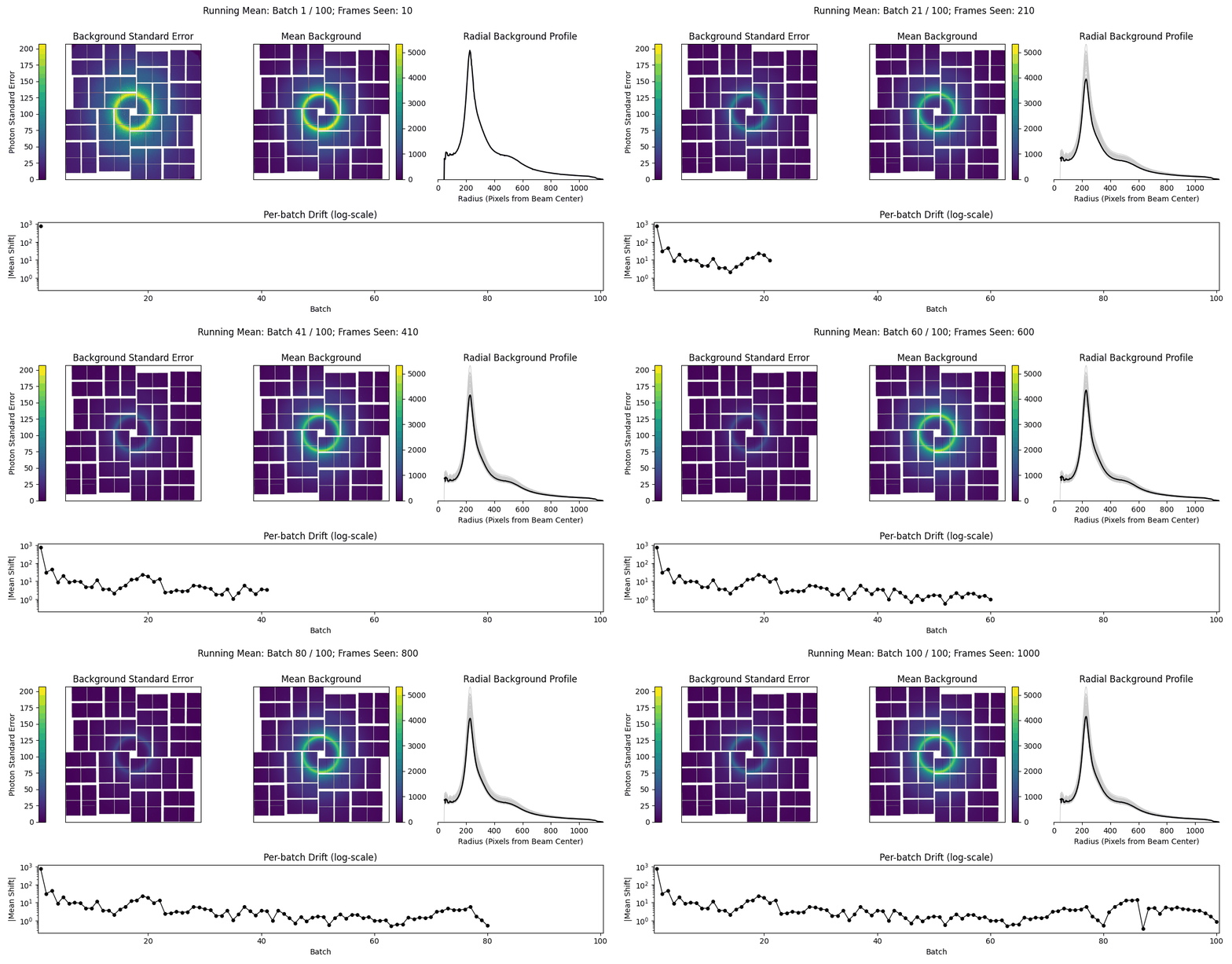
probixi also has a 'burn-in' phase, where the noise model reaches some stable point, this can be further interrogated with a handy gif.
Via the CLI:
probixi -i files.lst -g myGeometry.geom -p myCell.cell -o stream.stream --device cuda --gif myNoiseModel.gif
Or with python:
import torch

from probixi import Probixi, DataOffloader

pipeline = Probixi(
    list_file="files.lst",
    geometry_file="myGeometry.geom",
    cell_file="myCell.cell",
    device=torch.device("cuda"),
)

pipeline.noise_diagnostics("myNoiseModel.gif", stop=32)
cal = pipeline.calibrate(n_seed=1636)
print(f"kappa={cal.kappa:.2f}  prior_peak={cal.prior_peak:.4f}  "
      f"threshold={pipeline.threshold_calibration.threshold:.2f}")

# Stream every frame through detect -> index -> predict + integrate. The stream
# is lazy and each result stays on the GPU until you touch it, so you can branch
# off any downstream processing with torch
with DataOffloader(
    "stream.stream",
    geometry=pipeline.geometry,
    cell=pipeline.target_cell,
    geometry_file="myGeometry.geom",
    files=pipeline.metadata.files,
) as off:
    for result in pipeline.index_stream(pipeline.frames(), batch_size=8):
        off.write(result)  # or: pipeline.index_stream(...).to_stream(off)
        print(f"frame {result.frame_index}: "
              f"{result.n_indexed}/{result.n_peaks} indexed (rmsd {result.rmsd:.4f})")
DuckDB output
The .stream format is convenient for interop (e.g. partialator), but querying a
run means re-parsing a large text file. probixi can instead write a
DuckDB database. Please note this may be the default in the future.
probixi -i files.lst -g myGeometry.geom -p myCell.cell -o run.duckdb --device cuda
Or with python:
stream = pipeline.index_stream(pipeline.frames(), batch_size=8)
stream.to_db(
    "run.duckdb",
    geometry=pipeline.geometry,
    cell=pipeline.target_cell,
    geometry_file="myGeometry.geom",
    files=pipeline.metadata.files,
)
The database holds run metadata as small tables (geometry, panels, cell) plus:
frames— keyframe_id(a hash offilename//event) with additional per-frame informationreflections— the integrated Miller indices (h k l,I,sigma,peak,background,fs/ss, panel, resolution)peaks— the peak-search results per frame
Resolving indexing ambiguity
When the lattice symmetry is higher than the structure's point group, each crystal can
be indexed in more than one way. probixi-resolve clusters the crystals in a database
into the two choices and reindexes the ones on the wrong side -- an implementation of
CrystFEL's ambigator, created by Thomas White, in torch/Triton.
probixi-resolve -i run.duckdb -y 3 -w 321 -o detwinned.duckdb
Without -o the database is rewritten in place. Reindexing transforms reflections
h k l along with the matching crystals reciprocal axes and cell parameters, and
records every assignment in an ambiguity table. The same thing from python:
from probixi import Ambigator

amb = Ambigator("run.duckdb", symmetry="3", apparent="321")
result = amb.resolve()
print(f"{result.n_reindexed}/{len(result)} crystals reindexed")
amb.reindex(result, output="detwinned.duckdb")
Using probixi as only a peakfinder
Of course, if you only want to use probixi as a peakfinder and prefer to use your own indexing regime, this is possible -- through the CLI's --peaks-only flag or the Python API's peak_stream.
Via the CLI:
probixi -i files.lst -g myGeometry.geom -o peaks.stream --peaks-only --device cuda
Or with python:
import torch

from probixi import Probixi, PeakOffloader

pipeline = Probixi(
    list_file="files.lst",
    geometry_file="myGeometry.geom",
    device=torch.device("cuda"),
)

# Calibrate the noise model + detection threshold on the seed frames, as usual.
pipeline.calibrate(n_seed=1636)

peaks = pipeline.peak_stream(pipeline.frames(), estimate_scale=False)
with PeakOffloader(
    "peaks.stream",
    geometry=pipeline.geometry,
    geometry_file="myGeometry.geom",
    files=pipeline.metadata.files,
) as off:
    for result in peaks:
        if len(result):       # skip blanks; export only frames with peaks
            off.write(result)
Dependencies
- python >= 3.9
- click
- h5py
- hdf5plugin
- numpy
- torch
- matplotlib
- pillow
- duckdb
Contributing
There are many different ways to contribute to further development of this tool. If you experience a bug or would like an additional feature, please open up a ticket.
If you would like to contribute actively by merging code, please open a PR with the following:
- Code is formatted with
isort, thenblack, followed by aruff --check. This will initiate on PR, so it might be best to check beforehand. - Docstrings are minimally on user-facing functions in
numpystyle. - Comments, or some explanation (in PR) for the additions, limited to the scope of the project. If fixing a bug, comments should be included in the PR rather than the code itself.
1 maintainer

Metadata
1 maintainer
Release files for probixi 0.7.3
For a detailed explanation of source distributions (sdists) and built distributions (wheels), please see the package formats documentation.
Source distribution (sdist)
| File | Size | Uploaded | |
|---|---|---|---|
| probixi-0.7.3.tar.gz | 17.3 MB | Details |
Built distribution (wheel)
| File | Interpreter | ABI | Platform | Reset |
|---|---|---|---|---|
| probixi-0.7.3-py3-none-any.whl | Python 3 | none | any | Details |
Total release size: 17.5 MB
Release files / probixi-0.7.3.tar.gz
| Download URL | probixi-0.7.3.tar.gz |
|---|---|
| Size | 17.3 MB |
| Tags | Source |
|
SHA-256 checksum How to use checksums |
9ea4c0ee546ce89c30e7805fad8a9fe53eb4aaa539825c79da77458fb31b3768
|
|
BLAKE2b-256 checksum How to use checksums |
068a614deef05a0e0c2b6965e9681f8290276e4d4d238ed5d4e3352d3d9de357
|
| Upload date | |
|
Uploaded using Trusted Publishing? What is trusted publishing? |
Yes |
| Uploaded via |
twine/7.0.0 CPython/3.13.14
|
Provenance
Provenance describes where a file came from. On PyPI, provenance is shared via attestations, which provide a verifiable record of the build or publishing details. View details, limitations and caveats.


PyPI Publish Attestation
PyPI verified that this artifact, at this checksum, originated from the publisher listed below.
Signed by GitHub Actions, verified by PyPI on Oct 1, 2026.
Transparency logRelease files / probixi-0.7.3-py3-none-any.whl
| Download URL | probixi-0.7.3-py3-none-any.whl |
|---|---|
| Size | 166.8 kB |
| Tags | Python 3 |
|
SHA-256 checksum How to use checksums |
d9abbdebfb4df33664b19d16f7f1d001063d7a11d50c34a88e68894382137055
|
|
BLAKE2b-256 checksum How to use checksums |
ebe36db7130aaef4abd95ad9eaa446603903a1eebb6b4672acbd59f6b2d0b7ff
|
| Upload date | |
|
Uploaded using Trusted Publishing? What is trusted publishing? |
Yes |
| Uploaded via |
twine/7.0.0 CPython/3.13.14
|
Provenance
Provenance describes where a file came from. On PyPI, provenance is shared via attestations, which provide a verifiable record of the build or publishing details. View details, limitations and caveats.
PyPI Publish Attestation
PyPI verified that this artifact, at this checksum, originated from the publisher listed below.
Signed by GitHub Actions, verified by PyPI on Oct 1, 2026.
Transparency log













