
Automatic learning rate optimiser based on Prodigy and Schedule-Free

Project description
Prodigy + ScheduleFree
Eliminating hyperparameters, one commit at a time.
Current status: Experimental
Details
An optimiser based on Prodigy that includes schedule-free logic and much, much lower memory usage, the aim being to remove the need to set any hyperparameters. Of course, that's never the case with any optimiser, but hopefully, this comes close!
Hyperparameters eliminated: Learning rate (Prodigy), LR scheduler (ScheduleFree), epsilon (Adam-atan2, optional, not enabled by default). Still working on betas and weight decay, though those are much harder.
Based on code from:
Incorporates improvements from these pull requests (credit to https://github.com/dxqbYD and https://github.com/sangoi-exe):
- https://github.com/konstmish/prodigy/pull/23
- https://github.com/konstmish/prodigy/pull/22
- https://github.com/konstmish/prodigy/pull/20
As with the reference implementation of schedule-free, a constant scheduler should be used, along with the appropriate
calls to train() and eval(). See the schedule-free documentation for more details: https://github.com/facebookresearch/schedule_free
If you do use another scheduler, linear or cosine is preferred, as a restarting scheduler can confuse Prodigy's adaptation logic.
Leave lr set to 1 unless you encounter instability. Do not use with gradient clipping, as this can hamper the
ability for the optimiser to predict stepsizes. Gradient clipping/normalisation is already handled in the following configurations:
use_stableadamw=True,eps=1e8(or any reasonable positive epsilon. This is the default.)eps=None(Adam-atan2, scale invariant, but can mess with Prodigy's stepsize calculations in some scenarios)
A new parameter, beta4, allows d to be updated via a moving average, rather than being immediately updated. This can help
smooth out learning rate adjustments. Values of 0.9-0.99 are recommended if trying out the feature. If set to None, the
square root of beta1 is used, while a setting of 0 (the default) disables the feature.
By default, split_groups is set to True, so each parameter group will have its own adaptation values. So if you're training
different networks together, they won't contaminate each other's learning rates. The disadvantage of this approach is that some
networks can take a long time to reach a good learning rate when trained alongside others (for example, SDXL's Unet).
It's recommended to use a higher d0 (1e-5, 5e-5, 1e-4) so these networks don't get stuck at a low learning rate.
For Prodigy's reference behaviour, which lumps all parameter groups together, set split_groups to False.
To reduce memory usage, you can set factored to True. This uses low-rank approximations for the second moment, much like Adafactor. There
should be little to no difference in training performance, but your mileage may vary.
The optimiser also supports fused backward pass to significantly lower
gradient memory usage. The fused_back_pass argument must be set to True so the optimiser knows not to perform the regular step. Please note however that
your training scripts / UI of choice must support the feature for generic optimisers -- as of November 2024, popular trainers such as OneTrainer and Kohya
hard-code which optimisers have fused backward pass support, and so this optimiser's fused pass will not work out of the box with them.
In some scenarios, it can be advantageous to freeze Prodigy's adaptive stepsize after a certain number of steps. This
can be controlled via the prodigy_steps settings. It's been suggested that all Prodigy needs to do is achieve "escape velocity"
in terms of finding a good LR, which it usually achieves after ~25% of training, though this is very dependent on batch size and epochs.
This setting can be particularly helpful when training diffusion models, which have very different gradient behaviour than what most optimisers are tuned for. Prodigy in particular will increase the LR forever if it is not stopped or capped in some way (usually via a decaying LR scheduler).
Recommended usage
First, try using the optimiser with factored set to True. If you don't encounter problems, great, you can enjoy the optimiser with significantly less memory usage!
Otherwise, stick with the default settings.
The schedule-free component of the optimiser works best with a constant learning rate. In most cases, Prodigy will find the optimal learning rate within the first 25% of training, after which it may continue to increase the learning rate beyond what's best.
It is strongly recommended to set prodigy_steps equal to 25% of your
total step count, though you can experiment with values as little as 5-10%, depending on the model and type of training. The best way to figure out the best value
is to monitor the d value(s) during a training run.
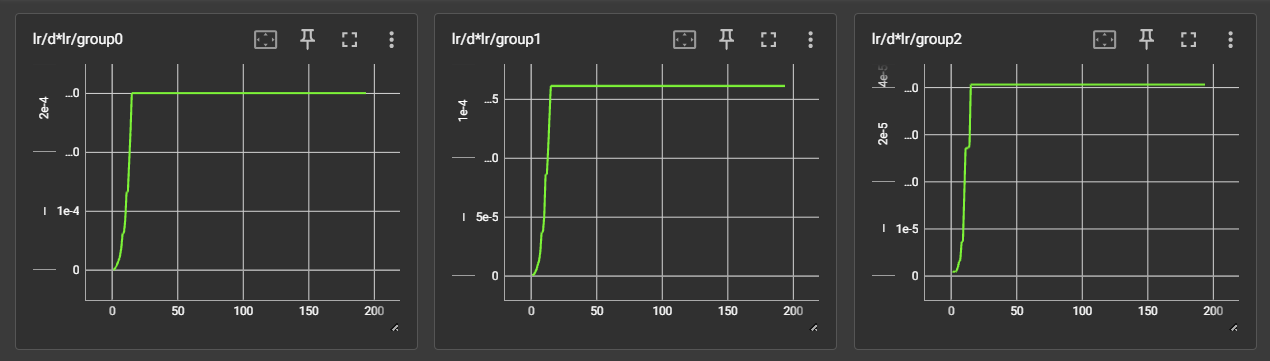
Here is an example of an SDXL LoRA run. From left to right are the d values (essentially the learning rate predicition) for TE1, TE2 and the Unet.
In this run, prodigy_steps was set to 20, as the optimal LR was found around step 15.
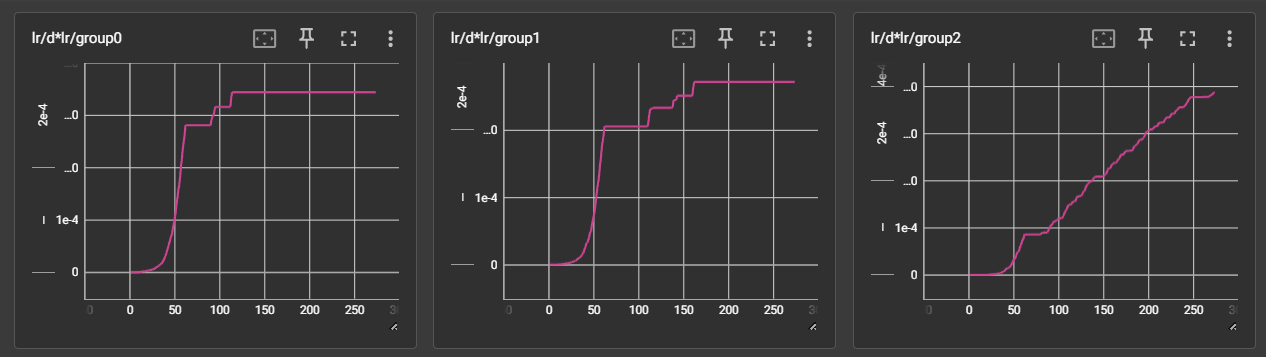
This image shows a different run with the same dataset, but with prodigy_steps set to 0. While the text encoders were mostly stable, the Unet LR continued to grow throughout training.
Release history Release notifications | RSS feed


Download files
Download the file for your platform. If you're not sure which to choose, learn more about installing packages.
Source Distribution
Built Distribution
Filter files by name, interpreter, ABI, and platform.
If you're not sure about the file name format, learn more about wheel file names.
Copy a direct link to the current filters
File details
Details for the file prodigy_plus_schedule_free-1.4.1.tar.gz.
File metadata
- Download URL: prodigy_plus_schedule_free-1.4.1.tar.gz
- Upload date:
- Size: 14.4 kB
- Tags: Source
- Uploaded using Trusted Publishing? No
- Uploaded via: twine/5.1.1 CPython/3.10.11
File hashes
| Algorithm | Hash digest | |
|---|---|---|
| SHA256 |
942867db765a953244b4c67a392d7f26c579d70c0251f67c71bd47e2c52294f5
|
|
| MD5 |
8347ff3ec39897d84e2779cd61723644
|
|
| BLAKE2b-256 |
fe035ce2ddfbb2aa7fd2b54dada8a6b4babf6a3d6c2e69a474fa8ecf3870d6c2
|
File details
Details for the file prodigy_plus_schedule_free-1.4.1-py3-none-any.whl.
File metadata
- Download URL: prodigy_plus_schedule_free-1.4.1-py3-none-any.whl
- Upload date:
- Size: 15.7 kB
- Tags: Python 3
- Uploaded using Trusted Publishing? No
- Uploaded via: twine/5.1.1 CPython/3.10.11
File hashes
| Algorithm | Hash digest | |
|---|---|---|
| SHA256 |
ec1de697a8e0ba51cf241644640abb5f55516ce9865098979dd7045c2be10db4
|
|
| MD5 |
53964c09be56e340305f113f7e4f8e2c
|
|
| BLAKE2b-256 |
a83aa54a1bed65d58f0146582721e69eee2e9c136275f389fbb9862b335867e4
|






