
Producer CLI
A command-line tool for AI music generation using the Producer service via AceDataCloud API.
Get your Ace Data Cloud API key
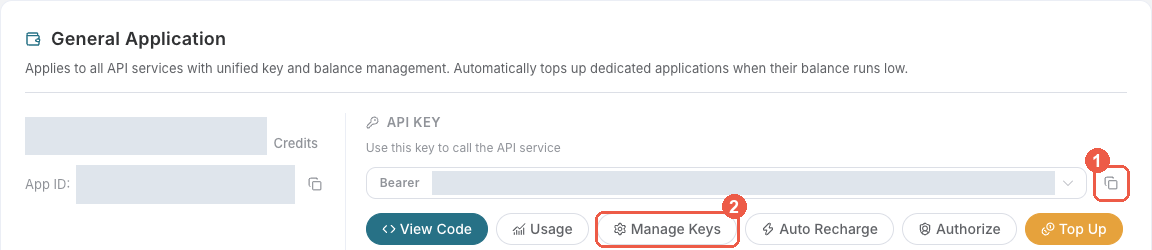
- Open Ace Data Cloud → Applications. Sign in, or register an account first.
- Find General application. If it has not been created, choose Initialize General Application. A general key can use the services available to your account; a dedicated application's key is limited to its service. Check the required service/model access and current pricing.
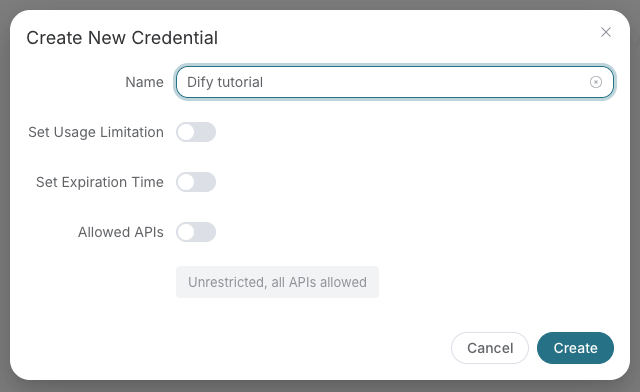
- Copy the API Key from the application card, or open Keys / Manage Keys → Create to create a separate key for this integration. Give it a recognizable name so you can revoke or rotate it independently.
- When creating a key, review Expiration Time, Set Usage Limitation, and Allowed APIs. Enable only the restrictions you need, allow the operations you will call, then click Create and copy the token from the key list. Task lookup does not grant permission to submit a generation. Confirm the application's balance can cover your first request; any trial allowance is whatever your account currently displays.
- Copy only the token value, without quotation marks, spaces, or
Bearer. An API Key / API Token field expects this raw value; only a manually configured HTTPAuthorizationheader needs theBearerprefix. Aplatform-...account-management token cannot replace a generation API key.
Save the key in the client's credential store or the environment variable shown below. Never put it in a prompt, shared workflow, screenshot, or Git commit. If authentication fails, check the full copied value, application/service access, expiration, usage limit, and balance before creating another key.
Installation
pip install producer-cli
Usage
# Set your API token
export ACEDATACLOUD_API_TOKEN=your_token

# Generate a music track
producer generate "A happy upbeat pop song about summer"

# Generate with a specific model
producer generate "Dark metal with heavy guitar riffs" -m "FUZZ-2.0 Pro"

# Generate an instrumental track
producer generate "Epic orchestral battle theme" --instrumental

# Generate lyrics
producer lyrics "A love song about the ocean at sunset"

# Create a cover of an existing track
producer cover abc123-def456

# Extend an existing track
producer extend abc123-def456 --continue-at 30.5

# Generate a variation
producer variation abc123-def456

# Swap vocals
producer swap-vocals abc123-def456

# Swap instrumentals
producer swap-instrumentals abc123-def456

# Replace a section
producer replace-section abc123 --replace-section-start 10 --replace-section-end 30

# Extract stems
producer stems abc123-def456

# Upload audio from URL
producer upload https://example.com/my-audio.mp3

# Generate video from audio
producer video abc123-def456

# Get WAV format
producer wav abc123-def456

# Check task status
producer task abc123-def456

# Wait for task completion
producer wait abc123-def456

# List available models
producer models

# Show configuration
producer config
Authentication
Set your API token via the ACEDATACLOUD_API_TOKEN environment variable or use the --token option:
producer --token your_token generate "A happy song"
License
MIT
1 maintainer

Metadata
1 maintainer
Release files for producer-cli 2026.10.12.2
For a detailed explanation of source distributions (sdists) and built distributions (wheels), please see the package formats documentation.
Source distribution (sdist)
| File | Size | Uploaded | |
|---|---|---|---|
| producer_cli-2026.10.12.2.tar.gz | 16.2 kB | Details |
Built distribution (wheel)
| File | Interpreter | ABI | Platform | Reset |
|---|---|---|---|---|
| producer_cli-2026.10.12.2-py3-none-any.whl | Python 3 | none | any | Details |
Total release size: 32.8 kB
Release files / producer_cli-2026.10.12.2.tar.gz
| Download URL | producer_cli-2026.10.12.2.tar.gz |
|---|---|
| Size | 16.2 kB |
| Tags | Source |
|
SHA-256 checksum How to use checksums |
bb875a5e5c95d89fa4ceff945c1acb8aa6a400fbe02d9136abdf343a5ce237f4
|
|
BLAKE2b-256 checksum How to use checksums |
8c2b3f354995b09946b84cd70738f0e1a8c0f75539f2c7f084fe9facfbd1d89e
|
| Upload date | |
|
Uploaded using Trusted Publishing? What is trusted publishing? |
No |
| Uploaded via |
twine/6.0.1 CPython/3.12.3
|
Release files / producer_cli-2026.10.12.2-py3-none-any.whl
| Download URL | producer_cli-2026.10.12.2-py3-none-any.whl |
|---|---|
| Size | 16.6 kB |
| Tags | Python 3 |
|
SHA-256 checksum How to use checksums |
47b2f7b7c0c2e16fc22ada70a159d7adcc6e9797bb249d5504c8a25e46b9b943
|
|
BLAKE2b-256 checksum How to use checksums |
e43c961cd3ddb0d0a5817a8bd42ff756548466d5c33dd20c628d2d71eb34327a
|
| Upload date | |
|
Uploaded using Trusted Publishing? What is trusted publishing? |
No |
| Uploaded via |
twine/6.0.1 CPython/3.12.3
|













