
Table-based exploration tool for Python profiling data (pstats files).
Verified details
These details have been verified by PyPIProject links
GitHub Statistics
Maintainers

Project description





Table-based exploration tool for Python profiling data (pstats files).
Get better at command line Git with my book Boost Your Git DX.
Requirements
Python 3.10 to 3.14 supported.
Installation
Install with pip:
python -m pip install profiling-explorer
Usage
profiling-explorer reads pstats files as generated by Python’s profilers: profiling.tracing (called cProfile on Python < 3.15) and profiling.sampling (new in Python 3.15). To use it, first generate a profile file, for example by running your program under cProfile:
$ python -m cProfile -o example.pstats example.py(Also runnable as python -m profiling.tracing instead on Python 3.15+.)
Then run profiling-explorer with the generated file:
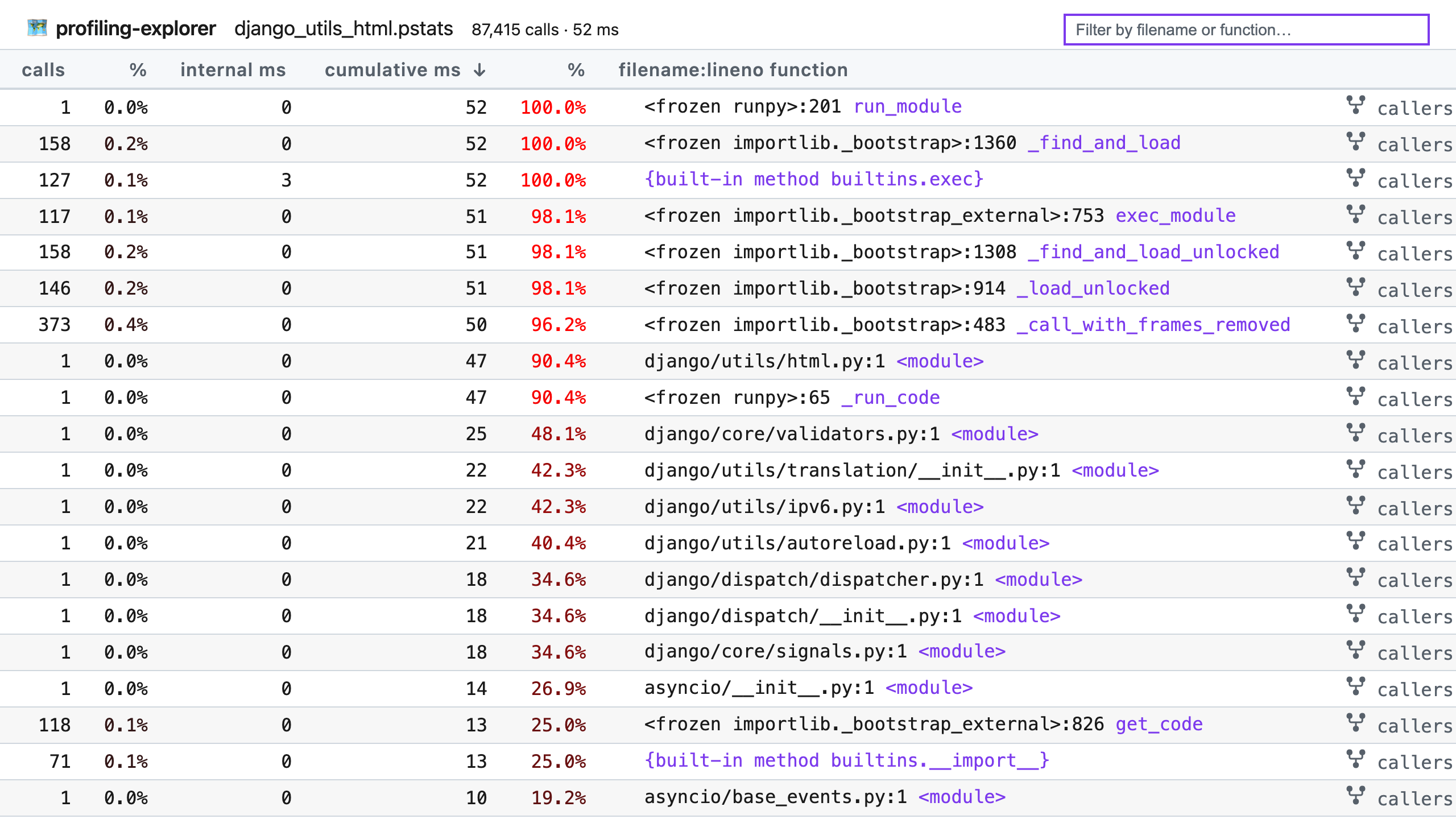
$ profiling-explorer example.pstatsThe report will open in your web browser, and you can explore the profile data with the interactive interface. Features:
Click the calls, internal ms, or cumulative ms column headers to sort by that column.
Use the search box to filter by filename or function name.
Hover by a filename + line number pair to reveal the copy button, which copies the location to your clipboard for faster opening.
Click the callers or callees links on the right of a row to see the callers or callees of that function.
Full help:
usage: profiling-explorer [-h] [--port PORT] [--dev] FILE

positional arguments:
  FILE         The pstats data file to explore.

options:
  -h, --help   show this help message and exit
  --port PORT  Port for the local web server (default: 8099).
  --dev        Run in development mode (enables server reload and debug mode).
Project details
Verified details
These details have been verified by PyPIProject links
GitHub Statistics
Maintainers


Download files
Download the file for your platform. If you're not sure which to choose, learn more about installing packages.
Source Distribution
Built Distribution
Filter files by name, interpreter, ABI, and platform.
If you're not sure about the file name format, learn more about wheel file names.
Copy a direct link to the current filters
File details
Details for the file profiling_explorer-1.0.1.tar.gz.
File metadata
- Download URL: profiling_explorer-1.0.1.tar.gz
- Upload date:
- Size: 15.7 kB
- Tags: Source
- Uploaded using Trusted Publishing? Yes
- Uploaded via: twine/6.1.0 CPython/3.13.7
File hashes
| Algorithm | Hash digest | |
|---|---|---|
| SHA256 |
61ee7f36b741edd052285591b6139e32cb29bacbfb3364ce35640f25057bf2fd
|
|
| MD5 |
cc9cb1d2792d2c6ff1bbb2515f89fc9a
|
|
| BLAKE2b-256 |
f002aa6d6c42229e91ecd74855c7c958f22071ef4332bd214ad5ec31ad4b3c5d
|
Provenance
The following attestation bundles were made for profiling_explorer-1.0.1.tar.gz:
Publisher:
main.yml on adamchainz/profiling-explorer
-
Statement:
-
Statement type:
https://in-toto.io/Statement/v1 -
Predicate type:
https://docs.pypi.org/attestations/publish/v1 -
Subject name:
profiling_explorer-1.0.1.tar.gz -
Subject digest:
61ee7f36b741edd052285591b6139e32cb29bacbfb3364ce35640f25057bf2fd - Sigstore transparency entry: 1219331207
- Sigstore integration time:
-
Permalink:
adamchainz/profiling-explorer@db3d87ce816686c9f9e44a39c392f72fbd4fb851 -
Branch / Tag:
refs/tags/1.0.1 - Owner: https://github.com/adamchainz
-
Access:
public
-
Token Issuer:
https://token.actions.githubusercontent.com -
Runner Environment:
github-hosted -
Publication workflow:
main.yml@db3d87ce816686c9f9e44a39c392f72fbd4fb851 -
Trigger Event:
push
-
Statement type:
File details
Details for the file profiling_explorer-1.0.1-py3-none-any.whl.
File metadata
- Download URL: profiling_explorer-1.0.1-py3-none-any.whl
- Upload date:
- Size: 16.9 kB
- Tags: Python 3
- Uploaded using Trusted Publishing? Yes
- Uploaded via: twine/6.1.0 CPython/3.13.7
File hashes
| Algorithm | Hash digest | |
|---|---|---|
| SHA256 |
d7c3e7769955c2653c80ea40cc0bf1e058be3c40a4a37266098603435d5a8a2f
|
|
| MD5 |
710a37c7c9779adb272c5d848605b533
|
|
| BLAKE2b-256 |
515f398d6b1c0457f80971d792e0b886a1b196fe80624b10fc801144aef38d10
|
Provenance
The following attestation bundles were made for profiling_explorer-1.0.1-py3-none-any.whl:
Publisher:
main.yml on adamchainz/profiling-explorer
-
Statement:
-
Statement type:
https://in-toto.io/Statement/v1 -
Predicate type:
https://docs.pypi.org/attestations/publish/v1 -
Subject name:
profiling_explorer-1.0.1-py3-none-any.whl -
Subject digest:
d7c3e7769955c2653c80ea40cc0bf1e058be3c40a4a37266098603435d5a8a2f - Sigstore transparency entry: 1219331212
- Sigstore integration time:
-
Permalink:
adamchainz/profiling-explorer@db3d87ce816686c9f9e44a39c392f72fbd4fb851 -
Branch / Tag:
refs/tags/1.0.1 - Owner: https://github.com/adamchainz
-
Access:
public
-
Token Issuer:
https://token.actions.githubusercontent.com -
Runner Environment:
github-hosted -
Publication workflow:
main.yml@db3d87ce816686c9f9e44a39c392f72fbd4fb851 -
Trigger Event:
push
-
Statement type:






