





Table-based exploration tool for Python profiling data (pstats files).
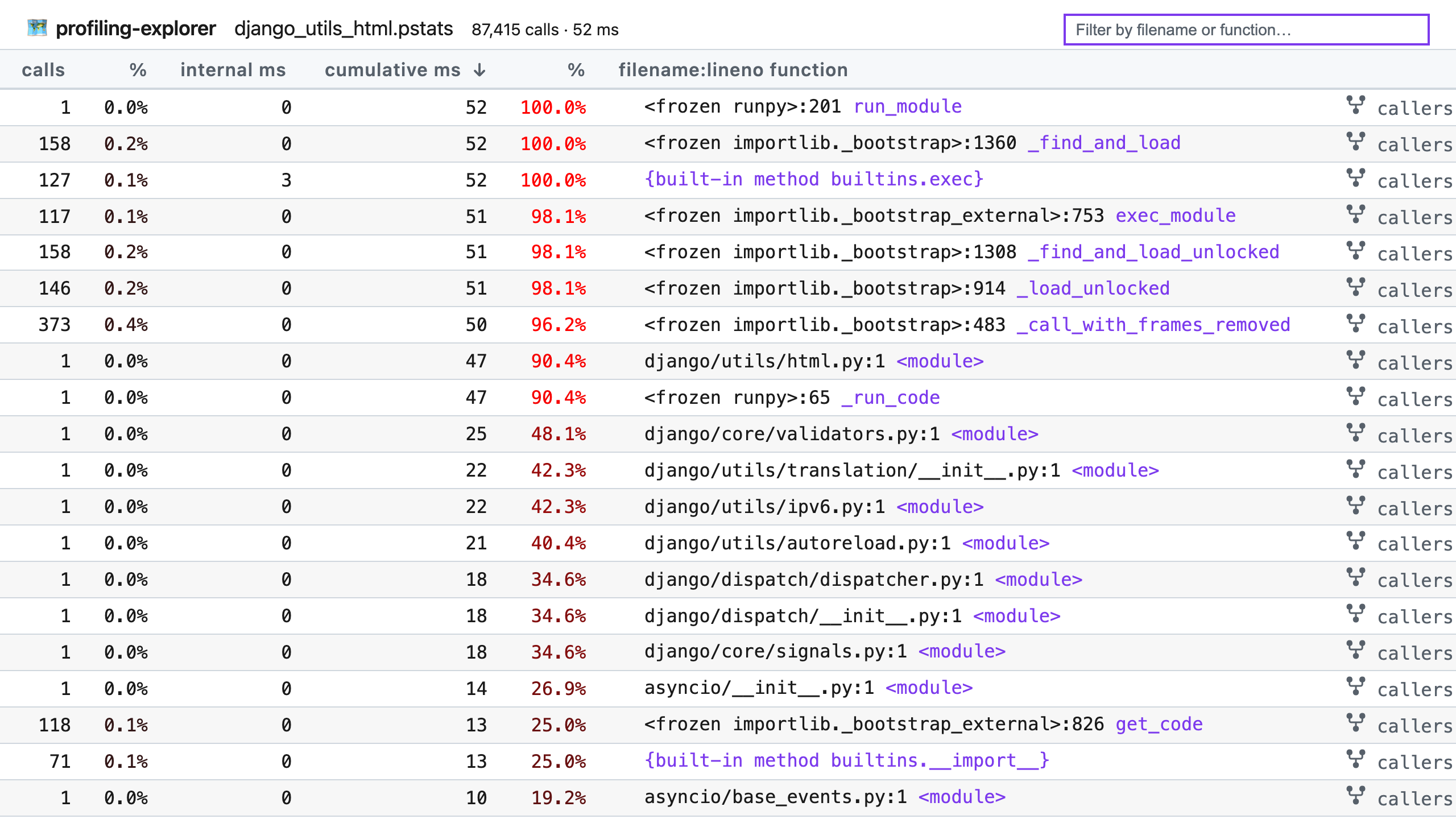
Read more in the introductory blog post.
Get better at command line Git with my book Boost Your Git DX.
Requirements
Python 3.10 to 3.14 supported.
Installation
Install with pip:
python -m pip install profiling-explorer
Usage
profiling-explorer reads pstats files as generated by Python’s profilers: profiling.tracing (called cProfile on Python < 3.15) and profiling.sampling (new in Python 3.15). To use it, first generate a profile file, for example by running your program under cProfile:
$ python -m cProfile -o example.pstats example.py(Also runnable as python -m profiling.tracing instead on Python 3.15+.)
Then run profiling-explorer with the generated file:
$ profiling-explorer example.pstatsThe report will open in your web browser, and you can explore the profile data with the interactive interface. Features:
Click the calls, internal ms, or cumulative ms column headers to sort by that column.
Use the search box to filter by filename or function name. Separate multiple search terms by spaces to match records that contain all terms.
Press a keyboard shortcut to focus the search box: /, Control+K, or Command+K. Select some text first, like a filename, to pre-fill the search box with that text.
Hover by a filename + line number pair to reveal the copy button, which copies the location to your clipboard for faster opening.
Click the callers or callees links on the right of a row to see the callers or callees of that function.
Full help:
usage: profiling-explorer [-h] [--port PORT] [--dev] FILE

positional arguments:
  FILE         The pstats data file to explore.

options:
  -h, --help   show this help message and exit
  --port PORT  Port for the local web server (default: 8099).
--dev Run in development mode (enables server reload and debug mode).1 maintainer

Release files for profiling-explorer 1.2.0
For a detailed explanation of source distributions (sdists) and built distributions (wheels), please see the package formats documentation.
Source distribution (sdist)
| File | Size | Uploaded | |
|---|---|---|---|
| profiling_explorer-1.2.0.tar.gz | 16.6 kB | Details |
Built distribution (wheel)
| File | Interpreter | ABI | Platform | Reset |
|---|---|---|---|---|
| profiling_explorer-1.2.0-py3-none-any.whl | Python 3 | none | any | Details |
Total release size: 34.2 kB
Release files / profiling_explorer-1.2.0.tar.gz
| Download URL | profiling_explorer-1.2.0.tar.gz |
|---|---|
| Size | 16.6 kB |
| Tags | Source |
|
SHA-256 checksum How to use checksums |
5e132b4d3b08b4d5e628cd1447d9a398c23a0de18c2349ef562c9f8d127374f8
|
|
BLAKE2b-256 checksum How to use checksums |
40ed47717b258c6c9443ad88133e8608d974220a29ba9b6c6802ed494d3914ce
|
| Upload date | |
|
Uploaded using Trusted Publishing? What is trusted publishing? |
Yes |
| Uploaded via |
twine/6.1.0 CPython/3.13.12
|
Provenance
Provenance describes where a file came from. On PyPI, provenance is shared via attestations, which provide a verifiable record of the build or publishing details. View details, limitations and caveats.


PyPI Publish Attestation
PyPI verified that this artifact, at this checksum, originated from the publisher listed below.
Signed by GitHub Actions, verified by PyPI on May 18, 2026.
Transparency logRelease files / profiling_explorer-1.2.0-py3-none-any.whl
| Download URL | profiling_explorer-1.2.0-py3-none-any.whl |
|---|---|
| Size | 17.6 kB |
| Tags | Python 3 |
|
SHA-256 checksum How to use checksums |
9ce158e4e7e48848eba179c4a531263a8b2178d46e2ce93bd685aed8509fcc48
|
|
BLAKE2b-256 checksum How to use checksums |
f0effb5146819dd422a8f64aee481a470cd551e54a347e3baec94687bb8128bf
|
| Upload date | |
|
Uploaded using Trusted Publishing? What is trusted publishing? |
Yes |
| Uploaded via |
twine/6.1.0 CPython/3.13.12
|
Provenance
Provenance describes where a file came from. On PyPI, provenance is shared via attestations, which provide a verifiable record of the build or publishing details. View details, limitations and caveats.
PyPI Publish Attestation
PyPI verified that this artifact, at this checksum, originated from the publisher listed below.
Signed by GitHub Actions, verified by PyPI on May 18, 2026.
Transparency log













