





ProgIter
ProgIter lets you measure and print the progress of an iterative process. This can be done either via an iterable interface or using the manual API. Using the iterable interface is most common.
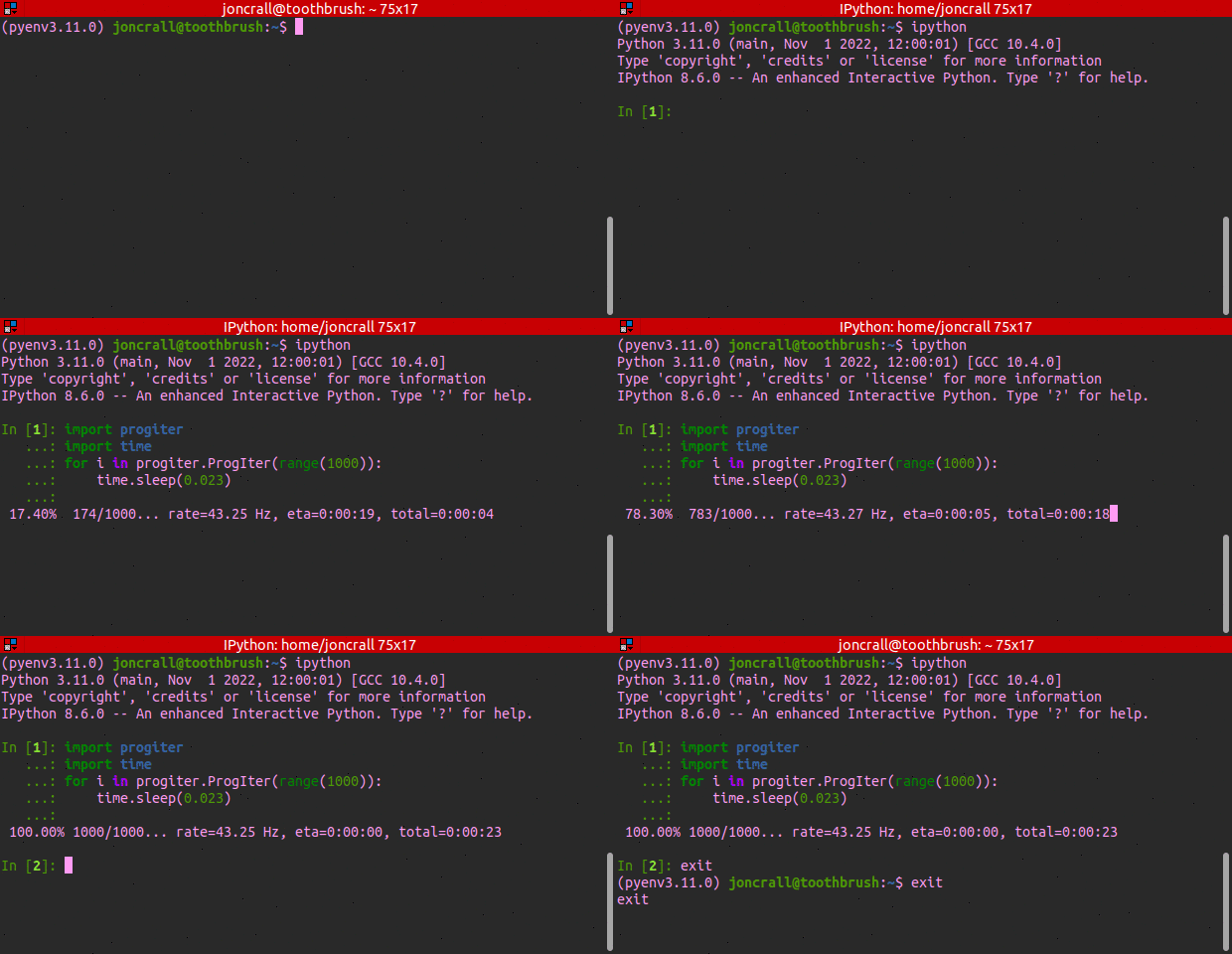
Basic usage is:
>>> from progiter import ProgIter
>>> for n in ProgIter(range(1000)):
>>>     ...  # do some work
The basic ProgIter is unthreaded. This differentiates it from tqdm and rich.progress which use a threaded implementation. The choice of implementation has different tradeoffs and neither is strictly better than the other. An unthreaded progress bar provides synchronous uncluttered logging, increased stability, and — unintuitively —- speed (due to Python’s GIL). Meanwhile threaded progress bars are more responsive, able to update multiple stdout lines at a time, and can look prettier (unless you try to log stdout to disk).
ProgIter was originally developed independently of tqdm, but the newer versions of this library have been designed to be compatible with tqdm-API. ProgIter is now a (mostly) drop-in alternative to tqdm. The tqdm library may be more appropriate in some cases. The main advantage of ProgIter is that it does not use any python threading, and therefore can be safer with code that makes heavy use of multiprocessing. The reason for this is that threading before forking may cause locks to be duplicated across processes, which may lead to deadlocks (although with tqdm this is very unlikely).
ProgIter is simpler than tqdm, which may be desirable for some applications. However, this also means ProgIter is not as extensible as tqdm. If you want a pretty bar or need something fancy, use tqdm (or rich); if you want useful information about your iteration by default, use progiter.
New in Version 2.0, progiter.ProgressManager, which enables near-seemless toggling between an unthreaded ProgIter backend and a threaded RichProgIter backend. Basic usage is:
from progiter.manager import ProgressManager
pman = ProgressManager()
with pman:
    for item in pman.progiter(range(1000)):
        ...  # do some work
The following gif illustrates this and more complex usage:

Package level documentation can be found at: https://progiter.readthedocs.io/en/latest/
Example
The basic usage of ProgIter is simple and intuitive: wrap a python iterable. The following example wraps a range iterable and reports progress to stdout as the iterable is consumed. The ProgIter object accepts various keyword arguments to modify the details of how progress is measured and reported. See API documentation of the ProgIter class here: https://progiter.readthedocs.io/en/latest/progiter.progiter.html#progiter.progiter.ProgIter
>>> from progiter import ProgIter
>>> def is_prime(n):
...     return n >= 2 and not any(n % i == 0 for i in range(2, n))
>>> for n in ProgIter(range(1000), verbose=2):
>>>     # do some work
>>>     is_prime(n)
0.00%    0/1000... rate=0 Hz, eta=?, total=0:00:00
0.60%    6/1000... rate=76995.12 Hz, eta=0:00:00, total=0:00:00
100.00% 1000/1000... rate=266488.22 Hz, eta=0:00:00, total=0:00:00
For more complex applications is may sometimes be desireable to manually use the ProgIter API. This is done as follows:
>>> from progiter import ProgIter
>>> n = 3
>>> prog = ProgIter(desc='manual', total=n, verbose=3, time_thresh=0)
>>> prog.begin() # Manually begin progress iteration
>>> for _ in range(n):
...     prog.step(inc=1)  # specify the number of steps to increment
>>> prog.end()  # Manually end progress iteration
manual 0.00% 0/3... rate=0 Hz, eta=?, total=0:00:00
manual 33.33% 1/3... rate=5422.82 Hz, eta=0:00:00, total=0:00:00
manual 66.67% 2/3... rate=8907.61 Hz, eta=0:00:00, total=0:00:00
manual 100.00% 3/3... rate=12248.15 Hz, eta=0:00:00, total=0:00:00
By default ProgIter aims to write a line to stdout once every two seconds to minimize its overhead and reduce clutter. Setting this to zero will force it to print on every iteration.
When working with ProgIter in either iterable or manual mode you can use the prog.ensure_newline method to guarantee that the next call you make to stdout will start on a new line. You can also use the prog.set_extra method to update a dynamic “extra” message that is shown in the formatted output. The following example demonstrates this.
>>> from progiter import ProgIter
>>> def is_prime(n):
...     return n >= 2 and not any(n % i == 0 for i in range(2, n))
>>> _iter = range(1000)
>>> prog = ProgIter(_iter, desc='check primes', verbose=2, time_thresh=1e-3)
>>> for n in prog:
>>>     if n == 97:
>>>         print('!!! Special print at n=97 !!!')
>>>     if is_prime(n):
>>>         prog.set_extra('Biggest prime so far: {}'.format(n))
>>>         prog.ensure_newline()
check primes 0.00%    0/1000... rate=0 Hz, eta=?, total=0:00:00
check primes 0.60%    6/1000...Biggest prime so far: 5 rate=79329.39 Hz, eta=0:00:00, total=0:00:00
!!! Special print at n=97 !!!
check primes 75.60%  756/1000...Biggest prime so far: 751 rate=272693.23 Hz, eta=0:00:00, total=0:00:00
check primes 99.30%  993/1000...Biggest prime so far: 991 rate=245852.75 Hz, eta=0:00:00, total=0:00:00
check primes 100.00% 1000/1000...Biggest prime so far: 997 rate=244317.84 Hz, eta=0:00:00, total=0:00:00
Installation
ProgIter can be easily installed via pip.
pip install progiterAlternatively, the ubelt library ships with its own version of ProgIter. Note that the ubelt version of progiter is distinct (i.e. ubelt actually contains a copy of this library), but the two libraries are generally kept in sync.
1 maintainer

Metadata
1 maintainer
Release files for progiter 2.0.0
For a detailed explanation of source distributions (sdists) and built distributions (wheels), please see the package formats documentation.
Source distribution (sdist)
| File | Size | Uploaded | Provenance | Actions |
|---|---|---|---|---|
| progiter-2.0.0.tar.gz | 28.1 kB | Without provenance | Details for progiter-2.0.0.tar.gz |
Built distribution (wheel)
| File | Interpreter | ABI | Platform | Actions Reset |
|---|---|---|---|---|
| progiter-2.0.0-py3-none-any.whl | Python 3 | none | any | Details for progiter-2.0.0-py3-none-any.whl |
Total release size: 52.9 kB
Release files / progiter-2.0.0.tar.gz
| Download URL | progiter-2.0.0.tar.gz |
|---|---|
| Size | 28.1 kB |
| Tags | Source |
|
SHA-256 checksum How to use checksums |
155b17bf3f090c3791219a2fce37769c96852b38f62ea9baf9162c731e8870e4
|
|
BLAKE2b-256 checksum How to use checksums |
0242c7ea4b181feadb567ced59636ba72bfd307aa2a00d83c22e38b7d823fc3e
|
| Upload date | |
|
Uploaded using Trusted Publishing? What is trusted publishing? |
No |
| Uploaded via |
twine/4.0.2 CPython/3.10.6
|
Release files / progiter-2.0.0-py3-none-any.whl
| Download URL | progiter-2.0.0-py3-none-any.whl |
|---|---|
| Size | 24.9 kB |
| Tags | Python 3 |
|
SHA-256 checksum How to use checksums |
66ab3aa88f804e969477ad9de52926a08c2d5b673d324132cfe1530888e26f10
|
|
BLAKE2b-256 checksum How to use checksums |
c4d5981d5651ecf71f47aeeecdb99b175daa1bfb2e157253e8c016a6515bf63e
|
| Upload date | |
|
Uploaded using Trusted Publishing? What is trusted publishing? |
No |
| Uploaded via |
twine/4.0.2 CPython/3.10.6
|
Security for progiter 2.0.0
Provenance
Provenance describes where a file came from. On PyPI, provenance is shared via attestations, which provide a verifiable record of the build or publishing details. View details, limitations and caveats.
No provenance found
None of the files in this release were uploaded with provenance metadata.
A note on package security
PyPI is a repository for distributing packages, not a service for auditing them. While third-party security researchers and our staff do their best to detect and remove malicious packages, PyPI cannot guarantee the quality, security or suitability of any given package.
To learn more about protecting yourself from malicious actors, visit our package security documentation.














