
 project-hub
Multi-repo workspace manager that unifies local git state and forge data (MRs, issues, pipelines, vulnerabilities) into a single MCP server + web dashboard.
Designed for engineers managing many repos under one parent directory — across multiple forges.
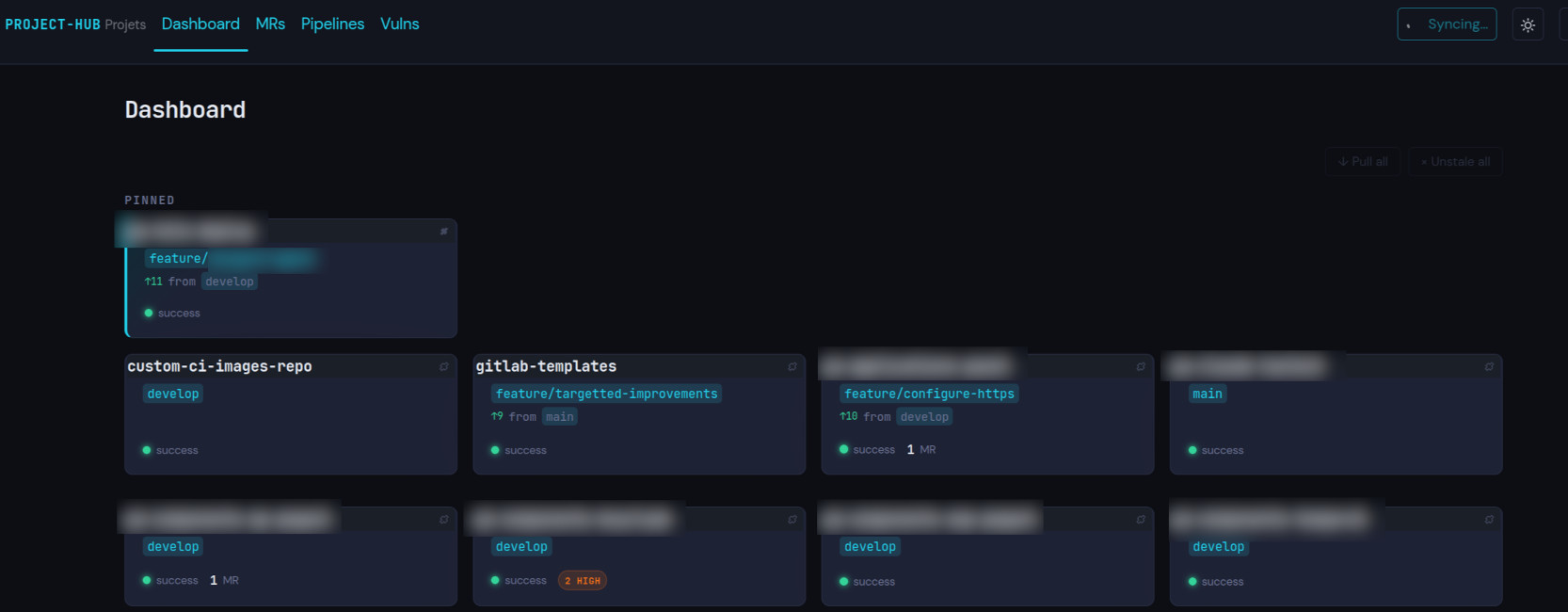
Killer features
aka why I built this
GitLab, GitHub, Bitbucket, Forgejo in a single interface. No more context-switching between forges. project-hub reads each repo's remote, recognizes the public forges and any host with the forge in its name, and asks you about the rest once. Then it talks to all of them — MRs, issues, pipelines, everything in one dashboard. A repo on Bitbucket, another on GitLab, a third on your team's Forgejo: same view, same tools, same agent.
Vulnerabilities that make sense. GitLab's vulnerability report is per-repo, noisy, and doesn't tell you what's already being fixed. project-hub aggregates vulns across all your repos, cross-references them with open MR branches to flag what's already fixed but not yet merged ("fixed in branch"), and lets you filter by severity, state, or hide already-handled ones. You see what actually needs work, not what's already in flight.
Stale branch detection. After merging an MR you often forget to switch back to the default branch locally. project-hub detects repos still sitting on stale feature branches and shows ahead/behind relative to the default branch — with a one-click checkout to clean up.
Events, not inbox. Stop reminding yourself to check your cluttered GitLab inbox. project-hub diffs state on every refresh cycle and surfaces what changed: review requested from you, MR approved or merged, new comment or push, issue opened/closed/assigned, pipeline failed or fixed, new or resolved vuln, stale branch, auth expiry. Events live in a slide-in panel on the dashboard and persist across sessions until dismissed.
MCP-powered multi-repo agent. Everything visible in the dashboard is exposed as MCP tools. Claude Code sees your repos, MRs, issues, pipelines, job logs, vulns, and events, and can fetch and safely pull your local repos. Forge access is read-only: the agent never approves, merges, or comments. Events surface as MCP notifications, making the agent proactive instead of reactive.
Features
- Unified dashboard — git status, MRs, issues, pipelines, vulns across all repos in one view
- Merge request, issue & pipeline views — cross-repo tables with filters (mine/all, MRs waiting for your review, failed only, current branches only)
- Per-repo detail page — MRs, issues, pipelines, active vulns for a single repo
- Web UI (htmx) with real-time sync, sortable tables, persistent filters
- Non-destructive pull — conflict detection via
git merge-tree, no worktree mutations - Pin & reorder repos, drag-and-drop card layout
- Bulk actions — pull all, unstale all in one click
Quick start
1. Register the MCP server once, for all directories:
claude mcp add --scope user project-hub -- uvx project-hub --mcp
From source instead (picks up local changes without cache issues):
claude mcp add --scope user project-hub -- \
  uv run --project /path/to/project-hub project-hub --mcp
2. Store a token for each forge you use. Tokens are global (OS keyring, keyed by host), not per workspace:
uvx project-hub auth login gitlab.com
uvx project-hub auth login github.com
uvx project-hub auth login bitbucket.org
uvx project-hub auth login git.example.org --type forgejo   # self-hosted: which API validates the token
--type only picks how the token is checked. The workspace learns each host's forge type at init (step 3).
3. Open Claude Code in the parent directory of your repos and ask:
Initialize a project-hub workspace here, then annotate each repo with its role and domain.
The agent calls init, which discovers the repos, writes .project-hub/config.yaml, and starts the refresh loop and the dashboard. Annotating is not optional: most tools skip or refuse a repo without a role and domain, because those annotations are what give the agent its context. List the repos that need no context under annotation_not_required in config.yaml.
init assumes GitLab for a self-hosted host it can't recognize and tells the agent so. Say which forge it really is ("git.example.org is a Forgejo") and the agent fixes it with configure_forge.
4. The dashboard opens in your browser at http://localhost:8400, or the next free port when 8400 is taken. Closed the tab? Ask the agent for the dashboard URL.
Without an agent, the CLI does the same and opens the browser:
cd ~/Projects                    # parent dir containing your repos
uvx project-hub init             # creates .project-hub/, prompts for unrecognized hosts
uvx project-hub                  # launch dashboard
How the MCP server behaves per directory
Installing with --scope user is safe — the server adapts to the current directory:
| Directory state | Behavior |
|---|---|
Has .project-hub/ |
Active — full tools + refresh |
Parent has .project-hub/ |
Disabled — zero tools (sub-repo) |
Has .no-project-hub |
Disabled — zero tools (opt-out) |
| Neither | Dormant — only init tool |
touch ~/some-project/.no-project-hub # force disable in a specific dir
MCP tools
| Tool | Description |
|---|---|
init |
Bootstrap .project-hub/ workspace |
list_repos |
List discovered repos with forge info and annotation status |
repo_status |
Git status (branch, ahead/behind, dirty) |
fetch_all |
Trigger full refresh cycle |
pull_safe |
Pull with conflict detection |
list_mrs |
Merge requests (repo, state, author, awaiting-review filters) |
list_issues |
Issues (repo, state, author, label filters) |
list_pipelines |
Pipelines (repo, status, ref filters) |
get_vulnerabilities |
Vulns — defaults to high/critical + detected, includes solutions |
get_pipeline_jobs |
Jobs for a specific pipeline |
get_job_log |
Fetch log output for a specific CI job |
annotate_repo |
Set per-repo annotations (role, domain, links, notes) |
acknowledge_alerts |
Mark events as seen |
rescan |
Re-scan workspace for new/removed repos |
auth_status |
Check forge authentication |
auth_login |
Store PAT for a forge instance |
configure_forge |
Configure forge host mapping |
Web dashboard
| Route | Description |
|---|---|
/ |
Dashboard with repo cards, pinning, drag-and-drop, events panel |
/mrs |
Merge requests table (mine/all filter) |
/issues |
Issues table (mine/all filter) |
/pipelines |
Pipelines table (failed only, current branches only) |
/vulns |
Vulnerabilities (severity, state, fixed-in-branch filters) |
/repo/{name} |
Per-repo detail: MRs, issues, pipelines, active vulns |
/settings |
Exclude/include repos, rescan workspace |
All filters and table sort are persisted in localStorage.
Architecture
Single Python process, dual interfaces: MCP (stdio) + HTTP (FastAPI/htmx). Background asyncio task refreshes git+forge data on a TTL cycle, diffs with SQLite cache to generate events.
project_hub/
  cli.py              # Click entry points
  core/
    workspace.py       # Orchestrator: discover -> refresh loop -> stop
    cache.py           # SQLite (WAL mode, aiosqlite)
    config.py          # YAML config with defaults
    discovery.py       # Scan for .git/ repos, classify forges
    models.py          # Dataclasses: Repo, MR, Issue, Pipeline, Vulnerability, Event
    events.py          # Diff old vs new state -> Event list
  forge/
    provider.py        # ForgeProvider ABC (shared interface for all forges)
    auth.py            # Token resolution: keyring -> auth.json -> env vars -> ~/.python-gitlab.cfg
    gitlab.py          # python-gitlab + GraphQL
    github.py          # PyGithub
    bitbucket.py       # atlassian-python-api (Cloud)
    forgejo.py         # REST v1 over requests (Forgejo >= 16 for CI)
  git/
    ops.py             # fetch, status, pull_safe (merge-tree conflict detection)
  mcp/
    server.py          # FastMCP tools + resources
  web/
    app.py             # FastAPI factory, routes, htmx fragments
    templates/         # Jinja2 templates
    static/            # CSS + vendored JS
Requirements
- Python 3.11+
- Git 2.38+ (for
git merge-tree --write-tree) - A token for each forge you use:
- GitLab: PAT with
read_apiscope - GitHub: PAT with
reposcope - Bitbucket Cloud: API token (app passwords deprecated June 2026)
- Forgejo: token with
read:repository,read:issue,read:user
- GitLab: PAT with
Tokens
auth login stores tokens in the OS keyring, or in ~/.config/project-hub/auth.json when no keyring is available. Without a stored token, project-hub falls back to environment variables: GITLAB_TOKEN (gitlab.com only, then ~/.python-gitlab.cfg for any GitLab host), GITHUB_TOKEN, BITBUCKET_TOKEN, FORGEJO_TOKEN.
Forge notes
-
Self-hosted forges are recognized only when the forge's name is in the hostname (
gitlab.example.com,forgejo.example.org) or forcodeberg.org. Declare the others in.project-hub/config.yaml:forges: git.example.org: type: forgejo
-
Vulnerabilities come from GitLab and GitHub only. Bitbucket and Forgejo have PRs, issues and pipelines.
-
Forgejo CI needs Forgejo 16 or later, the first release with an API for Actions jobs and logs. Older instances keep PRs and issues, and the pipelines tab shows "CI disabled".
Behind a TLS-intercepting proxy
A corporate proxy (Zscaler and the like) re-signs TLS with its own root, which Python's bundled CA list doesn't know: forge calls then fail with CERTIFICATE_VERIFY_FAILED. When IT has installed that root in the system store, point Python at it:
REQUESTS_CA_BUNDLE=/etc/ssl/certs/ca-certificates.crt
Put it in /etc/environment (read at login) so that the MCP server, started by Claude Code, inherits it too.
Development
uv run pytest tests/ -v
uv run --with 'pyflakes>=4,<5' pyflakes project_hub/
uv run --with 'pylint>=4,<5' pylint project_hub/
uv run --with 'radon>=6,<7' radon cc project_hub/ -s -n D   # must print nothing
CI runs the same commands as its lint and test gates.
License
Unlicense — public domain.
1 maintainer

Metadata
1 maintainer
Release files for project-hub 0.18.1
For a detailed explanation of source distributions (sdists) and built distributions (wheels), please see the package formats documentation.
Source distribution (sdist)
| File | Size | Uploaded | Provenance | Actions |
|---|---|---|---|---|
| project_hub-0.18.1.tar.gz | 458.4 kB | Without provenance | Details for project_hub-0.18.1.tar.gz |
Built distribution (wheel)
| File | Interpreter | ABI | Platform | Actions Reset |
|---|---|---|---|---|
| project_hub-0.18.1-py3-none-any.whl | Python 3 | none | any | Details for project_hub-0.18.1-py3-none-any.whl |
Total release size: 637.8 kB
Release files / project_hub-0.18.1.tar.gz
| Download URL | project_hub-0.18.1.tar.gz |
|---|---|
| Size | 458.4 kB |
| Tags | Source |
|
SHA-256 checksum How to use checksums |
778a51ca364f409f2dd2bbc0b32ce5fdb4e499d4f3cefd4acdc32867e89393ee
|
|
BLAKE2b-256 checksum How to use checksums |
d7c9717c7874a3656694990d82773afc6ccdfead523c431ea137ed6e1a24577c
|
| Upload date | |
|
Uploaded using Trusted Publishing? What is trusted publishing? |
No |
| Uploaded via |
uv/0.12.21 {"installer":{"name":"uv","version":"0.12.21","subcommand":["publish"]},"python":null,"implementation":{"name":null,"version":null},"distro":{"name":"Debian GNU/Linux","version":"13","id":"trixie","libc":null},"system":{"name":null,"release":null},"cpu":null,"openssl_version":null,"setuptools_version":null,"rustc_version":null,"ci":true}
|
Release files / project_hub-0.18.1-py3-none-any.whl
| Download URL | project_hub-0.18.1-py3-none-any.whl |
|---|---|
| Size | 179.4 kB |
| Tags | Python 3 |
|
SHA-256 checksum How to use checksums |
4568c635230acdd58f814525cfbc623fbb70a74dcda2582a3120b6d018ac5c01
|
|
BLAKE2b-256 checksum How to use checksums |
253685e381c93609db7b671e2b746c1cc5f6e6c74bebb0ba3d7d36192bcae2cf
|
| Upload date | |
|
Uploaded using Trusted Publishing? What is trusted publishing? |
No |
| Uploaded via |
uv/0.12.21 {"installer":{"name":"uv","version":"0.12.21","subcommand":["publish"]},"python":null,"implementation":{"name":null,"version":null},"distro":{"name":"Debian GNU/Linux","version":"13","id":"trixie","libc":null},"system":{"name":null,"release":null},"cpu":null,"openssl_version":null,"setuptools_version":null,"rustc_version":null,"ci":true}
|
Security for project-hub 0.18.1
Provenance
Provenance describes where a file came from. On PyPI, provenance is shared via attestations, which provide a verifiable record of the build or publishing details. View details, limitations and caveats.
No provenance found
None of the files in this release were uploaded with provenance metadata.
A note on package security
PyPI is a repository for distributing packages, not a service for auditing them. While third-party security researchers and our staff do their best to detect and remove malicious packages, PyPI cannot guarantee the quality, security or suitability of any given package.
To learn more about protecting yourself from malicious actors, visit our package security documentation.














