
Project David Platform




projectdavid-platform is a self-hosted AI runtime that implements the OpenAI Assistants API specification, deployable on your own infrastructure, fully air-gapped if required. You get a production-ready API server out of the box: assistants, autonomous agents, RAG pipelines, sandboxed code execution, and multi-turn conversation, all through a single, standards-compliant REST API with full parity to OpenAI. Connect any model, anywhere. Run inference locally via Ollama or vLLM, route to remote providers like Together AI, or span both, all through one unified API surface. Switch providers without changing a line of application code. If your stack already speaks the OpenAI Assistants API, it already speaks Project David.
Your models. Your data. Your infrastructure. Zero lock-in.

Documentation
| Topic | Link |
|---|---|
| Full Documentation | docs.projectdavid.co.uk |
| Platform Overview | docs.projectdavid.co.uk/docs/platform-overview |
| Configuration Reference | docs.projectdavid.co.uk/docs/platform-configuration |
| Upgrading | docs.projectdavid.co.uk/docs/platform-upgrading |
| CLI Reference | docs.projectdavid.co.uk/docs/projectdavid-platform-commands |
| SDK Quick Start | docs.projectdavid.co.uk/docs/sdk-quick-start |
| Sovereign Forge | docs.projectdavid.co.uk/docs/1_sovereign-forge-cluster |
Installation
pip install projectdavid-platform
No repository clone required. The compose files and configuration templates are bundled with the package.
Windows users: pip installs the
pdavidcommand to a Scripts directory that is not on PATH by default. Ifpdavidis not found after installation, add the following to your PATH:C:\Users\<your-username>\AppData\Roaming\Python\Python3XX\ScriptsReplace
Python3XXwith your Python version (e.g.Python313). On Linux and macOS this is handled automatically.
Quick Start
This section walks you from a fresh install to your first streaming inference response.
1. Start the stack
pdavid --mode up
On first run this will generate a .env file with unique cryptographically secure secrets, prompt for optional values, pull all required Docker images, and start the full stack in detached mode.
To start with local GPU inference via Ollama:
pdavid --mode up --ollama
Requires an NVIDIA GPU with the NVIDIA Container Toolkit installed.
To start the full Sovereign Forge training and inference mesh:
pdavid --mode up --training
This starts the training pipeline, Ray cluster, and the Ray Serve inference worker. See Sovereign Forge below.
2. Bootstrap the admin user
pdavid bootstrap-admin
Expected output:
================================================================
  ✓  Admin API Key Generated
================================================================
  Email   : admin@example.com
  User ID : user_abc123...
  Prefix  : ad_abc12
----------------------------------------------------------------
  API KEY : ad_xxxxxxxxxxxxxxxxxxxxxxxxxxxxxxxxxxxxxxxxxxxxxxxx
----------------------------------------------------------------
  This key will NOT be shown again.
================================================================
⚠️ Store this key immediately. It is shown exactly once and cannot be recovered.
3. Create a user and API key
The admin key provisions users. Each user gets their own API key for SDK operations.
import os
from projectdavid import Entity
from dotenv import load_dotenv
load_dotenv()

client = Entity(
    base_url=os.getenv("PROJECT_DAVID_PLATFORM_BASE_URL"),
    api_key=os.getenv("PROJECT_DAVID_PLATFORM_ADMIN_KEY"),
)

# Create a user
user = client.users.create_user(
    name="Sam Flynn",
    email="sam@encom.com",
)
print(user.id)

# Create an API key for that user
api_key = client.keys.create_key(user_id=user.id)
print(api_key)
Store user.id and the printed API key — you will need both for SDK operations.
4. Run your first inference
Install the SDK:
pip install projectdavid
⚠️
projectdavidis the developer SDK.projectdavid-platformis the deployment orchestrator. Do not confuse the two.
import os
from projectdavid import Entity, ContentEvent, ReasoningEvent
from dotenv import load_dotenv
load_dotenv()

# Use the user key — not the admin key — for application operations.
client = Entity(
    base_url=os.getenv("PROJECT_DAVID_PLATFORM_BASE_URL"),
    api_key=os.getenv("PROJECT_DAVID_PLATFORM_USER_KEY"),
)

# Create an assistant
assistant = client.assistants.create_assistant(
    name="Test Assistant",
    model="DeepSeek-V3",
    instructions="You are a helpful AI assistant named Nexa.",
    tools=[
        {"type": "web_search"},
    ],
)

# Create a thread — threads maintain the full message state between turns
thread = client.threads.create_thread()

# Add a message to the thread
message = client.messages.create_message(
    thread_id=thread.id,
    assistant_id=assistant.id,
    content="Find me a positive news story from today.",
)

# Create a run
run = client.runs.create_run(
    assistant_id=assistant.id,
    thread_id=thread.id,
)

# Set up the inference stream — bring your own provider API key
stream = client.synchronous_inference_stream
stream.setup(
    thread_id=thread.id,
    assistant_id=assistant.id,
    message_id=message.id,
    run_id=run.id,
    api_key=os.getenv("HYPERBOLIC_API_KEY"),  # or TOGETHER_API_KEY etc.
)

# Stream the response
for event in stream.stream_events(model="hyperbolic/deepseek-ai/DeepSeek-V3"):
    if isinstance(event, ReasoningEvent):
        print(event.content, end="", flush=True)
    elif isinstance(event, ContentEvent):
        print(event.content, end="", flush=True)
See the complete SDK reference at docs.projectdavid.co.uk/docs/sdk-quick-start.
Your Architecture
Do not use the platform API as your application backend directly. The intended design is a three-tier architecture:
- projectdavid-platform — inference orchestrator (this package)
- Your backend — business logic, auth, data
- Your frontend — user interface
See the reference backend and reference frontend for starting points.
Stack

| Service | Image | Description |
|---|---|---|
api |
thanosprime/projectdavid-core-api |
FastAPI backend exposing assistant and inference endpoints |
sandbox |
thanosprime/projectdavid-core-sandbox |
Secure code execution environment |
db |
mysql:8.0 |
Relational persistence |
qdrant |
qdrant/qdrant |
Vector database for embeddings and RAG |
redis |
redis:7 |
Cache and message broker |
searxng |
searxng/searxng |
Self-hosted web search |
browser |
browserless/chromium |
Headless browser for web agent tooling |
otel-collector |
otel/opentelemetry-collector-contrib |
Telemetry collection |
jaeger |
jaegertracing/all-in-one |
Distributed tracing UI |
samba |
dperson/samba |
File sharing for uploaded documents |
nginx |
nginx:alpine |
Reverse proxy — single public entry point on port 80 |
ollama |
ollama/ollama |
Local LLM inference (opt-in, --ollama) |
inference-worker |
thanosprime/projectdavid-core-inference-worker |
Ray HEAD node + Ray Serve inference mesh (opt-in, --training) |
training-worker |
thanosprime/projectdavid-core-training-worker |
Fine-tuning job runner (opt-in, --training) |
training-api |
thanosprime/projectdavid-core-training-api |
Fine-tuning REST API (opt-in, --training) |
System Requirements
| Resource | Minimum | Notes |
|---|---|---|
| CPU | 4 cores | 8+ recommended |
| RAM | 16GB | 32GB+ if running the inference mesh |
| Disk | 50GB free | SSD recommended |
| GPU | — | Nvidia 8GB+ VRAM, optional, required only for Ollama / Sovereign Forge |
Runtime dependencies: Docker Engine 24+, Docker Compose v2+, Python 3.9+. nvidia-container-toolkit required only for GPU services.
Lifecycle Commands
| Action | Command |
|---|---|
| Start the stack | pdavid --mode up |
| Start with Ollama | pdavid --mode up --ollama |
| Start Sovereign Forge | pdavid --mode up --training |
| Start Sovereign Forge + Ollama | pdavid --mode up --training --ollama |
| Pull latest images | pdavid --mode up --pull |
| Stop the stack | pdavid --mode down_only |
| Stop and remove all volumes | pdavid --mode down_only --clear-volumes |
| Force recreate containers | pdavid --mode up --force-recreate |
| Stream logs | pdavid --mode logs --follow |
| Add a GPU worker node | pdavid worker --join <head-node-ip> |
| Destroy all stack data | pdavid --nuke |
Full CLI reference at docs.projectdavid.co.uk/docs/projectdavid-platform-commands.
Configuration
pdavid configure --set HF_TOKEN=hf_abc123
pdavid configure --set TRAINING_PROFILE=standard
pdavid configure --interactive
Rotating MYSQL_PASSWORD, MYSQL_ROOT_PASSWORD, or SMBCLIENT_PASSWORD on a live stack requires a full down and volume clear. The CLI will warn you.
Full configuration reference at docs.projectdavid.co.uk/docs/platform-configuration.
Upgrading
pip install --upgrade projectdavid-platform
pdavid --mode up --pull
After upgrading, pdavid will print a notice on the next run pointing to the changelog. Running --pull fetches the latest container images. Your data and secrets are not affected.
Full upgrade guide at docs.projectdavid.co.uk/docs/platform-upgrading.
Sovereign Forge — Private Training + Inference Mesh
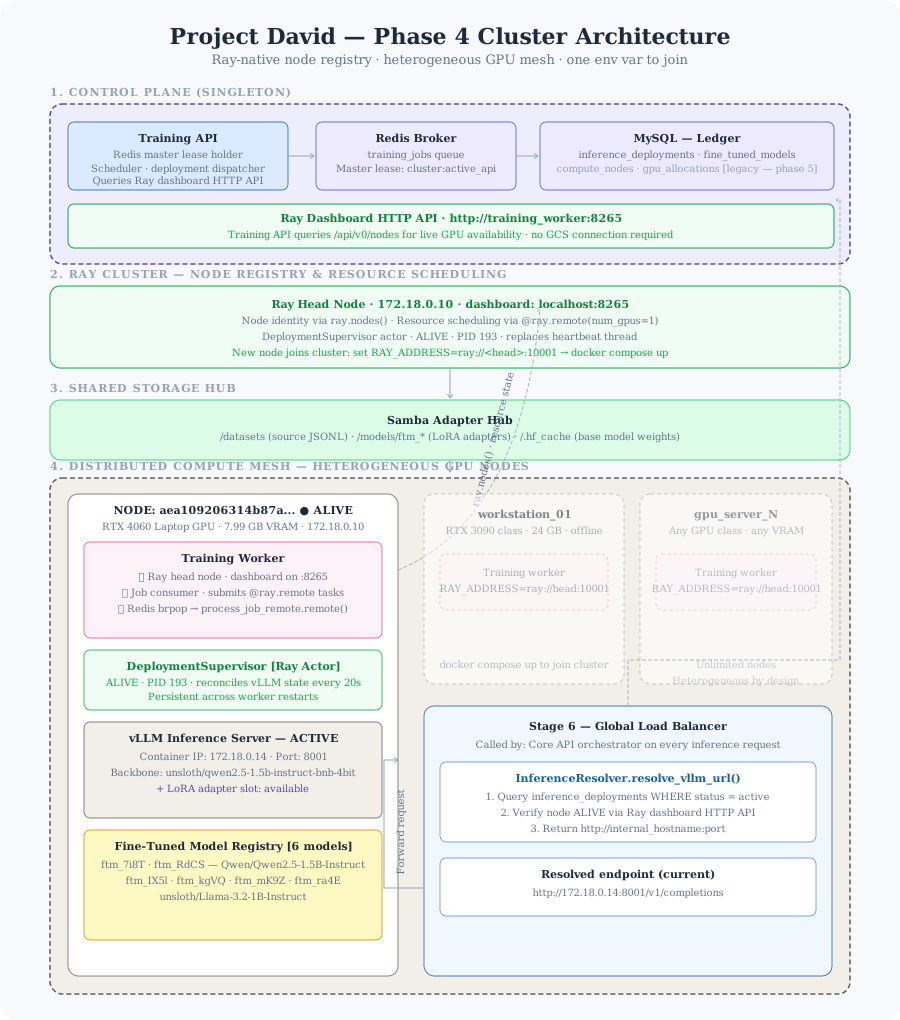
Project David includes an opt-in fine-tuning and inference cluster built on Ray Serve. Point it at any NVIDIA GPU — a laptop, a workstation, a gaming rig, or an H100 rack — and it handles training job scheduling, model deployment, and inference routing across all of them simultaneously. Your data and models never leave your machines.
pdavid --mode up --training
This starts three services under a Docker Compose profile:
inference-worker— Ray HEAD node. Owns the GPU on this machine. Runs Ray Serve and hosts the InferenceReconciler. All vLLM inference is managed here. The main API'sVLLM_BASE_URLpoints to this container.training-worker— Fine-tuning job runner. Manages the training job lifecycle via Redis queue.training-api— REST API for datasets, training jobs, and the model registry.
Scale-out — adding a second GPU machine
Run this on machine 2, 3, or N. No compose files or full stack installation needed on worker machines — just Docker and the NVIDIA Container Toolkit.
pip install projectdavid-platform
pdavid worker --join <head-node-ip>
Ray discovers the new node automatically and the InferenceReconciler distributes load across all available GPUs.
Full documentation at docs.projectdavid.co.uk/docs/1_sovereign-forge-cluster.
Docker Images
- thanosprime/projectdavid-core-api
- thanosprime/projectdavid-core-sandbox
- thanosprime/projectdavid-core-inference-worker
- thanosprime/projectdavid-core-training-api
- thanosprime/projectdavid-core-training-worker
All images are published automatically on every release of the source repository.
Related Repositories
| Repository | Purpose |
|---|---|
| projectdavid-core | Source code for the platform runtime |
| projectdavid | Python SDK — start here for application development |
| reference-backend | Reference backend application |
| reference-frontend | Reference frontend application |
Privacy
No data or telemetry leaves the stack except when you explicitly route to an external inference provider, your assistant calls web search at runtime, one of your tools calls an external API, or you load an image from an external URL.
Your instance is unique, with unique secrets. We cannot see your conversations, data, or secrets.
License
Distributed under the PolyForm Noncommercial License 1.0.0. Commercial licensing available — contact licensing@projectdavid.co.uk.
1 maintainer

Metadata
1 maintainer
Release files for projectdavid-platform 1.47.0
For a detailed explanation of source distributions (sdists) and built distributions (wheels), please see the package formats documentation.
Source distribution (sdist)
| File | Size | Uploaded | |
|---|---|---|---|
| projectdavid_platform-1.47.0.tar.gz | 67.2 kB | Details |
Built distribution (wheel)
| File | Interpreter | ABI | Platform | Reset |
|---|---|---|---|---|
| projectdavid_platform-1.47.0-py3-none-any.whl | Python 3 | none | any | Details |
Total release size: 122.1 kB
Release files / projectdavid_platform-1.47.0.tar.gz
| Download URL | projectdavid_platform-1.47.0.tar.gz |
|---|---|
| Size | 67.2 kB |
| Tags | Source |
|
SHA-256 checksum How to use checksums |
945066b027d6e26f4ce3123ce412c72cff84eb4d28517d8af9abb2413be1ce0c
|
|
BLAKE2b-256 checksum How to use checksums |
3e927590bb54934327882449744c6e7bef3c25b0b3677e39da29cf5bae756ca2
|
| Upload date | |
|
Uploaded using Trusted Publishing? What is trusted publishing? |
No |
| Uploaded via |
twine/7.0.0 CPython/3.13.14
|
Release files / projectdavid_platform-1.47.0-py3-none-any.whl
| Download URL | projectdavid_platform-1.47.0-py3-none-any.whl |
|---|---|
| Size | 54.8 kB |
| Tags | Python 3 |
|
SHA-256 checksum How to use checksums |
47d5e7a08255c8369128b9c3a034549a0b3aaf2bf049570c6a396b97ff389dc2
|
|
BLAKE2b-256 checksum How to use checksums |
95fc758a02f8d77bf8d78c9ccd387c1a699cbe2149aeff66c3bd99d5ee4e93cb
|
| Upload date | |
|
Uploaded using Trusted Publishing? What is trusted publishing? |
No |
| Uploaded via |
twine/7.0.0 CPython/3.13.14
|














