
Promem-MCP
Project Memory MCP — persistent project context for AI coding agents. Built by DIP-RO.






pip install promem-mcp
No database setup. No cloud. No daemon. No manual config.
Promem-MCP is a local-first, MCP-native context runtime that gives AI coding agents persistent project understanding — architecture, rules, decisions, conventions, environment intelligence, and Git context — without repeated explanations or context waste.
Quick Start
pip install promem-mcp
That's it. On first run, Promem-MCP auto-detects and auto-configures all your installed AI coding clients (Cursor, Claude, VS Code, Cline, etc.). Just restart your AI client after install.
Prefer manual control?
# See which clients are detected
promem config

# Auto-configure all detected clients at once
promem config --all

# Configure a specific client
promem config cursor
promem config claude-code
promem config vscode
Or manually add to your client's MCP config:
{
  "mcpServers": {
    "promem-mcp": {
      "command": "promem",
      "args": []
    }
  }
}
VS Code note: VS Code uses
"servers"key, not"mcpServers". Runpromem config vscodefor the correct format.
How It Works
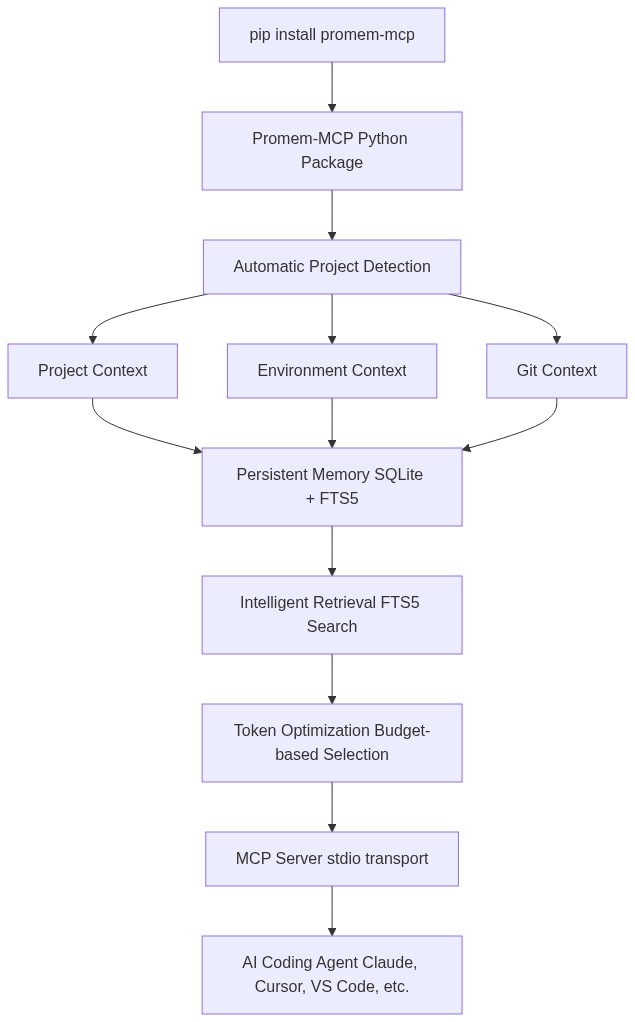
Features
- Zero-setup storage — SQLite database created automatically in OS-appropriate directory
- Automatic project detection — language, framework, package manager, test framework
- Persistent memory — rules, decisions, conventions, environment facts, Git intelligence
- Token-efficient retrieval — FTS5 search with token budgeting, returns only relevant context
- Provenance tracking — every memory knows where it came from and how confident it is
- Secret redaction — API keys, tokens, passwords are never stored or returned
- Project isolation — project memories never leak across projects
- Stale context detection — flags memories that conflict with current project state
- Contradiction detection — identifies conflicting project rules
- Session continuity — handoff summaries for switching between agents/sessions
- Git intelligence — recent commits, changed files, TODOs/FIXMEs
- Environment diagnostics — Python version, venv, .env completeness, Docker
- Local-first — no network requests, no cloud, no external services
MCP Tools
| Tool | Description |
|---|---|
ctx_search |
Search persistent project context with token budget |
ctx_get |
Get a specific memory by ID |
ctx_save |
Save a memory, decision, rule, or fact |
ctx_update |
Update an existing memory |
ctx_delete |
Delete a memory |
ctx_project |
Get current project information |
ctx_rules |
Get all project rules and conventions |
ctx_decisions |
Get all technical/architecture decisions |
ctx_recent |
Get recent memories and latest session |
ctx_git |
Get Git intelligence |
ctx_environment |
Get environment intelligence |
ctx_diagnostics |
Run environment diagnostics |
ctx_summary |
Get compact project summary for handoff |
CLI
contextmcp --version        # Version
promem status           # Project + storage status
promem doctor           # Health checks
promem stats            # Usage statistics
promem search "query"   # Search context
promem memory list      # List memories
promem decision "text"  # Save a decision
promem privacy          # Privacy info
promem config           # Client configuration
promem repair           # Rebuild index, optimize DB
promem reset            # Delete all data (with confirmation)
Client Support
| Client | Auto-config? | Config Key |
|---|---|---|
| Claude Code | promem config claude-code |
mcpServers |
| Claude Desktop | promem config claude-desktop |
mcpServers |
| Cursor | promem config cursor |
mcpServers |
| VS Code / Copilot | promem config vscode |
servers |
| OpenCode | promem config opencode |
mcp |
| Gemini CLI | promem config gemini-cli |
mcpServers |
| Windsurf | promem config windsurf |
mcpServers |
| Cline | promem config cline |
mcpServers |
| Roo Code | promem config roo-code |
mcpServers |
| Amazon Q | promem config amazon-q |
mcpServers |
| ZCode (GLM/Zhipu) | promem config zcode |
mcpServers |
| Tabnine | promem config tabnine |
mcpServers |
No client supports true zero-config auto-registration. ContextMCP detects installed clients, offers to write config (with backup + merge), and provides exact copy-paste snippets.
Privacy
- Local only — no network requests
- Project contents not uploaded
- Secrets redacted — never stored or returned
- No cloud dependencies
promem privacy
Storage Location
ContextMCP uses project-local storage — no centralized OS directory, no wasted space.
| Location | Path |
|---|---|
| Project-local (default) | <project-root>/.contextmcp/ |
Each project gets its own .contextmcp/contextmcp.db. Storage travels with the project. No global storage bloat.
Add .contextmcp/ to your .gitignore (already included by default in ContextMCP's ignore patterns).
Override with CONTEXTMCP_DATA_DIR environment variable if needed.
Installation
# pip
pip install promem-mcp

# uv
uv add promem-mcp

# pipx (global CLI)
pipx install promem-mcp
Works in venv, virtualenv, uv, pipx, and system Python.
Development
git clone https://github.com/DIP-RO/MCP_Package.git
cd MCP_Package
pip install -e ".[dev]"
pytest
License
MIT
1 maintainer

Metadata
1 maintainer
Release files for promem-mcp 0.2.1
For a detailed explanation of source distributions (sdists) and built distributions (wheels), please see the package formats documentation.
Source distribution (sdist)
| File | Size | Uploaded | |
|---|---|---|---|
| promem_mcp-0.2.1.tar.gz | 65.7 kB | Details |
Built distribution (wheel)
| File | Interpreter | ABI | Platform | Reset |
|---|---|---|---|---|
| promem_mcp-0.2.1-py3-none-any.whl | Python 3 | none | any | Details |
Total release size: 129.7 kB
Release files / promem_mcp-0.2.1.tar.gz
| Download URL | promem_mcp-0.2.1.tar.gz |
|---|---|
| Size | 65.7 kB |
| Tags | Source |
|
SHA-256 checksum How to use checksums |
9d70d20ebd26e8a2b529d85b75802d6e9dd9ec5ff0d883fc33dfe1c42051aa8f
|
|
BLAKE2b-256 checksum How to use checksums |
2f1ad5d93fd0f296460c7c3af0b1612512326c8749da1a5eee211f8258767474
|
| Upload date | |
|
Uploaded using Trusted Publishing? What is trusted publishing? |
No |
| Uploaded via |
twine/7.0.0 CPython/3.13.14
|
Release files / promem_mcp-0.2.1-py3-none-any.whl
| Download URL | promem_mcp-0.2.1-py3-none-any.whl |
|---|---|
| Size | 64.0 kB |
| Tags | Python 3 |
|
SHA-256 checksum How to use checksums |
71f9c56a8450b3f563d519d950b4d0c03b36b0aa6199f8cbcb5cb2265a32e9d5
|
|
BLAKE2b-256 checksum How to use checksums |
d1de38edd79ef96e527c2a4ef24338fcc35d4575a1df7a092629cf27025882bc
|
| Upload date | |
|
Uploaded using Trusted Publishing? What is trusted publishing? |
No |
| Uploaded via |
twine/7.0.0 CPython/3.13.14
|














