
Anonymize PII before it reaches an LLM - with consistent, reversible labels. 10 languages: JA/EN/ES/VI/ZH/KO/FR/DE/PT/IT.
Verified details
These details have been verified by PyPIProject links
GitHub Statistics
Maintainers

Project description
English | 日本語 | Español | Tiếng Việt | 中文 | 한국어 | Français | Deutsch | Português | Italiano
Prompt Anonymizer
Use frontier LLMs without showing them your PII. Reversible, on-device anonymization — don't trade intelligence for privacy.




Today you get two options. Run a local model — private, but you give up frontier intelligence. Or paste into ChatGPT / Claude / Gemini and police yourself, one prompt at a time. Prompt Anonymizer sits in between:
| Intelligence | Privacy | What you have to trust | |
|---|---|---|---|
| Local model | ✗ sacrificed | ✓ | nothing |
| Frontier model, raw | ✓ | ✗ | the vendor, and your own vigilance |
| Frontier model + Prompt Anonymizer | ✓ | ✓ | code you can read + one final review |
It replaces PII with consistent labels (<人名_1>, <Name_1>, <Nombre_1>,
<Tên_1>, …) before the text leaves your machine. Because the same value
always gets the same label, the LLM's answer still makes sense. When the reply
comes back, the mapping — which never left your device — restores the real
values.
Supported languages: English (en), Japanese (ja), Spanish (es),
Vietnamese (vi), and — new — Chinese (zh), Korean (ko), French (fr),
German (de), Portuguese (pt) and Italian (it). The default
PromptAnonymizer(languages=…) remains ("en", "ja"); every other language
is opt-in via languages=[...]. All UI language pickers and auto-detect
cover all ten. Language support is registry-driven — adding a language is one
registry entry (languages.py / types.ts) plus one label file.
Detection runs on-device (WebGPU / WASM in the browser, spaCy or local transformers in Python). Don't take our word for it: open DevTools, watch the network tab, or read the source. It's MIT-licensed and small enough to audit in one sitting — docs/AUDIT.md is the step-by-step procedure.
Table of contents
Demo
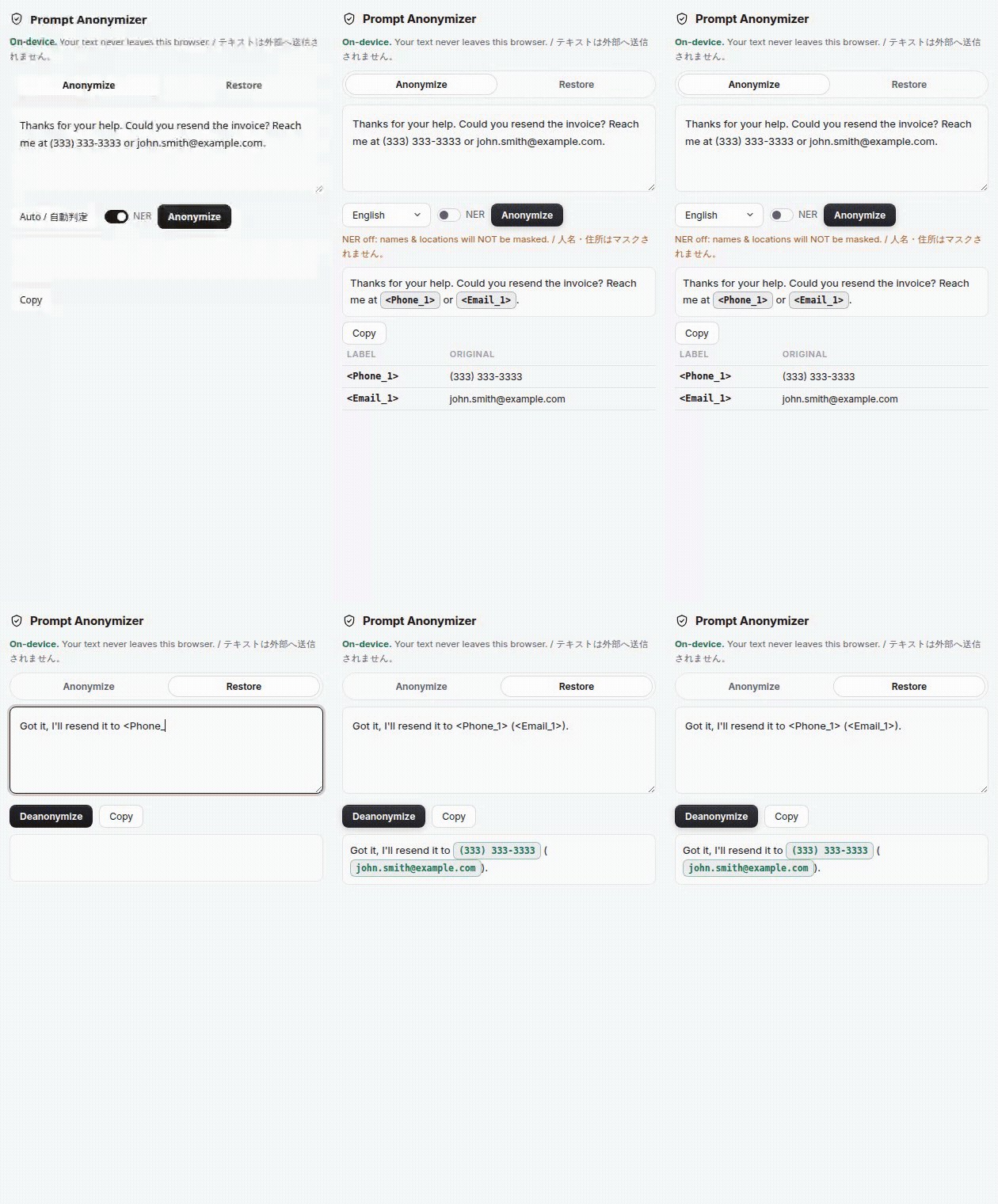
Anonymize → the mapping stays local → the LLM reply keeps the labels → restore:
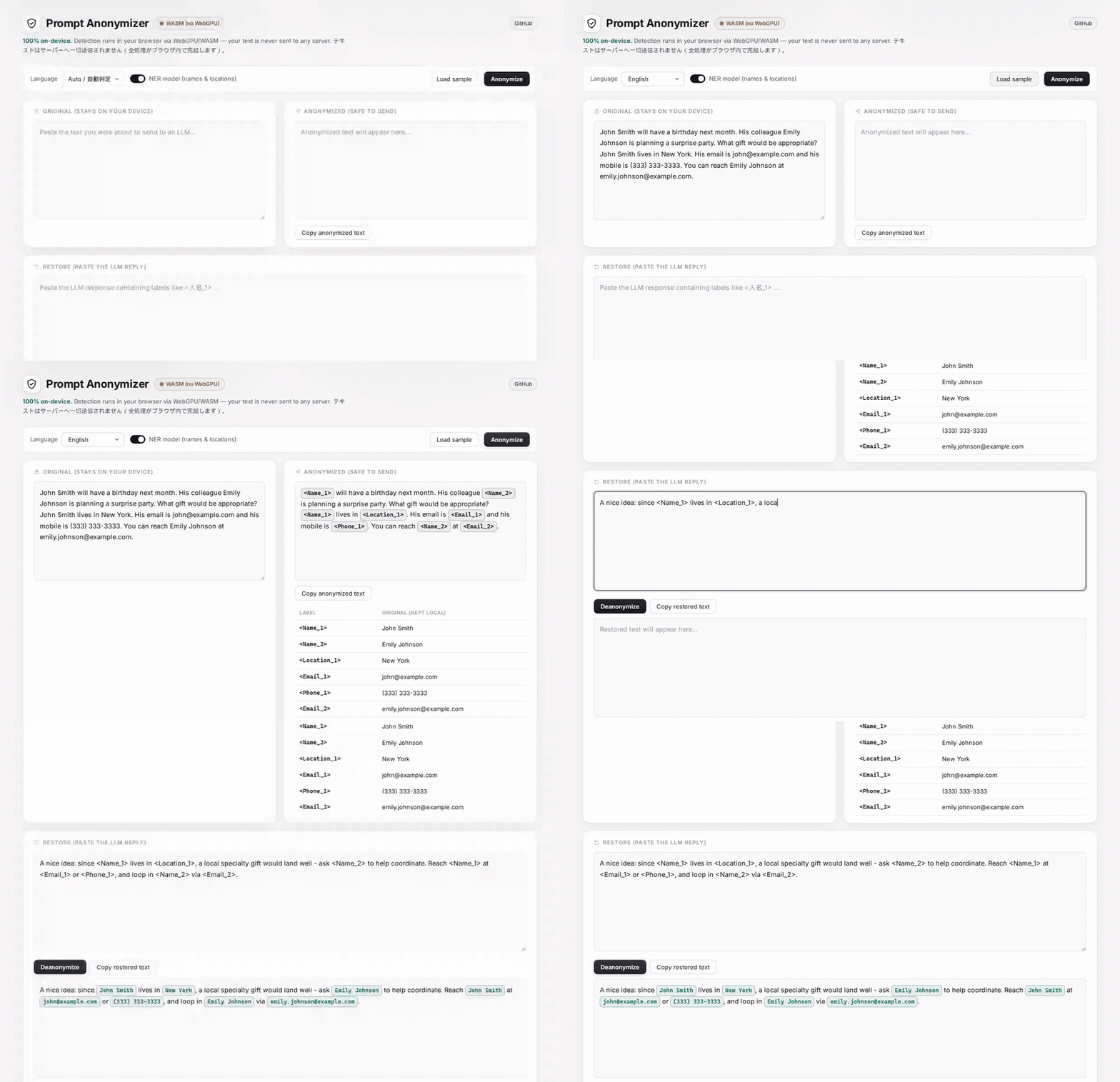
CLI demo
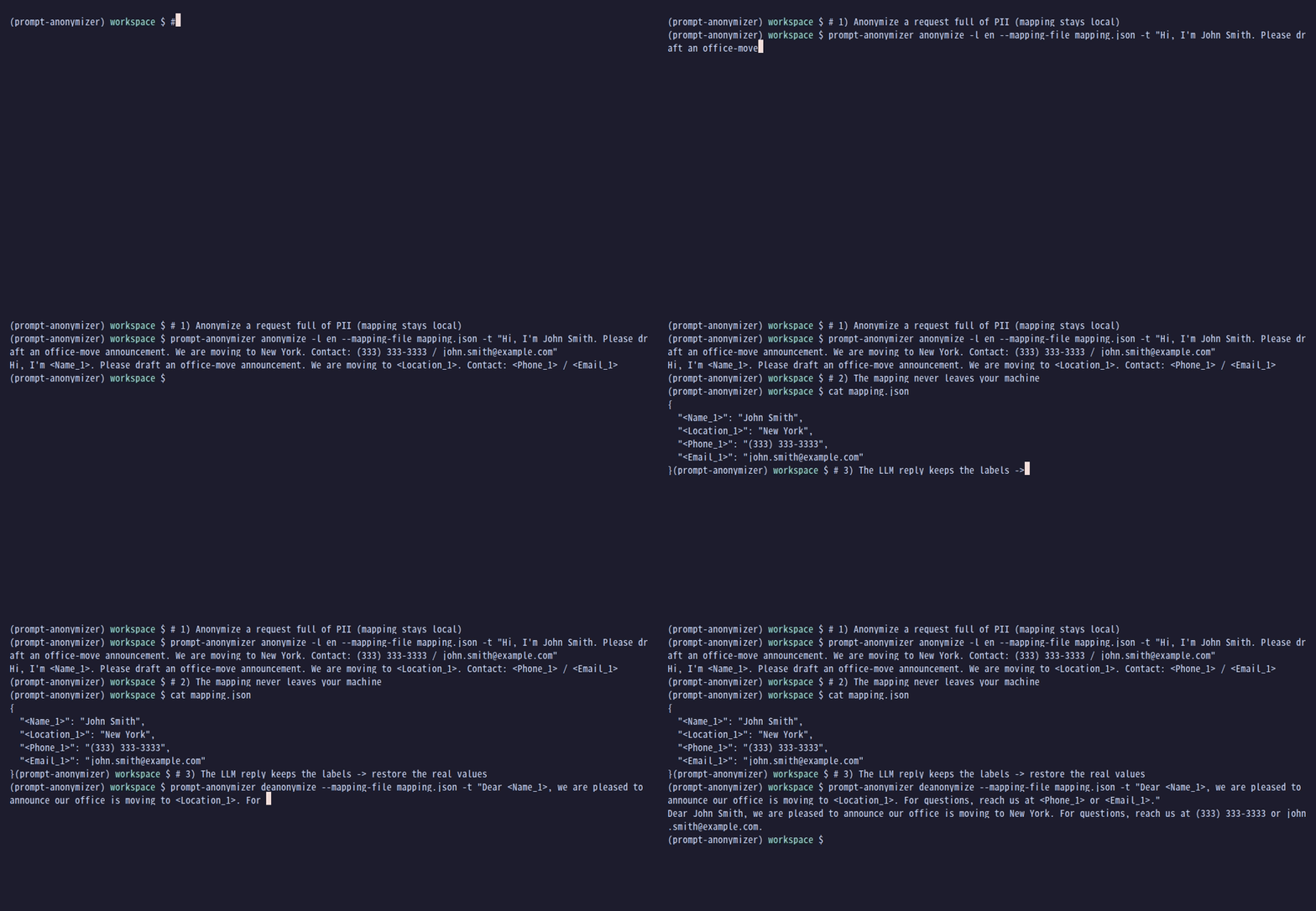
Chrome extension demo (side panel)
Try it
| Target | How | Notes |
|---|---|---|
| Browser (WebGPU) | akazah.github.io/prompt-anonymizer | 100% on-device: NER runs in your browser via WebGPU (WASM fallback). Your text is never sent to a server — verify it in the network tab. |
| Desktop app | Download from Releases (.dmg / .msi / .exe / .AppImage / .deb / .rpm) |
Tauri 2. Unsigned for now — your OS will warn on first launch. |
| Chrome extension | prompt-anonymizer-extension-*.zip from Releases |
Unzip → chrome://extensions → enable Developer mode → "Load unpacked". Select text → right-click → Anonymize selection. |
| Python / CLI | pip install prompt-anonymizer |
Presidio + spaCy. See Quickstart below. |
| Node CLI (npx) | npx @prompt-anonymizer/cli |
Same commands and flags as the Python CLI; transformers.js NER, fully on-device. |
| Web Component | @prompt-anonymizer/element |
Framework-agnostic <prompt-anonymizer> element: drop the full anonymize → restore panel into any site (plain HTML, Svelte, Angular, …). |
| React / Vue | @prompt-anonymizer/react / @prompt-anonymizer/vue |
Drop-in <AnonymizerPanel /> component plus a useAnonymizer() hook / composable for custom UIs. See Quickstart below. |
| Local proxy + admin GUI | npx @prompt-anonymizer/proxy |
OpenAI-compatible reverse proxy: point OPENAI_BASE_URL at it and PII is masked before leaving your machine, labels restored in responses (incl. streaming). Admin GUI on http://127.0.0.1:8787/admin/. See Quickstart below. |
| MCP server | npx @prompt-anonymizer/mcp |
anonymize / deanonymize / scan tools for any MCP client (Claude Desktop, Claude Code, Cursor, …). The label mapping stays in server memory (mapping_id) and is never shown to the model unless explicitly requested. See Quickstart below. |
| Commit hook / CI gate | prompt-anonymizer scan (both CLIs) + .pre-commit-hooks.yaml |
Exit-code PII gate for commit-time and CI checks: reports file:line:col and entity type, never the matched text. Offline and model-free by default. See below. |
Quickstart (Python)
pip install prompt-anonymizer
python -m spacy download ja_core_news_sm   # en: en_core_web_sm; es: es_core_news_sm
python -m spacy download xx_ent_wiki_sm    # vi: no official spaCy pipeline — WikiNER
# zh: zh_core_web_sm; ko: ko_core_news_sm; fr/de/pt/it: *_core_news_sm — or
# install every sm model at once: uv sync --group models (lg: --group models-lg)
from prompt_anonymizer import PromptAnonymizer

pa = PromptAnonymizer(languages=["ja"])
result = pa.anonymize("山田太郎の電話は090-1234-5678", language="ja")

result.text     # '<人名_1>の電話は<電話番号_1>'
result.mapping  # {'<人名_1>': '山田太郎', '<電話番号_1>': '090-1234-5678'}

pa_es = PromptAnonymizer(languages=["es"])
pa_es.anonymize(
    "El cliente es Javier Moreno, teléfono 612 345 678", language="es"
).text  # 'El cliente es <Nombre_1>, teléfono <Teléfono_1>'

# vi names need the transformer backend (see "Optional transformer NER backend")
pa_vi = PromptAnonymizer(languages=["vi"], ner_backend="hf")
pa_vi.anonymize(
    "Tôi tên là Nguyễn Văn An, số điện thoại 0912 345 678", language="vi"
).text  # 'Tôi tên là <Tên_1>, số điện thoại <SốĐiệnThoại_1>'

llm_output = call_your_llm(result.text)          # labels survive the round trip
pa.deanonymize(llm_output, result.mapping)       # real values restored, locally
CLI (-l ja|en|es|vi|zh|ko|fr|de|pt|it):
prompt-anonymizer anonymize -l ja --interactive --mapping-file mapping.json \
  -t "山田太郎の電話は090-1234-5678"
prompt-anonymizer anonymize -l es -t "El cliente es Javier Moreno, teléfono 612 345 678"
prompt-anonymizer anonymize -l fr -t "Le client est Pierre Durand, téléphone 06 12 34 56 78"
prompt-anonymizer deanonymize --mapping-file mapping.json -t "<人名_1>様 ..."
Quickstart (JavaScript / TypeScript)
The Node CLI mirrors the Python CLI (same commands, flags and JSON output), running the TypeScript core with transformers.js NER on-device:
npx @prompt-anonymizer/cli anonymize -t "山田太郎の電話は090-1234-5678"
To embed the ready-made anonymize → restore panel in any frontend, use the framework-agnostic web component:
<script type="module">
  import { definePromptAnonymizer } from "@prompt-anonymizer/element";
  definePromptAnonymizer();
</script>
<prompt-anonymizer language="auto"></prompt-anonymizer>
React (@prompt-anonymizer/react) and Vue 3 (@prompt-anonymizer/vue) ship
a typed <AnonymizerPanel /> wrapping that element:
import { AnonymizerPanel } from "@prompt-anonymizer/react"; // or "@prompt-anonymizer/vue"

<AnonymizerPanel language="auto" denyList={["ProjectX"]}
  onAnonymize={(result) => console.log(result.text)} />
For custom UIs, both packages also expose the anonymize → LLM → restore session as a hook / composable:
import { useAnonymizer } from "@prompt-anonymizer/react"; // or "@prompt-anonymizer/vue"

const { anonymize, restore, mapping, busy, error } = useAnonymizer();
const result = await anonymize(input, { language: "ja" });
// send result.text to the LLM — the mapping never leaves the device — then:
const { text: restored, unresolved } = await restore(llmReply);
By default detection is regex-only (emails, phone numbers, …); pass a
ner (e.g. new TransformersNerBackend() from @prompt-anonymizer/core)
to also mask names and locations.
Quickstart (local proxy)
Run the OpenAI-compatible proxy and point any client at it — PII is masked before the request leaves your machine and labels are restored in the response (streaming included). Mappings stay in proxy memory, per request:
npx @prompt-anonymizer/proxy            # listens on http://127.0.0.1:8787

# In your app / shell:
export OPENAI_BASE_URL=http://127.0.0.1:8787/v1
The admin GUI at http://127.0.0.1:8787/admin/ shows live status and
redaction events (labels and counts only), edits the proxy config
(upstream, NER, deny/allow lists) and offers a local-only anonymization
playground. The proxy binds to 127.0.0.1 by default; original values are
only revealable in the GUI when you explicitly enable --record-mappings.
Quickstart (MCP server)
Give any MCP client — Claude Desktop, Claude Code, Cursor, … — on-device anonymization tools:
# Claude Code:
claude mcp add prompt-anonymizer -- npx -y @prompt-anonymizer/mcp
Three tools, all designed so PII stays out of the model context:
anonymize returns the masked text plus a mapping_id (the mapping stays in
server memory unless you explicitly ask for it), deanonymize restores by
mapping_id — optionally straight to a file — and scan checks files for
PII, reporting file:line:col and entity type but never the matched text.
Pass --ner in the server args to also mask names/locations (one-time model
download on first use).
Commit-time / CI gate (scan)
Both CLIs ship a scan subcommand designed for git hooks and CI: it exits
0 when the inputs are clean, 1 when PII is found and 2 on errors. It
reports file:line:col and the entity type only — the matched text is
never printed, so hook output and CI logs stay PII-free. By default it is
offline, deterministic and model-free (structured PII: emails, phone
numbers, JP postal codes, My Number, credit cards — plus --deny terms);
--ner opts into name/location detection where models are available.
prompt-anonymizer scan src/prompt.txt docs/*.md      # files (e.g. staged)
git diff --cached -U0 | prompt-anonymizer scan       # or pipe a diff
prompt-anonymizer scan --deny ProjectX --json -t "..."
With the pre-commit framework
(hook definition: .pre-commit-hooks.yaml):
repos:
  - repo: https://github.com/akazah/prompt-anonymizer
    rev: v0.3.0
    hooks:
      - id: prompt-anonymizer-scan
        # args: [--deny, ProjectX, --allow, support@example.com]
Node projects can wire the same gate through husky + lint-staged
(npx @prompt-anonymizer/cli scan):
{ "lint-staged": { "*": "prompt-anonymizer scan" } }
Like everything else here, detection is best-effort: treat scan as a
safety net for obvious leaks, not a guarantee.
Why not …?
Why not just use Presidio? Use Microsoft Presidio directly if you need a general-purpose PII detection / anonymization framework. Prompt Anonymizer uses Presidio as the engine of its Python core and adds the LLM round-trip workflow on top: consistent placeholders, anonymized prompt out, local restore after the response — plus browser, extension and desktop surfaces that need no Python at all.
Why not LLM Guard? LLM Guard is a solid Python-side guardrail suite with its own Anonymize/Deanonymize. Prompt Anonymizer differs in three ways: multilingual detection across ten languages with locale-specific structured PII (checksum-validated national IDs such as My Number, per-region phone formats), non-developer surfaces (paste text in a browser page — no Python setup), and a codebase small enough to actually read.
Why not a "100% local" Chrome extension? Several closed-source extensions claim local processing. Claims are not audits. This project is MIT-licensed: open the network tab, or read the source. (Malicious "AI privacy" extensions that exfiltrate conversations have been documented — the category has earned the skepticism.)
How it works
- Detection — Presidio + spaCy NER (Python) or transformers.js NER + regex recognizers (browser/desktop/extension), extended with registry-driven, locale-specific phone patterns (JP, US/NANP, ES, VN, CN, KR, FR, DE, PT, IT) and Japanese-specific recognizers (〒 postal codes, My Number with check-digit validation). Emails and credit cards are language-agnostic; JP_POSTAL_CODE and JP_MY_NUMBER are detected in every language mode.
- Consistent labeling — spans are merged (score-first) and replaced offset-based from the end; identical values share one label.
- Reversal —
deanonymize(text, mapping)restores originals, longest label first. The mapping is returned to you and never persisted by the library; storing it safely is your responsibility.
Supported entities
| Entity | en label | ja label | es label | vi label | Engine |
|---|---|---|---|---|---|
| PERSON | Name | 人名 | Nombre | Tên | NER |
| EMAIL_ADDRESS | メールアドレス | Correo | pattern | ||
| LOCATION | Location | 住所 | Dirección | ĐịaChỉ | NER |
| PHONE_NUMBER | Phone | 電話番号 | Teléfono | SốĐiệnThoại | registry-driven per-language patterns + libphonenumber regions (JP/US/ES/VN/CN/KR/FR/DE/PT/IT) |
| JP_POSTAL_CODE | PostalCode | 郵便番号 | CódigoPostal | MãBưuĐiện | pattern (custom) |
| JP_MY_NUMBER | MyNumber | マイナンバー | MyNumber | MyNumber | pattern + check digit (custom) |
| CREDIT_CARD | CreditCard | クレジットカード | Tarjeta | ThẻTínDụng | pattern + Luhn check (both cores, all languages) |
| US_SSN (opt-in) | SSN | 社会保障番号 | SSN | SSN | pattern + invalidation rules (both cores, all languages) |
| IBAN_CODE (opt-in) | IBAN | IBAN | IBAN | IBAN | pattern + mod-97 check (both cores, all languages) |
| CUSTOM (deny list) | Custom | 秘匿情報 | Personalizado | TùyChỉnh | exact match |
Labels for the six new languages (zh, ko, fr, de, pt, it) ship in
src/prompt_anonymizer/labels/*.yaml (Python) and in LABELS in
web/packages/core/src/labeling.ts (TS).
deny_list forces masking of specific strings; allow_list exempts them.
Opt-in entities are not detected by default — request them explicitly:
PromptAnonymizer(entities=[...]), new Anonymizer({ entities }), or
--entities PERSON,EMAIL_ADDRESS,US_SSN,IBAN_CODE on either CLI.
Optional transformer NER backend (Python)
The default NER is spaCy, with the per-language model resolved from the
central registry (see the table below; install every sm model with
uv sync --group models, the lg ones with --group models-lg, or use
python -m spacy download <model>). Vietnamese has no official spaCy
pipeline — both model sizes use the multi-language WikiNER model
xx_ent_wiki_sm for tokenization and baseline PER/LOC NER. For good
Vietnamese name/location recall, use the transformer backend instead (see
below).
For markedly better PERSON/LOCATION recall (especially ja and vi),
install the hf extra and switch the backend — per-language Hugging Face
models, fully locally:
| Language | spaCy (sm / lg) |
HF NER (ner_backend="hf") |
|---|---|---|
ja |
ja_core_news_sm / ja_core_news_lg |
tsmatz/xlm-roberta-ner-japanese |
en |
en_core_web_sm / en_core_web_lg |
dslim/bert-base-NER |
es |
es_core_news_sm / es_core_news_lg |
Davlan/bert-base-multilingual-cased-ner-hrl |
vi |
xx_ent_wiki_sm (both sizes) |
NlpHUST/ner-vietnamese-electra-base |
zh |
zh_core_web_sm / zh_core_web_lg |
Davlan/bert-base-multilingual-cased-ner-hrl |
ko |
ko_core_news_sm / ko_core_news_lg |
Davlan/bert-base-multilingual-cased-ner-hrl |
fr |
fr_core_news_sm / fr_core_news_lg |
Davlan/bert-base-multilingual-cased-ner-hrl |
de |
de_core_news_sm / de_core_news_lg |
Davlan/bert-base-multilingual-cased-ner-hrl |
pt |
pt_core_news_sm / pt_core_news_lg |
Davlan/bert-base-multilingual-cased-ner-hrl |
it |
it_core_news_sm / it_core_news_lg |
Davlan/bert-base-multilingual-cased-ner-hrl |
The multilingual HRL model covers de/es/fr/it/pt/zh natively;
Korean has no dedicated checkpoint in this family and relies on mBERT's
cross-lingual transfer.
The TypeScript core (browser / extension / desktop / Node CLI) runs
transformers.js ONNX models: ja and en use the same families as above;
es, vi, zh, ko, fr, de, pt and it all use
Xenova/bert-base-multilingual-cased-ner-hrl (no ONNX export of a dedicated
Vietnamese NER model exists; the multilingual model transfers well to
Vietnamese, and the same transfer caveat applies to Korean).
pip install "prompt-anonymizer[hf]"
pa = PromptAnonymizer(languages=["ja"], ner_backend="hf")  # CLI: --ner-backend hf
pa_vi = PromptAnonymizer(languages=["vi"], ner_backend="hf")  # recommended for vi names
Batch processing is also available and much faster than a loop:
results = pa.anonymize_batch(texts, language="ja", batch_size=16)
Accuracy
Measured span-level on a seeded synthetic golden set (200 documents each for
all ten languages in tests/golden/golden_{lang}.json) —
see docs/EVAL.md for the full table and
uv run python -m prompt_anonymizer.evals to reproduce (defaults to all ten
languages). Highlights (Python core, sm models): ja PHONE_NUMBER /
EMAIL_ADDRESS / JP_POSTAL_CODE / CREDIT_CARD recall 1.00; ja PERSON recall
0.82 with spaCy, 1.00 with ner_backend="hf". es/vi PHONE_NUMBER recall is
also 1.00; vi PERSON/LOCATION benefit strongly from ner_backend="hf".
Structured-PII recall (phone / email / card) is 1.00 for the six new
languages (zh, ko, fr, de, pt, it) on the golden set — docs/EVAL.md
has the TS-core table; Python NER numbers are produced by the weekly eval.
These numbers exist to catch regressions, not to promise recall on real-world text.
Limitations
- Detection is best-effort and not guaranteed. False negatives happen;
always review the anonymized text before sending it anywhere
(
--interactive, and the mapping tables in the UIs, exist for this). - Anonymization hides identifiers, not context. Quasi-identifying details in the surrounding text (a rare job title, a specific event) can still narrow down who or what you're writing about.
- LOCATION recall is the weakest entity, especially for partial Japanese addresses.
- The browser NER model is a one-time ~100–300 MB download (cached afterwards).
- Desktop and extension builds are unsigned for now.
Roadmap
See open issues and IMPLEMENTATION_PLAN.md. Highlights: npm / PyPI publication, store publication (Chrome Web Store), code signing, smaller Japanese NER models, multi-region structured PII (more phone / national-ID formats via checksum validation).
Contributing / Security / License
- docs/INTEGRATIONS.md — recipes for LiteLLM, OpenWebUI, MCP clients, git hooks and CI
- CONTRIBUTING.md — dev setup (uv / pnpm), test and eval commands
- docs/AUDIT.md — verify the on-device claims yourself, step by step
- SECURITY.md — reporting vulnerabilities and anonymization bypasses
- MIT
Project details
Verified details
These details have been verified by PyPIProject links
GitHub Statistics
Maintainers
Release history Release notifications | RSS feed


Download files
Download the file for your platform. If you're not sure which to choose, learn more about installing packages.
Source Distribution
Built Distribution
Filter files by name, interpreter, ABI, and platform.
If you're not sure about the file name format, learn more about wheel file names.
Copy a direct link to the current filters
File details
Details for the file prompt_anonymizer-0.3.0.tar.gz.
File metadata
- Download URL: prompt_anonymizer-0.3.0.tar.gz
- Upload date:
- Size: 10.0 MB
- Tags: Source
- Uploaded using Trusted Publishing? Yes
- Uploaded via: twine/6.1.0 CPython/3.13.12
File hashes
| Algorithm | Hash digest | |
|---|---|---|
| SHA256 |
495813003228bbc26ad1fdf6ead8c93a9bf618119e3b8c38ce0d48f989508cc0
|
|
| MD5 |
e96b34d6e1a4508386dd07332d119951
|
|
| BLAKE2b-256 |
40ac6b6a8a74c0cb6b91f61efc57bd49926b0d87a36a252aebe27688f6b24f6b
|
Provenance
The following attestation bundles were made for prompt_anonymizer-0.3.0.tar.gz:
Publisher:
release.yml on akazah/prompt-anonymizer
-
Statement:
-
Statement type:
https://in-toto.io/Statement/v1 -
Predicate type:
https://docs.pypi.org/attestations/publish/v1 -
Subject name:
prompt_anonymizer-0.3.0.tar.gz -
Subject digest:
495813003228bbc26ad1fdf6ead8c93a9bf618119e3b8c38ce0d48f989508cc0 - Sigstore transparency entry: 2100746170
- Sigstore integration time:
-
Permalink:
akazah/prompt-anonymizer@d575a319ed6128fc45641d8f2605188e6dbf0c37 -
Branch / Tag:
refs/tags/v0.3.0 - Owner: https://github.com/akazah
-
Access:
public
-
Token Issuer:
https://token.actions.githubusercontent.com -
Runner Environment:
github-hosted -
Publication workflow:
release.yml@d575a319ed6128fc45641d8f2605188e6dbf0c37 -
Trigger Event:
push
-
Statement type:
File details
Details for the file prompt_anonymizer-0.3.0-py3-none-any.whl.
File metadata
- Download URL: prompt_anonymizer-0.3.0-py3-none-any.whl
- Upload date:
- Size: 53.7 kB
- Tags: Python 3
- Uploaded using Trusted Publishing? Yes
- Uploaded via: twine/6.1.0 CPython/3.13.12
File hashes
| Algorithm | Hash digest | |
|---|---|---|
| SHA256 |
ac426662f3bd19900bc628382f989195f05a11b019b500635409c33e6d2d8e40
|
|
| MD5 |
55d8db7d0ccd16ddf048f75ee1ee93d3
|
|
| BLAKE2b-256 |
bc3acc2b4919635c413820eb6157abf118dfb15bfb0de7f82de784f602d6abfc
|
Provenance
The following attestation bundles were made for prompt_anonymizer-0.3.0-py3-none-any.whl:
Publisher:
release.yml on akazah/prompt-anonymizer
-
Statement:
-
Statement type:
https://in-toto.io/Statement/v1 -
Predicate type:
https://docs.pypi.org/attestations/publish/v1 -
Subject name:
prompt_anonymizer-0.3.0-py3-none-any.whl -
Subject digest:
ac426662f3bd19900bc628382f989195f05a11b019b500635409c33e6d2d8e40 - Sigstore transparency entry: 2100746344
- Sigstore integration time:
-
Permalink:
akazah/prompt-anonymizer@d575a319ed6128fc45641d8f2605188e6dbf0c37 -
Branch / Tag:
refs/tags/v0.3.0 - Owner: https://github.com/akazah
-
Access:
public
-
Token Issuer:
https://token.actions.githubusercontent.com -
Runner Environment:
github-hosted -
Publication workflow:
release.yml@d575a319ed6128fc45641d8f2605188e6dbf0c37 -
Trigger Event:
push
-
Statement type:






