
prompt-inspector-ux 🔍





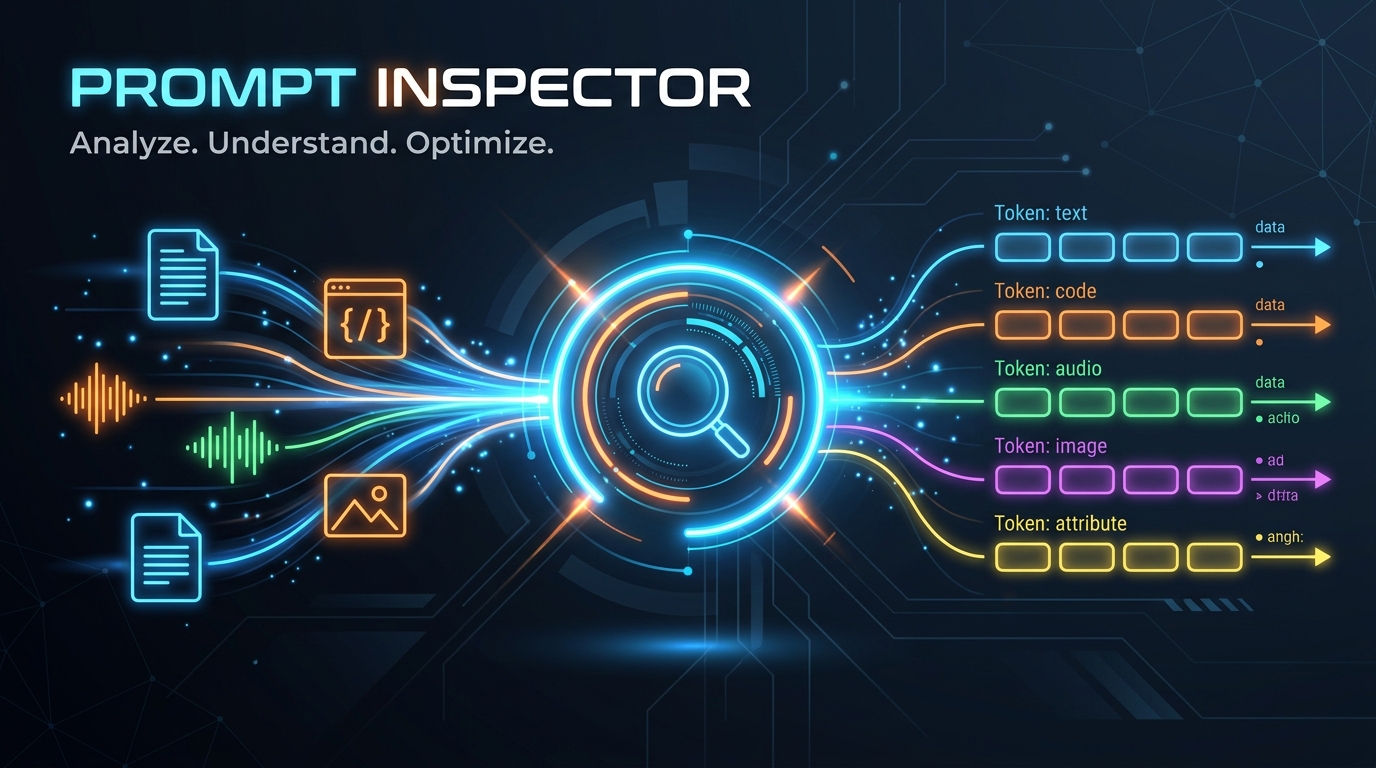
prompt-inspector-ux is a local, interactive middleware and visualizer for generative AI and Agentic workflows. It intercepts outgoing LLM API payloads pre-flight and streams them to a local dashboard, allowing you to visualize exactly what tokens, images, audio, documents (PDFs, Word docs), and templates you are sending to model providers before making API requests.
📚 Interactive Documentation
For detailed installation guides, programmatic APIs, and configuration references: 👉 prompt-inspector-ux Documentation Site
Key Features
- One-Line Integration: Just add
import prompt_inspector; prompt_inspector.inspect()at the top of your script. - Multi-Provider Patches: Automatically hooks and captures:
- OpenAI (Sync/Async Chat Completions, Azure OpenAI, Groq, and compatible endpoints).
- Anthropic (Sync/Async Messages).
- Google GenAI (New
google-genaiand legacygoogle-generativeaiclient model calls).
- Framework Agnostic: Works out of the box with LangChain, LangGraph, and LlamaIndex by intercepting the underlying client SDK calls.
- Rich Multimodal Visualizer Dashboard:
- Prompt timeline sidebar tracking all model queries.
- HTML Document Sandbox: Preview parsed templates inside a secure iframe.
- Code Panel: View code snippets, syntax highlighted.
- Inline Document Reader: Scroll and inspect PDFs and Word Documents (.docx) directly in the dashboard UI (powered by in-browser Mammoth.js conversion).
- Media Players: Native HTML5 players for audio waves (
.wav,.mp3) and video tokens. - Zero Overhead: Serves local files from the filesystem via a loopback port instead of sending massive base64 strings, saving CPU and memory.
Installation
Install using pip:
pip install prompt-inspector-ux
Or using uv:
uv add prompt-inspector-ux
Quickstart
Just call inspect() at the very beginning of your application. This spins up the server in a background thread and opens the browser tab to your dashboard:
import prompt_inspector
from openai import OpenAI

# 1. Start the visualizer and auto-patch all SDKs
prompt_inspector.inspect(port=8989)

# 2. Make your LLM calls normally (no other changes required!)
client = OpenAI()
response = client.chat.completions.create(
    model="gpt-4o",
    messages=[
        {"role": "user", "content": "Explain quantum mechanics in 1 sentence."}
    ]
)
Run Standalone CLI
To run the visualization server independently (for example, to persist your trace history across different script runs):
prompt-inspector start --port 8989
Then open http://localhost:8989 in your browser. Any scripts executing prompt_inspector.inspect() will detect the active server and stream traces to it.
Framework Integration Examples
1. LangChain / LangGraph
Since LangChain packages wrap standard provider SDKs under the hood, prompt-inspector captures them automatically with zero additional config or callbacks:
import prompt_inspector
from langchain_openai import ChatOpenAI
from langchain_core.messages import HumanMessage, SystemMessage

prompt_inspector.inspect()

# Works with standard, Groq, Azure, or self-hosted OpenAI instances
llm = ChatOpenAI(
    model="qwen/qwen3.6-27b",
    base_url="https://api.groq.com/openai/v1",
    api_key="your-groq-key"
)

messages = [
    SystemMessage(content="You are an expert systems architect."),
    HumanMessage(content="Explain Reciprocal Rank Fusion.")
]

llm.invoke(messages)
2. Google GenAI (Gemini)
Gemini supports rich multimodal prompts including images and document PDFs:
import prompt_inspector
from PIL import Image
from google import genai
from google.genai import types

prompt_inspector.inspect()

client = genai.Client()

# Send text, PIL Images, and PDF bytes directly
contents = [
    "Analyze this workflow diagram and summarize the text inside the PDF:",
    Image.open("flowchart.png"),
    types.Part.from_bytes(
        data=open("document.pdf", "rb").read(),
        mime_type="application/pdf"
    )
]

client.models.generate_content(
    model='gemini-2.5-flash',
    contents=contents
)
3. LlamaIndex
LlamaIndex models are patched automatically through their underlying completions layer:
import prompt_inspector
from llama_index.llms.openai import OpenAI

prompt_inspector.inspect()

llm = OpenAI(model="gpt-4")
response = llm.complete("Explain Retrieval-Augmented Generation.")
4. Anthropic Claude
Captures message blocks, system prompts, and media objects:
import prompt_inspector
import anthropic

prompt_inspector.inspect()

client = anthropic.Anthropic()
message = client.messages.create(
    model="claude-3-5-sonnet-20241022",
    max_tokens=1000,
    temperature=0,
    system="Respond only in markdown.",
    messages=[
        {
            "role": "user",
            "content": [
                {
                    "type": "text",
                    "text": "What does this code do?"
                }
            ]
        }
    ]
)
Multimodal Payload Examples (Audio, Video, PDF, Word & Combinations)
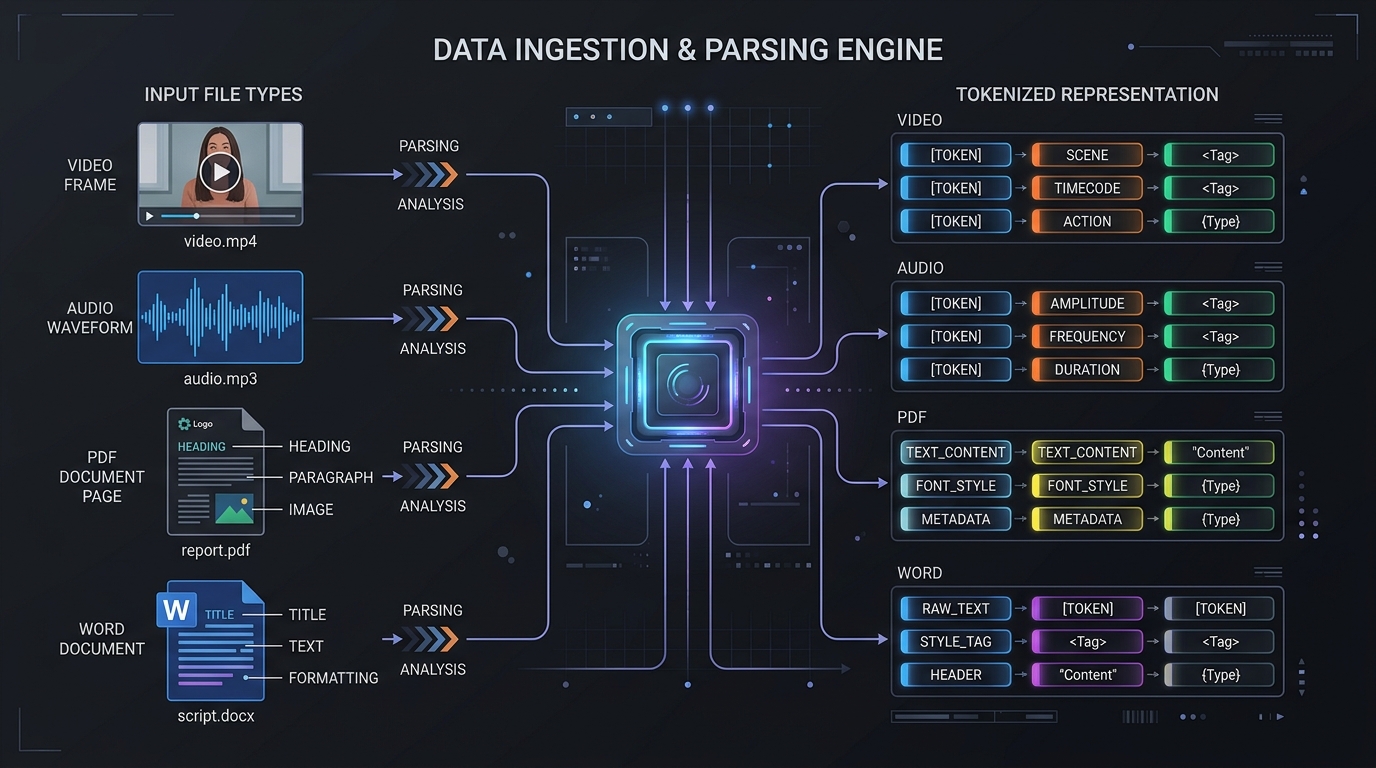
prompt-inspector fully extracts and visualizes various document and media formats. Here is how you can send them using different SDKs and model providers.
1. Google GenAI (Gemini)
Gemini models support native multimodal inputs. You can send images (using PIL), audio, video, PDFs, and Word docs as inline bytes:
import base64
import prompt_inspector
from PIL import Image
from google import genai
from google.genai import types

prompt_inspector.inspect()
client = genai.Client()

# Helper to read file bytes
def read_bytes(path):
    with open(path, "rb") as f:
        return f.read()

# --- Example A: Sending an Audio File ---
audio_contents = [
    "Analyze the sound cue in this clip:",
    types.Part.from_bytes(data=read_bytes("instructions.wav"), mime_type="audio/wav")
]
client.models.generate_content(model="gemini-2.5-flash", contents=audio_contents)

# --- Example B: Sending a Video File ---
video_contents = [
    "Provide a summary of the activity in this video:",
    types.Part.from_bytes(data=read_bytes("screen_recording.mp4"), mime_type="video/mp4")
]
client.models.generate_content(model="gemini-2.5-flash", contents=video_contents)

# --- Example C: Sending a PDF Document ---
pdf_contents = [
    "Verify the ranking equations in this PDF:",
    types.Part.from_bytes(data=read_bytes("equations.pdf"), mime_type="application/pdf")
]
client.models.generate_content(model="gemini-2.5-flash", contents=pdf_contents)

# --- Example D: Sending a Word Document (.docx) ---
docx_contents = [
    "Summarize this project brief:",
    types.Part.from_bytes(
        data=read_bytes("project_brief.docx"),
        mime_type="application/vnd.openxmlformats-officedocument.wordprocessingml.document"
    )
]
client.models.generate_content(model="gemini-2.5-flash", contents=docx_contents)

# --- Example E: Combination Payload (Text + Image + Audio + PDF) ---
complex_contents = [
    "Review the flowchart, listen to the audio instructions, and verify with the pdf sheet:",
    Image.open("flowchart.png"),
    types.Part.from_bytes(data=read_bytes("instructions.wav"), mime_type="audio/wav"),
    types.Part.from_bytes(data=read_bytes("formulas.pdf"), mime_type="application/pdf")
]
client.models.generate_content(model="gemini-2.5-flash", contents=complex_contents)
2. OpenAI / Groq / Compatible Endpoints
For OpenAI-compatible endpoints, you pass multimodal structures inside the messages array:
import base64
import prompt_inspector
from openai import OpenAI

prompt_inspector.inspect()
client = OpenAI()

def encode_b64(path):
    with open(path, "rb") as f:
        return base64.b64encode(f.read()).decode("utf-8")

# --- Combination Payload (Text + Image + Audio + Document) ---
messages = [
    {
        "role": "user",
        "content": [
            {
                "type": "text",
                "text": "Analyze the diagram, hear the sound, and verify with the PDF document:"
            },
            {
                "type": "image_url",
                "image_url": {"url": f"data:image/png;base64,{encode_b64('diagram.png')}"}
            },
            {
                "type": "input_audio",
                "input_audio": {
                    "data": encode_b64("instructions.wav"),
                    "format": "wav"
                }
            },
            {
                "type": "document",
                "document": {
                    "data": {
                        "base64": encode_b64("reference.pdf")
                    },
                    "mime_type": "application/pdf"
                }
            }
        ]
    }
]

client.chat.completions.create(
    model="gpt-4o",
    messages=messages
)
Local Development Setup
If you want to run or contribute to prompt-inspector locally:
-
Clone the repository:
git clone https://github.com/SachinMishra-ux/prompt-inspector.git
cd prompt-inspector
-
Set up the virtual environment:
uv sync -
Build the React Dashboard UI: The frontend is built using Vite and Tailwind CSS. Build the static assets:
npm run build --prefix ui
This compiles the bundle directly into the python package's
static/directory so it is distributed with the PyPI wheel. -
Run Unit Tests:
uv run python3 -m unittest discover -s tests/unit
License
This project is licensed under the MIT License.
1 maintainer

Metadata
1 maintainer
Release files for prompt-inspector-ux 0.1.4
For a detailed explanation of source distributions (sdists) and built distributions (wheels), please see the package formats documentation.
Source distribution (sdist)
| File | Size | Uploaded | |
|---|---|---|---|
| prompt_inspector_ux-0.1.4.tar.gz | 15.2 MB | Details |
Built distribution (wheel)
| File | Interpreter | ABI | Platform | Reset |
|---|---|---|---|---|
| prompt_inspector_ux-0.1.4-py3-none-any.whl | Python 3 | none | any | Details |
Total release size: 15.4 MB
Release files / prompt_inspector_ux-0.1.4.tar.gz
| Download URL | prompt_inspector_ux-0.1.4.tar.gz |
|---|---|
| Size | 15.2 MB |
| Tags | Source |
|
SHA-256 checksum How to use checksums |
eb016ef4084d38112df96f1519db0ef2c212f9853fccc5f005874e4af3088ade
|
|
BLAKE2b-256 checksum How to use checksums |
70f6efd26725fa1b2d9ece65a58e371e8445debee9b33baafd83c3b84bedfaa6
|
| Upload date | |
|
Uploaded using Trusted Publishing? What is trusted publishing? |
Yes |
| Uploaded via |
twine/7.0.0 CPython/3.13.14
|
Provenance
Provenance describes where a file came from. On PyPI, provenance is shared via attestations, which provide a verifiable record of the build or publishing details. View details, limitations and caveats.


PyPI Publish Attestation
PyPI verified that this artifact, at this checksum, originated from the publisher listed below.
Signed by GitHub Actions, verified by PyPI on Aug 31, 2026.
Transparency logRelease files / prompt_inspector_ux-0.1.4-py3-none-any.whl
| Download URL | prompt_inspector_ux-0.1.4-py3-none-any.whl |
|---|---|
| Size | 200.5 kB |
| Tags | Python 3 |
|
SHA-256 checksum How to use checksums |
8a805f1c81f3aecb6e5e8dc340f1cef90f61bc5830f07d7f802024348381a443
|
|
BLAKE2b-256 checksum How to use checksums |
72d055df8515dc33992f04b775765875476a1d5df35626b04aa5aabced2cea14
|
| Upload date | |
|
Uploaded using Trusted Publishing? What is trusted publishing? |
Yes |
| Uploaded via |
twine/7.0.0 CPython/3.13.14
|
Provenance
Provenance describes where a file came from. On PyPI, provenance is shared via attestations, which provide a verifiable record of the build or publishing details. View details, limitations and caveats.
PyPI Publish Attestation
PyPI verified that this artifact, at this checksum, originated from the publisher listed below.
Signed by GitHub Actions, verified by PyPI on Aug 31, 2026.
Transparency log













