
Library for building powerful interactive command lines in Python

Project description






prompt_toolkit is a library for building powerful interactive command line applications in Python.
Read the documentation on readthedocs.
NOTICE: prompt_toolkit 3.0
Please notice that this branch is the prompt_toolkit 3.0 branch. For most users, it should be compatible with prompt_toolkit 2.0, but it requires at least Python 3.6. On the plus side, prompt_toolkit 3.0 is completely type annotated and uses asyncio natively.
Gallery
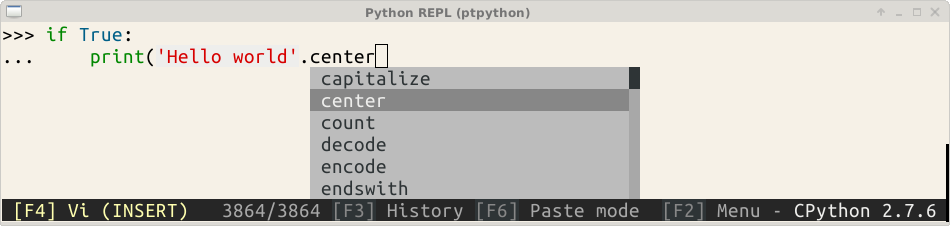
ptpython is an interactive Python Shell, build on top of prompt_toolkit.
prompt_toolkit features
prompt_toolkit could be a replacement for GNU readline, but it can be much more than that.
Some features:
Pure Python.
Syntax highlighting of the input while typing. (For instance, with a Pygments lexer.)
Multi-line input editing.
Advanced code completion.
Both Emacs and Vi key bindings. (Similar to readline.)
Even some advanced Vi functionality, like named registers and digraphs.
Reverse and forward incremental search.
Works well with Unicode double width characters. (Chinese input.)
Selecting text for copy/paste. (Both Emacs and Vi style.)
Support for bracketed paste.
Mouse support for cursor positioning and scrolling.
Auto suggestions. (Like fish shell.)
Multiple input buffers.
No global state.
Lightweight, the only dependencies are Pygments, six and wcwidth.
Runs on Linux, OS X, FreeBSD, OpenBSD and Windows systems.
And much more…
Feel free to create tickets for bugs and feature requests, and create pull requests if you have nice patches that you would like to share with others.
Installation
pip install prompt_toolkit
For Conda, do:
conda install -c https://conda.anaconda.org/conda-forge prompt_toolkit
About Windows support
prompt_toolkit is cross platform, and everything that you build on top should run fine on both Unix and Windows systems. Windows support is best on recent Windows 10 builds, for which the command line window supports vt100 escape sequences. (If not supported, we fall back to using Win32 APIs for color and cursor movements).
It’s worth noting that the implementation is a “best effort of what is possible”. Both Unix and Windows terminals have their limitations. But in general, the Unix experience will still be a little better.
For Windows, it’s recommended to use either cmder or conemu.
Getting started
The most simple example of the library would look like this:
from prompt_toolkit import prompt

if __name__ == '__main__':
    answer = prompt('Give me some input: ')
    print('You said: %s' % answer)
For more complex examples, have a look in the examples directory. All examples are chosen to demonstrate only one thing. Also, don’t be afraid to look at the source code. The implementation of the prompt function could be a good start.
Philosophy
The source code of prompt_toolkit should be readable, concise and efficient. We prefer short functions focusing each on one task and for which the input and output types are clearly specified. We mostly prefer composition over inheritance, because inheritance can result in too much functionality in the same object. We prefer immutable objects where possible (objects don’t change after initialization). Reusability is important. We absolutely refrain from having a changing global state, it should be possible to have multiple independent instances of the same code in the same process. The architecture should be layered: the lower levels operate on primitive operations and data structures giving – when correctly combined – all the possible flexibility; while at the higher level, there should be a simpler API, ready-to-use and sufficient for most use cases. Thinking about algorithms and efficiency is important, but avoid premature optimization.
Projects using prompt_toolkit
Special thanks to
Release history Release notifications | RSS feed


Download files
Download the file for your platform. If you're not sure which to choose, learn more about installing packages.
Source Distribution
Built Distribution
Filter files by name, interpreter, ABI, and platform.
If you're not sure about the file name format, learn more about wheel file names.
Copy a direct link to the current filters
File details
Details for the file prompt_toolkit-3.0.3.tar.gz.
File metadata
- Download URL: prompt_toolkit-3.0.3.tar.gz
- Upload date:
- Size: 3.0 MB
- Tags: Source
- Uploaded using Trusted Publishing? No
- Uploaded via: twine/3.1.1 pkginfo/1.5.0.1 requests/2.22.0 setuptools/45.0.0 requests-toolbelt/0.9.1 tqdm/4.42.0 CPython/3.7.5
File hashes
| Algorithm | Hash digest | |
|---|---|---|
| SHA256 |
a402e9bf468b63314e37460b68ba68243d55b2f8c4d0192f85a019af3945050e
|
|
| MD5 |
c0f7beb0d22886f99de990816fb4aba0
|
|
| BLAKE2b-256 |
8fbc58ba47a2a864d8e3d968d03b577c85fbdf52c8d324a030df71ac9c06c1b5
|
File details
Details for the file prompt_toolkit-3.0.3-py3-none-any.whl.
File metadata
- Download URL: prompt_toolkit-3.0.3-py3-none-any.whl
- Upload date:
- Size: 348.4 kB
- Tags: Python 3
- Uploaded using Trusted Publishing? No
- Uploaded via: twine/3.1.1 pkginfo/1.5.0.1 requests/2.22.0 setuptools/45.0.0 requests-toolbelt/0.9.1 tqdm/4.42.0 CPython/3.7.5
File hashes
| Algorithm | Hash digest | |
|---|---|---|
| SHA256 |
c93e53af97f630f12f5f62a3274e79527936ed466f038953dfa379d4941f651a
|
|
| MD5 |
65316d46354a58a94fb1d1e0f9a0895a
|
|
| BLAKE2b-256 |
f522f00412fafc68169054cc623a35c32773f22b403ddbe516c8adfdecf25341
|






