
PromptBin - MCP Server Example
The easiest way to run a Model Context Protocol (MCP) server with full prompt management.
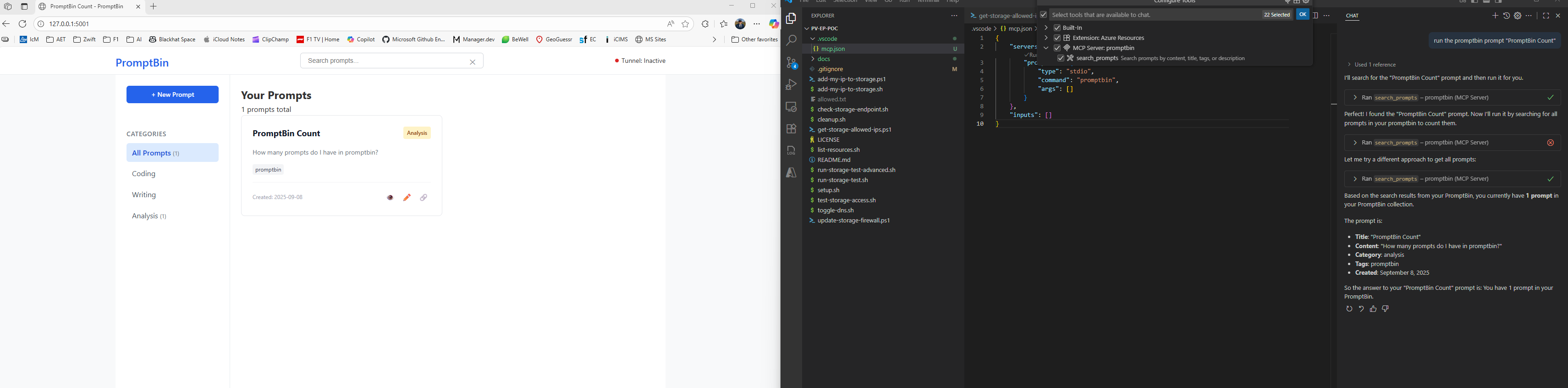
Setup
1. Install and Configure
# Install PromptBin
pip install promptbin

# Install Dev Tunnels CLI (optional, for public sharing)
promptbin-install-tunnel

# Authenticate with Dev Tunnels (optional, one-time setup)
devtunnel user login -g

# Verify setup
promptbin-setup
2. Add to Your AI Client
Claude Desktop - Add to Settings → Developer → Edit Config:
{
  "mcpServers": {
    "promptbin": {
      "type": "stdio",
      "command": "uvx",
      "args": ["promptbin"]
    }
  }
}
3. Start Using
That's it! PromptBin is now running:
- Web UI:
http://localhost:5001- Manage and create prompts - MCP Server: Ready for AI tool connections
Key Features
- 🚀 Easy setup: One command to get started
- 🔗 MCP integration: Full Model Context Protocol support
- 🌐 Web interface: Auto-launching prompt management UI
- 🔒 Secure sharing: Share prompts via Dev Tunnels with rate limiting
- 📁 Local-first: Your data stays private, stored locally
- ⚙️ Production-ready: Comprehensive logging and error handling
Usage Options
# Default: Run both MCP server and web interface
promptbin

# Run only MCP server (for AI tools)
promptbin --mcp

# Run only web interface (standalone)
promptbin --web

# Custom port and options
promptbin --port 8080 --data-dir ~/my-prompts
Development Mode
For development or customization:
git clone https://github.com/ianphil/promptbin
cd promptbin
uv sync
uv run promptbin
What You Get
- ✅ Complete MCP server - Full Model Context Protocol implementation
- ✅ Auto-launching web UI - Prompt management interface at localhost:5000
- ✅ AI tool integration - Works with Claude Desktop, ChatGPT Desktop
- ✅ Secure sharing - Share prompts publicly via Dev Tunnels
- ✅ File-based storage - No database required, organized by category
- ✅ Cross-platform - Windows, macOS, Linux support
- ✅ Production-ready - Rate limiting, logging, graceful shutdown
Advanced Features
Secure Public Sharing (Optional)
PromptBin includes Microsoft Dev Tunnels integration for sharing prompts publicly:
# Install Dev Tunnels CLI
uv run promptbin-install-tunnel

# Authenticate (one-time setup)
devtunnel user login -g

# Start PromptBin, then click "Start Tunnel" in the footer
Now your shared prompts get public URLs that work from anywhere. Includes automatic rate limiting and security protections.
For detailed setup instructions, see TUNNELS.md.
System Validation
# Check if your system is ready
uv run promptbin-setup
Add MCP Server to ChatGPT & Claude (Desktop)
Prereq: Install PromptBin first (pip install promptbin). The apps will launch the MCP server themselves.
ChatGPT Desktop (Mac/Windows):
- Open Settings → Developer → Model Context Protocol.
- Click "Add Server".
- Name: PromptBin
- Command:
uvx - Args:
promptbin
Claude Desktop (Mac/Windows):
- Open Settings → Developer → Edit Config
"PromptBin": {
            "command": "uvx",
            "args": ["promptbin"]
        }
Notes:
- After adding, you can list/search prompts via the PromptBin MCP tools. The MCP server also starts the local web UI on
http://127.0.0.1:<port>. - If
uvxis not available, ensure you haveuvinstalled and usepip install promptbininstead.
1 maintainer

Metadata
1 maintainer
Release files for promptbin 0.5.1
For a detailed explanation of source distributions (sdists) and built distributions (wheels), please see the package formats documentation.
Source distribution (sdist)
| File | Size | Uploaded | Provenance | Actions |
|---|---|---|---|---|
| promptbin-0.5.1.tar.gz | 185.4 kB | Without provenance | Details for promptbin-0.5.1.tar.gz |
Built distribution (wheel)
| File | Interpreter | ABI | Platform | Actions Reset |
|---|---|---|---|---|
| promptbin-0.5.1-py3-none-any.whl | Python 3 | none | any | Details for promptbin-0.5.1-py3-none-any.whl |
Total release size: 263.4 kB
Release files / promptbin-0.5.1.tar.gz
| Download URL | promptbin-0.5.1.tar.gz |
|---|---|
| Size | 185.4 kB |
| Tags | Source |
|
SHA-256 checksum How to use checksums |
3faea887d534895c87c984f3e424c8120c7973849a121f027377da0e180e2ad9
|
|
BLAKE2b-256 checksum How to use checksums |
36b4bad2a1629317e7820b369884b9cb0009e8497c6fcf39cdfaf4ddb1f88fe5
|
| Upload date | |
|
Uploaded using Trusted Publishing? What is trusted publishing? |
No |
| Uploaded via |
uv/0.8.17
|
Release files / promptbin-0.5.1-py3-none-any.whl
| Download URL | promptbin-0.5.1-py3-none-any.whl |
|---|---|
| Size | 78.1 kB |
| Tags | Python 3 |
|
SHA-256 checksum How to use checksums |
d5b04cb06ead5c260ec53fc55edb3b4abcd31ceffb5ab4e3dcd2bf74686b9ad8
|
|
BLAKE2b-256 checksum How to use checksums |
d6c23b496b49e7b45297fc619b0029b1cff77d951a75a03cba192dc29f8a44d3
|
| Upload date | |
|
Uploaded using Trusted Publishing? What is trusted publishing? |
No |
| Uploaded via |
uv/0.8.17
|
Security for promptbin 0.5.1
Provenance
Provenance describes where a file came from. On PyPI, provenance is shared via attestations, which provide a verifiable record of the build or publishing details. View details, limitations and caveats.
No provenance found
None of the files in this release were uploaded with provenance metadata.
A note on package security
PyPI is a repository for distributing packages, not a service for auditing them. While third-party security researchers and our staff do their best to detect and remove malicious packages, PyPI cannot guarantee the quality, security or suitability of any given package.
To learn more about protecting yourself from malicious actors, visit our package security documentation.














