
Multi-provider LLM prompt optimization toolkit: compress prompts by 50-80% while preserving quality. Supports Cohere, Gemini with automatic failover. Perfect for RAG, API cost reduction, and production GenAI workflows.

Project description
PromptFit


Smart prompt optimization for modern LLMs
PromptFit automatically analyzes, compresses, and optimizes your prompts to fit within token budgets while preserving semantic relevance and context. No more manual prompt trimming or unexpected token overages.
The Problem
Working with modern LLMs like GPT, Cohere, Gemini, and Claude often means dealing with strict token limits. This becomes especially challenging when building applications that require:
- Rich, multi-section prompts for RAG (Retrieval-Augmented Generation)
- Few-shot learning examples
- Complex instruction sets
- Large context windows
Developers typically resort to manual prompt trimming, which risks:
- Loss of critical context
- Incomplete or poor-quality responses
- Unexpected token costs
- Time wasted on prompt engineering
Solution
PromptFit solves this through intelligent prompt optimization:
- Token Budget Analysis: Estimate token usage before sending prompts to LLMs
- Semantic Relevance Scoring: Rank prompt sections by relevance using embeddings and cosine similarity
- Smart Content Pruning: Remove low-relevance sections while preserving key information
- Caching Layer – Skip re-computing embeddings for repeated sentences and queries.
- Better RAG Support – Easily drop into retrieval-augmented generation pipelines.
- Intelligent Paraphrasing: Compress content using LLMs instead of just dropping it
- Modular Architecture: Use individual components or the complete optimization pipeline
Key Features
Token Budget Estimator
Analyze token usage for prompt templates, sections, and variables before API calls.
Semantic Relevance Scoring
Split prompts into sections, generate embeddings, and rank by cosine similarity to your query.
Smart Prompt Pruner
Intelligently remove or trim low-relevance sections while keeping important content.
Paraphrasing Module
Use Cohere's LLM to rewrite and compress content instead of dropping it entirely.
Caching for Speed Reuse previous computations to make repeated optimization calls instant
CLI Support
Optimize prompts directly from the command line for quick testing.
Does PromptFit Lose Context?
Traditional approach (risky):
Truncate text to meet limits, often removing vital information.
PromptFit approach (intelligent):
- Uses cosine similarity between query and content to prioritize relevant information
- Applies token estimation to ensure output fits within budget
- Optionally compresses content through paraphrasing rather than deletion
- Maintains query context throughout the optimization process
Tested Output
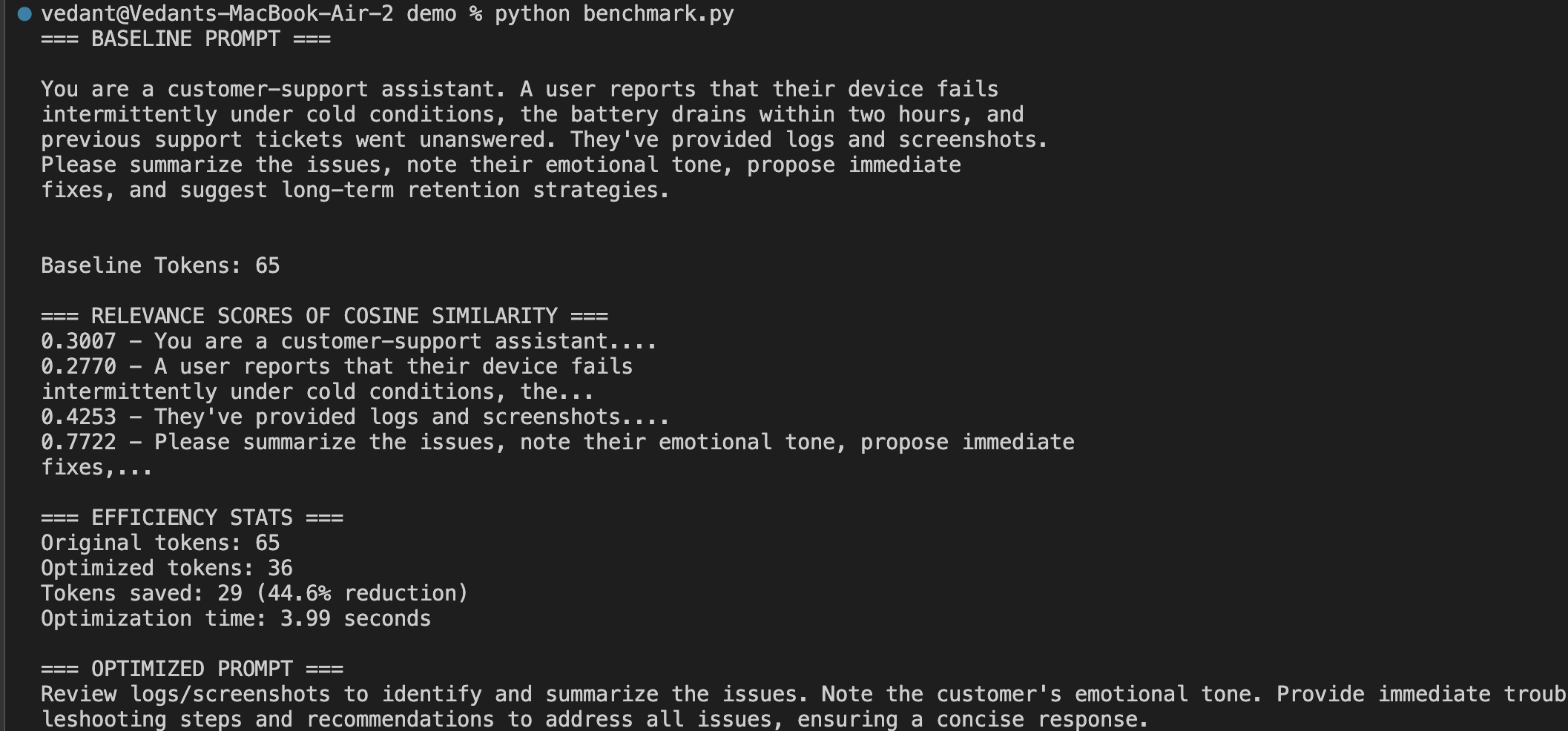
Performance Comparison
RAG Flow optimization results:
| Metric | Baseline | With PromptFit | Improvement |
|---|---|---|---|
| Tokens in Context | 284 | 97 | 65.8% reduction |
| Optimization Time | N/A | 1.72s | Real-time |
| Prompt Clarity | Mixed/redundant | Concise & relevant | More focused |
| Cost Efficiency | Higher token usage | Reduced tokens | Lower spend |
| Response Quality | Sometimes verbose | Direct & contextual | More precise |
Installation
pip install promptfit
Quick Start
Python API
import os
from promptfit.optimizer import optimize_prompt

# Set your Cohere API key
os.environ["COHERE_API_KEY"] = "your-api-key-here"

# Your original prompt
prompt = """
You are a customer-support assistant. A user reports that their device fails
intermittently under cold conditions, the battery drains within two hours, and
previous support tickets went unanswered. They've provided logs and screenshots.
Please summarize the issues, note their emotional tone, propose immediate
fixes, and suggest long-term retention strategies.
"""

query = "Summarize issues, emotional tone, action items, and retention strategies."

# Optimize for 40 token budget
optimized_prompt = optimize_prompt(prompt, query, max_tokens=40)
print(optimized_prompt)
Command Line
python -m promptfit.cli "YOUR_PROMPT" "YOUR_QUERY" --max-tokens 120
Detailed Example
import os
import time
from promptfit.token_budget import estimate_tokens
from promptfit.utils import split_sentences
from promptfit.embedder import get_embeddings
from promptfit.relevance import compute_cosine_similarities
from promptfit.optimizer import optimize_prompt

# Set API key
os.environ["COHERE_API_KEY"] = "your-api-key-here"

prompt = """
You are a customer-support assistant. A user reports that their device fails
intermittently under cold conditions, the battery drains within two hours, and
previous support tickets went unanswered. They've provided logs and screenshots.
Please summarize the issues, note their emotional tone, propose immediate
fixes, and suggest long-term retention strategies.
"""

query = "Summarize issues, emotional tone, action items, and retention strategies."

# Analyze original prompt
sentences = split_sentences(prompt)
print(f"Split into {len(sentences)} sentences")

# Get embeddings for relevance scoring
all_texts = [query] + sentences
embeddings = get_embeddings(all_texts)

# Compute relevance scores
query_emb = embeddings[0]
sent_embs = embeddings[1:]
scores = compute_cosine_similarities(query_emb, sent_embs)

print("\nRelevance Scores:")
for sent, score in zip(sentences, scores):
    print(f"{score:.4f} - {sent[:50]}...")

# Optimize with timing
budget = 40
start_time = time.time()
optimized = optimize_prompt(prompt, query, max_tokens=budget)
optimization_time = time.time() - start_time

# Results
orig_tokens = estimate_tokens(prompt)
opt_tokens = estimate_tokens(optimized)
tokens_saved = orig_tokens - opt_tokens

print(f"\nResults:")
print(f"Original: {orig_tokens} tokens")
print(f"Optimized: {opt_tokens} tokens")
print(f"Saved: {tokens_saved} tokens ({tokens_saved/orig_tokens*100:.1f}%)")
print(f"Time: {optimization_time:.2f}s")
print(f"\nOptimized prompt:\n{optimized}")
Environment Setup
Create a .env file in your project root:
COHERE_API_KEY=your-actual-api-key-here
Or set the environment variable:
export COHERE_API_KEY=your-actual-api-key-here
Technical Details
Language: Python 3.10+
LLM: Cohere command-r-plus
Embeddings: embed-english-v3.0
Tokenizer: Cohere's estimator with fallback
Dependencies: cohere, scikit-learn, tiktoken, python-dotenv, nltk, rich, typer, pytest
Project Structure
promptfit/
├── __init__.py
├── token_budget.py      # Token estimation utilities
├── embedder.py          # Embedding generation
├── relevance.py         # Similarity scoring
├── optimizer.py         # Main optimization logic
├── paraphraser.py       # Content compression
├── cli.py              # Command line interface
├── utils.py            # Helper functions
├── config.py           # Configuration management
├── tests/              # Test suite
│   ├── test_token_budget.py
│   ├── test_relevance.py
│   ├── test_optimizer.py
│   └── test_paraphraser.py
└── demo/
    └── demo_usage.py   # Complete example
Why PromptFit?
Cost Effective: Only send relevant, concise prompts to reduce token usage and API costs.
Reliable: Never exceed token limits or lose critical context through intelligent optimization.
Time Saving: Automate prompt engineering so you can focus on building your application.
LLM Agnostic: Built for Cohere but easily adaptable to OpenAI, Anthropic, Google, and other providers.
Production Ready: Comprehensive test suite and modular design for enterprise applications.
Contributing
Contributions are welcome! Please feel free to submit pull requests, report issues, or suggest improvements.
For major changes, please open an issue first to discuss your proposed changes.
License
MIT License - see LICENSE file for details.
Author
Vedant Laxman Chandore
GitHub Profile
Built for developers building the next generation of GenAI applications. Optimize your prompts, maximize your results.


Download files
Download the file for your platform. If you're not sure which to choose, learn more about installing packages.
Source Distribution
Built Distribution
Filter files by name, interpreter, ABI, and platform.
If you're not sure about the file name format, learn more about wheel file names.
Copy a direct link to the current filters
File details
Details for the file promptfit-0.5.0.tar.gz.
File metadata
- Download URL: promptfit-0.5.0.tar.gz
- Upload date:
- Size: 32.8 kB
- Tags: Source
- Uploaded using Trusted Publishing? No
- Uploaded via: twine/6.1.0 CPython/3.10.12
File hashes
| Algorithm | Hash digest | |
|---|---|---|
| SHA256 |
e969a74127b94dcd8b23c665f8a3ee77da327ecbee2caf2dc0513d57b41ac6a5
|
|
| MD5 |
6ae394c71953d4cb2b9c7b9090b02614
|
|
| BLAKE2b-256 |
7cd28dfff02986cacbc070e42cf1148e602ff29ec060eb3abd1886f47d5e8753
|
File details
Details for the file promptfit-0.5.0-py3-none-any.whl.
File metadata
- Download URL: promptfit-0.5.0-py3-none-any.whl
- Upload date:
- Size: 36.7 kB
- Tags: Python 3
- Uploaded using Trusted Publishing? No
- Uploaded via: twine/6.1.0 CPython/3.10.12
File hashes
| Algorithm | Hash digest | |
|---|---|---|
| SHA256 |
87031dbbda3237b883a2a63044057e4dd20aee9a15ea5de091e37a8ac0a7eba4
|
|
| MD5 |
08afb0c375ec8bff2575c1afdf346949
|
|
| BLAKE2b-256 |
6f6111a1e1743cd0ff90eb89bb919fab8d0273678afb093066d2edcce5de9486
|






