
AI-powered prompt engineering CLI tool

Project description
Promptheus
AI-powered prompt engineering for humans who'd rather spend their time on ideas than housekeeping.
Promptheus is a CLI tool that takes your rough prompt ideas and helps refine them into something worth sending to an AI. Think of it as a pre-flight checklist for your prompts—ask the right questions upfront, tweak until it feels right, and keep a history of what worked.
Why This Exists
You're working with AI and you want better results. You know prompts matter, but who has time to craft the perfect prompt every single time? Promptheus handles the refinement workflow so you can focus on what you're trying to build. It asks clarifying questions when needed, lets you tweak iteratively, and gets out of the way when you just want to ship something fast.
Quick Start
Installation
pip install -e .
Verify Installation
promptheus --version
# Should output: Promptheus v0.1.0
Set Up Your API Keys
Create a .env file in your project directory (or use the provided .env.example as a template):
# Pick one or more providers
GEMINI_API_KEY=your_gemini_key_here
ANTHROPIC_API_KEY=your_anthropic_key_here
OPENAI_API_KEY=your_openai_key_here
GROQ_API_KEY=your_groq_key_here
DASHSCOPE_API_KEY=your_qwen_key_here  # for Qwen
ZAI_API_KEY=your_glm_key_here          # for GLM
Promptheus will auto-detect which provider to use based on your available keys. You can override this with flags or environment variables if you prefer.
Optional: Shell Completion
Enable tab completion for better CLI experience:
# Generate and install completion automatically
promptheus completion --install

# Or generate completion script for your shell
promptheus completion bash > ~/.bash_completion.d/promptheus.bash
# or
promptheus completion zsh > ~/.zsh/completions/_promptheus

# Then restart your shell or source the completion file
source ~/.bash_completion.d/promptheus.bash
# or
source ~/.zshrc
The completion works with Poetry environments and supports:
- Provider and model completion
- Subcommand completion (history, list-models, validate, template, completion)
- All flags and options
- Context-aware suggestions
Basic Usage
# Interactive mode (REPL-style)
promptheus

# Single prompt
promptheus "Write a technical blog post about microservices"

# Skip questions mode (skip refinement)
promptheus -s "Explain how kubernetes works"

# Force refinement with questions
promptheus -r "Draft a product announcement"

# Use a specific provider
promptheus --provider gemini "Analyze this codebase structure"

# Load prompt from file
promptheus -f my-prompt.txt
promptheus @my-prompt.txt

# Pipe it in
cat idea.txt | promptheus
Features
Adaptive Interaction
Promptheus automatically detects what kind of task you're working on:
- Analysis tasks (research, code review, exploration): Skips unnecessary questions by default—you already know what you want
- Generation tasks (writing, creating, design): Offers clarifying questions to help you think through requirements
You can override this with -s (skip-questions) or -r (refine) flags.
Six AI Providers, One Interface
Promptheus supports multiple LLM providers with a consistent experience:
- Google Gemini (gemini-2.0-flash-exp, gemini-1.5-pro, gemini-1.5-flash)
- Anthropic Claude (claude-3-5-sonnet, claude-3-5-haiku, claude-3-opus)
- OpenAI (gpt-4o, gpt-4-turbo, gpt-3.5-turbo)
- Groq (llama-3.3-70b-versatile, llama-3.1-70b-versatile, mixtral-8x7b)
- Qwen (qwen-max, qwen-plus, qwen-turbo)
- GLM (glm-4-plus, glm-4-0520, glm-4-air)
Switch providers with --provider or pin a specific model with --model. The tool handles all the provider-specific quirks behind the scenes.
Clarifying Questions
When Promptheus detects a generation task, it can ask you clarifying questions to flesh out your prompt:
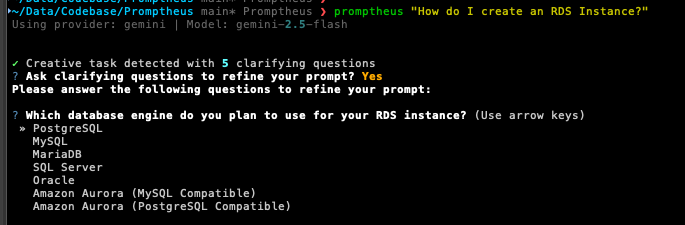
The AI generates contextual questions based on your initial prompt. Use --skip-questions to bypass questions and directly improve your prompt.
Iterative Tweaking
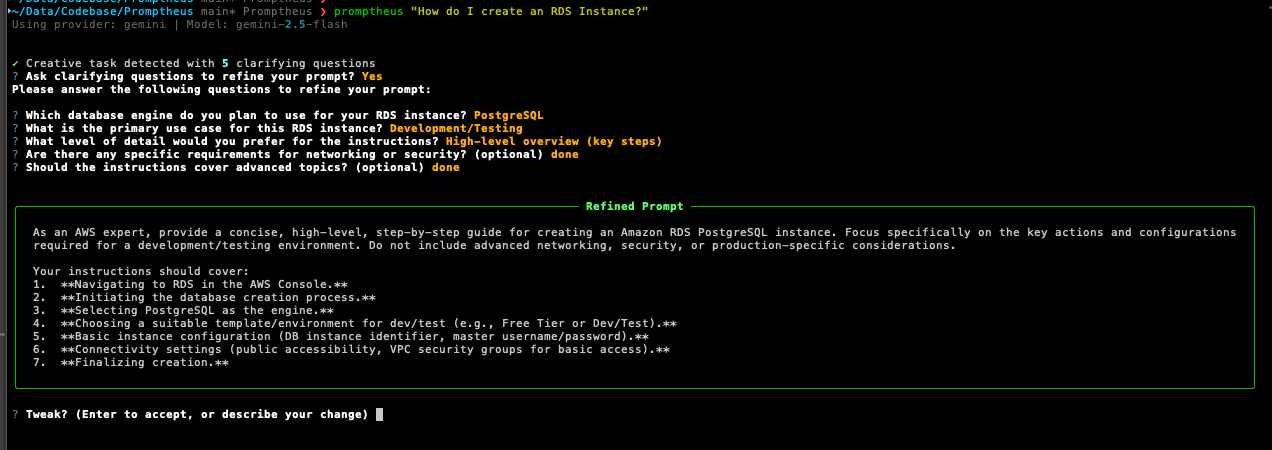
After refinement, you get a chance to make targeted edits:
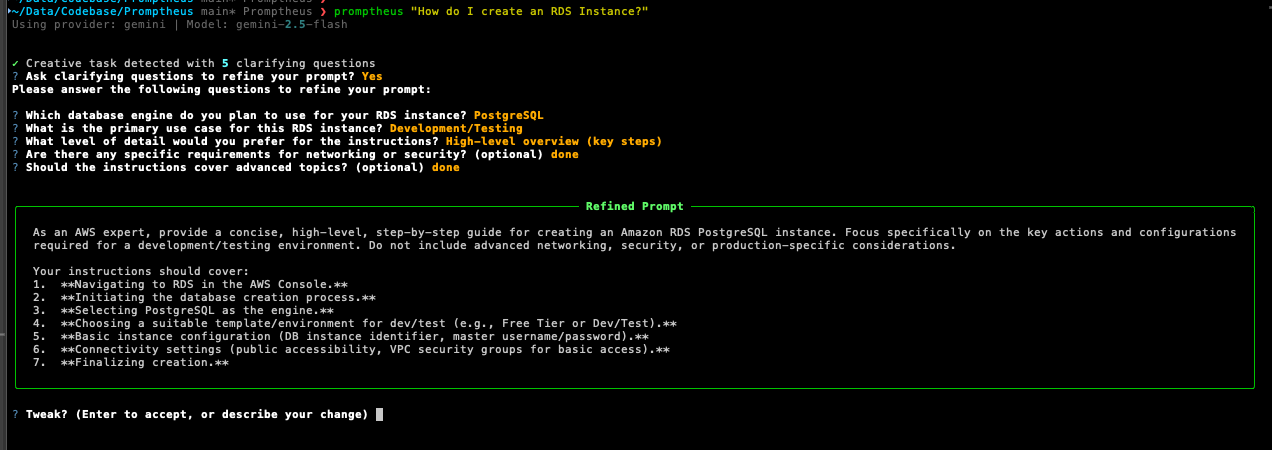
Just describe what you want changed in natural language. Hit Enter when you're happy with it.
Session History
Every refined prompt is saved automatically for future reference. You can revisit past prompts, load them for reuse, or clear history when needed.
# View history from CLI
promptheus history
promptheus history --limit 50
promptheus history --clear

# From interactive mode
/history
/load 3
/clear-history
History Privacy & Security
Smart Auto-Detection: Promptheus automatically detects your usage context to protect privacy:
- Interactive terminal sessions (like
promptheuswithout arguments): History enabled by default - Non-interactive usage (pipelines, scripts, automation): History disabled by default
- Batch processing: History disabled to prevent accidental logging of sensitive prompts
Manual Control: Override auto-detection with the PROMPTHEUS_ENABLE_HISTORY environment variable:
# Force enable history (useful for CI/CD with manual review)
PROMPTHEUS_ENABLE_HISTORY=1 promptheus "analyze this data"

# Force disable history (for maximum privacy)
PROMPTHEUS_ENABLE_HISTORY=0 promptheus "secret project plan"

# Alternative values supported: true/yes/on, false/no/off
PROMPTHEUS_ENABLE_HISTORY=true promptheus "confidential analysis"
Security Considerations:
- History is stored locally in your home directory (
~/.promptheus/or%APPDATA%/promptheus) - No data is transmitted to external services
- Prompts with special characters (newlines, backslashes) are safely escaped
- Uses efficient JSONL format for O(1) append operations
History includes timestamps, task types, and both original and refined versions so you can track what worked.
Output Helpers
- Copy to clipboard:
-c/--copy— refined prompt goes straight to your clipboard
Piping & Output Formatting
Promptheus automatically detects when output is piped and adjusts its behavior accordingly:
# Auto-quiet: automatically enabled when piping
promptheus "Explain Docker" | cat

# Questions are still asked (on stderr), final output on stdout
promptheus "Draft a report" | tee result.txt

# If stdin is not interactive, questions are automatically skipped
echo "Write a story" | promptheus | cat

# Different output formats
promptheus -o plain "Write a haiku"        # Plain text (default)
promptheus -o json "Create a function"     # JSON format with metadata
Piping Behavior:
- Auto-quiet: When stdout is not a TTY (piping), quiet mode is automatically enabled
- Prompt processing unchanged: Questions are still asked based on LLM's decision when stdin is interactive
- Non-interactive stdin: When stdin is not a TTY (piped input), questions are automatically skipped and light refinement is used
- Clean separation: All UI messages (status, warnings, progress, questions) go to stderr; only the final refined prompt goes to stdout
- No interactive tweaks: Clipboard (
--copy) is disabled in quiet mode - Error handling: Errors always appear on stderr with non-zero exit codes
Pipe Integration
Promptheus works seamlessly with Unix pipes and command substitution:
# Chain with other AI tools
promptheus "Write a story" | codex exec
claude "$(promptheus 'Create a haiku')"

# Standard Unix utilities
promptheus "Explain Docker" | tee output.txt       # Save and display
promptheus "Ideas" | grep -i "docker" > ideas.txt  # Filter results
echo "topic" | promptheus | cat > result.txt       # Chain transformations

# JSON processing
promptheus -o json "API schema" | jq '.endpoints'

# Batch processing
cat prompts.txt | while read line; do
  promptheus "$line" >> results.txt
done
Interactive Mode (REPL)
Launch promptheus with no arguments to enter interactive mode. Process multiple prompts in one session, reuse your provider/model/flag settings, and use built-in helpers like /history, arrow-key navigation, and multiline input support.
Interactive mode includes:
- Slash commands:
/history,/load <n>,/clear-history,/copy,/status,/set provider <name>,/toggle refine, and many more - Keyboard shortcuts: Use Shift+Enter or Option/Alt+Enter for multiline prompts
- Session management: Change provider/model on the fly with
/setcommands - Copy to clipboard: Use
/copyto copy the last refined result
Input Methods
- Inline:
promptheus "Your prompt here" - File flag:
promptheus -f path/to/prompt.txt - @ shortcut:
promptheus @path/to/prompt.txt - Stdin:
cat prompt.txt | promptheusorecho "prompt" | promptheus
Mix and match with flags as needed.
Command Reference
Core Flags
| Flag | Description |
|---|---|
-s, --skip-questions |
Skip clarifying questions and improve prompt directly |
-r, --refine |
Force clarifying questions even for analysis tasks |
-o, --output-format |
Output format: plain (default) or json |
-c, --copy |
Copy refined prompt to clipboard |
Provider Selection
| Flag | Description |
|---|---|
--provider <name> |
Use specific provider (gemini, anthropic, openai, groq, qwen, glm) |
--model <model> |
Use specific model (overrides provider default) |
Input Methods
| Flag | Description |
|---|---|
-f <file> |
Load prompt from file |
@<file> |
Shortcut syntax for loading from file |
| (stdin) | Pipe prompt via standard input |
History Commands
| Command | Description |
|---|---|
promptheus history |
View all saved prompts |
promptheus history --limit N |
View last N prompts |
promptheus history --clear |
Clear all history |
/history |
View history (interactive mode) |
/load <n> |
Load prompt #n from history (interactive mode) |
/clear-history |
Clear history (interactive mode) |
Interactive Mode Commands
| Command | Description |
|---|---|
/history |
View history |
/load <n> |
Load prompt #n from history |
/clear-history |
Clear all history |
/copy |
Copy last refined result to clipboard |
/about |
Show version and configuration info |
/bug |
Submit a bug report |
/help |
Show all available commands |
/status |
Show current session settings |
/set provider <name> |
Change AI provider mid-session |
/set model <name> |
Change model mid-session |
/toggle refine |
Toggle refine mode on/off |
/toggle skip-questions |
Toggle skip-questions mode on/off |
Utility Commands
| Command | Description |
|---|---|
promptheus --help |
Show help message |
promptheus --version |
Show version info |
promptheus completion |
Generate shell completion script |
promptheus completion --install |
Automatically install shell completion |
promptheus completion bash |
Generate bash completion script |
promptheus completion zsh |
Generate zsh completion script |
Configuration
Environment Variables
You can control Promptheus behavior via environment variables:
# Provider Selection
export PROMPTHEUS_PROVIDER=gemini        # Override auto-detection
# Available: gemini, anthropic, openai, groq, qwen, glm

# Model Selection
export PROMPTHEUS_MODEL=gemini-2.0-flash-exp
# Examples: claude-3-5-sonnet-20241022, gpt-4o, llama-3.1-405b

# History Persistence
export PROMPTHEUS_ENABLE_HISTORY=1      # Force enable history
export PROMPTHEUS_ENABLE_HISTORY=0      # Force disable history
# Values: 1/0, true/false, yes/no, on/off
# Default: Smart auto-detection (interactive=enabled, pipes=disabled)

# Debug and Logging
export PROMPTHEUS_DEBUG=1               # Enable verbose debug output
export PROMPTHEUS_LOG_LEVEL=INFO        # Override log level
# Values: DEBUG, INFO, WARNING, ERROR, CRITICAL

export PROMPTHEUS_LOG_FORMAT=json       # JSON structured logs
# Values: "json" or custom format string
# Default: "%(asctime)s %(levelname)s [%(name)s] %(message)s"

export PROMPTHEUS_LOG_FILE=app.log      # Log to file instead of console
# Values: Any valid file path
Configuration Hierarchy
Promptheus follows this precedence order (highest to lowest):
- Explicit CLI arguments (
--provider gemini,--model gpt-4o) - Environment variables (
PROMPTHEUS_PROVIDER,PROMPTHEUS_MODEL) - Auto-detection based on available API keys
- Provider-specific defaults
.env File Location
Promptheus searches upward from your current directory for a .env file, stopping at:
.gitdirectory (project root)pyproject.toml(Python project marker)setup.py(Python project marker)
This lets you have project-specific configurations without polluting global settings.
Advanced Logging Configuration
For development and debugging, Promptheus offers comprehensive logging controls:
# Basic debug mode (enables DEBUG level and detailed output)
PROMPTHEUS_DEBUG=1 promptheus "test prompt"

# Fine-grained log level control
PROMPTHEUS_LOG_LEVEL=DEBUG promptheus "analyze this"

# JSON structured logs for parsing and monitoring
PROMPTHEUS_LOG_FORMAT=json promptheus "generate code"

# Log to file for audit trails
PROMPTHEUS_LOG_FILE=/var/log/promptheus.log promptheus "important task"

# Custom log format
PROMPTHEUS_LOG_FORMAT="%(levelname)s: %(message)s" promptheus "simple format"
Logging Behavior:
- Default: Minimal console output (clean user experience)
- Debug mode: Detailed verbose output with full stack traces
- File logging: All logs written to specified file, console stays clean
- JSON format: Structured logs ideal for log aggregation systems
Common Use Cases:
# CI/CD pipeline with structured logs
PROMPTHEUS_LOG_FORMAT=json PROMPTHEUS_LOG_FILE=ci.log promptheus --version

# Development debugging
PROMPTHEUS_DEBUG=1 PROMPTHEUS_LOG_FILE=debug.log promptheus

# Production monitoring with silent console
PROMPTHEUS_LOG_LEVEL=WARNING PROMPTHEUS_LOG_FILE=production.log promptheus
Documentation
For more detailed guides, check the docs/ directory:
- Usage Guide: Detailed examples and workflows
- Development Guide: Contributing, testing, and architecture
- Troubleshooting: Common issues and solutions
Examples
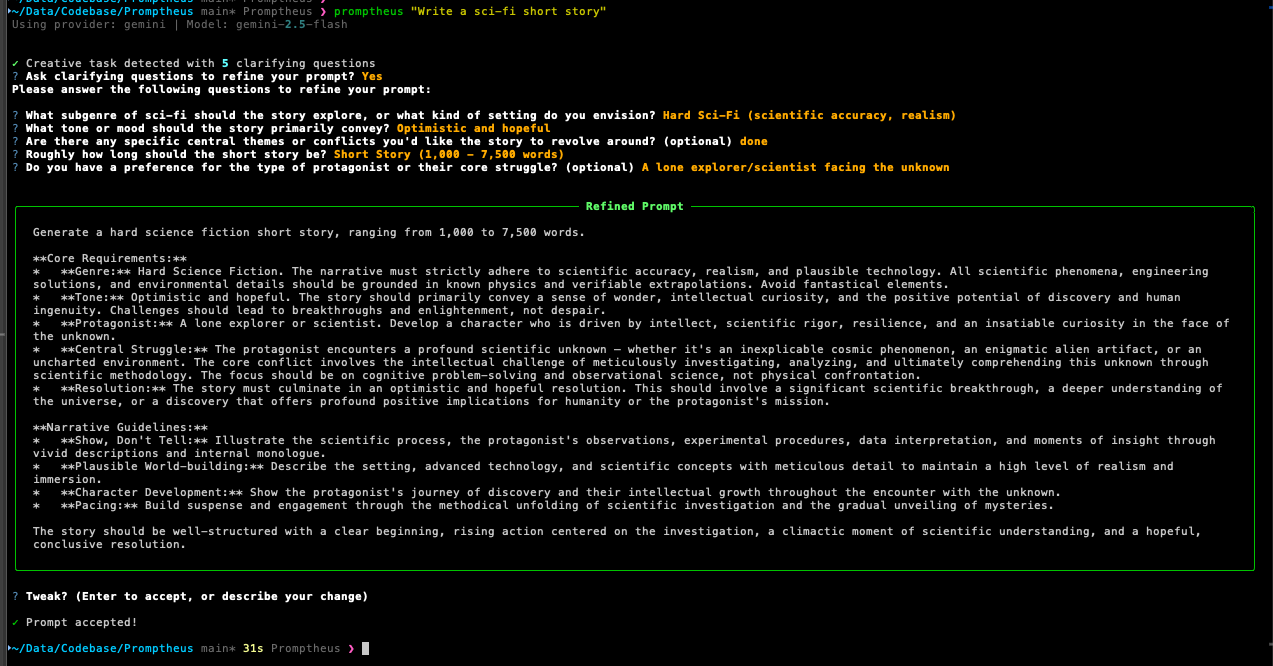
Creative Writing
Code Analysis
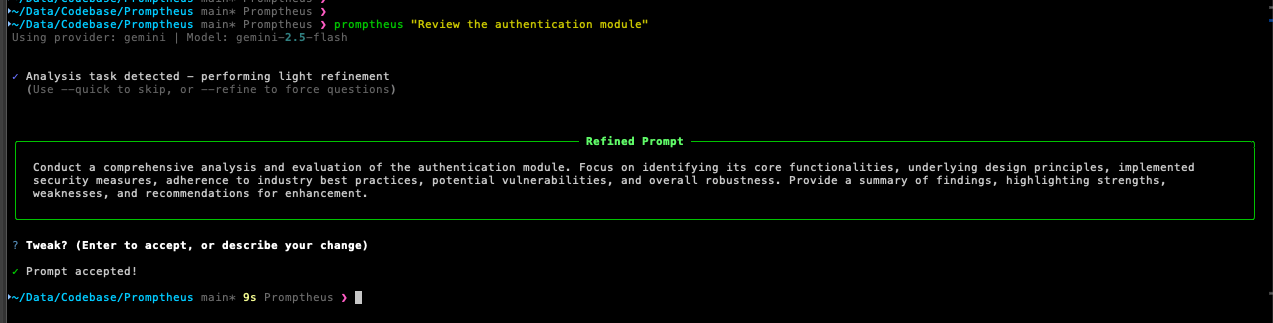
Interactive Session
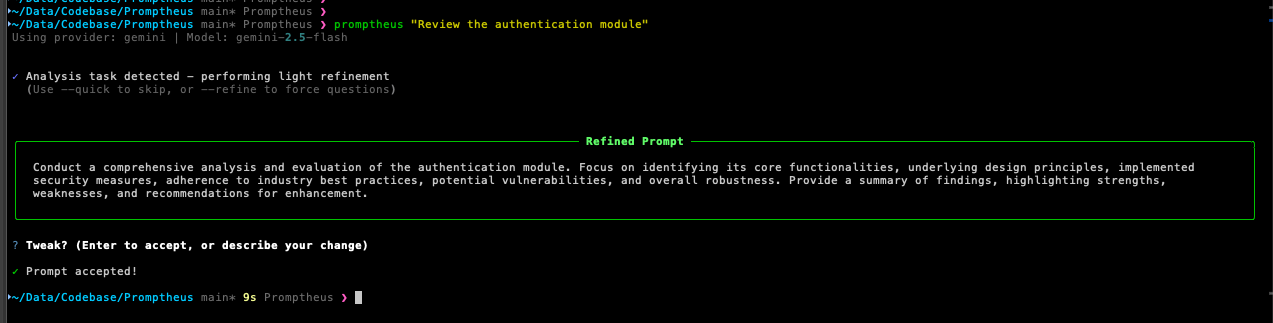
Requirements
- Python 3.8 or higher (Python 3.14 supported for Gemini provider)
- At least one AI provider API key (Gemini, Claude, OpenAI, Groq, Qwen, or GLM)
Installation from Source
git clone https://github.com/abhichandra21/Promptheus.git
cd Promptheus
pip install -e .
For development:
pip install -e ".[dev]"
pytest -q
Python 3.14 Compatibility
The Gemini provider fully supports Python 3.14 via the unified google-genai SDK. Other providers may have varying levels of support:
- If you encounter compatibility issues with a specific provider on Python 3.14, consider using Python 3.13 or earlier
- Use virtual environments to manage different Python versions as needed
- Most providers are expected to add Python 3.14 support in upcoming SDK updates
Utilities
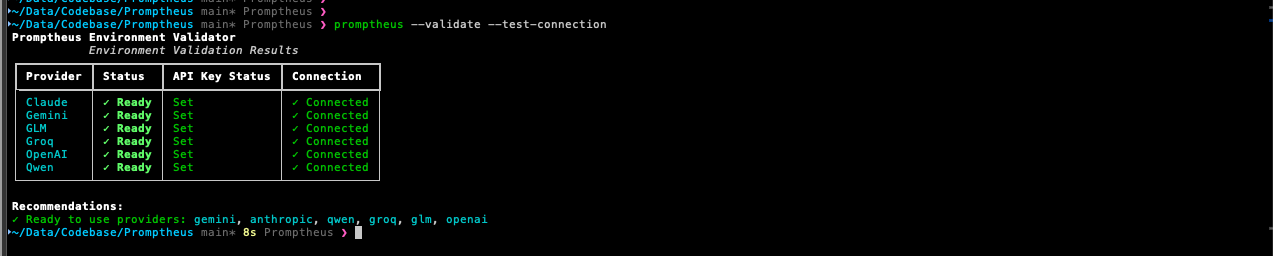
Environment Validator
Test your API keys and provider connections:
# Validate providers
promptheus validate --test-connection
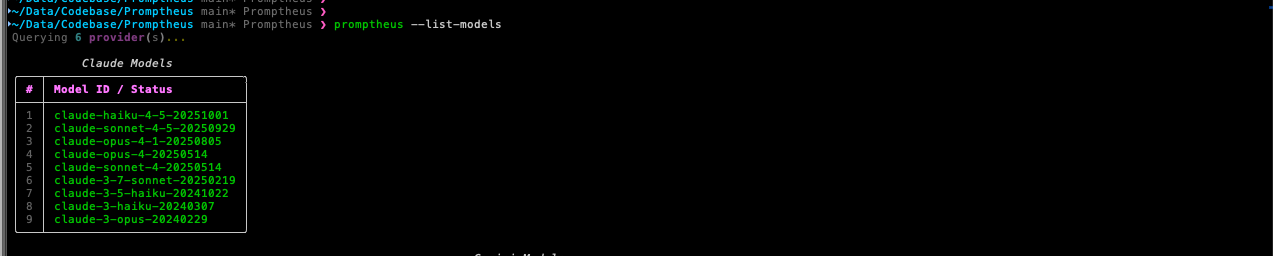
Model Lister
See all available providers and models:
# List all providers and models
promptheus list-models
Contributing
Contributions are welcome. Please follow these guidelines:
- Keep changes focused (feature, refactor, or docs—pick one)
- Use short, imperative commit messages
- Include behavior notes and testing details in PRs
- Never log raw API keys
- Run
black .before committing - Add tests under
tests/astest_<module>.py
For detailed development instructions, see docs/development.md.
Troubleshooting
Command Not Found
pip install -e .
which promptheus
python -m promptheus.main "Test prompt"
Provider Issues
# Check API keys
cat .env
env | grep -E '(GEMINI|ANTHROPIC|OPENAI|GROQ|DASHSCOPE|ZAI)'

# Force a specific provider
promptheus --provider gemini "Test"

# Validate provider setup
promptheus validate --providers gemini
Clipboard Not Working
- Linux: Install
xcliporxsel(sudo apt-get install xclip) - macOS/Windows: Should work out of the box
- WSL: May require X server for clipboard access
For more troubleshooting tips, see docs/troubleshooting.md.
License
MIT License. See LICENSE file for details.
Project Links
- Repository: https://github.com/abhichandra21/Promptheus
- Issues: https://github.com/abhichandra21/Promptheus/issues
Acknowledgments
Built with:
- Rich for terminal formatting
- Questionary for interactive prompts
- PyPerclip for clipboard support
- Provider SDKs from Google, Anthropic, OpenAI, Groq, Alibaba Cloud, and Zhipu AI
Release history Release notifications | RSS feed


Download files
Download the file for your platform. If you're not sure which to choose, learn more about installing packages.
Source Distribution
Built Distribution
Filter files by name, interpreter, ABI, and platform.
If you're not sure about the file name format, learn more about wheel file names.
Copy a direct link to the current filters
File details
Details for the file promptheus-0.1.1.tar.gz.
File metadata
- Download URL: promptheus-0.1.1.tar.gz
- Upload date:
- Size: 58.7 kB
- Tags: Source
- Uploaded using Trusted Publishing? No
- Uploaded via: poetry/2.2.1 CPython/3.14.0 Linux/6.11.0-1018-azure
File hashes
| Algorithm | Hash digest | |
|---|---|---|
| SHA256 |
007b8e2867c72152102314b8eea45ccca710615d47c0ab9d3b8b9854326e30e3
|
|
| MD5 |
e9f781fe1e46706703204207b86cfd9e
|
|
| BLAKE2b-256 |
4d4b6f63c0d75f31176c8ce0643857a3994849a406614c5ad10061b055ced942
|
File details
Details for the file promptheus-0.1.1-py3-none-any.whl.
File metadata
- Download URL: promptheus-0.1.1-py3-none-any.whl
- Upload date:
- Size: 65.8 kB
- Tags: Python 3
- Uploaded using Trusted Publishing? No
- Uploaded via: poetry/2.2.1 CPython/3.14.0 Linux/6.11.0-1018-azure
File hashes
| Algorithm | Hash digest | |
|---|---|---|
| SHA256 |
43b5ecbe6a2400b81ec411a484b0e0b61d69cc9e5f8dbdde31f523bc424c91be
|
|
| MD5 |
38572a4f64df8fe38ccb456edb063138
|
|
| BLAKE2b-256 |
e603832686aab56f6d61491dc240d298956a53e4ad73db39ebfc538319b8c6aa
|






