






What Promptise is
The framework for agentic intelligence.
Promptise gives you everything an agentic system needs, in one place and working together from the first line: agents that think, safe ways for them to act in your systems, and a harness that keeps them running and accountable. You decide what your agent should do; Promptise takes care of everything around it.
Start with one agent on your laptop and grow it into a fleet running real work, with the same framework and the same way of building all the way through. No rewrite in between, and nothing to stitch together yourself.
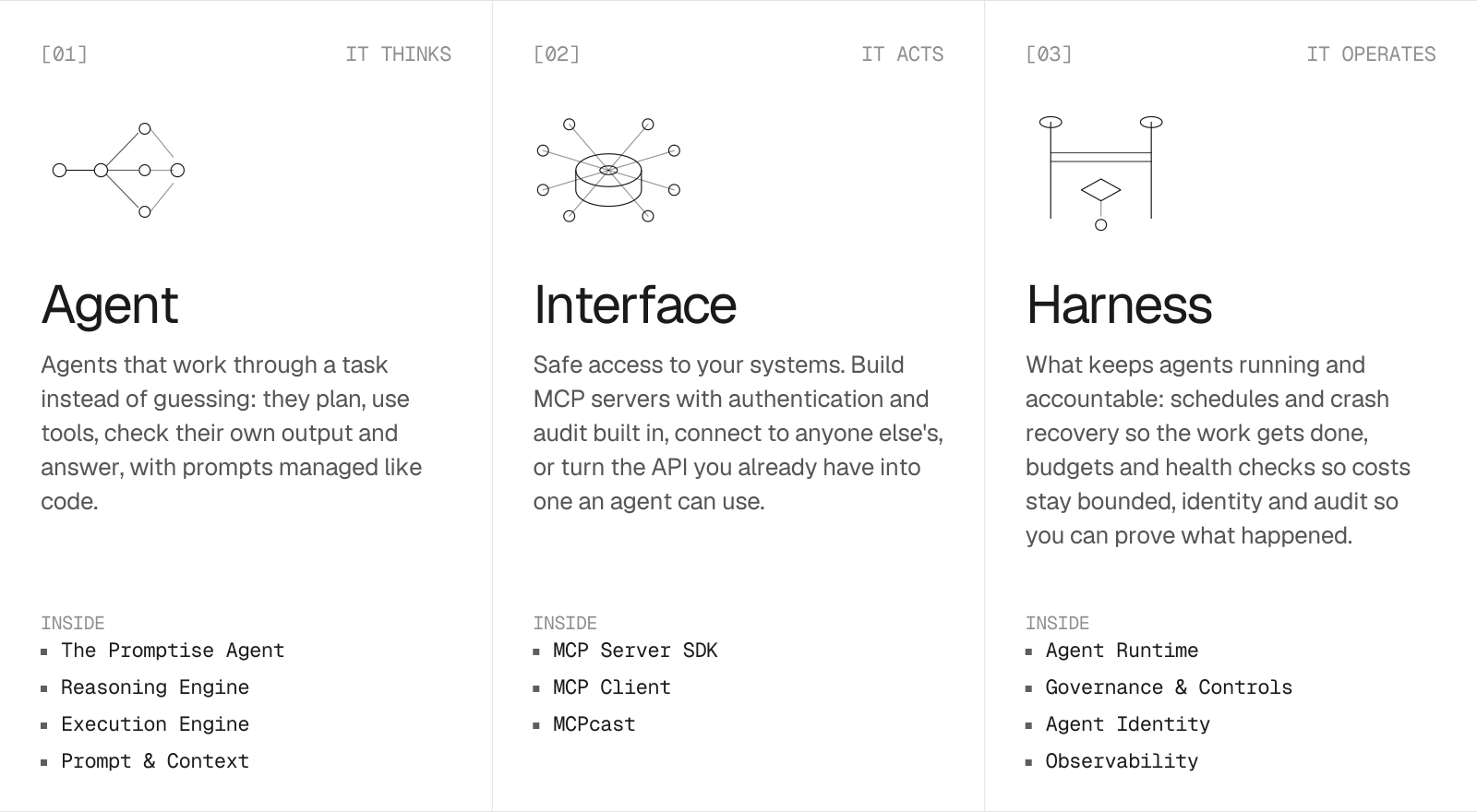
| Layer | What it does for you |
|---|---|
| Agent · it thinks | Agents that work through a task step by step, check their own work and get it right. |
| Interface · it acts | Safe access to your tools, your data and the systems you already run. |
| Harness · it operates | Keeps your agents running around the clock, within budget, and accountable for everything they do. |
Get started in 30 seconds
pip install promptise
import asyncio
from promptise import build_agent, PromptiseSecurityScanner, SemanticCache
from promptise.config import HTTPServerSpec
from promptise.memory import ChromaProvider

async def main():
    agent = await build_agent(
        model="openai:gpt-5-mini",
        servers={
            "tools": HTTPServerSpec(url="http://localhost:8000/mcp"),
        },
        instructions="You are a helpful assistant.",
        memory=ChromaProvider(persist_directory="./memory"),  # remembers across calls
        guardrails=PromptiseSecurityScanner.default(),          # blocks injection, redacts PII
        cache=SemanticCache(),                                  # serves similar queries instantly
        observe=True,                                           # traces every step
    )

    result = await agent.ainvoke({
        "messages": [{"role": "user", "content": "What's the status of our pipeline?"}]
    })
    print(result["messages"][-1].content)
    await agent.shutdown()

asyncio.run(main())
One call. The agent discovers its tools on the MCP server by itself; memory, guardrails, cache and tracing are one argument each, and the ones you leave out cost nothing. Vector memory and the ML guardrails need the extras: pip install "promptise[all]".
Any model, one string. openai:gpt-5-mini · anthropic:claude-sonnet-4-5 · azure:chat-prod · gemini:gemini-2.5-pro · bedrock:… · ollama:llama3.1. The same string works in build_agent(), .superagent files and every CLI command, and promptise models check <string> tells you exactly what a provider still needs. → Model setup
Run your project
promptise.toml is to an agent project what package.json is to a Node project: it names the main file, the scripts and the environment the project needs. promptise run runs your program like python main.py; with dev tools, the terminal UI or the HTTP API it also instruments every agent the program builds, with no code changes.
promptise init --project my-bot   # promptise.toml, agent.py, main.py, .env.example
promptise run                     # run main.py with the project's environment
promptise run --devtools          # live traces, tool calls, tokens and cost
promptise run --tui               # the full terminal UI
promptise run --serve             # an HTTP API for your agent
promptise run --prod              # JSON logs, preflight checks, graceful SIGTERM
[scripts] work like npm scripts (promptise run dev), and --watch restarts on every save. → Projects & promptise run
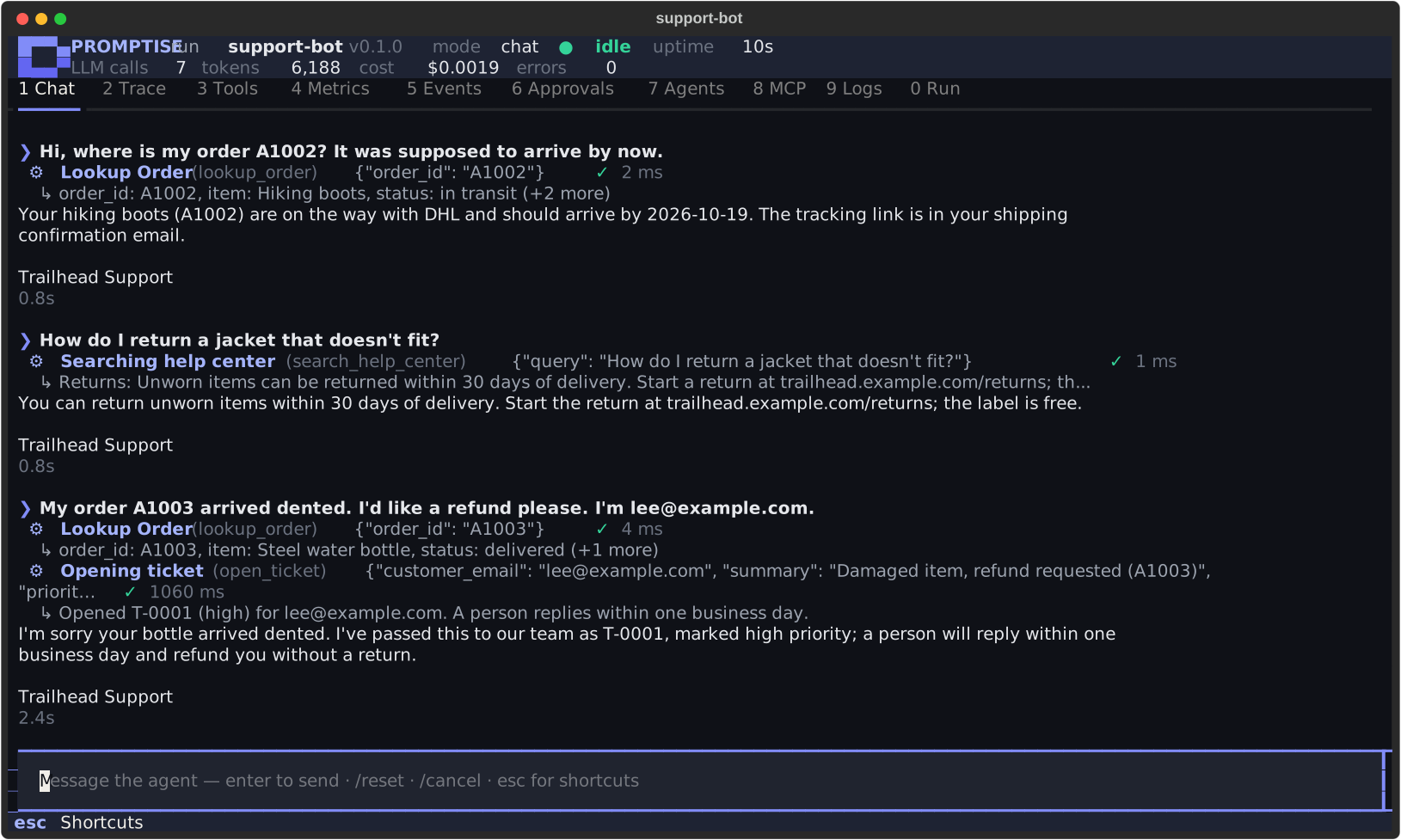
One request, through the whole system
A customer writes in at three in the morning. The runtime wakes the agent, its identity is established, the input is checked, it gathers context, plans, calls a tool through MCP, a person approves the refund, it checks its own work, answers, and every step lands in the audit trail.
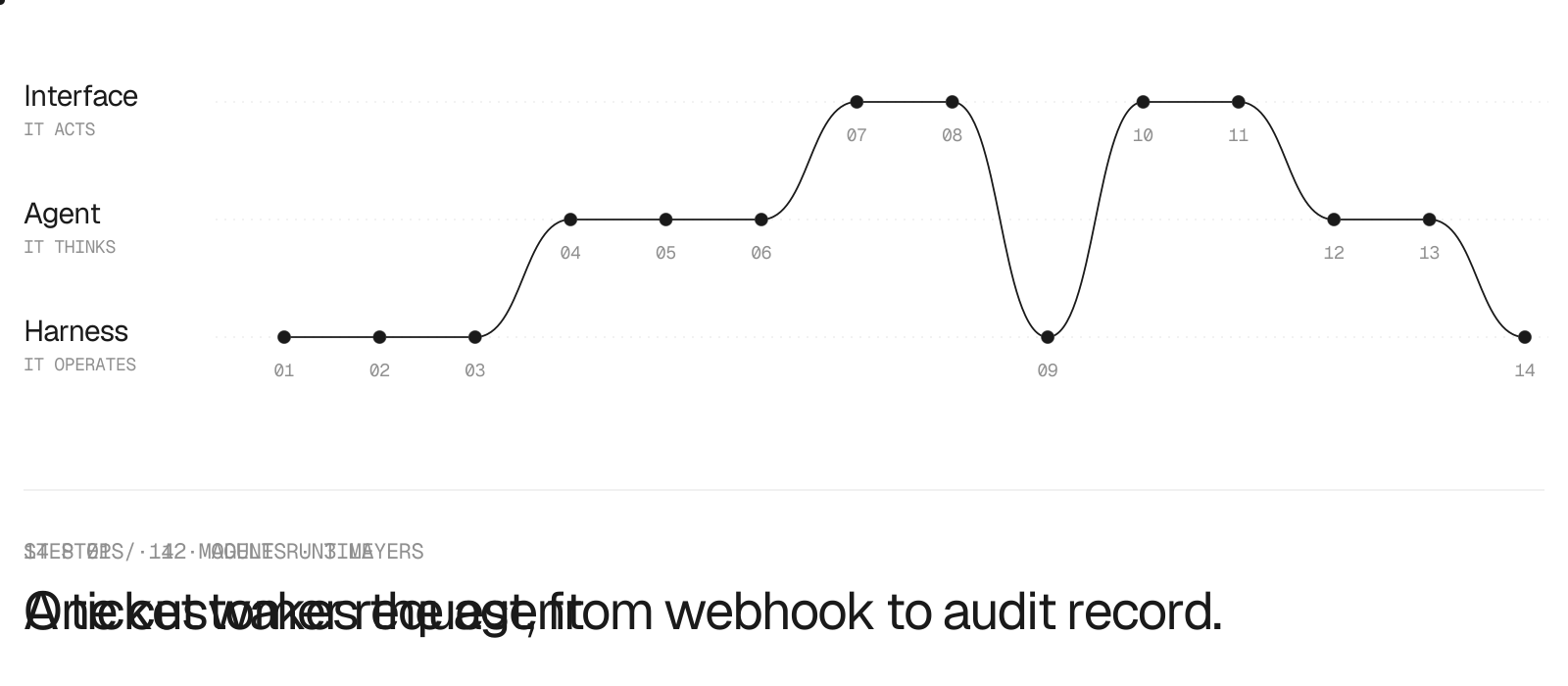
Walk through all fourteen steps, with every module linked →
Already have an API? MCPcast it.
promptise mcpcast openapi.yaml --profile standard --auth env-token
MCPcast reads an OpenAPI or Swagger document and writes a real, reviewed MCP server: a small set of tools an agent can actually use, chosen and described for agents. Reads by default; writes only when you ask, and every one of them approval-gated on the server, so a person signs off before anything changes, whichever MCP client calls it.
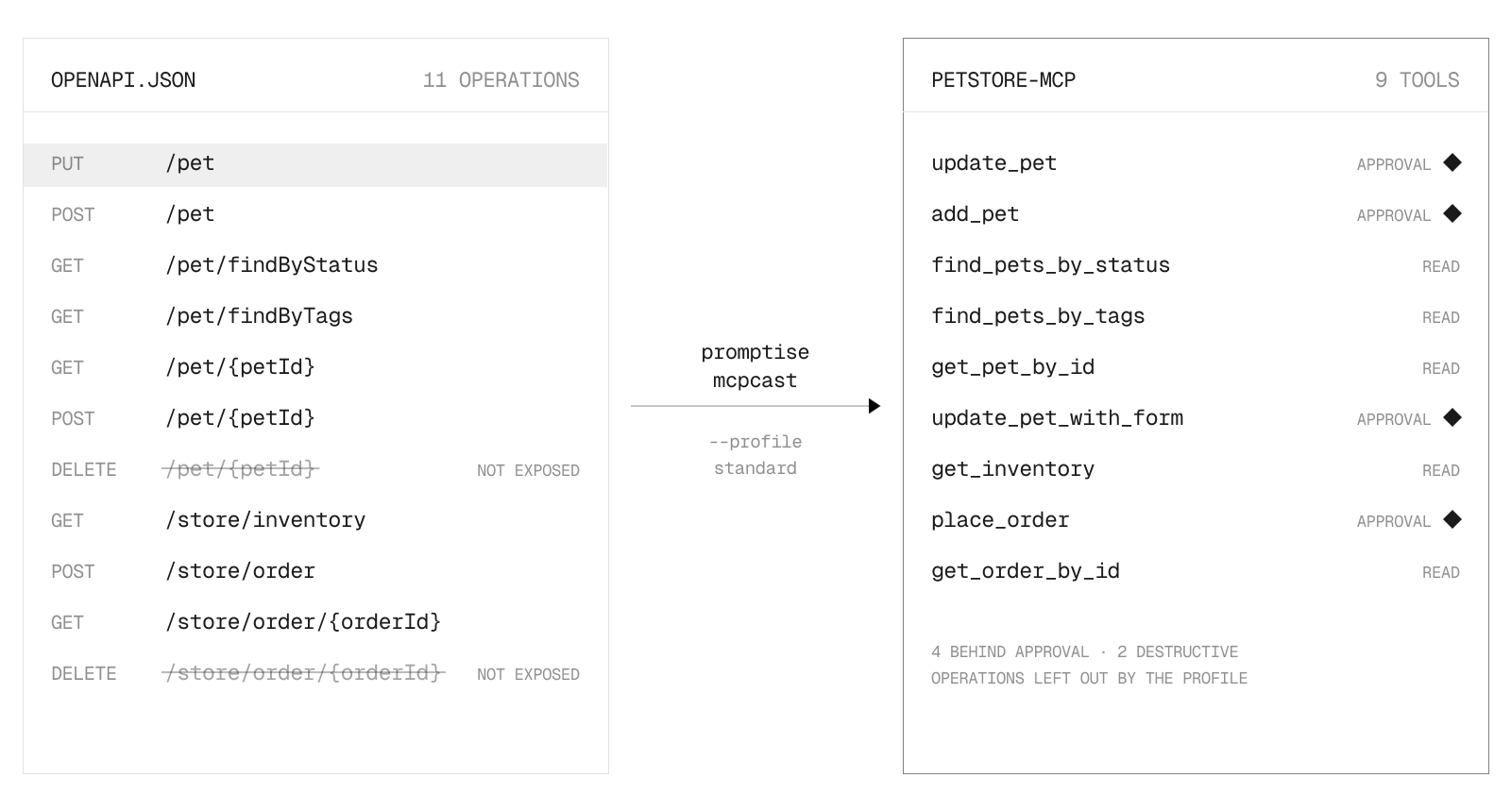
What comes out is a project, not a script: an installable package, a launcher, a generated test suite, pyproject.toml, a Dockerfile and a README, all regenerated from mcpcast.plan.yaml, the one file you edit. --eval grades the result A to F with a real agent before you ship, and plain promptise mcpcast opens a guided setup in the terminal. Above: the real output for the Swagger Petstore spec. → MCPcast, end to end
Built for governance and structure
For people and teams who need their agentic systems to be accountable: who did what, on whose behalf, within which limits. These are part of the framework, not something you add later.
-
Multi-tenant, by construction. Tag a request with a tenant, and every place data lives — memory, cache, conversations, rate limits, audit — stays separated per tenant. Two tenants who both have a user named
alicecan never see each other's data. It's a structural rule, not a filter you have to remember on every query. → Multi-Tenant Platform guide -
Human approval, enforced on the server. Mark a tool as needing sign-off and the approval is required no matter which app calls it — including one you didn't write. Denies on timeout, rejects self-approval, records who approved what. → Approval Gates
-
A real identity for each agent. Agents authenticate as themselves to the APIs they call, backed by Microsoft Entra ID, AWS, Google Cloud, SPIFFE, or plain OIDC — so you can retire the shared API key, and every action traces to the person it acted for, even across agents calling agents. → Agent Identity
-
Audit you can hand to a reviewer. Every action is written to a tamper-evident chain, tied to the tenant and the user. Delete one user's cached answers, memories and recorded events with
purge_user()when they ask. → Auth & Security -
Runs offline. The security models, embeddings, and vector store can all run locally — so the whole stack works air-gapped, for on-premises and regulated environments where data can't leave. → Guardrails · Model Setup
Everything Promptise ships
Works with what you already run
| Area | Works with |
|---|---|
| Models | OpenAI · Anthropic · Azure OpenAI & AI Foundry · Gemini & Vertex AI · Bedrock · Mistral · Groq · Ollama · Hugging Face · any LangChain chat model · FallbackChain for failover → Model setup |
| Memory & vectors | ChromaDB · Mem0 · Sentence Transformers · local embeddings for air-gapped installs → Memory |
| Conversations | PostgreSQL · Redis · SQLite · in-memory, with session ownership enforced → Conversations |
| Identity & auth | Microsoft Entra ID · AWS IAM · Google Cloud · SPIFFE / SPIRE · OIDC · JWT · OAuth 2.0 → Agent Identity |
| Observability | OpenTelemetry · Prometheus · Slack · PagerDuty · webhook · HTML · JSON · console → Observability |
| Sandbox & deploy | Docker · gVisor · seccomp · capability dropping · Kubernetes health probes → Sandbox |
| Protocols | Model Context Protocol over stdio, streamable HTTP and SSE · OpenAPI · HMAC-chained audit logs |
Contributing · Security · Changelog · License: Apache 2.0
Built by Promptise · questions and ideas in Discussions · bugs in Issues
Formerly DeepMCPAgent, a public preview of one part of this framework (MCP-native agent tooling).
1 maintainer

Metadata
1 maintainer
Release files for promptise 1.7.1
For a detailed explanation of source distributions (sdists) and built distributions (wheels), please see the package formats documentation.
Source distribution (sdist)
| File | Size | Uploaded | Provenance | |
|---|---|---|---|---|
| promptise-1.7.1.tar.gz | 8.7 MB | Without provenance | Details |
Built distribution (wheel)
| File | Interpreter | ABI | Platform | Reset |
|---|---|---|---|---|
| promptise-1.7.1-py3-none-any.whl | Python 3 | none | any | Details |
Total release size: 10.2 MB
Release files / promptise-1.7.1.tar.gz
| Download URL | promptise-1.7.1.tar.gz |
|---|---|
| Size | 8.7 MB |
| Tags | Source |
|
SHA-256 checksum How to use checksums |
d9af3179c77fac9e5adb5b1ba91bfea6fb6e38c1e6c30b36cc78bb96819d6d7a
|
|
BLAKE2b-256 checksum How to use checksums |
67992d29f628627d4e832802db9168b85ce71ebe9b0ae16f3515119e86f404fc
|
| Upload date | |
|
Uploaded using Trusted Publishing? What is trusted publishing? |
No |
| Uploaded via |
twine/7.0.0 CPython/3.11.17
|
Release files / promptise-1.7.1-py3-none-any.whl
| Download URL | promptise-1.7.1-py3-none-any.whl |
|---|---|
| Size | 1.5 MB |
| Tags | Python 3 |
|
SHA-256 checksum How to use checksums |
4cd10e9a2009744924f9750b731880827709325736aca52e67802a5224df43f9
|
|
BLAKE2b-256 checksum How to use checksums |
b4ab42a134bc4397a363fe0cc0f0efced51d44c25f58745ac4f376de6a15c65b
|
| Upload date | |
|
Uploaded using Trusted Publishing? What is trusted publishing? |
No |
| Uploaded via |
twine/7.0.0 CPython/3.11.17
|
Security for promptise 1.7.1
Provenance
Provenance describes where a file came from. On PyPI, provenance is shared via attestations, which provide a verifiable record of the build or publishing details. View details, limitations and caveats.
No provenance found
None of the files in this release were uploaded with provenance metadata.
A note on package security
PyPI is a repository for distributing packages, not a service for auditing them. While third-party security researchers and our staff do their best to detect and remove malicious packages, PyPI cannot guarantee the quality, security or suitability of any given package.
To learn more about protecting yourself from malicious actors, visit our package security documentation.














