
🧩 Promptix
Local-First Prompt Management for Production LLM Applications





Quick Start • Features • Examples • Studio • Docs
🎯 What is Promptix?
Stop hardcoding prompts in your Python code. Promptix is a powerful prompt management system that gives you version control, dynamic templating, and a beautiful UI for managing LLM prompts—all stored locally in your repository.
💡 Prompts Are Code
In modern LLM applications, your prompts are just as critical as your code. A prompt change can alter your application's behavior, break functionality, or introduce bugs—just like a code change.
Think about it:
- Your app's business logic lives in BOTH your Python code AND your prompts
- A poorly tested prompt in production can cause customer-facing issues
- You need to test the combination of code + prompts together
- Rollback capabilities are essential when a prompt change goes wrong
Yet most teams treat prompts as "just text"—no versioning, no testing, no staging environment.
Promptix brings software engineering rigor to prompts:
| Traditional Code | Prompts with Promptix |
|---|---|
| ✅ Version control (Git) | ✅ Version control (built-in) |
| ✅ Testing before deploy | ✅ Draft/Live states for testing |
| ✅ Staging environment | ✅ Test versions in dev, promote to prod |
| ✅ Rollback on issues | ✅ Revert to previous versions instantly |
| ✅ Code review process | ✅ Visual diff and review in Studio |
| ✅ CI/CD integration | ✅ File-based storage works with CI/CD |
Your prompts deserve the same engineering practices as your code.
Real-World Scenario: Your customer support chatbot starts giving incorrect refund information. Was it a code bug or a prompt change? With prompts scattered in code, you can't easily tell. With Promptix, you see exactly which prompt version was live, can diff changes, and rollback instantly—just like you would with code.
The Problem
# ❌ Before: Prompts scattered everywhere in your code
def get_response(customer_name, issue):
    system_msg = f"You are a helpful support agent. Customer: {customer_name}..."
    # Copy-pasted prompts, no versioning, hard to maintain
The Solution
# ✅ After: Clean, versioned, dynamic prompts
from promptix import Promptix

config = (
    Promptix.builder("CustomerSupport")
    .with_customer_name("Jane Doe")
    .with_issue_type("billing")
    .for_client("openai")
    .build()
)

response = client.chat.completions.create(**config)
🚀 Quick Start in 30 Seconds
1. Install Promptix
pip install promptix
2. Create Your First Prompt
promptix studio # Opens web UI at http://localhost:8501
This creates a clean, organized structure in your repository:
prompts/
├── CustomerSupport/
│   ├── config.yaml          # Prompt metadata and settings
│   ├── current.md           # Current live version
│   └── versions/
│       ├── v1.md            # Version history
│       ├── v2.md
│       └── v3.md
└── CodeReviewer/
    ├── config.yaml
    ├── current.md
    └── versions/
        └── v1.md
That's it! Your prompts live in your repo, version-controlled with Git, just like your code.
3. Use It in Your Code
from promptix import Promptix

# Simple static prompt
prompt = Promptix.get_prompt("MyPrompt")

# Dynamic prompt with variables
system_instruction = (
    Promptix.builder("CustomerSupport")
    .with_customer_name("Alex")
    .with_priority("high")
    .system_instruction()
)
That's it! 🎉 You're now managing prompts like a pro.
✨ What You Get
👀 See It in Action
Example 1: Static Prompts with Versioning
# Use the current live version
live_prompt = Promptix.get_prompt("WelcomeMessage")

# Test a draft version before going live
draft_prompt = Promptix.get_prompt(
    prompt_template="WelcomeMessage",
    version="v2"
)
Example 2: Dynamic Context-Aware Prompts
# Adapt prompts based on real-time conditions
system_instruction = (
    Promptix.builder("CustomerSupport")
    .with_customer_tier("premium" if user.is_premium else "standard")
    .with_sentiment("frustrated" if sentiment < 0.3 else "neutral")
    .with_history_length("detailed" if interactions > 5 else "brief")
    .system_instruction()
)
Example 3: OpenAI Integration
from openai import OpenAI

client = OpenAI()

# Build complete config for OpenAI
openai_config = (
    Promptix.builder("CodeReviewer")
    .with_code_snippet(code)
    .with_review_focus("security")
    .with_memory([
        {"role": "user", "content": "Review this code for vulnerabilities"}
    ])
    .for_client("openai")
    .build()
)

response = client.chat.completions.create(**openai_config)
Example 4: Anthropic Integration
from anthropic import Anthropic

client = Anthropic()

# Same builder, different client
anthropic_config = (
    Promptix.builder("CodeReviewer")
    .with_code_snippet(code)
    .with_review_focus("security")
    .for_client("anthropic")
    .build()
)

response = client.messages.create(**anthropic_config)
Example 5: Conditional Tool Selection
# Tools automatically adapt based on variables
config = (
    Promptix.builder("CodeReviewer")
    .with_var({
        'language': 'Python',      # Affects which tools are selected
        'severity': 'high',
        'focus': 'security'
    })
    .with_tool("vulnerability_scanner")  # Override template selections
    .build()
)
Example 6: Testing Prompts Before Production
# ❌ Don't do this: Change live prompts without testing
live_config = Promptix.builder("CustomerSupport").build()  # Risky!

# ✅ Do this: Test new prompt versions in staging
class SupportAgent:
    def __init__(self, environment='production'):
        self.env = environment

    def get_response(self, customer_data, issue):
        # Use draft version in development/staging
        version = "v2" if self.env == "staging" else None

        config = (
            Promptix.builder("CustomerSupport", version=version)
            .with_customer_name(customer_data['name'])
            .with_issue_type(issue)
            .for_client("openai")
            .build()
        )

        return client.chat.completions.create(**config)

# In your tests
def test_new_prompt_version():
    """Test new prompt version before promoting to live"""
    agent = SupportAgent(environment='staging')

    response = agent.get_response(
        customer_data={'name': 'Test User'},
        issue='billing'
    )

    assert response.choices[0].message.content  # Validate response
    # Add more assertions based on expected behavior

# After tests pass, promote v2 to live in Promptix Studio
🎨 Promptix Studio
Launch the visual prompt editor with one command:
promptix studio
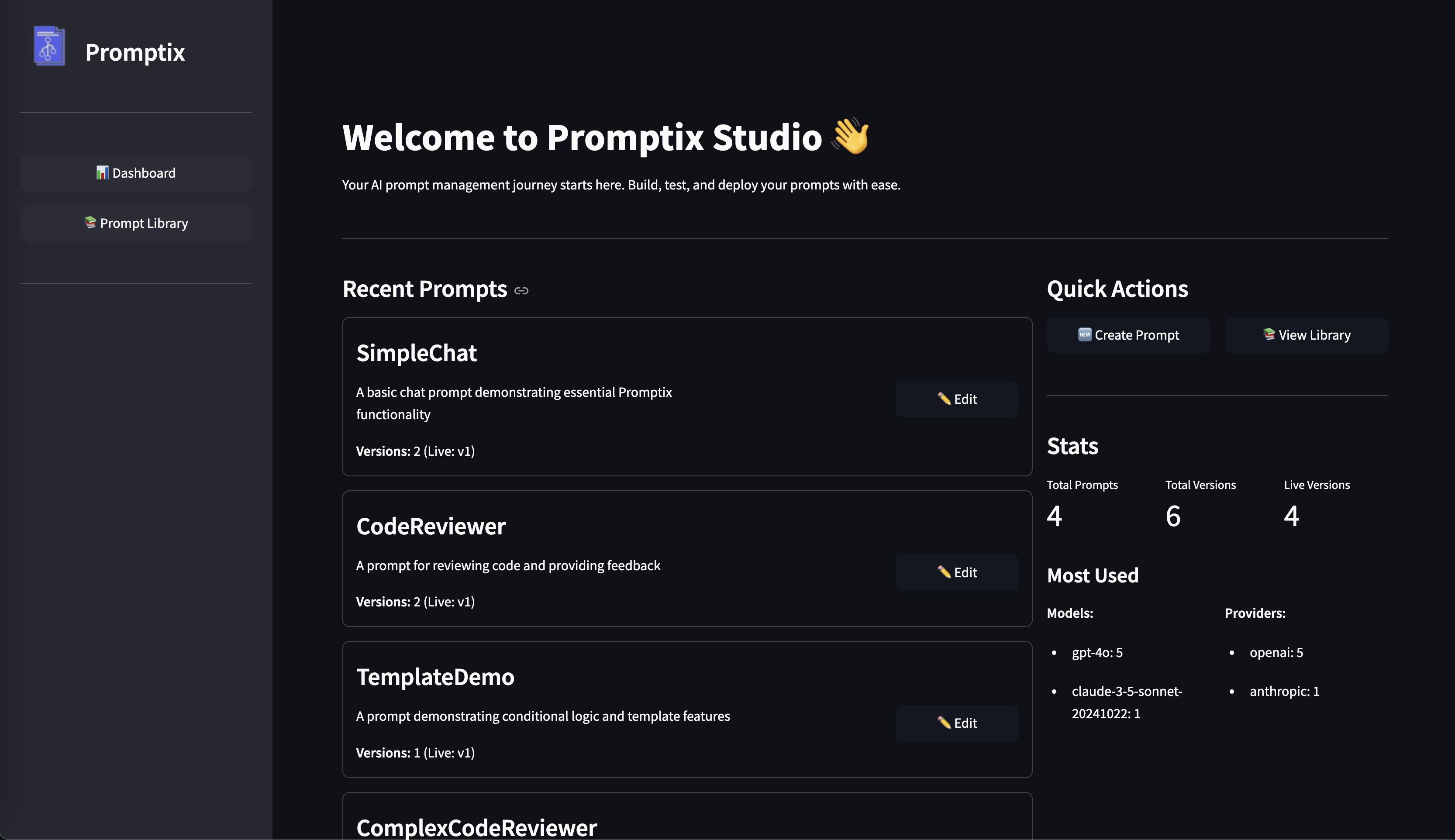
Features:
- 📊 Dashboard with prompt usage analytics
- 📚 Prompt Library for browsing and editing
- 🔄 Version Management with live/draft states
- ✏️ Visual Editor with instant validation
- 📈 Usage Statistics for models and providers
- 🚀 Quick Creation of new prompts
🏗️ Why Promptix?
The Engineering Problem
In production LLM applications, your application logic is split between code and prompts. Both need professional engineering practices.
| Challenge | Without Promptix | With Promptix |
|---|---|---|
| 🧪 Testing Changes | Hope for the best in production | Test draft versions in staging, promote when ready |
| 🔧 Updating Prompts | Redeploy entire app for prompt tweaks | Update prompts independently, instant rollback |
| 🍝 Code Organization | Prompts scattered across files | Centralized, versioned prompt library |
| 🎭 Dynamic Behavior | Hardcoded if/else in strings | Context-aware templating with variables |
| 🔄 Multi-Provider | Rewrite prompts for each API | One prompt, multiple providers |
| 👥 Collaboration | Edit strings in code PRs | Visual Studio UI for non-technical edits |
| 🐛 Debugging Issues | Which version was live? | Full version history and diff |
| 🚀 CI/CD Integration | Manual prompt management | File-based, works with existing pipelines |
📚 Real-World Use Cases
🎧 Customer Support Agents
# Adapt based on customer tier, history, and sentiment
config = (
    Promptix.builder("SupportAgent")
    .with_customer_tier(customer.tier)
    .with_interaction_history(customer.interactions)
    .with_issue_severity(issue.priority)
    .build()
)
📞 Phone Call Agents
# Dynamic call handling with sentiment analysis
system_instruction = (
    Promptix.builder("PhoneAgent")
    .with_caller_sentiment(sentiment_score)
    .with_department(transfer_dept)
    .with_script_type("complaint" if is_complaint else "inquiry")
    .system_instruction()
)
💻 Code Review Automation
# Specialized review based on language and focus area
config = (
    Promptix.builder("CodeReviewer")
    .with_language(detected_language)
    .with_review_focus("performance")
    .with_tool("complexity_analyzer")
    .build()
)
✍️ Content Generation
# Consistent brand voice with flexible content types
config = (
    Promptix.builder("ContentCreator")
    .with_brand_voice(company.voice_guide)
    .with_content_type("blog_post")
    .with_target_audience(audience_profile)
    .build()
)
🧪 Advanced Features
How Versioning Works
Promptix stores prompts as files in your repository, making them part of your codebase:
prompts/
└── CustomerSupport/
    ├── config.yaml              # Metadata: active version, description
    ├── current.md               # Symlink to live version (e.g., v3.md)
    └── versions/
        ├── v1.md                # First version
        ├── v2.md                # Tested, but not live yet
        └── v3.md                # Currently live (linked by current.md)
Development Workflow:
-
Create new version in Promptix Studio or by adding
v4.md -
Test in development:
# Test new version without affecting production
test_config = Promptix.builder("CustomerSupport", version="v4").build()
-
Run your test suite with the new prompt version
-
Promote to live in Studio (updates
config.yamlandcurrent.md) -
Production uses new version:
# This now uses v4 automatically
prod_config = Promptix.builder("CustomerSupport").build()
-
Rollback if needed: Change active version in Studio instantly
All changes are tracked in Git - you get full history, diffs, and blame for prompts just like code!
Custom Tools Configuration
# Configure specialized tools based on scenario
config = (
    Promptix.builder("SecurityReviewer")
    .with_code(code_snippet)
    .with_tool("vulnerability_scanner")
    .with_tool("dependency_checker")
    .with_tool_parameter("vulnerability_scanner", "depth", "thorough")
    .build()
)
Schema Validation
# Automatic validation against defined schemas
try:
    system_instruction = (
        Promptix.builder("TechnicalSupport")
        .with_technical_level("expert")  # Validated against allowed values
        .system_instruction()
    )
except ValueError as e:
    print(f"Validation Error: {str(e)}")
Memory/Chat History
# Include conversation history
memory = [
    {"role": "user", "content": "What's my account balance?"},
    {"role": "assistant", "content": "Your balance is $1,234.56"}
]

config = (
    Promptix.builder("BankingAgent")
    .with_customer_id(customer_id)
    .with_memory(memory)
    .build()
)
📖 Learn More
- 📝 Developer's Guide - Complete usage guide
- 🎯 Design Philosophy - Why Promptix exists
- 💡 Examples - Working code examples
- 📚 API Reference - Full API documentation
🤝 Contributing
Promptix is actively developed and welcomes contributions!
Ways to contribute:
- ⭐ Star the repository
- 🐛 Report bugs or request features via Issues
- 🔧 Submit pull requests
- 📢 Share your experience using Promptix
Your feedback helps make Promptix better for everyone!
💖 Support Promptix
Promptix is free and open-source, built to solve real problems in production LLM applications. If you're finding it valuable, here's how you can help:
🌟 For Teams & Enterprises
If your company is using Promptix in production, we'd love to hear about it!
- Be featured in our "Who's Using Promptix" section
- Share feedback on enterprise features you need
- Tell your success story (with permission)
🚀 Show Your Support
- ⭐ Star this repository - helps others discover Promptix
- 🐛 Report issues and suggest features
- 💬 Share testimonials - your experience helps the community grow
- ☕ Sponsor the project - GitHub Sponsors
🤝 Enterprise Support
Need help with production deployments? We offer:
- Priority support for critical issues
- Custom feature development
- Implementation guidance and consulting
- Commercial licensing options
Get in touch - let's discuss how we can help!
📄 License
MIT License - see LICENSE file for details.
Made with ❤️ by developers, for developers
1 maintainer

Metadata
1 maintainer
Release files for promptix 0.2.0
For a detailed explanation of source distributions (sdists) and built distributions (wheels), please see the package formats documentation.
Source distribution (sdist)
| File | Size | Uploaded | |
|---|---|---|---|
| promptix-0.2.0.tar.gz | 105.6 kB | Details |
Built distribution (wheel)
| File | Interpreter | ABI | Platform | Reset |
|---|---|---|---|---|
| promptix-0.2.0-py3-none-any.whl | Python 3 | none | any | Details |
Total release size: 210.4 kB
Release files / promptix-0.2.0.tar.gz
| Download URL | promptix-0.2.0.tar.gz |
|---|---|
| Size | 105.6 kB |
| Tags | Source |
|
SHA-256 checksum How to use checksums |
42f6706e5e1e84a6f69e8a172e37e4bf307b7b7345db4e74d04647188ef6e10a
|
|
BLAKE2b-256 checksum How to use checksums |
439700c62e31dcf86b62e803506811eb11f2924205bf1278ac348f746a6fcbc2
|
| Upload date | |
|
Uploaded using Trusted Publishing? What is trusted publishing? |
No |
| Uploaded via |
twine/6.2.0 CPython/3.9.23
|
Release files / promptix-0.2.0-py3-none-any.whl
| Download URL | promptix-0.2.0-py3-none-any.whl |
|---|---|
| Size | 104.9 kB |
| Tags | Python 3 |
|
SHA-256 checksum How to use checksums |
4bfe21cb40f7f964f7e5e04a2a3b546c3d96a968d0f4e8e076fbba955c9a554a
|
|
BLAKE2b-256 checksum How to use checksums |
9aa49e7049938a663b33d92cee2aec977dbde7a82b7ee03a5f685747a6ea0053
|
| Upload date | |
|
Uploaded using Trusted Publishing? What is trusted publishing? |
No |
| Uploaded via |
twine/6.2.0 CPython/3.9.23
|














