
PromptMend
Type a trigger, get a well-structured LLM prompt. Copy a rough draft, type -i- anywhere,
and Espanso replaces it with a precise, sectioned prompt rewritten by a
local or cloud model.






One small Python CLI, promptmend, sits behind every trigger. Espanso runs it when you type
the trigger. It reads your clipboard, checks the draft for sensitive content before anything
leaves your machine, and sends it to the model with the rewrite instructions. Espanso pastes
the result in place of the trigger. If something went wrong, you get a readable
[promptmend: …] message, never a blank.
It works the same on macOS and Windows, with OpenRouter, Anthropic, Ollama or LM Studio. A full-screen terminal interface and plain commands set it up and manage it.
![Copy a draft, type -i-, Espanso runs promptmend, the data-protection gate checks it, a cloud or local model rewrites it, and the rewrite is pasted; a flagged draft gets a [promptmend: …] marker instead](https://pypi-camo.freetls.fastly.net/514e72f1ccbf1942f3a4b07113ddb79be0f83801/68747470733a2f2f7261772e67697468756275736572636f6e74656e742e636f6d2f766c617374696d696c62757265732f70726f6d70746d656e642f6d61696e2f646f63732f666c6f772d6c696768742e737667)
Highlights
- Golden-template rewrite. Any draft becomes
CONTEXT / GOAL / INSTRUCTIONS / CONSTRAINTS / INPUTS / OUTPUTS. - Two tiers.
-i-answers in seconds;-ip-uses a reasoning model for hard drafts. - Four providers. OpenRouter, Anthropic, Ollama and LM Studio; fully local if you like.
- Data-protection gate. Keys, cards, IDs, emails and your own patterns never leave unless you override.
- Your persona, once.
PROMPT_PERSONAopens every rewrite with your role. - Never a blank paste. Errors arrive inline as
[promptmend: …]. - Clean output. No reasoning block, control characters or invisible Unicode.
- Interface and commands. A full-screen interface, headless commands and
promptmend doctor. - Benchmarked defaults. Models and prompt chosen by a bundled benchmark.
Screenshot
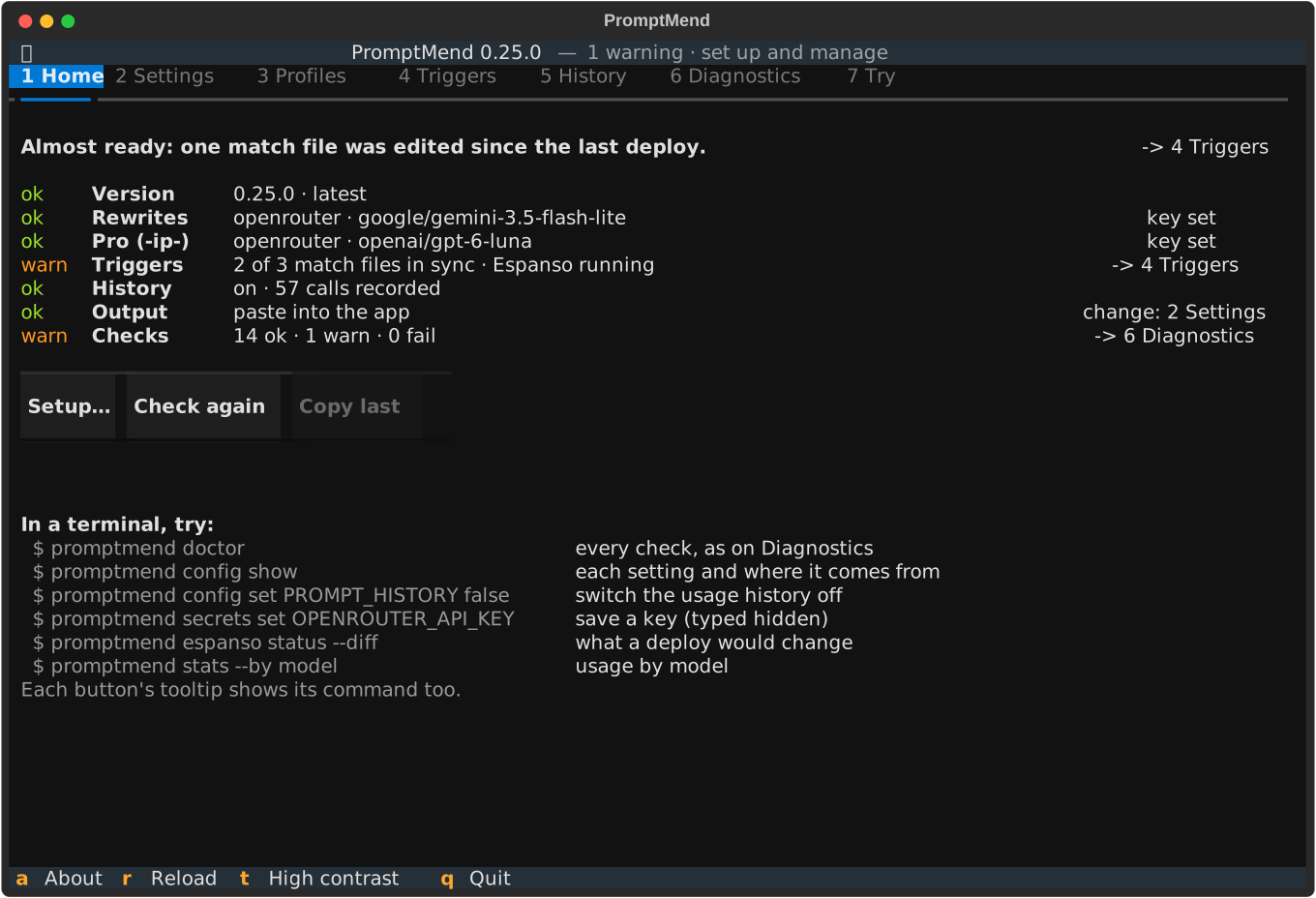
Home shows whether you are ready, what each trigger runs, the match files, the history and the
doctor checks, with this session's commands below.
More: docs/interface.md (every tab, the Try tab, the keys).
Example
A one-line draft becomes a full golden-template prompt.
A draft and its rewrite
Draft on the clipboard:
write a short board update on why customer churn went up last quarter, use the attached churn dashboard export
Pasted in its place (real output of the v0.19.0 prompt on its default model,
google/gemini-3.5-flash-lite on google-ai-studio/flex, effort minimal, no persona,
generated 2026-10-06):
<CONTEXT>
I need to write a short board update explaining why customer churn went up last quarter, using the attached churn dashboard export.
</CONTEXT>

<GOAL>
A concise, executive-level board update explaining the drivers of increased customer churn last quarter and the actions being taken.
</GOAL>

<INSTRUCTIONS>
1/ Execute, but state assumptions up front.
2/ Load and validate all inputs. If anything is missing, ambiguous, or contradictory, ask me up to 5 targeted questions before drafting; if step 1 says execute, state your assumption instead and ask only about a gap that blocks the task.
3/ Analyse the churn dashboard export to identify the trends, segments, and main drivers behind the churn increase last quarter.
4/ Draft the board update containing: an executive summary of the churn metrics, the primary causes identified in the data, and the mitigation steps.
5/ Use a separate agent with corporate governance and investor reporting domain knowledge if you can run one, otherwise review as an independent expert in that domain would: perform a critical review, check for errors, and ensure the output is complete and accurate, review formatting and clarity, and ensure the output is well structured and easy to read; summarize all issues and improvement points, validate them with me before implementing any changes.
6/ Flag material judgment calls or trade-offs and let me decide.
</INSTRUCTIONS>

<CONSTRAINTS>
- Keep it short: a brief update suitable for a board of directors.
- Tone: professional, objective, and analytical.
- Use only the data provided in the churn dashboard export and general business knowledge labelled as such.
- Out of scope: detailed tactical execution plans or historical data prior to last quarter.
</CONSTRAINTS>

<INPUTS>
Churn dashboard export [REVIEW: attach or paste the churn dashboard export data]
</INPUTS>

<OUTPUTS>
structured .md, well formatted with clear headings/subheadings
</OUTPUTS>
The prompt makes two choices independently. Here the model read "short" as one small task, so step 1 is "execute now"; analysing an export first could also justify "plan first". The board audience selected the independent-review step. A quick note to yourself would get a self-review checklist instead.
More: docs/profiles.md
(what the default profile does, and how to write your own).
Requirements
- Espanso, installed and running.
- macOS or Windows. Linux works too, with
xclip,xselorwl-clipboard. - An OpenRouter API key for
-i-, or Ollama or LM Studio for fully local use. - Python 3.12 or later, which Homebrew or uv installs for you.
More: docs/install.md.
Install
macOS, with Homebrew:
brew tap vlastimilbures/tap
brew trust --formula vlastimilbures/tap/promptmend
brew install vlastimilbures/tap/promptmend
Or with uv:
uv tool install promptmend -c https://github.com/vlastimilbures/promptmend/releases/latest/download/constraints.txt
Windows, in PowerShell or a Command Prompt:
powershell -ExecutionPolicy ByPass -c "irm https://github.com/vlastimilbures/promptmend/releases/latest/download/install.ps1 | iex"
It needs no Python first: it installs uv if needed, then the latest release, and runs
promptmend doctor. Or with uv: see
docs/install.md.
Linux: use the uv line above, plus xclip, xsel or wl-clipboard for the clipboard.
To update, use the channel you installed with, then run promptmend doctor. Before you
uninstall, run promptmend espanso detach, or every trigger fails once the CLI is gone.
More: docs/install.md (every channel, verifying a download, update, uninstall, upgrading from older versions).
Quick start
-
Set it up in a terminal, or open the interface instead:
promptmend setup
promptmend                 # or the full-screen interface
setupasks for the provider, the profile and the API key, then previews the Espanso match files and deploys them only if you agree. It ends with a test call against a local stub, never a paid call. -
Copy a rough draft.
-
Type
-i-in any text field. Wait a few seconds without typing or switching windows: Espanso pastes wherever the focus is when the answer arrives. -
If anything is off, ask the doctor:
promptmend doctor
More: docs/install.md
(setup options, migrating a .env) and
docs/troubleshooting.md.
Fully local
The local triggers need no API key. Pull a model in Ollama, or load one
in LM Studio and enable its local server. Then use -il- (Ollama) or
-ilm- (LM Studio):
ollama pull qwen3:8b                            # the default OLLAMA_MODEL
promptmend config set PROMPT_LOCAL_ONLY true    # optional: refuse every cloud call
Triggers
| Trigger | What it does | Provider |
|---|---|---|
-i- |
Rewrites the clipboard into the golden template | OpenRouter |
-ip- |
The same rewrite on the pro tier (a reasoning model, slower) | OpenRouter |
-if- |
The same rewrite; a form picks model, effort, tokens and timeout | OpenRouter |
-iok- |
-i-, sent once despite a flagged label, ID, email or IBAN |
OpenRouter |
-il- |
General prompt improvement, fully local | Ollama |
-ilm- |
General prompt improvement, fully local | LM Studio |
-p- |
An empty golden template to fill in, opening with your persona | — |
-risk- |
A static risk-analysis prompt scaffold to fill in | — |
- A trigger fires only at the start of a word, never inside
a[n-i-1]. - It sends whatever is on the clipboard, so copy the draft first.
- Do not type or switch windows while it runs. Or set
PROMPT_OUTPUT=clipboardto get the rewrite on the clipboard instead.
More: docs/usage.md
(profiles per trigger, clipboard output, the -if- form, your own triggers).
Key commands
| Command | What it does |
|---|---|
promptmend / promptmend ui |
Opens the full-screen interface |
promptmend setup |
First run: provider, profile, key, match files and a smoke test |
promptmend doctor |
Checks the install, settings, keys, Espanso, match files and history |
promptmend config show |
Every setting, its value and where it comes from |
promptmend config set NAME VALUE |
Saves a setting after checking it |
promptmend secrets set NAME |
Saves an API key from a hidden prompt |
promptmend profiles list |
Lists the built-in and your own profiles |
promptmend espanso status |
Shows whether the deployed match files are up to date |
promptmend espanso deploy |
Writes or updates the match files, after a preview |
promptmend stats |
Calls, latency, tokens and costs from the local usage history |
promptmend improve --source stdin |
Rewrites a draft piped in, in a terminal |
promptmend --version |
Prints the installed version |
More: docs/commands.md (every option, the scripting contract, exit codes).
Configuration
Settings live in config.toml and API keys in secrets.toml, both in the config folder. Each
setting is named like an environment variable, and a real environment variable wins over the
files.
| OS | Config folder (settings, keys, profiles) | Data folder (usage history) |
|---|---|---|
| macOS | ~/.config/promptmend/ ($XDG_CONFIG_HOME) |
~/.local/share/promptmend/ ($XDG_DATA_HOME) |
| Windows | %APPDATA%\promptmend\ |
%LOCALAPPDATA%\promptmend\ |
| Linux | ~/.config/promptmend/ ($XDG_CONFIG_HOME) |
~/.local/share/promptmend/ ($XDG_DATA_HOME) |
Change them with promptmend config set, or in the interface's
Settings tab.
The common changes:
promptmend config set OPENROUTER_MODEL google/gemini-3.5-flash-lite      # the -i- model
promptmend config set PROMPT_PERSONA "I am working as a Head of Data at Example Corp."
promptmend config set PROMPT_OUTPUT clipboard   # copy the rewrite instead of pasting it
promptmend config set PROMPT_LOCAL_ONLY true    # refuse every cloud call
promptmend config set PROMPT_HISTORY false      # keep no usage history
A change applies to the next trigger, with no redeploy. Keys go in with
promptmend secrets set OPENROUTER_API_KEY, never as an argument. Settings still in a .env
move over with promptmend config migrate, after a preview.
More: docs/configuration.md (all settings, files and folders) and docs/profiles.md (persona, your own profiles).
Privacy
Cloud triggers send your clipboard to OpenRouter (and the endpoint that serves the model) or
to Anthropic. So does Ollama or LM Studio at another address, or an Ollama cloud model. Each
such call carries:
- the draft, after the data-protection gate and the removal of invisible characters;
- the system prompt: the profile's instructions and your persona, which the gate does not scan;
- the model name and request settings;
- the API key, only as the authentication header of its own provider.
The gate blocks keys, tokens, passwords, payment cards, some national ID numbers, emails, IBANs,
confidentiality labels and your own patterns. -iok- sends one flagged draft on purpose when
every finding is a label, ID, email or IBAN.
PROMPT_LOCAL_ONLY=true refuses every cloud call, and the local triggers keep everything on
your machine. On macOS and Windows, clipboard items a password manager marks as concealed are
refused. The usage history is metadata only and never leaves this device.
The gate is a heuristic safety net, not a compliance control: use cloud triggers only where your organisation's policy allows.
More: docs/privacy.md (what is sent and to whom, what the gate blocks, clipboard safety, usage history).
Model benchmark
A bundled benchmark chose the defaults. It scores every rewrite mechanically for template
fidelity, prompt injection, language edge cases, latency and real cost. -i- runs
google/gemini-3.5-flash-lite on google-ai-studio/flex (effort minimal). -ip- runs
openai/gpt-6-luna on openai (effort low).
More: docs/benchmark.md (the scores, timings and costs, and how to run it).
Documentation
| Page | What you find there |
|---|---|
| Install | Every channel on macOS, Windows and Linux, verifying, updating, uninstalling, upgrading |
| Usage | The triggers, what they send, paste or clipboard output, your own triggers, the match files |
| Commands | improve and its options, the scripting contract, management commands, exit codes |
| Configuration | Where settings and keys live, how to change them, the complete settings reference |
| Profiles | The built-in profiles, your own profiles and the persona |
| Privacy | What is sent and to whom, the gate, local-only mode, the usage history |
| Interface | The tabs, Home, the Try tab and the keys |
| Troubleshooting | doctor first, then each marker and symptom with its fix |
| Benchmark | How the default models and prompt were chosen, and every result |
Contributing
Contributions are welcome. Read CONTRIBUTING.md first. It covers setting up a checkout, the checks CI runs, and how to add a profile, trigger, setting or provider. Release notes are in CHANGELOG.md.
Security
Found a way around the data-protection gate, or another vulnerability? Report it privately as described in SECURITY.md.
License
Licensed under the MIT License.
Built on Espanso, Typer, Textual, HTTPX and uv, with models served by OpenRouter, Anthropic, Ollama and LM Studio.
1 maintainer

Metadata
1 maintainer
Release files for promptmend 0.25.0
For a detailed explanation of source distributions (sdists) and built distributions (wheels), please see the package formats documentation.
Source distribution (sdist)
| File | Size | Uploaded | |
|---|---|---|---|
| promptmend-0.25.0.tar.gz | 749.7 kB | Details |
Built distribution (wheel)
| File | Interpreter | ABI | Platform | Reset |
|---|---|---|---|---|
| promptmend-0.25.0-py3-none-any.whl | Python 3 | none | any | Details |
Total release size: 986.7 kB
Release files / promptmend-0.25.0.tar.gz
| Download URL | promptmend-0.25.0.tar.gz |
|---|---|
| Size | 749.7 kB |
| Tags | Source |
|
SHA-256 checksum How to use checksums |
7bd4b53a40ebebc71d940b6076fd2d2bad0d946686464633308689bce027bf0f
|
|
BLAKE2b-256 checksum How to use checksums |
0b5fdbbe393ba307e0b33cf8c1e3224259f77b16894ccd06d07f1a32184e0585
|
| Upload date | |
|
Uploaded using Trusted Publishing? What is trusted publishing? |
Yes |
| Uploaded via |
twine/7.0.0 CPython/3.13.14
|
Provenance
Provenance describes where a file came from. On PyPI, provenance is shared via attestations, which provide a verifiable record of the build or publishing details. View details, limitations and caveats.


PyPI Publish Attestation
PyPI verified that this artifact, at this checksum, originated from the publisher listed below.
Signed by GitHub Actions, verified by PyPI on Oct 14, 2026.
Transparency logRelease files / promptmend-0.25.0-py3-none-any.whl
| Download URL | promptmend-0.25.0-py3-none-any.whl |
|---|---|
| Size | 237.1 kB |
| Tags | Python 3 |
|
SHA-256 checksum How to use checksums |
5b8e460558c37d7ebc577fe8c999c7063c0621d1463118f6bc061ccac5af7b50
|
|
BLAKE2b-256 checksum How to use checksums |
79c14dbbbd8af0c5721f231bda0c5c02c4b4b2bd79609bb294c6c81812227973
|
| Upload date | |
|
Uploaded using Trusted Publishing? What is trusted publishing? |
Yes |
| Uploaded via |
twine/7.0.0 CPython/3.13.14
|
Provenance
Provenance describes where a file came from. On PyPI, provenance is shared via attestations, which provide a verifiable record of the build or publishing details. View details, limitations and caveats.
PyPI Publish Attestation
PyPI verified that this artifact, at this checksum, originated from the publisher listed below.
Signed by GitHub Actions, verified by PyPI on Oct 14, 2026.
Transparency log













