
Cadence sync for teams agent-coding in the same room — one dashboard that says when to PROMPT and when to TALK.

Project description
promptparty 🎉
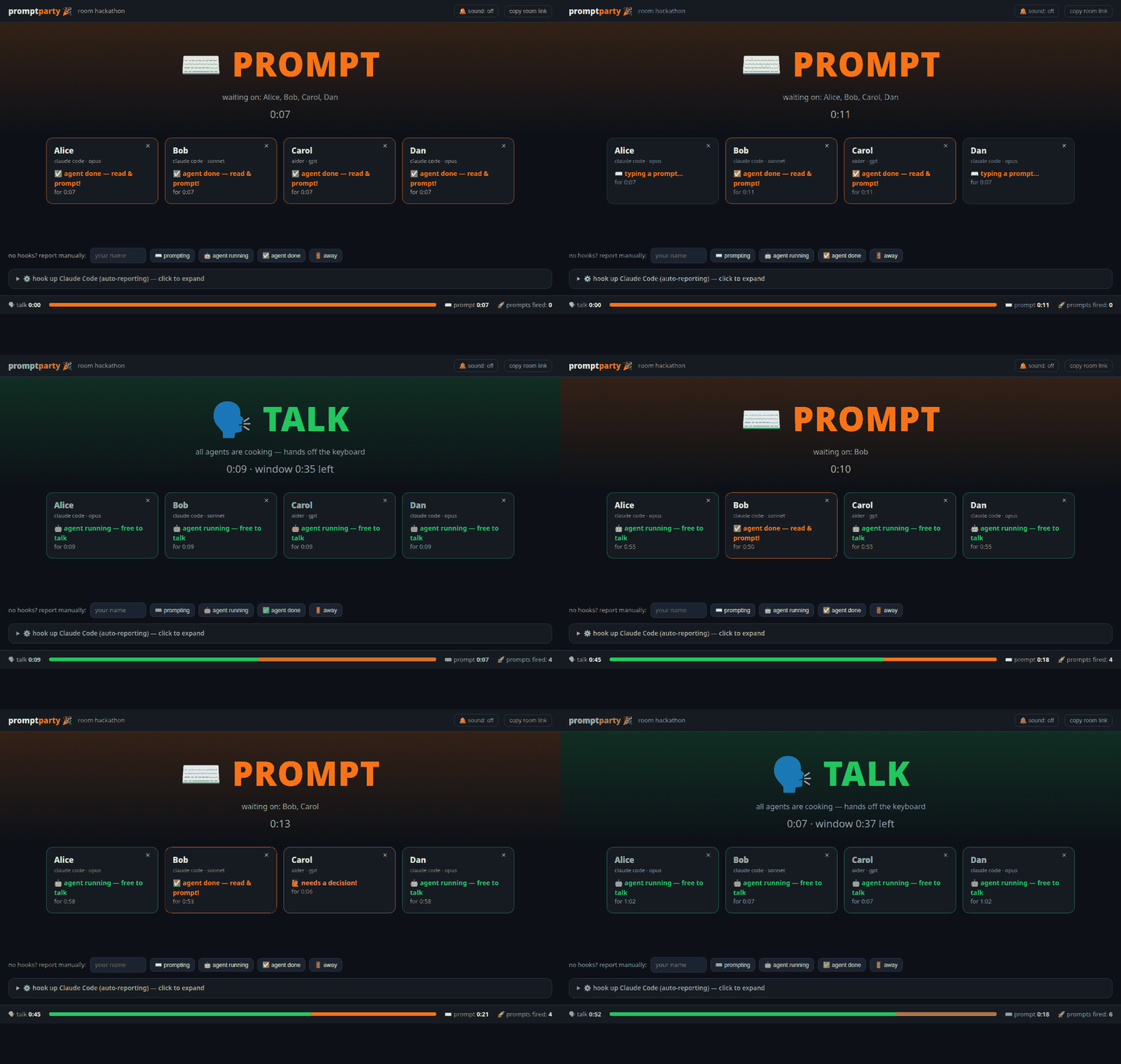
Cadence sync for teams agent-coding in the same room. One shared dashboard that tells everyone when it's time to ⌨️ PROMPT and when it's time to 🗣️ TALK — because the worst part of group agentic coding is everyone heads-down at different moments, waiting on each other, and the conversation dying.
The rhythm promptparty gives you:
- ⌨️ PROMPT — someone's agent finished (or needs a permission). Read the output, fire the next prompt.
- 🗣️ TALK — all agents are generating. Hands off the keyboard: discuss what's coming, plan the next move, actually talk to each other.
- Agents finish → the dashboard flips back to PROMPT (with an optional chime).
Everyone keeps their own terminal, own Claude Code session, own model — promptparty never calls a model and needs no API key. It only watches the states.
Quickstart (60 seconds)
One person starts the server and opens a room (put it on a big screen or a spare browser tab):
uvx promptparty # or: pipx install promptparty && promptparty
Each teammate runs one command inside the project they're coding in:
uvx promptparty hooks --server http://192.168.1.20:8765 --room a1b2c3 --name Katka
(The dashboard's ⚙️ panel shows this exact command with your room pre-filled.)
That installs Claude Code hooks into
./.claude/settings.json that report automatically:
| you do | dashboard shows |
|---|---|
submit a prompt (UserPromptSubmit) |
🤖 agent running — free to talk |
agent finishes its turn (Stop) |
✅ agent done — read & prompt! |
agent asks for permission (Notification) |
🙋 needs a decision |
Restart your Claude Code session (or reload hooks) and you're live.
Not using Claude Code?
Any tool can report with one request — wire it into whatever hooks your tool has, or an alias:
curl -X POST http://SERVER:8765/api/ROOM/event \
     -H 'content-type: application/json' \
     -d '{"name":"Katka","state":"generating"}'
# states: prompting | generating | ready | blocked | away
There are also manual buttons at the bottom of the dashboard.
What you get
- 🚦 A giant phase banner: TALK (all agents cooking) / PROMPT (with who the room is waiting on).
- 🃏 A card per person: state, model, how long they've been in it. Blocked agents pulse red so permission prompts stop rotting unnoticed.
- 🔔 Optional chime on phase flips — you don't even need the screen in view.
- 📊 Session stats: talk time vs prompt time and total prompts fired. (Great post-hackathon bragging material.)
- 🧹 Zero config, zero database, zero API keys. Rooms live in memory.
How it works
A single FastAPI process keeps per-room state and pushes it to dashboards over WebSockets. Hook reports are plain HTTP POSTs. The phase rule is one line:
if every non-away member's agent is generating → TALK, otherwise → PROMPT.
That's the whole trick. It works because agent turns are long enough (tens of seconds to minutes) that "all agents running" is a genuine conversational window.
Options
promptparty [serve] [--port 8765] [--host 0.0.0.0]
promptparty hooks --server URL --room SLUG --name YOU [--settings PATH]
promptparty hooks --remove [--settings PATH]
Playing from different networks? Put the server behind any tunnel
(ngrok http 8765, cloudflared tunnel --url http://localhost:8765).
Roadmap
-
PreCompact/SubagentStophook nuances (long multi-agent turns) - Per-room history graph (talk/prompt timeline you can screenshot)
- Team pomodoro mode: enforced talk windows
- Adapters for aider / codex / opencode hooks out of the box
PRs welcome — this was born at a hackathon and stays intentionally tiny: one Python file of server, one HTML file of dashboard, no build step.
Security notes
- Anyone with the room URL can view and post states. It's presence data, not code — but run it on a network you trust.
- Rooms are in-memory and vanish on restart.
License
MIT © moudrkat


Download files
Download the file for your platform. If you're not sure which to choose, learn more about installing packages.
Source Distribution
Built Distribution
Filter files by name, interpreter, ABI, and platform.
If you're not sure about the file name format, learn more about wheel file names.
Copy a direct link to the current filters
File details
Details for the file promptparty-0.1.0.tar.gz.
File metadata
- Download URL: promptparty-0.1.0.tar.gz
- Upload date:
- Size: 413.3 kB
- Tags: Source
- Uploaded using Trusted Publishing? No
- Uploaded via: twine/6.2.0 CPython/3.12.3
File hashes
| Algorithm | Hash digest | |
|---|---|---|
| SHA256 |
b0adb101ec26576055771151d55460bc7998267449cb85d4e68ebb35e6afbbfe
|
|
| MD5 |
9edd55f04749099f6673c4765610b941
|
|
| BLAKE2b-256 |
8d3e50c7809a80c9ac79bddc52579d1087cec1a415d73025452559f36851d451
|
File details
Details for the file promptparty-0.1.0-py3-none-any.whl.
File metadata
- Download URL: promptparty-0.1.0-py3-none-any.whl
- Upload date:
- Size: 13.6 kB
- Tags: Python 3
- Uploaded using Trusted Publishing? No
- Uploaded via: twine/6.2.0 CPython/3.12.3
File hashes
| Algorithm | Hash digest | |
|---|---|---|
| SHA256 |
38f4084107364b0ab4914cf85b7780d440c5df47c5c5bb4fc96fd71e21dbcf57
|
|
| MD5 |
832f77b20e35812e1dbde62c1321e379
|
|
| BLAKE2b-256 |
52b2cf17048984bc15861684fa34dc23d8d5f0e38848c79651955490c7eec3ca
|






