
Dependency-free prompt scheduler for AI rate-limit resets.

Project description
PromptQueue


Schedule AI prompts for the moment your limits reset.
PromptQueue is a tiny, dependency-free prompt scheduler for Claude, Codex, ChatGPT, Gemini, Copilot, Cursor, Antigravity, and anything else you can launch from your machine.
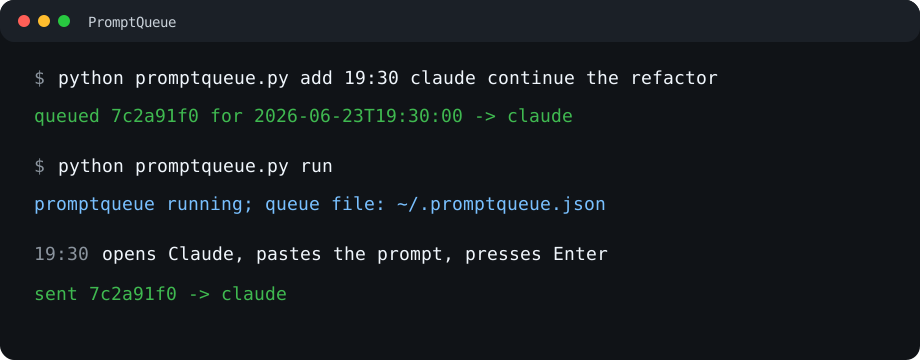
When an AI tool says "try again at 7:30 PM", do not keep the tab open, set a reminder, or paste the same prompt later. Queue it now. PromptQueue waits, opens or focuses the target app, pastes the prompt, and submits it when the time arrives.
promptqueue add 19:30 claude finish the migration plan
promptqueue run
One Python file. Standard library only. No accounts, no server, no private APIs.
Why This Exists
AI rate limits waste the worst kind of time: attention.
You already know what you want to ask next. The only problem is the clock. PromptQueue turns "come back later" into a queued job you can trust.
Use it when:
- Claude, Codex, ChatGPT, Gemini, or Copilot tells you to wait for a reset
- you want a long prompt to run after you sleep
- you want a coding agent to resume work when capacity returns
- you want a dead-simple local queue instead of another SaaS dashboard
If this saves you one context switch, it has already done its job.
30 Second Demo
Queue a Claude prompt for 11:30 PM:
promptqueue add 23:30 claude write a first draft of the launch email
promptqueue run
Queue a Codex CLI prompt:
promptqueue add 23:30 codex-exec add tests for the queue runner
promptqueue run
Queue a multiline prompt safely:
@'
Review this repo.
Find the smallest useful next improvement.
Then implement it.
'@ | promptqueue add --stdin 23:30 claude
promptqueue run
View what is waiting:
promptqueue list --full
promptqueue show JOB_ID
Supported Targets
antigravity  Google Antigravity UI
chatgpt      ChatGPT web UI
claude       Claude web UI
claude-code  Claude CLI
codex        Codex desktop UI
codex-exec   Codex CLI
copilot      Copilot web UI
copy         clipboard only
cursor       Cursor UI
gemini       Gemini web UI
Run this to see the built-in aliases on your machine:
promptqueue targets
UI targets open or focus the app, click near the composer, paste, then press Enter by default.
CLI targets run the command directly with the prompt as one argument.
Agent Ready
This repo includes instruction files for common AI coding tools:
AGENTS.md                         Codex and general agents
CLAUDE.md                         Claude Code
GEMINI.md                         Gemini CLI
.cursor/rules/promptqueue.mdc     Cursor
.agents/skills/promptqueue/       Antigravity-style skill
That means you can tell an agent:
My limits reset at 7:30 pm. Schedule this prompt for Claude:
"Continue the refactor and run the tests."
The agent should queue it with PromptQueue instead of making you remember.
Requirements
- Python 3.10+
- Windows for GUI paste/submit automation
- macOS/Linux work for queue management, URLs, clipboard fallback, and CLI targets, but GUI paste currently uses Windows APIs
Install
Install from PyPI:
pip install promptqueue
promptqueue selftest
Or clone the repo and run the single Python file:
git clone https://github.com/AtharvaMaik/PromptQueue.git
cd PromptQueue
python promptqueue.py selftest
After pip install, use promptqueue. When running from a clone without installing, use python promptqueue.py.
PromptQueue stores jobs in:
%USERPROFILE%\.promptqueue.json
Override the queue path when you want an isolated queue:
$env:PROMPTQUEUE_FILE="C:\path\queue.json"
How It Works
addwrites a job to the local queue file.runchecks for due jobs.- When a job is due, PromptQueue copies the prompt to the clipboard.
- For UI targets, it opens or focuses the app, clicks the composer, pastes, and optionally submits.
- For CLI targets, it launches the command directly.
- Attempts, failures, retries, and history stay visible in the queue file.
If the machine wakes up after the scheduled time, run catches overdue jobs.
Commands
add
Queue a prompt.
promptqueue add [options] WHEN TARGET PROMPT...
WHEN can be a local time like 23:30 or an ISO-ish datetime like 2026-06-24 01:15.
Options:
--click bottom                 Click near the bottom of the focused window before paste.
--click x,y                    Click x/y pixels from the target window top-left.
--command-template TEMPLATE    Run a custom command; use {prompt}.
--delay SECONDS                Wait before paste/submit. Default: 5.
--file FILE                    Read prompt text from a UTF-8 file.
--max-attempts N               Attempts before marking failed. Default: 5.
--no-submit                    Paste only; do not press Enter.
--pre-keys KEYS                Windows SendKeys before paste, e.g. "{ESC}".
--retry-base SECONDS           Initial retry delay. Default: 30.
--stdin                        Read prompt text from stdin.
--window TITLE                 Focus a window whose title contains TITLE.
Examples:
promptqueue add 23:30 claude summarize this paper
promptqueue add --window Codex 23:30 copy this lands in Codex
promptqueue add --no-submit 23:30 claude paste this but do not send it
promptqueue add --file prompt.txt 23:30 claude
"prompt from stdin" | promptqueue add --stdin 23:30 copy
promptqueue add --command-template "claude -p {prompt}" 23:30 command review this repo
run
Start the queue worker:
promptqueue run
Check once and exit:
promptqueue run --once
Poll faster or slower:
promptqueue run --poll 5
The runner must be alive when jobs are due.
list
Show queued jobs:
promptqueue list
promptqueue list --all
promptqueue list --full
show
Show one job as JSON:
promptqueue show JOB_ID
remove
Delete one job:
promptqueue remove JOB_ID
windows
List visible Windows window titles. Use this to find the right --window value.
promptqueue windows
targets
List built-in target aliases:
promptqueue targets
selftest
Run the built-in smoke test:
promptqueue selftest
Retries And History
Every job stores attempts and history. Failures stay visible in list and show.
promptqueue add --max-attempts 8 --retry-base 60 23:30 claude retry this more patiently
promptqueue list --all
promptqueue show JOB_ID
Backoff is exponential and capped at one hour.
Notes
PromptQueue intentionally does the boring thing: it uses local files, the clipboard, app launching, and keyboard paste. That keeps it portable and inspectable.
For GUI apps, it does not use private app APIs. If one app misses the composer, adjust --window, --click, --delay, or --pre-keys.
Contributing
Issues and PRs are welcome. Start with CONTRIBUTING.md and CODE_OF_CONDUCT.md.
The best contributions are small and practical: a better target alias, a failing selftest for a real bug, clearer setup docs, or a platform-specific paste improvement.
License
MIT. See LICENSE.
Star the repo if it saves you from waiting around for an AI limit reset. That is the whole point.
Release history Release notifications | RSS feed

Download files
Download the file for your platform. If you're not sure which to choose, learn more about installing packages.
Source Distribution
Built Distribution
Filter files by name, interpreter, ABI, and platform.
If you're not sure about the file name format, learn more about wheel file names.
Copy a direct link to the current filters
File details
Details for the file promptqueue-0.1.0.tar.gz.
File metadata
- Download URL: promptqueue-0.1.0.tar.gz
- Upload date:
- Size: 13.1 kB
- Tags: Source
- Uploaded using Trusted Publishing? No
- Uploaded via: twine/6.2.0 CPython/3.10.6
File hashes
| Algorithm | Hash digest | |
|---|---|---|
| SHA256 |
13649301550fb119a47dcce32f6b18ed7214cd7205834bf3255a6ff7c3008f7c
|
|
| MD5 |
c8c754998684d89b7805ec787590d02f
|
|
| BLAKE2b-256 |
7df806ae2f9d761fe9659891e5305e16a5a8f7f89f9252fbfdc587908f1c3607
|
File details
Details for the file promptqueue-0.1.0-py3-none-any.whl.
File metadata
- Download URL: promptqueue-0.1.0-py3-none-any.whl
- Upload date:
- Size: 12.6 kB
- Tags: Python 3
- Uploaded using Trusted Publishing? No
- Uploaded via: twine/6.2.0 CPython/3.10.6
File hashes
| Algorithm | Hash digest | |
|---|---|---|
| SHA256 |
e906280ea34284addb5a4c5bc761b1c4941576679211d59c997fda4f1434de03
|
|
| MD5 |
1f21692d3355d9cca5a54b266e1f08ed
|
|
| BLAKE2b-256 |
d933e4ff0905650479e408496191395e159c8a1ea83c2385768979c8d68dfd6d
|






