



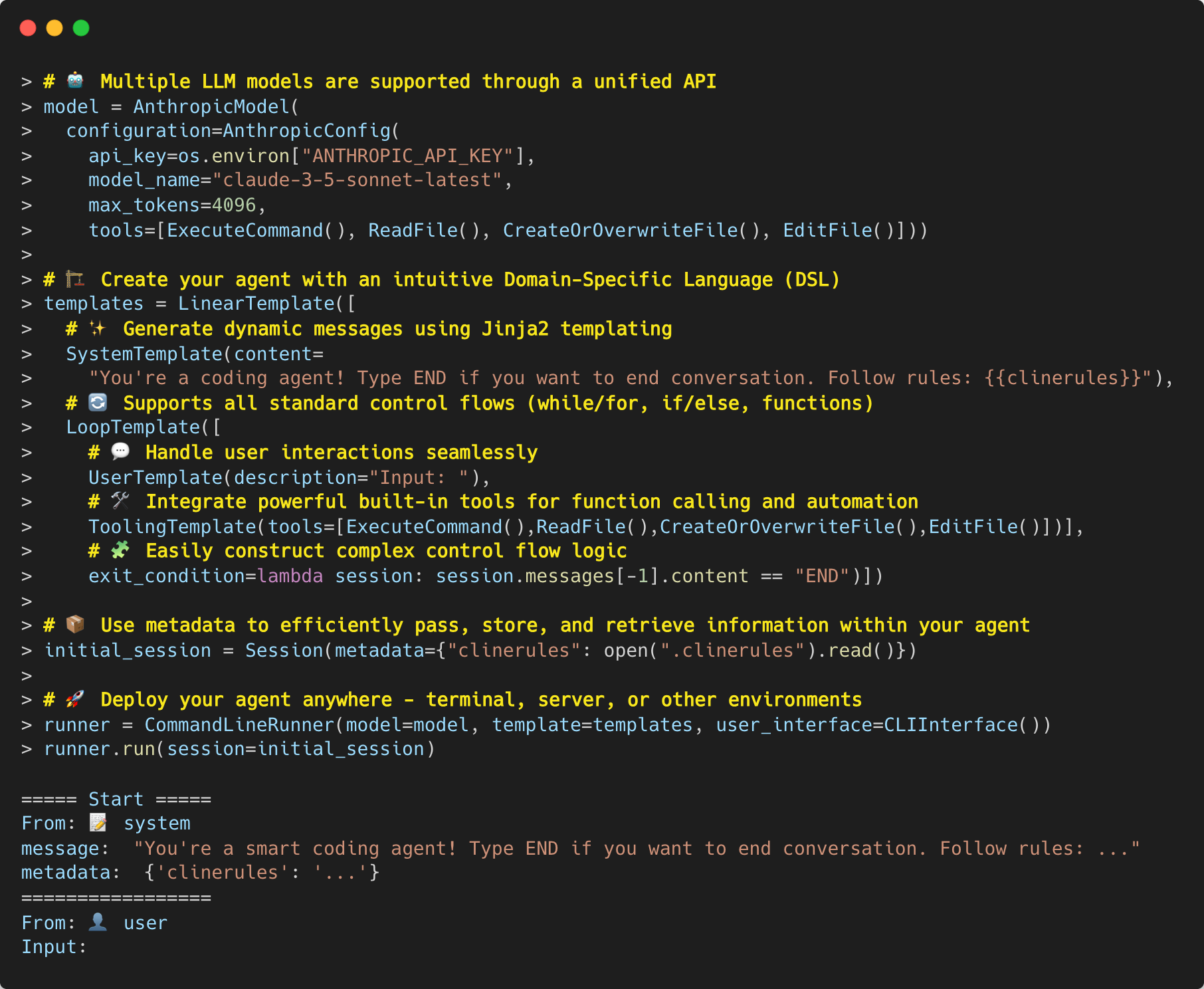
PromptTrail is a Python framework designed to make building LLM-powered applications easier and more maintainable. It provides:
🔌 Unified LLM Interface
- Multiple Providers: OpenAI, Google Gemini, Anthropic Claude, and local models via Transformers
- Consistent API: Same interface for all providers with full type hints
- Easy Extension: Simple provider interface to add new LLM services
🛠️ Developer Tools
- Testing: Mock providers to test LLM interactions without API calls
- Cost Optimization: Built-in caching to reduce API usage
- [Coming Soon]: Advanced logging and debugging features
🤖 Agent as Code Framework
- Intuitive Templates: Natural way to define conversation flows
- Powerful Tooling: Type-safe function calling and built-in utilities
- Extensible: Hooks system for custom behaviors and integrations
- Subroutines: Isolated execution contexts with flexible session management
Contents
Quickstart
- See Quickstart for more details.
Installation
pip install prompttrail
or
git clone https://github.com/combinatrix-ai/PromptTrail.git
cd PromptTrail
pip install -e .
Examples
LLM API Call
This is the simplest example of how to use PromptTrail as a thin wrapper around LLMs of various providers.
> import os
> from prompttrail.core import Session, Message
> from prompttrail.models.openai import OpenAIModel, OpenAIConfig
>
> api_key = os.environ["OPENAI_API_KEY"]
> config = OpenAIConfig(
>     api_key=api_key,
>     model_name="gpt-4o-mini",
>     max_tokens=100,
>     temperature=0
> )
> model = OpenAIModel(configuration=config)
> session = Session(
>   messages=[
>     Message(content="Hey", role="user"),
>   ]
> )
> message = model.send(session=session)

Message(content="Hello! How can I assist you today?", role="assistant")
If you want streaming output, you can use the send_async method if the provider offers the feature.
> message_generator = model.send_async(session=session)
> for message in message_generator:
>     print(message.content, sep="", flush=True)

Hello! How can # text is incrementally typed
Developer Tools
We provide various tools for developers to build LLM applications. For example, you can mock LLMs for testing.
> from prompttrail.core import Session, Message
> from prompttrail.core.mock import EchoMockProvider
> from prompttrail.models.openai import OpenAIModel, OpenAIConfig
>
> # Create a configuration with EchoMockProvider
> config = OpenAIConfig(
>     api_key="dummy",  # API key is not used when using mock provider
>     model_name="gpt-4o-mini",
>     mock_provider=EchoMockProvider()  # Simply echoes back the last message
> )
> model = OpenAIModel(configuration=config)
>
> # Use the model as usual - it will echo back the messages
> session = Session(
>     messages=[Message(content="Hello", role="user")]
> )
> message = model.send(session=session)
> print(message)

Message(content="Hello", role="assistant")  # EchoMockProvider simply returns the same content
Agent as Code
You can write a simple agent like below. Without reading the documentation, you can understand what this agent does!
template = LinearTemplate(
    [
        SystemTemplate(
            content="You're a math teacher bot.",
        ),
        LoopTemplate(
            [
                UserTemplate(
                    description="Let's ask a question to AI:",
                    default="Why can't you divide a number by zero?",
                ),
                # Generates response using LLM
                AssistantTemplate(),
                # Or, you can impersonate as LLM
                AssistantTemplate(content="Are you satisfied?"),
                UserTemplate(
                    description="Input:",
                    default="Yes.",
                ),
                # Let the LLM decide whether to end the conversation or not
                AssistantTemplate(
                    content="The user has stated their feedback."
                    + "If you think the user is satisfied, you must answer `END`. Otherwise, you must answer `RETRY`."
                ),
                AssistantTemplate(),  # Generates END or RETRY response
            ],
            exit_condition=lambda session: ("END" in session.get_last_message().content),
        ),
    ],
)

runner = CommandLineRunner(
    model=OpenAIModel(
        configuration=OpenAIConfig(
            api_key=os.environ["OPENAI_API_KEY"],
            model_name="gpt-4o"
        )
    ),
    template=template,
    user_interface=CLIInterface(),
)

runner.run()
You can talk with the agent on your console like below:
===== Start =====
From: 📝 system
message:  You're a math teacher bot.
=================
Let's ask a question to AI:
From: 👤 user
message:  Why can't you divide a number by zero?
=================
From: 🤖 assistant
message:  Dividing a number by zero is undefined in mathematics. Here's why:

Let's say we have a division operation a/b. This operation asks the question: "how many times does b fit into a?" If b is zero, the question becomes "how many times does zero fit into a?", and the answer is undefined because zero can fit into a an infinite number of times.

Moreover, if we look at the operation from the perspective of multiplication (since division is the inverse of multiplication), a/b=c means that b*c=a. If b is zero, there's no possible value for c that would satisfy the equation, because zero times any number is always zero, not a.

So, due to these reasons, division by zero is undefined in mathematics.
=================
From: 🤖 assistant
message:  Are you satisfied?
=================
Input:
From: 👤 user
message:  Yes.
=================
From: 🤖 assistant
message:  The user has stated their feedback.If you think the user is satisfied, you must answer `END`. Otherwise, you must answer `RETRY`.
=================
From: 🤖 assistant
message:  END
=================
====== End ======
Go to examples directory for more examples.
You can also use subroutines to break down complex tasks into manageable pieces:
from prompttrail.agent.subroutine import SubroutineTemplate
from prompttrail.agent.session_init_strategy import InheritSystemStrategy
from prompttrail.agent.squash_strategy import FilterByRoleStrategy

# Define a calculation subroutine
calculation = CalculationTemplate()  # Your calculation logic here
subroutine = SubroutineTemplate(
    template=calculation,
    session_init_strategy=InheritSystemStrategy(),  # Inherit system messages
    squash_strategy=FilterByRoleStrategy(roles=["assistant"])  # Keep only assistant messages
)

# Use in main template
template = LinearTemplate([
    SystemTemplate(content="You are a math teacher."),
    UserTemplate(content="What is 6 x 7?"),
    subroutine,  # Execute calculation in isolated context
])
See examples/agent/subroutine_example.py for a complete example.
Tooling
PromptTrail provides a powerful tool system for function calling that handles all the complexity of:
- Type-safe argument validation
- Automatic documentation generation from type hints
- Function calling API formatting and execution
- Result parsing and conversion
You can define your own tools using TypedDict for structured data and type annotations for safety:
from typing import Literal
from typing_extensions import TypedDict
from prompttrail.agent.tools import Tool, ToolArgument, ToolResult

# Define the structure of tool output
class WeatherData(TypedDict):
    """Weather data structure"""
    temperature: float
    weather: Literal["sunny", "rainy", "cloudy", "snowy"]

# Define the result wrapper
class WeatherForecastResult(ToolResult):
    """Weather forecast result"""
    content: WeatherData

# Implement the tool
class WeatherForecastTool(Tool):
    """Weather forecast tool"""
    name: str = "get_weather_forecast"
    description: str = "Get the current weather in a given location"

    # Define arguments with type safety
    arguments: Dict[str, ToolArgument[Any]] = {
        "location": ToolArgument[str](
            name="location",
            description="The location to get the weather forecast",
            value_type=str,
            required=True
        ),
        "unit": ToolArgument[str](
            name="unit",
            description="Temperature unit (celsius or fahrenheit)",
            value_type=str,
            required=False
        )
    }

    def _execute(self, args: Dict[str, Any]) -> ToolResult:
        """Execute the weather forecast tool"""
        # Implement real API call here
        return WeatherForecastResult(
            content={
                "temperature": 20.5,
                "weather": "sunny"
            }
        )

# Use the tool in a template
template = LinearTemplate(
    [
        SystemTemplate(
            content="You are a helpful weather assistant that provides weather forecasts.",
        ),
        UserTemplate(
            role="user",
            content="What's the weather in Tokyo?",
        ),
        ToolingTemplate(
            functions=[WeatherForecastTool()],
        ),
    ]
)
The conversation will be like below:
===== Start =====
From: 📝 system
message:  You are a helpful weather assistant that provides weather forecasts.
=================
From: 👤 user
message:  What's the weather in Tokyo?
=================
From: 🤖 assistant
data:  {'function_call': {'name': 'get_weather_forecast', 'arguments': {'location': 'Tokyo'}}}
=================
From: 🧮 function
message:  {"content": {"temperature": 20.5, "weather": "sunny"}}
=================
From: 🤖 assistant
message:  The weather in Tokyo is currently sunny with a temperature of 20.5°C.
=================
====== End ======
See documentation for more information.
Find More
You can find more examples in examples directory:
-
Agent Examples
- Fermi Problem Solver (examples/agent/fermi_problem.py)
- Math Teacher Bot (examples/agent/math_teacher.py)
- Weather Forecast Bot (examples/agent/weather_forecast.py)
- FAQ Bot (examples/agent/faq-bot/)
-
Developer Tools (Dogfooding)
- Auto-generated Commit Messages (examples/dogfooding/commit_with_auto_generated_comment.py)
- Docstring Generator (examples/dogfooding/create_docstring.py)
- Unit Test Generator (examples/dogfooding/create_unit_test.py)
- Comment Fixer (examples/dogfooding/fix_comment.py)
- Markdown Fixer (examples/dogfooding/fix_markdown.py)
License
- PromptTrail is licensed under the MIT License.
Contributing
- Contributions are more than welcome!
- See CONTRIBUTING for more details.
Showcase
- If you build something with PromptTrail, please share it with us via Issues or Discussions!
1 maintainer

Metadata
1 maintainer
Release files for prompttrail 0.2.1
For a detailed explanation of source distributions (sdists) and built distributions (wheels), please see the package formats documentation.
Source distribution (sdist)
| File | Size | Uploaded | Provenance | |
|---|---|---|---|---|
| prompttrail-0.2.1.tar.gz | 120.7 kB | Without provenance | Details |
Built distribution (wheel)
| File | Interpreter | ABI | Platform | Reset |
|---|---|---|---|---|
| prompttrail-0.2.1-py3-none-any.whl | Python 3 | none | any | Details |
Total release size: 178.4 kB
Release files / prompttrail-0.2.1.tar.gz
| Download URL | prompttrail-0.2.1.tar.gz |
|---|---|
| Size | 120.7 kB |
| Tags | Source |
|
SHA-256 checksum How to use checksums |
5210b307d009ee13c9e9294b7afb4c9381e73d870aed1bd9ad964d031bf372a5
|
|
BLAKE2b-256 checksum How to use checksums |
85d618fc4342e36c3a7fec7d48a644f912f70cecfdedb66d714c1f30e569ad43
|
| Upload date | |
|
Uploaded using Trusted Publishing? What is trusted publishing? |
No |
| Uploaded via |
twine/5.1.1 CPython/3.12.8
|
Release files / prompttrail-0.2.1-py3-none-any.whl
| Download URL | prompttrail-0.2.1-py3-none-any.whl |
|---|---|
| Size | 57.6 kB |
| Tags | Python 3 |
|
SHA-256 checksum How to use checksums |
91264c0b9c62f0d8960dd18454bffb5c31f2a6acdff47cf29ec5dcb6b5b9cb1a
|
|
BLAKE2b-256 checksum How to use checksums |
e5d0325d3fd27ea13baf2c68b43372695b8f865859a4b044641ed4f9497071fc
|
| Upload date | |
|
Uploaded using Trusted Publishing? What is trusted publishing? |
No |
| Uploaded via |
twine/5.1.1 CPython/3.12.8
|
Security for prompttrail 0.2.1
Provenance
Provenance describes where a file came from. On PyPI, provenance is shared via attestations, which provide a verifiable record of the build or publishing details. View details, limitations and caveats.
No provenance found
None of the files in this release were uploaded with provenance metadata.
A note on package security
PyPI is a repository for distributing packages, not a service for auditing them. While third-party security researchers and our staff do their best to detect and remove malicious packages, PyPI cannot guarantee the quality, security or suitability of any given package.
To learn more about protecting yourself from malicious actors, visit our package security documentation.














