

PromptTree
Git-native prompt engineering library. Version and manage your LLM prompts like code — with a branching registry, Jinja2 templating, AES-256 encryption, and a visual UI.
Install
pip install prompttree          # core library + CLI
pip install "prompttree[ui]"    # with Streamlit UI
Requires Python 3.10+.
Quick Start
prompttree init # creates .prompttree/ workspace in current directory
import prompttree as pt

engine = pt.PromptTree()

# Save a prompt and label it
# Recommendation (prompttree ui) : Use UI for saving rapid prompt iterations
node = engine.save(
    content="Summarise the following in {{language}}: {{text}}",
    name="Summariser",
    display_name="v1",
    model="gpt-4o",
    temperature=0.7,
    label="prod",
)

# Resolve by label (scoped to the prompt family name)
prompt = engine.get_prompt("Summariser", label="prod", vars={"language": "French", "text": "the quarterly report"})
print(prompt)
# → "Summarise the following in French: the quarterly report"

# Resolve latest node in the family (no label needed)
prompt = engine.get_prompt("Summariser", vars={"language": "Spanish", "text": "the quarterly report"})

# Resolve directly by node ID
prompt = engine.get_prompt(node.id, by="id", vars={...})
Visual UI
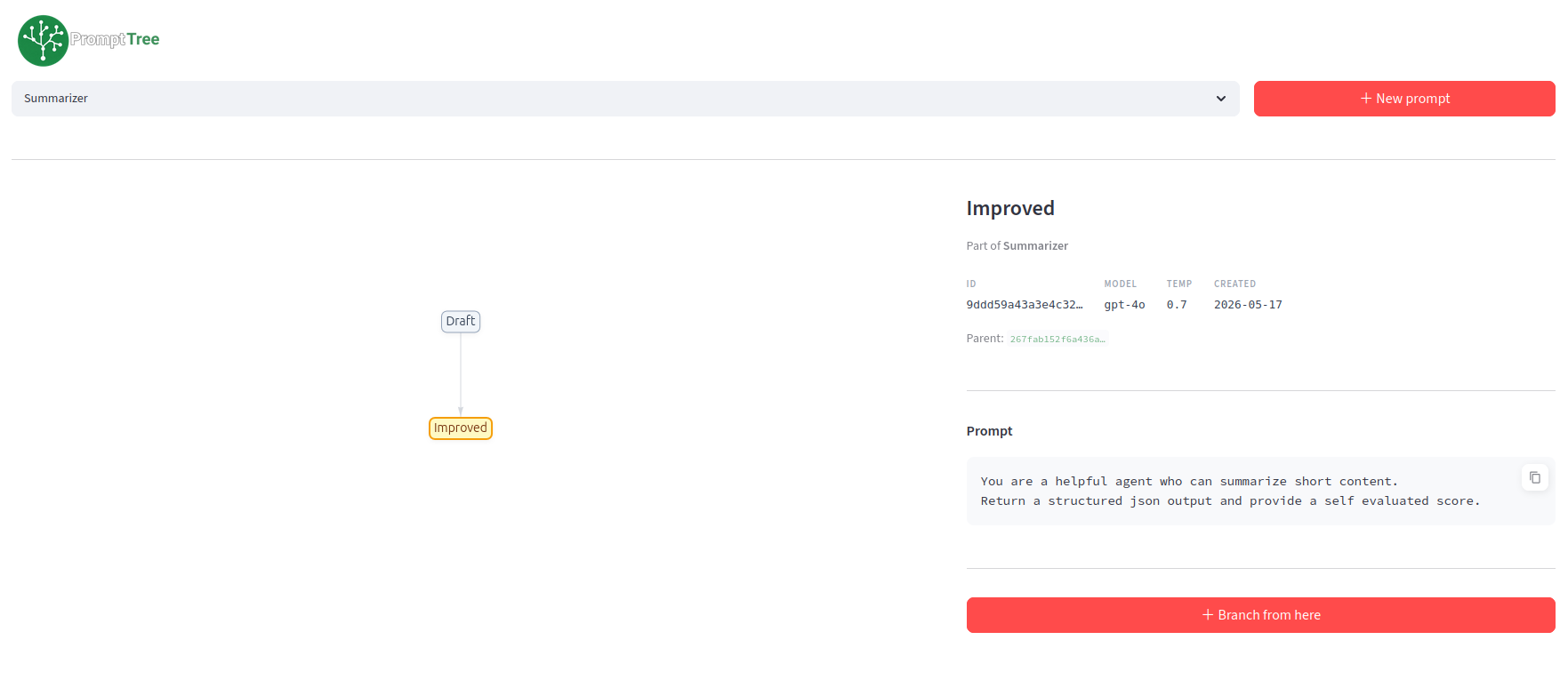
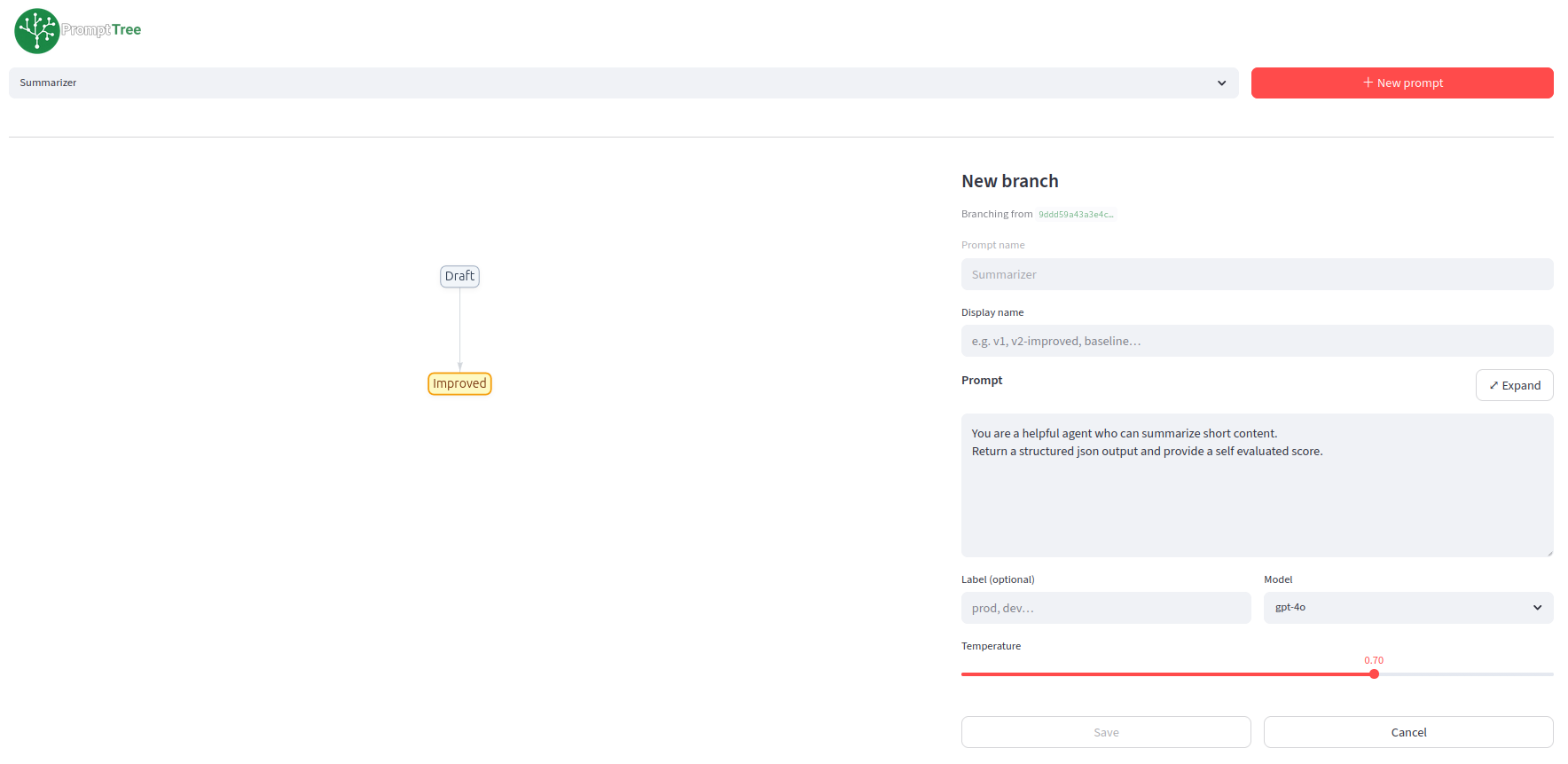
Launch a browser-based DAG explorer to create, browse, and branch prompts:
prompttree ui
Opens at http://localhost:8501.
- Browse all prompt families from the dropdown
- Click any node in the DAG to inspect its content and metadata
- Branch directly from any node
- Assign labels to nodes
Core Concepts
Registry
The Registry is the versioned store for your prompts. Each prompt is saved as a node — a YAML file containing the content, model settings, and a pointer to its parent node.
Nodes form a DAG (directed acyclic graph): you branch from any existing node to create a new version, preserving the full lineage.
Summariser
├── v1  ←  label: prod
├── v2  (branched from v1)
└── v3  (branched from v1)
All nodes live in .prompttree/registry/nodes/ and are git-tracked — diffs, history, and blame work out of the box.
Labels
Labels are human-readable aliases pointing to a specific node within a prompt family. They are scoped to the family name, so two families can each have their own prod label without conflict.
engine.set_label("Summariser", "prod", v2.id)
engine.set_label("Classifier", "prod", other_node.id)  # independent — no collision

engine.get_prompt("Summariser", label="prod", vars={...})
engine.get_prompt("Classifier", label="prod", vars={...})
Labels are stored in .prompttree/registry/labels.json as a nested map:
{
  "Summariser":  { "prod": "a1b2c3...", "staging": "d4e5f6..." },
  "Classifier":  { "prod": "g7h8i9..." }
}
Resolving Prompts
get_prompt has three resolution modes:
| Call | Resolves to |
|---|---|
get_prompt("My Prompt", label="prod") |
Node with the prod label in that family |
get_prompt("My Prompt") |
Most recently created node in the family |
get_prompt(node_id, by="id") |
Exact node by ID |
Jinja2 Templating
Prompt content supports Jinja2 {{ variable }} syntax. Variables are injected at render time via get_prompt().
node = engine.save("Translate {{text}} to {{language}}.", name="Translator")
prompt = engine.get_prompt("Translator", vars={"text": "hello world", "language": "French"})
API Reference
PromptTree(storage, key)
| Parameter | Default | Description |
|---|---|---|
storage |
".prompttree" |
Path to workspace directory |
key |
None |
AES-256 decryption key (only needed for encrypted registries) |
Methods
# Save & retrieve
engine.save(content, name, display_name, model, temperature, parent_id, tags, label) → RegistryNode
engine.get_prompt(name_or_id, label=None, by=None, vars=None) → str
engine.get_node(node_id) → RegistryNode | None
engine.list_nodes() → list[RegistryNode]
engine.list_names() → list[str]
engine.get_nodes_by_name(name) → list[RegistryNode]

# Labels
engine.get_labels() → dict[str, dict[str, str]]   # {name: {label: node_id}}
engine.set_label(name, label, node_id)

# Bulk operations
engine.delete_family(name) → int     # deletes all nodes + labels for a family
engine.reset() → int                 # wipes the entire registry

# Encryption
engine.lock(key) → int
engine.unlock(key) → int
Branching Versions
Branch from any node by passing parent_id:
v1 = engine.save("Summarise {{text}} briefly.", name="Summariser", label="prod")

v2 = engine.save(
    "Summarise {{text}} briefly. Use bullet points.",
    name="Summariser",
    display_name="v2",
    parent_id=v1.id,
)

# Promote v2 to prod when ready
engine.set_label("Summariser", "prod", v2.id)
Encryption
Encrypt all registry nodes before deploying to CI/production:
prompttree lock --key $PT_KEY      # encrypts all nodes in-place
prompttree unlock --key $PT_KEY    # decrypts back to plaintext
Decryption happens in-memory at render time — the encrypted YAML is never modified:
engine = pt.PromptTree(key="my-secret-key")
prompt = engine.get_prompt("Summariser", label="prod", vars={...})   # decrypts on the fly
Uses AES-256-GCM with a random nonce per encryption. The key is SHA-256 hashed so any string length is accepted.
CLI
prompttree init                        # initialise workspace + update .gitignore
prompttree list                        # list all nodes and labels
prompttree lock --key $PT_KEY          # encrypt registry
prompttree unlock --key $PT_KEY        # decrypt registry
prompttree delete-family <NAME>        # delete all nodes + labels for a prompt family
prompttree delete-family <NAME> --yes  # skip confirmation prompt
prompttree reset                       # wipe the entire registry
prompttree reset --yes                 # skip confirmation prompt
prompttree ui                          # launch the visual UI
prompttree ui --port 8080              # on a custom port
Workspace Layout
.prompttree/
├── registry/
│   ├── nodes/          # one YAML file per prompt node (git-tracked)
│   └── labels.json     # {name: {label: node_id}} map (git-tracked)
.prompttree/.lab/ and .prompttree/.artifacts/ are local-only and automatically added to .gitignore by prompttree init.
Node YAML Format
id: "a1b2c3d4..."
parent_id: null
name: "Summariser"
display_name: "v1"
metadata:
  encrypted: false
  model: "gpt-4o"
  temperature: 0.7
  created_at: "2024-01-01T00:00:00+00:00"
  tags: []
content: "Summarise {{text}} briefly. Use bullet points."
Development
git clone https://github.com/yedhuk/prompttree
cd prompttree
python -m venv .venv && source .venv/bin/activate
pip install -e ".[dev,ui]"

pytest          # run tests
ruff check prompttree/
mypy prompttree/
License
MIT © Yedhu Krishna
1 maintainer

Metadata
1 maintainer
Release files for prompttree 1.1.3
For a detailed explanation of source distributions (sdists) and built distributions (wheels), please see the package formats documentation.
Source distribution (sdist)
| File | Size | Uploaded | Provenance | Actions |
|---|---|---|---|---|
| prompttree-1.1.3.tar.gz | 54.3 kB | Without provenance | Details for prompttree-1.1.3.tar.gz |
Built distribution (wheel)
| File | Interpreter | ABI | Platform | Actions Reset |
|---|---|---|---|---|
| prompttree-1.1.3-py3-none-any.whl | Python 3 | none | any | Details for prompttree-1.1.3-py3-none-any.whl |
Total release size: 104.6 kB
Release files / prompttree-1.1.3.tar.gz
| Download URL | prompttree-1.1.3.tar.gz |
|---|---|
| Size | 54.3 kB |
| Tags | Source |
|
SHA-256 checksum How to use checksums |
55b14846326c786e000a8625eba02a058b313c967ceb5f5f9c49e0fed8c101a5
|
|
BLAKE2b-256 checksum How to use checksums |
f999ca735f755fbe6c8ed97570288a0a4f27dc03f1040e22b664ce02dfa6e440
|
| Upload date | |
|
Uploaded using Trusted Publishing? What is trusted publishing? |
No |
| Uploaded via |
twine/6.2.0 CPython/3.12.8
|
Release files / prompttree-1.1.3-py3-none-any.whl
| Download URL | prompttree-1.1.3-py3-none-any.whl |
|---|---|
| Size | 50.3 kB |
| Tags | Python 3 |
|
SHA-256 checksum How to use checksums |
25efd0c63030174ef0ce3e1e60b720310f128b63eef428a7c28c733fc1a8e0be
|
|
BLAKE2b-256 checksum How to use checksums |
a5b17201006f5629af6968ad6e20a5dcdae3d6a883123258ca163f7cdb1260be
|
| Upload date | |
|
Uploaded using Trusted Publishing? What is trusted publishing? |
No |
| Uploaded via |
twine/6.2.0 CPython/3.12.8
|
Security for prompttree 1.1.3
Provenance
Provenance describes where a file came from. On PyPI, provenance is shared via attestations, which provide a verifiable record of the build or publishing details. View details, limitations and caveats.
No provenance found
None of the files in this release were uploaded with provenance metadata.
A note on package security
PyPI is a repository for distributing packages, not a service for auditing them. While third-party security researchers and our staff do their best to detect and remove malicious packages, PyPI cannot guarantee the quality, security or suitability of any given package.
To learn more about protecting yourself from malicious actors, visit our package security documentation.














