
prompture-hub
A self-hosted LLM gateway. Hold the real provider keys server-side, hand out scoped hub keys, meter every call.




Self-hosted gateway over Prompture's multi-provider LLM driver registry. Think OpenRouter, except you control the keys, the metering, and the trust boundary.
pip install prompture-hub

 Analytics — spend, errors, p95 latency and fallback rate by model, provider and key |
 Scoped keys — model allowlist, spend cap, rate limit, expiry and IP allowlist |
 Keys — revoke instantly; expired keys stop working on their own |
 Sessions — resumable conversations with per-turn tokens and cost |
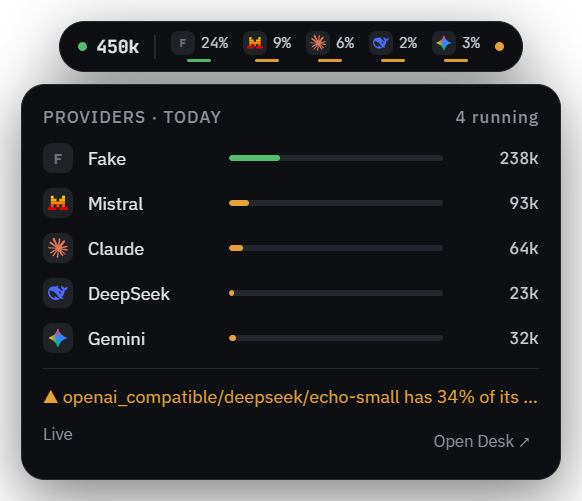
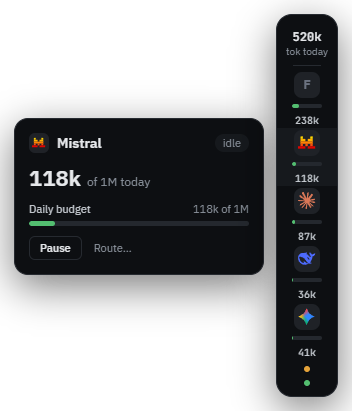
Prompture Desk: The Hub in Your Tray
Watch spend and live calls from your tray, and pause keys without opening the dashboard. Prompture Desk pairs with the hub once and shows running calls, spend per provider and project, rate-limit headroom and alerts. Windows, macOS and Linux.
Why this exists
You have provider API keys (OpenAI, Anthropic, Groq, Ollama, etc.). You want to let other apps — including apps you don't fully trust — call LLMs through your keys, with per-app limits and observability, without ever handing those apps the real provider keys.
prompture-hub does that by:
- Holding the real provider keys server-side (loaded once from
.env) - Issuing hub-scoped API keys that untrusted apps use
- Enforcing per-key allowed-model whitelists, daily spend caps, and rate limits
- Recording every call (cost, latency, tokens) for the dashboard
The untrusted app never sees OPENAI_API_KEY (or any other real provider secret). If you revoke its hub key, it's locked out instantly — no scrambling to rotate provider keys.
Status
v0.0.5, alpha. Solo / localhost / SQLite, requires prompture>=1.16, published on PyPI. The hub also serves the companion API used by Prompture Desk (pairing, limits, spend, live events, pausing keys). See CHANGELOG.md for what changed in each version. The architecture (auth, key model, storage) is designed to extend to multi-user and public deployment later without rewriting the v0.x surface.
Install
pip install prompture-hub
Already using Prompture? pip install "prompture[hub]" installs the same thing, and prompture hub launches it.
The dashboard UI ships prebuilt inside the package — no Node, no npm, no checkout required. (Prefer an isolated install? pipx install prompture-hub.)
Point it at one provider key and launch:
# create a minimal .env in your working directory
python -c "import secrets; print('HUB_ADMIN_TOKEN=' + secrets.token_urlsafe(32))" >> .env
echo "OPENAI_API_KEY=sk-..." >> .env                     # any provider Prompture supports
echo "OLLAMA_BASE_URL=http://localhost:11434" >> .env    # local models work too

prompture-hub
Open http://localhost:1984/ — you'll land on the dashboard at /app/. See .env.example for every setting (OAuth login, spend caps, all provider keys).
Run from source (for development)
You only need this if you're hacking on the hub itself — it requires Node to build the dashboard.
git clone https://github.com/jhd3197/prompture-hub
cd prompture-hub
pip install -e ".[dev]"
cp .env.example .env            # fill in HUB_ADMIN_TOKEN + provider keys

cd frontend && npm install && npm run build && cd ..   # build the dashboard
uvicorn prompture_hub.main:app --reload                # http://localhost:1984
For live frontend reload, run npm run dev inside frontend/ (it proxies to the API on :1984) instead of the one-off build.
Then create a scoped key for an untrusted app:
curl -X POST http://localhost:1984/admin/keys \
  -H "Authorization: Bearer $HUB_ADMIN_TOKEN" \
  -H "Content-Type: application/json" \
  -d '{
    "name": "sketchy-app",
    "allowed_models": ["ollama/llama3.1:8b"],
    "daily_spend_cap_usd": 1.0,
    "rate_limit_per_min": 30
  }'
The response includes the plaintext key once — copy it now, you cannot retrieve it again. Hand it to the untrusted app. From inside that app:
curl http://localhost:1984/v1/chat/completions \
  -H "Authorization: Bearer ph_xxxxxxxxxxxx" \
  -H "Content-Type: application/json" \
  -d '{
    "model": "ollama/llama3.1:8b",
    "messages": [{"role": "user", "content": "hi"}]
  }'
The dashboard lives at http://localhost:1984/ and shows recent keys, recent calls, and 24-hour spend.
API surfaces
| Surface | Endpoints | Use case |
|---|---|---|
| OpenAI-compatible | /v1/chat/completions, /v1/models |
Drop-in for any OpenAI-SDK client: tools, image_url parts, response_format and streaming all pass through. Wire format comes from prompture.gateway, so it matches prompture serve exactly. |
| OpenAI Responses | /v1/responses |
What Codex CLI speaks. Function calls + streaming; stateless (previous_response_id is rejected — send full input). |
| Anthropic-compatible | /v1/messages, /v1/messages/count_tokens |
What Claude Code and the Anthropic SDKs speak. Tools + streaming. Bare ids like claude-sonnet-4-5 route to Prompture's claude/ driver; anything else (combo/…, auto/…, openai/gpt-4o) works too. Key via x-api-key or bearer. |
| Embeddings | /v1/embeddings |
Prompture's embedding drivers, metered per key. |
| Prompture-native | /v1/extract |
Structured extraction with JSON Schema. Exposes Prompture's ask_for_json + strategies (provider_native, tool_call, prompted_repair) over HTTP. |
| Sessions | /v1/conversations (CRUD) + conversation_id on /v1/chat/completions |
Resumable chat: a later request replays prior turns server-side so the client doesn't need to ship full history. |
| Companion | /v1/companion/info, /v1/companion/device/*, /v1/live, /v1/limits, /v1/spend, /v1/alerts, /v1/keys/{id} |
For desktop companions and status widgets: device pairing, a live stream of calls, headroom, spend and alerts, plus key controls. See Companion API. |
Every chat surface accepts Prompture's virtual model names — combo/<name> fallback chains, auto/cheap / auto/best, aliases and fusion/<name> — so retries, key rotation and failover happen inside the hub. Each usage row records which model actually served the call and how many attempts it took.
Connect your tools
prompture-hub setup <tool> prints exactly what a tool needs to go through the hub (env vars for bash and PowerShell, or a config snippet):
prompture-hub setup claude-code --create-key --model combo/chat   # mint a key + print env
prompture-hub setup claude-code --key ph_... --write               # merge into ~/.claude/settings.json (backed up first)
prompture-hub setup codex --key ph_... --model auto/best            # ~/.codex/config.toml snippet (Responses API)
prompture-hub setup aider | cursor | continue | openai | anthropic
prompture-hub setup claude-code --key ph_... --project . --write   # tag this folder's spend (see Projects)
Projects
Send X-Project: <name> on any /v1/* call (or give a key a default_project) and its spend is attributed to that project: analytics gets a By project breakdown and ?project= filter, and /v1/spend splits by project. setup --project NAME configures the header per tool (--project . uses the current folder name). Claude Code gets it in the folder's .claude/settings.local.json, Codex in http_headers, Continue in requestOptions. For tools that can't send headers, --create-key --project NAME mints a key with that default.
Resumable sessions
Create a conversation, then reference its id on subsequent /v1/chat/completions calls:
# 1. open a session (optionally with a system prompt)
curl -X POST http://localhost:1984/v1/conversations \
  -H "Authorization: Bearer ph_xxxxxxxxxxxx" \
  -H "Content-Type: application/json" \
  -d '{"title": "seo-audit-run", "system": "You are an SEO auditor."}'
# => { "id": "conv_...", ... }

# 2. talk to it; prior turns are loaded automatically
curl http://localhost:1984/v1/chat/completions \
  -H "Authorization: Bearer ph_xxxxxxxxxxxx" \
  -H "Content-Type: application/json" \
  -d '{
    "model": "ollama/llama3.1:8b",
    "conversation_id": "conv_...",
    "messages": [{"role": "user", "content": "Audit example.com"}]
  }'

# 3. inspect history later
curl http://localhost:1984/v1/conversations/conv_... \
  -H "Authorization: Bearer ph_xxxxxxxxxxxx"
Set "persist": false on a chat request to use the session as read-only history without recording the new turn. Conversations are scoped to the HubKey that created them.
Companion API
Endpoints for desktop companions, tray apps and status widgets. They report on the hub; they can't call models.
Prompture Desk is the desktop companion built on them.
Pairing follows the OAuth 2.0 Device Authorization Grant (RFC 8628). No password is typed on the device:
- The device calls
POST /v1/companion/device/codewithscopeset toreadorread control, and shows the returneduser_code. - You open
/app/pair?code=…in the dashboard (or type the code there) and approve. You can downgrade the request to read-only. - The device polls
POST /v1/companion/device/tokenuntil it receives aphd_…token.
Tokens are listed and revocable under Settings › Devices. GET /v1/companion/info is public and reports the hub version, API version and features, so a companion can adapt before it pairs.
| Endpoint | Scope | What it returns |
|---|---|---|
GET /v1/live |
read | Server-Sent Events: request.started, request.first_token, request.activity (coding agents: working vs waiting), request.finished, key.updated, alert.fired. On connect you get a snapshot of running calls. Missed events replay from Last-Event-ID. Metadata only: no prompt or completion text. |
GET /v1/limits |
read | Each key's spend cap and rate limit, provider rate-limit headroom (from the headers providers send on every response) and provider account balances. Every figure says where it came from. |
GET /v1/spend?period=day|week|month |
read | Spend in the current UTC period, split by project, key and model. |
GET /v1/alerts |
read | Recent alerts. POST /v1/alerts/{id}/ack needs control scope. |
POST /v1/keys/{id}/pause · /resume · PATCH /v1/keys/{id} |
control | Pause a key, set a route override (serve every chat call on the key with a chosen model or combo), or change its cap, period, rate limit or default project. Changes are recorded in the audit log. |
The dashboard session and HUB_ADMIN_TOKEN also work on these endpoints. When dashboard login is on, a device paired by a user sees only that user's keys. Provider headroom and account balances are shown only to callers who can see every key.
Admin cap controls
These need the HUB_ADMIN_TOKEN. Spend adjustments count only in the cap window they were made in, so they lapse when the window rolls over. A grant larger than the current spend leaves extra headroom above the cap.
| Endpoint | What it does |
|---|---|
PATCH /admin/keys/{id} |
Change daily_spend_cap_usd, spend_period and rate_limit_per_min. At least one field is required; revoked keys return 404. |
POST /admin/keys/{id}/reset-spend |
Bring the key's spend in the current window to zero. Optional reason. |
POST /admin/keys/{id}/grant |
Credit amount_usd (> 0) against the current window. Optional reason. |
GET /admin/keys/{id}/adjustments |
Adjustments counting toward the current window. |
GET /admin/audit?key_id=&action=&limit= |
Audit log of key changes, newest first (limit up to 500): who, when, and the before and after values. |
The dashboard's Edit limits button on the Keys page changes the cap, period and rate limit through PATCH /v1/keys/{id}.
Spend-cap enforcement
Calls to /v1/chat/completions (stream and non-stream), /v1/embeddings, /v1/messages, /v1/responses and /v1/extract are checked against the key's spend cap and rate limit before the provider is called. Usage rows are only written when a call finishes, so each admitted call also holds a cost reservation until it settles; concurrent and streaming calls therefore cannot all pass on the same headroom, and calls still in flight count toward the per-minute rate limit.
- The estimate is
estimated input tokens x input price + output tokens x output price, with prices from Prompture's rate tables. Input tokens are a roughchars / 4heuristic; output tokens are the request'smax_tokens/max_completion_tokens/max_output_tokens, elseHUB_DEFAULT_OUTPUT_TOKEN_ESTIMATE. A largemax_tokenson a small cap can be refused even if the real answer would be short. - A reservation is released when the call is recorded, errors, or the client disconnects.
HUB_RESERVATION_TTL_SECONDSexpires any that leak. - Virtual models are priced conservatively: a
combo/orauto/route is the most expensive of its targets,fusion/is the sum of its panel and judge, and any unpriced target makes the whole route unpriced. - Local providers (Ollama, LM Studio,
local_http, ...) and models with explicit zero rates are priced at 0, not unknown.
| Setting | Default | Meaning |
|---|---|---|
HUB_UNKNOWN_PRICING |
block |
block refuses a model with no known prices (402 pricing_unknown). warn allows it, logs a warning, sets X-Hub-Cost-Warning: unknown-pricing and reserves nothing. Anything else is rejected at startup. |
HUB_DEFAULT_OUTPUT_TOKEN_ESTIMATE |
1024 |
Output tokens assumed when the request sets no max. |
HUB_RESERVATION_TTL_SECONDS |
900 |
Safety expiry for a reservation that was never released. |
Refusals keep detail and add an error object:
{"detail": "Spend cap of $5.00 per day would be exceeded ...",
 "error": {"code": "spend_cap_would_exceed", "type": "insufficient_quota", "message": "...",
           "period": "day", "cap_usd": 5.0, "spent_usd": 4.2, "reserved_usd": 0.6, "estimated_usd": 0.5,
           "window_start": "2026-01-01T00:00:00Z", "window_resets_at": "2026-01-02T00:00:00Z"}}
Codes: spend_cap_exceeded (402, cap already reached), spend_cap_would_exceed (402, the estimate plus reservations would pass it), pricing_unknown (402, with model and setting), and rate_limit_exceeded (429, with limit_per_min, in_last_minute, retry_after_seconds and a Retry-After header). GET /v1/limits shows reserved_usd next to spent_usd.
Caveats:
- The ledger is process-local: it assumes one hub process (the Docker image runs one uvicorn). With several workers each only sees its own reservations.
- Estimates are heuristics; the real cost is still recorded after the call, so a call can finish above its estimate.
- Coding-agent runs (
/v1/coding-agents/run) have no per-token price and are not reserved; they only get the early cap and rate-limit check. - Custom
openai_compatible/<profile>/...models count as unpriced unless Prompture knows their rates.
Alerts
Rules are set under Settings › Alerts (/api/alerts/rules). Each rule watches for one of:
- key spend: a share of a key's cap is used. The default is Prompture's budget degrade threshold.
- provider rate-limit headroom: little of a window is left. The default is Prompture's routing
min_headroom. - low account balance
- fallbacks
- failed calls
Fired alerts are stored, appear on /v1/live, and can also post to a webhook or an ntfy topic. A rule repeats at most once per its cooldown.
Custom endpoints
Register any OpenAI-compatible server (vLLM, llama.cpp, a private gateway) under Settings › Endpoints (/api/endpoints). Its models are served as openai_compatible/<name>/<model>. They're metered, attributed and alerted on like built-in providers, and listed in /v1/models after a health check. The hub stores only the name of the env var that holds the endpoint's key, never the key itself.
Dashboard login (Google / GitHub OAuth)
The HTML dashboard at / is gated behind OAuth login when configured. Programmatic clients (/v1/*, /admin/*) are unaffected — they keep using hub-issued keys / HUB_ADMIN_TOKEN.
Setup:
-
Generate a session secret:
python -c "import secrets;print(secrets.token_urlsafe(48))"
Put it in
.envasHUB_SESSION_SECRET=.... -
Set your public URL — this is what OAuth providers will redirect back to:
HUB_BASE_URL=http://localhost:1984 # or https://hub.yourdomain.com
-
Set the allowlist (emails that may log in). Empty = nobody can log in.
HUB_ALLOWED_EMAILS=you@example.com,teammate@example.com
-
Create the OAuth apps you want (one or both):
Google — https://console.cloud.google.com/apis/credentials → OAuth client ID → Web application
- Authorized redirect URI:
{HUB_BASE_URL}/auth/google/callback - Paste the client id/secret into
HUB_GOOGLE_CLIENT_ID/HUB_GOOGLE_CLIENT_SECRET
GitHub — https://github.com/settings/developers → New OAuth App
- Authorization callback URL:
{HUB_BASE_URL}/auth/github/callback - Paste into
HUB_GITHUB_CLIENT_ID/HUB_GITHUB_CLIENT_SECRET
- Authorized redirect URI:
-
Restart the hub. Visit
/and you'll be redirected to/auth/login.
Fallback (dev-only): if HUB_SESSION_SECRET is empty or neither OAuth provider is configured, login is disabled and require_user falls back to localhost-open mode — convenient for solo dev, never safe for a public deployment. Always set a session secret + provider + allowlist before exposing the hub.
Run in a container (secondary)
cp .env.example .env
# fill HUB_ADMIN_TOKEN + provider keys

docker compose up -d --build
docker compose logs -f hub
curl http://localhost:1984/health
The container runs as non-root hub (uid 10001), persists SQLite at /data/prompture_hub.db via the hub_data volume, binds 0.0.0.0:1984, and has a /health healthcheck.
Reaching host-local model servers from the container:
- Linux: add
network_mode: hostto thehubservice so it shares the host's localhost, or - macOS / Windows / Linux: point provider base URLs at the host gateway, e.g.
OLLAMA_BASE_URL=http://host.docker.internal:11434.
For a public deployment, put it behind nginx/Caddy with TLS and rate limits — don't expose port 1984 to the internet directly.
Architecture
prompture-hub/
├── src/prompture_hub/
│   ├── main.py              FastAPI app factory + SPA mount + uvicorn CLI
│   ├── settings.py          HubSettings (admin_token, db_path, host/port, OAuth)
│   ├── auth.py              require_admin / require_hub_key / require_user
│   ├── oauth.py             Authlib OAuth registry (Google + GitHub)
│   ├── routers/
│   │   ├── openai_compat.py /v1/chat/completions, /v1/models
│   │   ├── extract.py       /v1/extract (Prompture-native)
│   │   ├── conversations.py /v1/conversations (resumable sessions)
│   │   ├── admin.py         /admin/keys CRUD + /admin/usage
│   │   ├── auth.py          /auth/{google,github}/start + /callback + /logout
│   │   └── spa_api.py       /api/* — JSON consumed by the React SPA
│   ├── storage/
│   │   ├── db.py            SQLite engine + session factory + init_db (auto-migrate)
│   │   └── models.py        HubKey, UsageRecord, User, Conversation, Message
│   ├── migrations/          Alembic env + versions/ (ships in the wheel; auto-applied on boot)
│   └── static/
│       └── app/             Built SPA bundle (bundled into the package at build time)
└── frontend/                Vite + React + TypeScript dashboard
    └── src/
        ├── components/      Sidebar, Modal, Toast, StatCard, TrustFlow, …
        ├── pages/           LoginPage, Dashboard, KeysPage, ModelsPage
        ├── api.ts           Typed fetch wrappers
        └── styles.css       Design system (light + dark via [data-theme])
Migrations
You never run migrations. The schema is managed by Alembic, and the migration environment ships inside the package (prompture_hub/migrations/). On every boot the app runs alembic upgrade head programmatically — a fresh database gets the full schema, an existing one gets only the migrations it's missing. Upgrading is just pip install -U prompture-hub (or pulling a newer image); the next start self-migrates.
Maintainers only — authoring a migration after a model change
After changing a model in src/prompture_hub/storage/models.py, generate a migration and commit it so it ships (and auto-applies) with the next release:
alembic revision --autogenerate -m "add foo column to hubkey"
# Review the generated file in src/prompture_hub/migrations/versions/ —
# autogenerate is a hint, not a substitute for reading the SQL it emits.
If you have an old SQLite from before Alembic was introduced and it
already has tables but no alembic_version row, the cleanest path is to
delete it and let init_db create the new schema fresh:
rm prompture_hub*.db
Frontend dev loop
cd frontend
npm run dev        # http://localhost:1985  (proxies /api, /auth, /v1 to FastAPI)
The Vite dev server proxies all backend paths (/api, /auth, /v1, /admin, /docs, /health) to http://127.0.0.1:1984, so you can run uvicorn + vite side by side with hot reload on both.
Security model
- Hub-issued keys are 32-byte URL-safe tokens, prefixed
ph_. Only the SHA-256 hash is stored; plaintext is returned to the caller once at creation. - Admin endpoints (
/admin/*) requireAuthorization: Bearer $HUB_ADMIN_TOKEN. Different credential from hub-issued keys — separation of duties. - Real provider keys (
OPENAI_API_KEY, etc.) are read directly by Prompture's drivers from environment. They never appear in any HTTP response. - Per-key policies: model allowlist, spend cap per day/week/month, rate limit, optional expiry and IP / CIDR allowlist.
X-Forwarded-Foris only honored withHUB_TRUST_PROXY_HEADERS=true. - Localhost-only by default:
HUB_HOST=127.0.0.1. Public exposure requires a reverse proxy + TLS. - Device tokens (
phd_…) are hashed like hub keys and can never call models.controlscope is granted separately at approval time. Pending pairings expire after 10 minutes and are capped in number. - Live events carry metadata only: ids, model, project, status, tokens, cost, timings. Prompt and completion text never reach
/v1/live. Behind a reverse proxy, disable response buffering for/v1/live.
Analytics
The dashboard's Analytics page (and GET /api/analytics?days=7|30|90) shows requests, spend, error rate, p50/p95 latency and fallback rate per day, broken down by requested model, serving provider and hub key, plus the most recent errors.
Roadmap
Shipped: OpenAI chat completions, Responses API and Anthropic Messages API (streaming + tools), embeddings, /v1/extract, combos / auto/ / fusion routing with per-call route metering, scoped keys (model allowlist, spend caps, rate limits, expiry, IP allowlists, pause, route override), analytics dashboard, per-project attribution, setup command for coding tools, reasoning replay, optional prompt compression, resumable conversations, coding-agent runner, OAuth login, Alembic migrations, companion API (device pairing, live stream, limits, spend, alerts, key controls), custom OpenAI-compatible endpoints.
Next:
- Combo / alias management in the dashboard (today:
PROMPTURE_COMBOS_FILE) - Multi-user and hosted deployments — Postgres backend, audit log
previous_response_idsupport for/v1/responses
License
MIT
1 maintainer

Metadata
1 maintainer
Release files for prompture-hub 0.0.5
For a detailed explanation of source distributions (sdists) and built distributions (wheels), please see the package formats documentation.
Source distribution (sdist)
| File | Size | Uploaded | Provenance | Actions |
|---|---|---|---|---|
| prompture_hub-0.0.5.tar.gz | 1.9 MB | Without provenance | Details for prompture_hub-0.0.5.tar.gz |
Built distribution (wheel)
| File | Interpreter | ABI | Platform | Actions Reset |
|---|---|---|---|---|
| prompture_hub-0.0.5-py3-none-any.whl | Python 3 | none | any | Details for prompture_hub-0.0.5-py3-none-any.whl |
Total release size: 2.1 MB
Release files / prompture_hub-0.0.5.tar.gz
| Download URL | prompture_hub-0.0.5.tar.gz |
|---|---|
| Size | 1.9 MB |
| Tags | Source |
|
SHA-256 checksum How to use checksums |
e021aa31a17f8bd7b43fd0de3751933e1aa9b089d7923d41e4c9f4261ba7e7b1
|
|
BLAKE2b-256 checksum How to use checksums |
e0a7003bd6ed63046aa7b9ccb7808eed08abcc960c1d1713bb2ab4cb30b9d645
|
| Upload date | |
|
Uploaded using Trusted Publishing? What is trusted publishing? |
No |
| Uploaded via |
twine/7.0.0 CPython/3.13.16
|
Release files / prompture_hub-0.0.5-py3-none-any.whl
| Download URL | prompture_hub-0.0.5-py3-none-any.whl |
|---|---|
| Size | 206.1 kB |
| Tags | Python 3 |
|
SHA-256 checksum How to use checksums |
703036704ef8b18616b0691ce2c8f1bb66bd7001ac290d7589b5552c11ffbd95
|
|
BLAKE2b-256 checksum How to use checksums |
4728a5b29969349450675ad5732e5333782de6a72b244177bcae69284a1ec239
|
| Upload date | |
|
Uploaded using Trusted Publishing? What is trusted publishing? |
No |
| Uploaded via |
twine/7.0.0 CPython/3.13.16
|
Security for prompture-hub 0.0.5
Provenance
Provenance describes where a file came from. On PyPI, provenance is shared via attestations, which provide a verifiable record of the build or publishing details. View details, limitations and caveats.
No provenance found
None of the files in this release were uploaded with provenance metadata.
A note on package security
PyPI is a repository for distributing packages, not a service for auditing them. While third-party security researchers and our staff do their best to detect and remove malicious packages, PyPI cannot guarantee the quality, security or suitability of any given package.
To learn more about protecting yourself from malicious actors, visit our package security documentation.














