
Turn your Claude Code conversation history into a searchable markdown library + SQLite database
Verified details
These details have been verified by PyPIProject links
GitHub Statistics
Maintainers

Project description
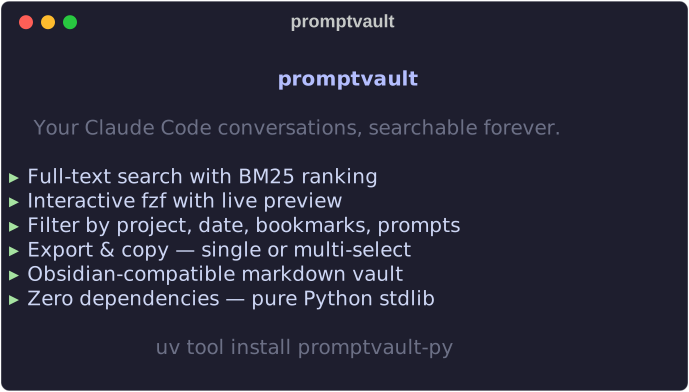




Your Claude Code conversations, searchable forever.
The Problem
Claude Code stores conversations in ~/.claude/history.jsonl — not searchable, not browsable, not persistent. Claude compacts and deletes old sessions without warning.
pv turns that history into a searchable markdown library + SQLite database. Browse in Obsidian, search from the terminal with fzf. Zero dependencies. Pure stdlib.
Quick Start
# recommended — fast, isolated, always on PATH
uv tool install promptvault-py

# alternative — same idea, traditional tool
pipx install promptvault-py

pv-sync                        # sync your Claude Code history
pv                             # browse conversations
pv search "database migration" # full-text search

# upgrade to latest version
uv tool upgrade promptvault-py   # or: pipx upgrade promptvault-py
Don't have uv?
curl -LsSf https://astral.sh/uv/install.sh | sh(docs)Don't have pipx?
brew install pipxorpip install --user pipx(docs)
Both tools install pv into an isolated virtualenv and symlink the executable to ~/.local/bin/, so it's available globally — no environment activation needed.
pvis the short alias.promptvault/promptvault-syncalso work.
Optional: install fzf for the interactive UI (brew install fzf / apt install fzf). Without it, pv falls back to plain text.
How It Works
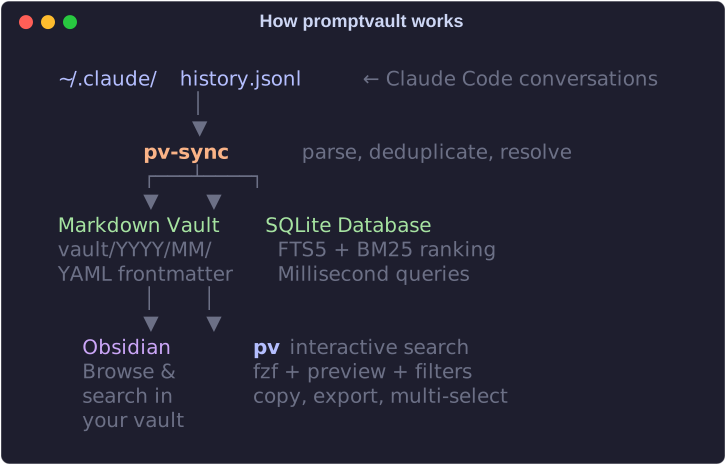
pv-sync reads history.jsonl, groups prompts by conversation, and generates:
- Markdown vault — One
.mdper conversation,YYYY/MM/structure, YAML frontmatter. Drop into Obsidian. - SQLite database — FTS5 full-text search with BM25 ranking. Millisecond queries.
The sync is idempotent — always rebuilds from source, impossible to reach a bad state. Resolves pasted-text placeholders, deduplicates prompts, filters slash commands, cleans whitespace.
Commands
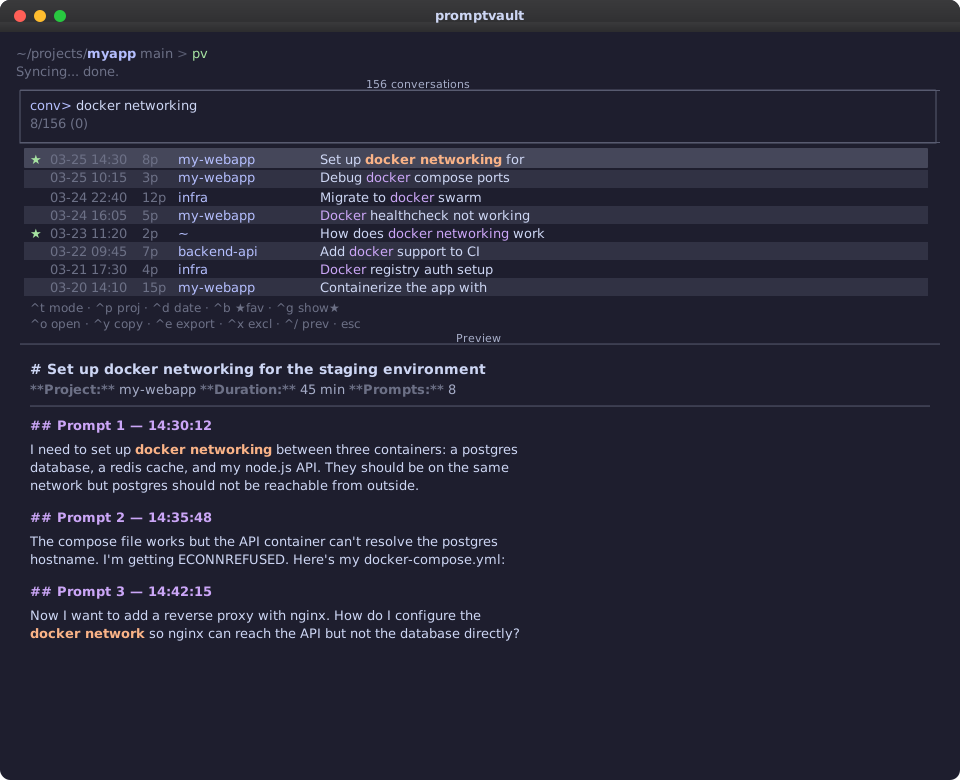
All commands launch fzf by default (split pane: conversation list + live preview). Add --no-fzf for plain text.
| Command | Description |
|---|---|
pv |
Browse all conversations interactively |
pv search "query" |
Full-text search ranked by relevance |
pv recent [N] |
Last N conversations (default 20) |
pv list [--date DATE] [--project NAME] |
Filter by date or project |
pv stats |
Vault overview |
pv-sync |
Rebuild vault + database |
Controls:
| Key | Action |
|---|---|
Enter |
Open in $EDITOR (returns to fzf) |
Ctrl-T |
Toggle conversation / prompt view |
Ctrl-P |
Cycle project filter |
Ctrl-D |
Cycle date range (all/today/week/month) |
Ctrl-Y |
Copy to clipboard |
Ctrl-E |
Export to file (save dialog) |
Ctrl-/ |
Toggle preview |
Tab |
Multi-select |
Esc |
Quit |
Full documentation: docs/usage.md
Real-Time Capture
A Claude Code hook captures prompts the moment you send them — no sync needed.
Add to ~/.claude/hooks.json:
{
  "hooks": {
    "UserPromptSubmit": [{
      "hooks": [{
        "type": "command",
        "command": "python3 /path/to/promptvault/promptvault/hook.py",
        "timeout": 5000
      }]
    }]
  }
}
Fast (<50ms), silent (no stdout), safe (errors swallowed). Captures to ~/.claude/prompt-library/capture.jsonl.
Windows: use
pythoninstead ofpython3and backslash paths.
Markdown Vault
Each conversation becomes an Obsidian-compatible .md with YAML frontmatter:
~/.claude/prompt-library/vault/
├── _index.md
├── 2026/
│   └── 03/
│       ├── 2026-03-25__c792e74f__refactor-user-auth.md
│       └── ...
Open as an Obsidian vault. The Calendar plugin works well for browsing.
Environment Variables
| Variable | Default |
|---|---|
PROMPTVAULT_HISTORY |
~/.claude/history.jsonl |
PROMPTVAULT_OUTPUT |
~/.claude/prompt-library |
PROMPTVAULT_DB |
~/.claude/prompt-library/prompts.db |
PROMPTVAULT_VAULT |
~/.claude/prompt-library/vault |
PROMPTVAULT_PROJECTS |
~/.claude/projects |
PROMPTVAULT_CAPTURE_LOG |
~/.claude/prompt-library/capture.jsonl |
Contributing
Contributions welcome! See CONTRIBUTING.md. 293 tests, all synthetic data.
git clone https://github.com/reidemeister94/promptvault.git
cd promptvault
uv tool install --editable .   # global "pv" that tracks your local source
make setup-dev-env
make test && make lint
License
MIT
If pv saves your prompts, save us a 
Project details
Verified details
These details have been verified by PyPIProject links
GitHub Statistics
Maintainers
Release history Release notifications | RSS feed


Download files
Download the file for your platform. If you're not sure which to choose, learn more about installing packages.
Source Distribution
Built Distribution
Filter files by name, interpreter, ABI, and platform.
If you're not sure about the file name format, learn more about wheel file names.
Copy a direct link to the current filters
File details
Details for the file promptvault_py-0.0.6.tar.gz.
File metadata
- Download URL: promptvault_py-0.0.6.tar.gz
- Upload date:
- Size: 46.2 kB
- Tags: Source
- Uploaded using Trusted Publishing? Yes
- Uploaded via: twine/6.1.0 CPython/3.13.7
File hashes
| Algorithm | Hash digest | |
|---|---|---|
| SHA256 |
7c60bee46476b57ab7a549ea80e808e37c1078a792a8fa49f127fab8ee15ca3c
|
|
| MD5 |
92d863daea56f6f126a2a208ded55a4c
|
|
| BLAKE2b-256 |
246ba9eae4a87a9cff4c395c95d1b83b30c3c3443784a734b958493395f61449
|
Provenance
The following attestation bundles were made for promptvault_py-0.0.6.tar.gz:
Publisher:
publish.yml on reidemeister94/promptvault
-
Statement:
-
Statement type:
https://in-toto.io/Statement/v1 -
Predicate type:
https://docs.pypi.org/attestations/publish/v1 -
Subject name:
promptvault_py-0.0.6.tar.gz -
Subject digest:
7c60bee46476b57ab7a549ea80e808e37c1078a792a8fa49f127fab8ee15ca3c - Sigstore transparency entry: 1185817286
- Sigstore integration time:
-
Permalink:
reidemeister94/promptvault@c45658f75bc4518dd8ed31c62653fad0ef7d3ed5 -
Branch / Tag:
refs/tags/0.0.6 - Owner: https://github.com/reidemeister94
-
Access:
public
-
Token Issuer:
https://token.actions.githubusercontent.com -
Runner Environment:
github-hosted -
Publication workflow:
publish.yml@c45658f75bc4518dd8ed31c62653fad0ef7d3ed5 -
Trigger Event:
push
-
Statement type:
File details
Details for the file promptvault_py-0.0.6-py3-none-any.whl.
File metadata
- Download URL: promptvault_py-0.0.6-py3-none-any.whl
- Upload date:
- Size: 21.1 kB
- Tags: Python 3
- Uploaded using Trusted Publishing? Yes
- Uploaded via: twine/6.1.0 CPython/3.13.7
File hashes
| Algorithm | Hash digest | |
|---|---|---|
| SHA256 |
01752da8c660e9c1a4b3fe1aa1ba167f3dd3ca5abd1aae1f7a52305c94f2fac7
|
|
| MD5 |
576f886722d052638fefdf3ae9be50b8
|
|
| BLAKE2b-256 |
c6e27dd4229739ed3087e94b993418a12dc1679baa035f5687ced3eaac804e9c
|
Provenance
The following attestation bundles were made for promptvault_py-0.0.6-py3-none-any.whl:
Publisher:
publish.yml on reidemeister94/promptvault
-
Statement:
-
Statement type:
https://in-toto.io/Statement/v1 -
Predicate type:
https://docs.pypi.org/attestations/publish/v1 -
Subject name:
promptvault_py-0.0.6-py3-none-any.whl -
Subject digest:
01752da8c660e9c1a4b3fe1aa1ba167f3dd3ca5abd1aae1f7a52305c94f2fac7 - Sigstore transparency entry: 1185817290
- Sigstore integration time:
-
Permalink:
reidemeister94/promptvault@c45658f75bc4518dd8ed31c62653fad0ef7d3ed5 -
Branch / Tag:
refs/tags/0.0.6 - Owner: https://github.com/reidemeister94
-
Access:
public
-
Token Issuer:
https://token.actions.githubusercontent.com -
Runner Environment:
github-hosted -
Publication workflow:
publish.yml@c45658f75bc4518dd8ed31c62653fad0ef7d3ed5 -
Trigger Event:
push
-
Statement type:






