
Note: PromptWatch project has been discontinued
PromptWatch.io ... session tracking for LangChain
It enables you to:
- track all the chain executions
- track LLM Prompts and re-play the LLM runs with the same input parameters and model settings to tweak your prompt template
- track your costs per project and per tenant (your customer)
Installation
pip install promptwatch
Basic usage
In order to enable session tracking wrap you chain executions in PromptWatch block
from langchain import OpenAI, LLMChain, PromptTemplate
from promptwatch import PromptWatch

prompt_template = PromptTemplate.from_template("Finish this sentence {input}")
my_chain = LLMChain(llm=OpenAI(), prompt=prompt_template)

with PromptWatch(api_key="<your-api-key>") as pw:
    my_chain("The quick brown fox jumped over")
Here you can get your API key: http://www.promptwatch.io/get-api-key (no registration needed)
You can set it directly into PromptWatch constructor, or set is as an ENV variable PROMPTWATCH_API_KEY
Comprehensive Chain Execution Tracking
With PromptWatch.io, you can track all chains, actions, retrieved documents, and more to gain complete visibility into your system. This makes it easy to identify issues with your prompts and quickly fix them for optimal performance.
What sets PromptWatch.io apart is its intuitive and visual interface. You can easily drill down into the chains to find the root cause of any problems and get a clear understanding of what's happening in your system.
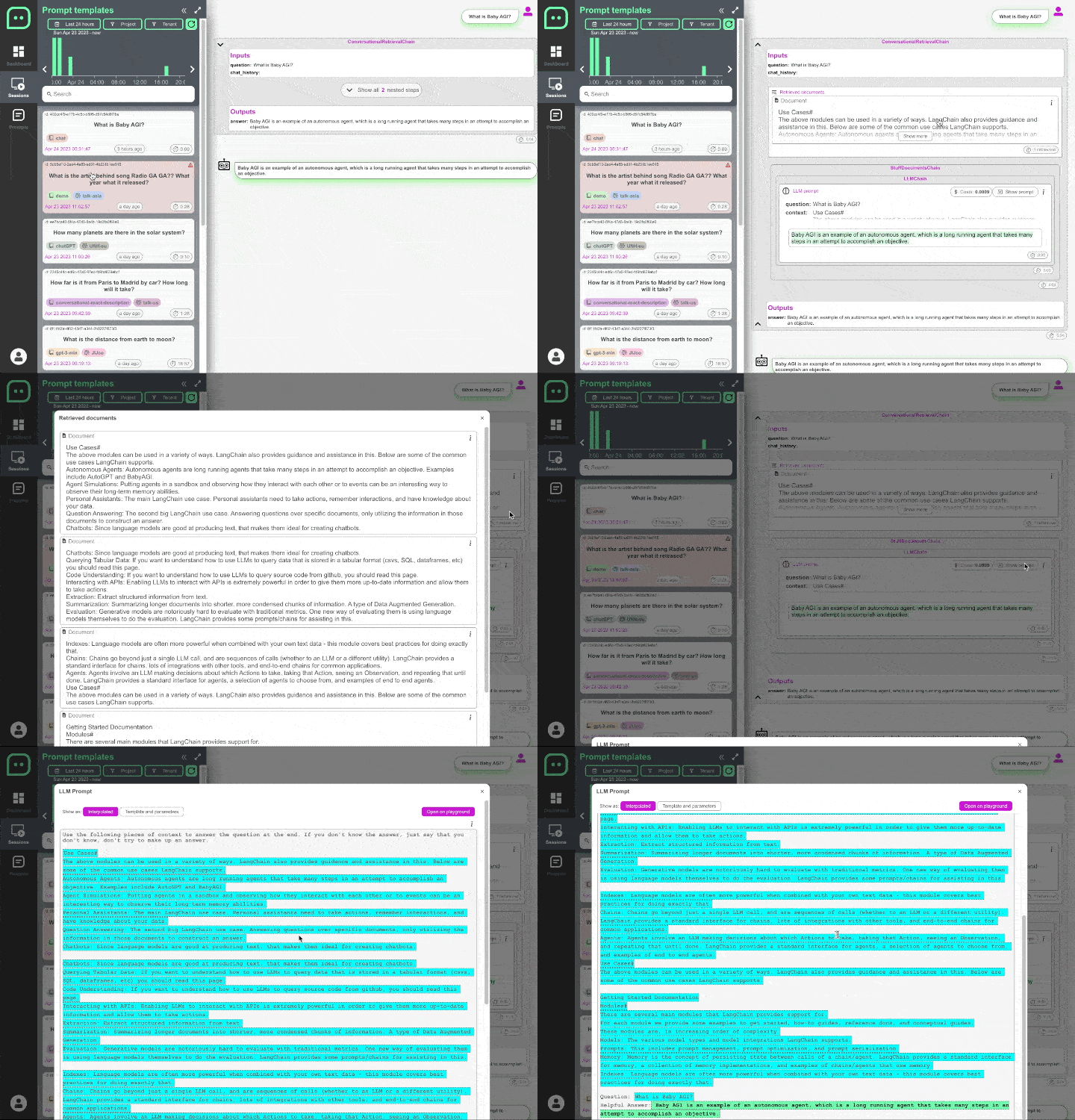
Read more here: Chain tracing documentation
LLM Prompt caching
It is often tha case that some of the prompts are repeated over an over. It is costly and slow. With PromptWatch you just wrap your LLM model into our CachedLLM interface and it will automatically reuse previously generated values.
Read more here: Prompt caching documentation
LLM Prompt Template Tweaking
Tweaking prompt templates to find the optimal variation can be a time-consuming and challenging process, especially when dealing with multi-stage LLM chains. Fortunately, PromptWatch.io can help simplify the process!
With PromptWatch.io, you can easily experiment with different prompt variants by replaying any given LLM chain with the exact same inputs used in real scenarios. This allows you to fine-tune your prompts until you find the variation that works best for your needs.

Read more here: Prompt tweaking documentation
Keep Track of Your Prompt Template Changes
Making changes to your prompt templates can be a delicate process, and it's not always easy to know what impact those changes will have on your system. Version control platforms like GIT are great for tracking code changes, but they're not always the best solution for tracking prompt changes.
Read more here: Prompt template versioning documentation
Unit testing
Unit tests will help you understand what impact your changes in Prompt templates and your code can have on representative sessions examples.

1 maintainer

Metadata
1 maintainer
Release files for promptwatch 0.4.6
For a detailed explanation of source distributions (sdists) and built distributions (wheels), please see the package formats documentation.
Source distribution (sdist)
| File | Size | Uploaded | |
|---|---|---|---|
| promptwatch-0.4.6.tar.gz | 37.5 kB | Details |
Built distribution (wheel)
| File | Interpreter | ABI | Platform | Reset |
|---|---|---|---|---|
| promptwatch-0.4.6-py3-none-any.whl | Python 3 | none | any | Details |
Total release size: 79.0 kB
Release files / promptwatch-0.4.6.tar.gz
| Download URL | promptwatch-0.4.6.tar.gz |
|---|---|
| Size | 37.5 kB |
| Tags | Source |
|
SHA-256 checksum How to use checksums |
1f6653843de05d6d6cbf7d457e38dbd487325f0cf619e89c99a61cc5e6cefb3e
|
|
BLAKE2b-256 checksum How to use checksums |
d96e8f615d144b74885d07625fe0942896039feaa5459f6117d59bc7e623b207
|
| Upload date | |
|
Uploaded using Trusted Publishing? What is trusted publishing? |
No |
| Uploaded via |
twine/6.2.0 CPython/3.11.11
|
Release files / promptwatch-0.4.6-py3-none-any.whl
| Download URL | promptwatch-0.4.6-py3-none-any.whl |
|---|---|
| Size | 41.5 kB |
| Tags | Python 3 |
|
SHA-256 checksum How to use checksums |
07aabed1fa1f9eac270e1837c79dbb78b0c8b3f244f320be43e5a0fbf3c0c9fb
|
|
BLAKE2b-256 checksum How to use checksums |
56a460bd3b30620caa42a28d66d7e426a241d499920564ae4f4c3c92dd6c0b94
|
| Upload date | |
|
Uploaded using Trusted Publishing? What is trusted publishing? |
No |
| Uploaded via |
twine/6.2.0 CPython/3.11.11
|














