
ProofCLI
A command can exit successfully and still produce the wrong result.
Run the command. Check its files. Report what passed and what failed.




Windows · macOS · Linux · JSON contracts · Human and JSON reports
Quick start · See it fail · Checks · Documentation · Limitations
ProofCLI tests the output of command-line tools. Give it a command and a JSON contract: the expected exit code, log patterns, output files, and their contents. It runs the command in a fresh temporary directory and returns a report and an exit code you can use in CI.
Use it for an exporter that drops records, a generator that writes an empty file, or an automated workflow that prints “done” before producing the expected result. A passing check means the declared assertions passed. The quality of those assertions still matters.
Watch the 30-second demo · Run the examples · GitHub Action
Quick start
Use a virtual environment with an existing Python installation. Releases contain a universal wheel, source distribution, and SHA-256 checksums. This is not a standalone executable.
Windows (PowerShell):
py -3 -m venv .venv
.venv\Scripts\python -m pip install proofcli==0.4.0
.venv\Scripts\proofcli --help
macOS:
python3 -m venv .venv
.venv/bin/python -m pip install proofcli==0.4.0
.venv/bin/proofcli --help
Use the environment's python -m proofcli if the console command is not on PATH. From a checkout, use python -m pip install .. The GitHub release also provides a wheel, source archive, and checksums. PyPI uploads follow successful GitHub release validation; see the publishing workflow for index availability.
Run your first contract
The examples below assume the environment's executables are on PATH; otherwise use their full paths as above.
proofcli init proofcli.json
proofcli validate proofcli.json
proofcli run proofcli.json --report verification.json --artifacts evidence
init writes a working example without executing it. validate checks the schema, not dependency availability. run executes and verifies. The legacy proofcli SPEC form still works.
Artifact directories must be new. Reports are replaced atomically when explicitly reused; the spec, input sources, and retained output paths are protected. Failed files are preserved with --artifacts. --json emits one JSON object on stdout; child logs stay inside its fields.
See it fail
Clone this repository to try the real CSV exporter. After installation:
proofcli run examples/export/good.json
proofcli run examples/export/wrong-value.json --report bad-report.json --artifacts bad-output
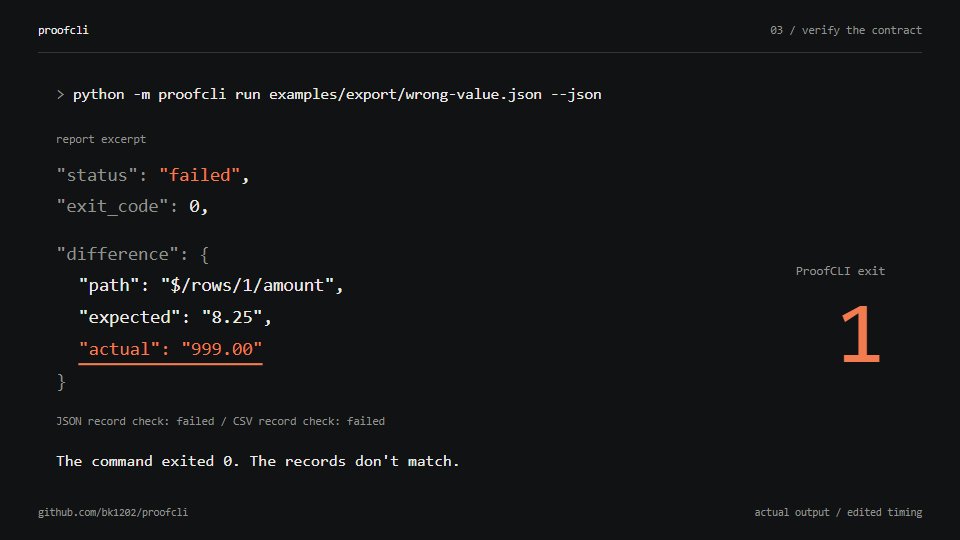
Both exporter commands exit 0 and create valid, nonempty JSON and CSV. The second silently changes Grace's amount to 999.00 while keeping the original total. Its old success message, row-count check, and JSON summary check still pass. Exact record assertions fail and ProofCLI returns 1. Diagnostics identify $/rows/1/amount, with expected and actual values.
This is the mismatch recorded in the report:
{
  "path": "$/rows/1/amount",
  "reason": "value or type differs",
  "expected": "8.25",
  "actual": "999.00"
}
| Example | What goes wrong despite exit code 0 |
|---|---|
| Wrong field value | A record disagrees with the expected amount. |
| Missing record | A record is dropped while the summary still claims three. |
| Unexpected column | The CSV contains a column the contract forbids. |
| Empty export | The exporter reports success without the required records. |
These examples execute the exporter against a checked-in CSV fixture. --report saves the checks and logs; --artifacts keeps the files for inspection.
What you can check
| Check | Contract option |
|---|---|
| Exit code and execution deadline | expect.exit_code, timeout_seconds |
| Patterns in stdout and stderr | stdout_regex, stderr_regex |
| Regular output files and minimum byte size | files[].path, min_size |
| Patterns in file text | text_regex |
| Selected JSON fields | json_contains |
| Exact JSON values, keys, and ordered arrays | json_equals |
| CSV columns and minimum row count | csv.columns, csv.min_rows |
| Exact CSV headers and ordered records | csv.exact_columns, csv.rows |
A contract
This example stages a fixture, runs the exporter, and checks every CSV record:
{
  "version": 1,
  "argv": ["{python}", "{spec_dir}/export.py", "input.csv", "report.json"],
  "inputs": [{"source": "fixtures/input.csv", "dest": "input.csv"}],
  "timeout_seconds": 10,
  "verification_timeout_seconds": 5,
  "expect": {
    "exit_code": 0,
    "files": [{
      "path": "report.csv",
      "csv": {
        "columns": ["id", "customer", "amount"],
        "exact_columns": true,
        "rows": [
          {"id": "1", "customer": "Ada", "amount": "12.50"},
          {"id": "2", "customer": "Grace", "amount": "8.25"},
          {"id": "3", "customer": "Linus", "amount": "13.00"}
        ]
      }
    }]
  }
}
Save it beside examples/export/export.py, or start with the complete good contract. Specs use JSON; YAML is not supported. CSV values are strings. JSON booleans do not equal numbers; output decimals are compared without binary float rounding.
argv has no implicit shell, variable expansion, pipes, or globbing. {python} selects ProofCLI's interpreter, preserving its virtual environment. {spec_dir} and {work_dir} expand inside arguments. Windows batch files are rejected; invoke an interpreter explicitly when shell behavior is intentional.
See the complete specification, report format, and use cases.
Exit codes and CI
GitHub Action
After checking out your repository, add one step:
steps:
  - uses: actions/checkout@v7
  - uses: bk1202/proofcli@v0.4.0
    id: proof
    with:
      spec: tests/export-contract.json
The Action sets up Python and runs the ProofCLI source bundled at that version. It requires no separate pip install and fails the step when verification fails. It exposes report, status, and exit-code outputs and writes a job summary. Use a full commit SHA instead of a tag when your workflow requires an immutable dependency.
Optional report and artifacts inputs choose where evidence is saved. Upload reports with your CI's artifact step if you want them retained after the job. See the Action guide for a complete workflow and failure handling.
The broken exporter workflow is intentionally red: its exit-code-only job passes while the ProofCLI job fails. This demonstrates a weak CI check; CI with suitable pytest or shell assertions can catch the same defect.
Exit codes
| Exit | Meaning |
|---|---|
0 |
Every requested assertion completed and passed, or init/validate succeeded. |
1 |
Command/expectation failure, timeout, output overflow, or assertion deadline exceeded. |
2 |
Invalid usage/spec, supervision, file handling, or report I/O error. |
130 |
Ctrl+C/SIGINT or Windows Ctrl+Break. |
143 |
SIGTERM interruption. |
The child's actual exit code is separate; on POSIX a negative code indicates a signal. Check status and verification_complete before treating a report as evidence. Use your CI system's artifact mechanism to upload retained files/reports.
Limitations
- Fresh directories prevent previous-run output from satisfying checks. Inputs are independent copies with byte counts/SHA-256 fingerprints. Output links/reparse points and hard-link aliases of staged inputs are rejected.
- Each stream is bounded to 1 MiB in memory; overflow stops the command. Logs are not first written to unbounded temporary files. Specs and semantic file reads are also capped at 1 MiB.
- Logs must be valid UTF-8. Invalid bytes fail capture and log assertions; reports retain the captured bytes as base64 plus decoding-error offsets. A handled interruption drains pending pipe bytes within the capture limit and a bounded wait.
- Assertions run in a separate supervised process with an independent deadline. A pathological regex cannot indefinitely block the CLI.
- Ordinary descendants are terminated on completion, timeout, and handled interruption: Job Objects on Windows, process groups on macOS. POSIX children that detach into another session can escape. SIGKILL, crashes, native uninterruptible I/O, and external filesystem races are not universally controllable.
- This is not a security sandbox. Commands inherit your environment and user permissions. They can access other files/network, modify external state, and create arbitrarily large output files. There are no general CPU, memory, network, or disk quotas. Reports may contain sensitive argv and logs.
- A pass proves only the declared properties of observed files and decoded logs. Weak assertions, unrepresentative fixtures, or an agent changing both code and expectations can still give false confidence. No visual, audio, business, or universal semantic correctness is established.
See the audit for confirmed defects and remaining limits, and validation evidence for actual test results and skipped cases. The project has not had an independent third-party security review.
The 0.4 capture notes document the invalid-byte false positive, interruption fix, and intentional compatibility change.
Why not pytest or a shell script?
| Tool | Good fit | Tradeoff |
|---|---|---|
| ProofCLI | Small, reviewable JSON contracts around real commands; consistent reports across Windows/macOS. | Limited assertion vocabulary and fixed resource policies. |
| pytest | Arbitrary Python assertions, rich fixtures, parametrization, plugins, and complex application tests. | Python test code and a pytest dependency; subprocess ownership/reporting must be chosen or implemented. |
| Shell scripts | Short checks with existing utilities and direct composition. | Quoting, utilities, cleanup, and reports vary across shells/platforms. |
ProofCLI can run inside pytest, a shell script, or CI. Choose a general test framework when the verification logic outgrows a declarative contract.
Documentation
| Guide | Contents |
|---|---|
| Specification | Every contract field, path rule, placeholder, and resource limit. |
| Reports | Statuses, diagnostics, interruption handling, and exit codes. |
| Use cases | Choosing checks for exporters, generators, and workflows. |
| Audit | Defects found, regression coverage, and unresolved risks. |
| Releases | Build, validation, checksums, and publication. |
| Changelog | Version history and compatibility changes. |
Contributing
Bug reports should include a minimal contract, the expected result, and the actual report. Use a small reproducer that can be shared safely. See CONTRIBUTING.md for development setup and checks, and SECURITY.md for security reports.
python -m pip install --require-hashes -r requirements-build.txt
python -m build --no-isolation
python tools/verify_dist.py
python -m pip install .
python -m unittest discover -s tests -v
CI exercises the installed wheel on Windows, macOS, and Linux, fresh wheel/sdist installations on Windows/macOS, and the composite Action on all three platforms. Build tools are hash-locked; Actions are pinned to commit IDs. Release instructions describe validation, checksums, and PyPI publication.
See CHANGELOG, SECURITY, and CONTRIBUTING. Licensed under MIT.
Motivation included CLI-Anything issues #406 and #407. ProofCLI is independently implemented; no CLI-Anything code was copied.
1 maintainer

Metadata
1 maintainer
Release files for proofcli 0.4.0
For a detailed explanation of source distributions (sdists) and built distributions (wheels), please see the package formats documentation.
Source distribution (sdist)
| File | Size | Uploaded | |
|---|---|---|---|
| proofcli-0.4.0.tar.gz | 178.3 kB | Details |
Built distribution (wheel)
| File | Interpreter | ABI | Platform | Reset |
|---|---|---|---|---|
| proofcli-0.4.0-py3-none-any.whl | Python 3 | none | any | Details |
Total release size: 204.8 kB
Release files / proofcli-0.4.0.tar.gz
| Download URL | proofcli-0.4.0.tar.gz |
|---|---|
| Size | 178.3 kB |
| Tags | Source |
|
SHA-256 checksum How to use checksums |
edcac380169ed07ca24c7770380647656e137a1cf31d0622ec31fe7b97a80829
|
|
BLAKE2b-256 checksum How to use checksums |
0bf6c74da74d357980e3dd8c75117452df740c4c2d30281049d1c72da49011da
|
| Upload date | |
|
Uploaded using Trusted Publishing? What is trusted publishing? |
Yes |
| Uploaded via |
twine/7.0.0 CPython/3.13.14
|
Provenance
Provenance describes where a file came from. On PyPI, provenance is shared via attestations, which provide a verifiable record of the build or publishing details. View details, limitations and caveats.


PyPI Publish Attestation
PyPI verified that this artifact, at this checksum, originated from the publisher listed below.
Signed by GitHub Actions, verified by PyPI on Oct 15, 2026.
Transparency logRelease files / proofcli-0.4.0-py3-none-any.whl
| Download URL | proofcli-0.4.0-py3-none-any.whl |
|---|---|
| Size | 26.5 kB |
| Tags | Python 3 |
|
SHA-256 checksum How to use checksums |
8923d8501947043424cc4d65692acb0dd8d5cf4787c85ed144f5f314873e7110
|
|
BLAKE2b-256 checksum How to use checksums |
bb1f8d9f84431c679cba92852d56de477c7b62103dbb9c64eac4cd88b1152561
|
| Upload date | |
|
Uploaded using Trusted Publishing? What is trusted publishing? |
Yes |
| Uploaded via |
twine/7.0.0 CPython/3.13.14
|
Provenance
Provenance describes where a file came from. On PyPI, provenance is shared via attestations, which provide a verifiable record of the build or publishing details. View details, limitations and caveats.
PyPI Publish Attestation
PyPI verified that this artifact, at this checksum, originated from the publisher listed below.
Signed by GitHub Actions, verified by PyPI on Oct 15, 2026.
Transparency log













