
proofcut
An AI video editor that proves its cuts. Your recordings in, a finished, mastered film out: cut by transcript, with b-roll, cards, music and captions, and every step an agent can call. proofcut renders on your own machine, then transcribes the render and checks that it says what the edit says.
https://github.com/user-attachments/assets/4153d180-3d7c-4c70-af5f-54d63d0a8bd5
Above: an agent cutting a demo video, unattended. The two runs it was cut from, uncut (silent: the recorder took frames only, and the voice is in the film the agent cut): the workspace (2:26) and Claude Code with the proofcut plugin (3:09).
That is not a staged run. TRIAL.md scores three unattended ones, each handed a goal and no steps, and each passed every one of its checks.
- The demo cut, the one above.
- Real footage: 96 seconds of narration with its fluffed takes left in, plus four clips of film footage. The agent cut it to 45 seconds, chose footage by what each line was about, burned captions, and checked its own render: all 123 expected words heard back.
- A whole film: the demo material plus a score, briefed as a finished film ready to upload. In 192 seconds and $2.27 the agent cut it, laid the music under the voice, ended on a card, mastered it to −16 LUFS, and checked it. The score, the level and the end card were each measured in the delivered file, not taken from the project.
Have a Mac or a Windows PC and half an hour? One person has run proofcut on an Intel Mac and nobody yet on Apple silicon, and on Windows only its author has. One script runs the whole test and removes what it installed: § Help wanted.
Try it
Check your machine first, before cloning anything. proofcut doctor probes
every tool proofcut uses and prints the fix for anything missing
(§ Requirements has the list). With
uv installed:
uvx proofcut doctor
The first run downloads Python 3.13 if uv has none, plus proofcut's dependencies, about 230 MB together.
On Linux, Windows and an Intel Mac, proofcut setup installs whatever doctor
marked ✗, for you alone and with no sudo or administrator rights, and
proofcut setup --uninstall removes exactly what it added. It says what it
will download and asks first; whisper is about 1.9 GB of it. On an Apple
silicon Mac, follow the fix doctor prints under each ✗.
uvx proofcut setup
The demo and your own recordings run from a checkout:
git clone https://github.com/tydude001/proofcut && cd proofcut
uv sync
The two-minute demo
No footage needed. docs/DEMO.md generates a voiceover with a real retake, b-roll and a score, then walks a whole small film: cut the retake by naming its words, hang b-roll off a phrase, lay the score under the voice, render and master it, end on a card, and check the render against the timeline.
uv run python scripts/make_demo.py ~/proofcut-demo
In Claude Code
The plugin registers proofcut's MCP server, so all 93 tools are available with no setup of your own:
/plugin marketplace add tydude001/proofcut
/plugin install proofcut@proofcut
The first start downloads about 175 MB of Python dependencies, and Claude
Code gives a server 30 seconds to connect. On a slow connection, start that
first session as MCP_TIMEOUT=300000 claude, or reconnect proofcut in /mcp
once the download has finished.
Any other MCP client runs the same server, from a checkout or with no checkout at all:
uv run --project /path/to/proofcut proofcut mcp
uvx proofcut mcp
On your own recording
uv run proofcut init myproject
uv run proofcut -C myproject import VO.wav --clip-id vo
uv run proofcut -C myproject transcribe vo                  # whisper, word-timed
uv run proofcut -C myproject seed vo                        # auto-editor strips silences
uv run proofcut -C myproject transcript vo --search "here's the thing"
uv run proofcut -C myproject cut vo 111:114 --plan          # what do those indices say?
uv run proofcut -C myproject cut vo 111:114 --pad 0.1       # inclusive word range
uv run proofcut -C myproject export final.mp4 --render      # or a .kdenlive to finish in an NLE
uv run proofcut -C myproject verify final.mp4               # did the render say what you edited?
To watch the edit instead, open the workspace. It plays the source through the edit, so seeing a cut costs no render:
uv run proofcut -C myproject open        # server plus an app window
uv run proofcut -C myproject web --open  # the same page in a browser tab
From recordings to a finished film
One project, and proofcut's own commands from the first import to the delivered file. No NLE finishes the film, and nothing else touches the render. Each stage is one command, and each row links the section of the manual that walks it.
| Stage | Command |
|---|---|
| Bring in the voiceover and footage, and transcribe | import, transcribe |
| Cut retakes and asides by naming their words | cut vo 111:114 |
| Hang b-roll and cards off the lines they belong to | cue add, card new |
| Open cold on a scene, end on a card | head, tail |
| Play the footage's own lines in a gap, or under the narration | hold add, hold under |
| Score it: placed passages, crossfaded, levelled under the voice | music |
| Pull breaths down without cutting them | attenuate |
| Render and master to a loudness target | export --render --loudness -16 |
| Burn in captions | captions --burn |
| Check the render says what the edit says | verify, frames, hold check |
Two video essays of five to six minutes have been rebuilt this way and measured against their originals, which had been finished outside proofcut. One came out the same length to the frame. The other matched its original's 63 voiceover ranges to the millisecond, with the voice aligned to the sample, starting from a retake pass made in Kdenlive. Both master at the original's −16 LUFS (HISTORY.md § The Lambs/Longlegs native rebuild, § The Scream native rebuild).
proofcut makes no footage and writes no script. It takes what you recorded to a film, and proves the film matches the edit.
Beyond the stages above, one line each:
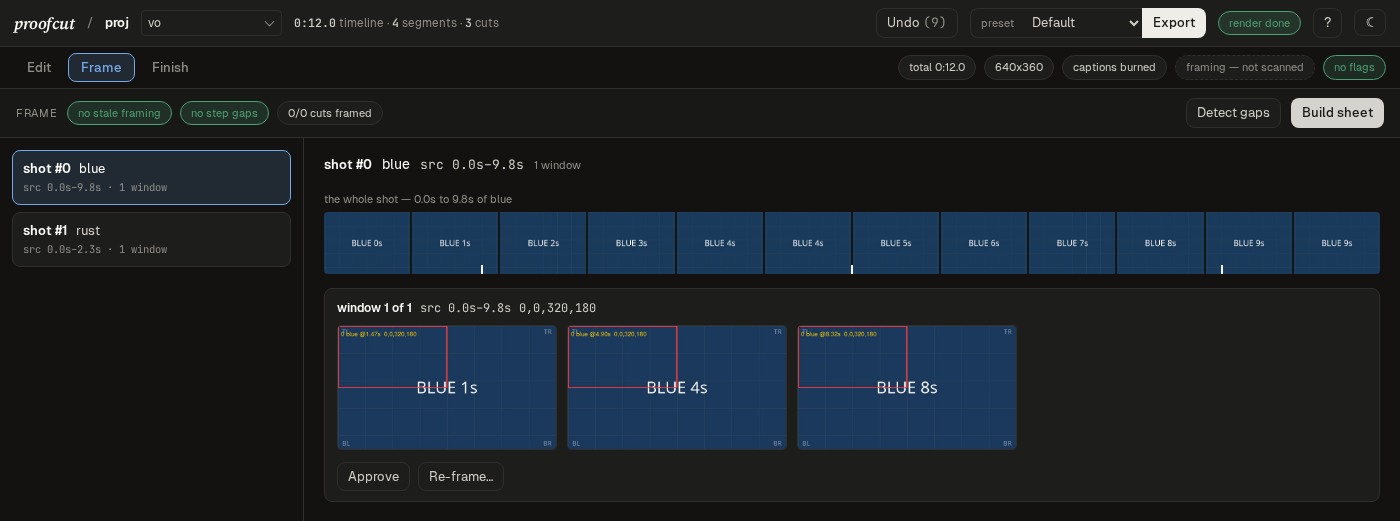
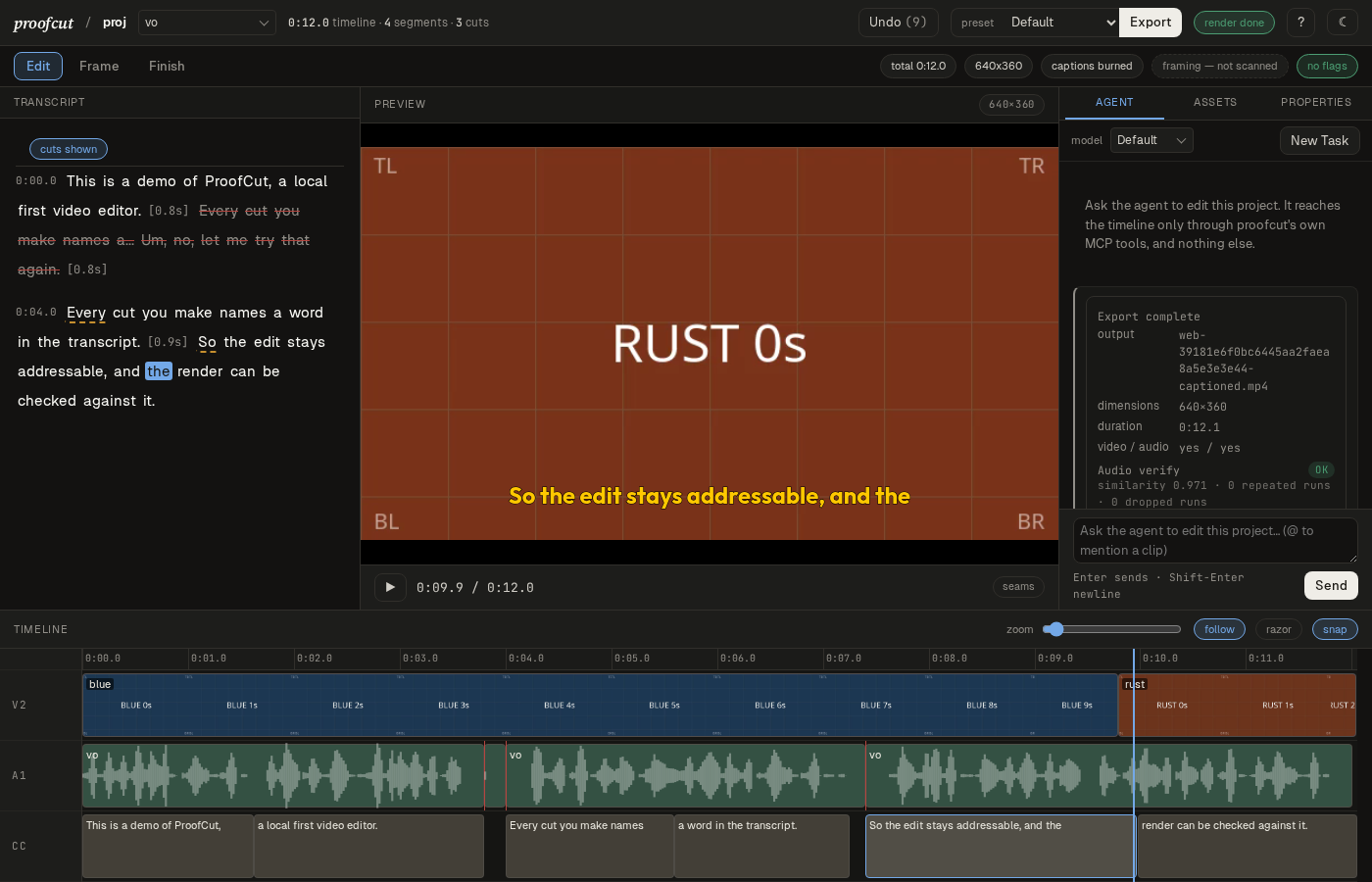
- The workspace. Edit (transcript, preview, drag-trim and razor), Frame (review every crop in place) and Finish (presets, verify, and the finished file). The truth strip warns while you edit if the film would ship wrong.
- An agent that can look.
shot-sheetdraws the whole picture track as one labelled grid, andfootage-sheetbrowses a clip you haven't cut yet. Both return the image itself over MCP. - Transcript self-checks. Retake seams, invented words, swallowed repeats
and suspect durations are reported when a transcript is attached, and
unspokenlets the render itself testify to words nobody said. - B-roll by description.
describewrites what is on screen in each ~10-second window of footage, so an agent can choose a clip by what a line is about. - Reframing. Per-shot crop windows for aspect changes, face-aware
proposals (
reframe-detect), a review sheet, and stacked splits for two speakers. Cards are redrawn at the new frame size, never stretched. - Derived reels.
reelcuts part of the film into a new project, such as a vertical teaser. It reports every picture it dropped and pins the ones it kept. - NLE round-trip. Export to Kdenlive or OTIO, finish elsewhere, and
import-editthe trim back.
proofcut is 0.x software. A project from an older version is refused rather
than guessed at, and proofcut migrate brings it forward.
Why proofcut
- It checks its own work.
verifytranscribes the finished file and diffs it word by word against the timeline, so a retake left in the film is caught before anyone watches it. Frame counts and the picture are measured too, because ffmpeg, melt and auto-editor all exit 0 on some failures. - Cuts stay addressable. Every word in a recording keeps a fixed index
that never renumbers, so
cut vo 111:114names the same words however many cuts came before it.--planprints what a range says before anything changes, andrestoreandundowalk it back. - Built for agents. 93 MCP tools with typed inputs and structured
returns, so Claude Code, Codex or your own agent can drive it. Tools like
shot-sheetreturn an image of the edit, not a file path the agent can't open. - One engine, three ways in. The MCP server, the
proofcutcommand line and a browser workspace all call the same operations. Every tool has a matching command (the test suite enforces it), so anything an agent does, you can script or re-run by hand. - Local-first. Commercial AI editors are apps around a metered cloud service. proofcut transcribes, edits and renders on your machine, and calls no cloud service of its own: no account, no per-minute billing. The only thing that talks to a model provider is the agent you choose to run (the optional footage-description and voice models download once, on first use).
- No lock-in. The timeline is OpenTimelineIO. Export a
.kdenliveor OTIO file, finish in Resolve, Premiere or Kdenlive, and bring your trim back withimport-edit.
Help wanted: a Mac or a Windows run
GitHub's macOS and Windows runners take the demo to a checked render, but a runner never reads the instructions. On a Mac, one person has taken the demo to a checked render, on an Intel Mac (i7-8850H, macOS 15.7.9); nobody has on Apple silicon. On Windows, the author's own Windows 11 laptop has, twice, and nobody else's PC; Windows 10 and ARM64 PCs have not been tried at all. If you have one of these machines and half an hour, one script installs what proofcut needs, makes a short test video, has proofcut cut, score, master and check it, and puts a report on your Desktop. It asks before it starts, records what it added, and removes exactly that on request, nothing you already had. A run that stops at the first step is just as useful, because where it stops is the finding.
On a Mac:
git clone https://github.com/tydude001/proofcut
bash proofcut/scripts/mac_trial.sh
On Apple silicon it installs uv, ffmpeg-full, espeak-ng and
auto-editor with Homebrew (and Homebrew itself if you have none), plus the
Shotcut app for its renderer and whisper. Homebrew no longer installs on
Intel Macs, so on one the script downloads the same tools into
~/proofcut-mac-trial instead, and needs only Apple's Command Line Tools.
bash proofcut/scripts/mac_trial.sh --uninstall removes what it added.
Then file the report.
On Windows, from PowerShell:
git clone https://github.com/tydude001/proofcut
powershell -ExecutionPolicy Bypass -File proofcut\scripts\windows_trial.ps1
It downloads uv, ffmpeg, auto-editor, espeak-ng, Shotcut's renderer
and whisper into one folder under %LOCALAPPDATA%. Nothing is installed
system-wide and it needs no administrator rights. The same command with
-Uninstall deletes that folder. It puts proofcut-windows-report.zip on
your Desktop with your home folder's name taken out; file the report.
Requirements
proofcut is developed on Linux (a Fedora-based desktop). On macOS and Windows the test suite passes on CI and GitHub's runners take the demo to a checked render. A person's Intel Mac has too, and on Windows the author's own PC; nobody has tried Apple silicon by hand yet. Where each OS stands is in docs/plans/PORTABILITY.md.
Every hard part of an editor already exists as mature open source, and
proofcut is the layer that lets an agent drive those tools and check what
they produced. Run uv run proofcut doctor to check everything below at
once. On Linux, Windows and an Intel Mac, uv run proofcut setup installs
any of the last four that doctor marks ✗: a static ffmpeg, whisper,
auto-editor's release binary and Shotcut's melt — on Linux the portable
build, which renders with no display at all
(docs/plans/INSTALL.md).
| You need | For | Notes |
|---|---|---|
| Python 3.13 and uv | everything | uv sync installs the Python side. The only runtime dependencies are mcp and OpenTimelineIO, which holds the timeline and exports it to other editors. |
ffmpeg / ffprobe built with libx264, freetype and libass |
cutting, concatenating, captions, rendering | Fedora's default ffmpeg-free has no libx264: use RPM Fusion's ffmpeg. On a Mac, Homebrew's ffmpeg lacks freetype and libass: install ffmpeg-full and put $(brew --prefix ffmpeg-full)/bin first on PATH (it is keg-only). |
| auto-editor 31+ | silence and bad-take removal, single-source renders | Install the upstream binary. The PyPI package is a stale 29.x. |
| whisper | word-timed transcription (30+ languages), render verification | Any openai-whisper install. uv tool install --python 3.12 openai-whisper is the short route (3.12 because torch's Intel-Mac builds stop there, and on an Intel Mac also --with 'numpy<2', which that last torch needs); add --torch-backend cpu without an NVIDIA GPU (1.9 GB instead of 5.5 GB). Found via PROOFCUT_WHISPER, then PATH. The CPU build transcribed the demo's 19-second voiceover in 33 seconds. |
MLT (melt) |
layered renders (b-roll, cards, music) | Your distribution's MLT package (mlt on Fedora, whose melt package is an unrelated compression tool), or Kdenlive, whose flatpak copy is found automatically. PROOFCUT_MELT overrides both. |
Optional. Each unlocks one feature, proofcut doctor reports whether it is
available, and everything else works without it:
| Optional | Unlocks | Notes |
|---|---|---|
ImageMagick 7 (magick) |
title and end cards, rendered from SVG templates | ImageMagick 6's convert is not used, so distributions that still ship 6 (Ubuntu 24.04) need ImageMagick's own build. |
Claude Code (claude, logged in) |
the agent pane in the workspace | proofcut mcp works with any MCP client; only the pane runs claude itself. |
PROOFCUT_VLM |
describe (b-roll search by what's on screen) |
The python of a venv with torch, transformers, bitsandbytes and Pillow, on a CUDA GPU. The Qwen2.5-VL model downloads on first use. |
PROOFCUT_FACE |
reframe-detect (face-aware crops) |
The python of a venv with insightface, onnxruntime and opencv-python. |
PROOFCUT_TTS, PROOFCUT_TTS_MODEL, PROOFCUT_TTS_VOICE |
vo-synth (a line in a cloned voice) |
A python with qwen-tts and a CUDA torch, a local Qwen3-TTS snapshot, and a directory holding a reference clip of the voice. There is no default voice, on purpose. |
Working on proofcut
Whether you're a person or a coding agent, start with CLAUDE.md. It holds the rules and the traps this repo has already hit, and Claude Code loads it automatically. CONTRIBUTING.md is the short version a pull request is checked against, and SECURITY.md says how to report a vulnerability.
Where things live:
| Path | What it is |
|---|---|
src/proofcut/ops.py |
Every operation. The MCP tools, the CLI and the web UI all call these. |
src/proofcut/server.py |
The MCP server. Register tools with @_tool(), never @mcp.tool(). |
src/proofcut/cli.py |
The proofcut command: one subcommand per tool, printing JSON. |
src/proofcut/webui.py, src/proofcut/web/ |
The workspace. It posts to ops and renders what comes back; it never decides anything itself. |
src/proofcut/project.py, timeline.py |
The project manifest (proofcut.json) and the OTIO timeline. |
tests/ |
test_server_stdio.py drives a real proofcut mcp subprocess; test_webui_http.py a real socket. |
scripts/ |
The demo maker, the Mac and Windows trial kits, screenshot capture. |
docs/ |
The manual, the demo, and the design record (below). |
Run the checks:
uv sync
uv run ruff check .      # never `ruff format`; see CONTRIBUTING.md
uv run pytest
The suite talks to a real proofcut mcp subprocess, so it is slower than a
pure unit suite. Tests that need whisper, auto-editor, melt or ImageMagick
skip when the tool is missing. Tests that render through melt also need a
display: on a headless machine use QT_QPA_PLATFORM=offscreen or xvfb-run -a (proofcut doctor tells you which your MLT needs). Without one they fail
with "no display for MLT's Qt module to open", which is the environment, not a
regression.
The documentation:
- docs/MANUAL.md: every command, with the reasoning.
- docs/DEMO.md: the whole loop in two minutes.
proofcut's reasoning is part of what it ships, so the design record is public:
- PLAN.md: architecture, stack decisions, open questions.
- HISTORY.md: the dated record of what shipped and what the evidence said.
- PRIOR-ART.md: what else exists in this space, and what proofcut does that they don't.
- NEXT.md: the directions after the queues closed, ranked.
- TRIAL.md: an agent cutting a video end to end, unattended and scored.
- docs/plans/: the plans, in progress and finished. A step that landed says "Shipped" and names its HISTORY.md section.
License
PolyForm Shield 1.0.0. proofcut is source-available, not open source: you can read, run, change and redistribute it for any purpose except building a product that competes with it. Cutting your own videos, running it for clients, building on it and forking it to fix a bug are all fine. For a commercial licence, ask.
The bundled typefaces are not proofcut's to relicense. The caption face in
src/proofcut/fonts/ and the three browser faces in src/proofcut/web/ are
OFL-1.1, each with its licence text beside it and its source in that
directory's FONTS.md.
Say thanks
If proofcut cut a video for you, you can buy me a coffee on Ko-fi.
1 maintainer

Download files
Download the file for your platform. If you're not sure which to choose, learn more about installing packages.
Source Distribution
Built Distribution
Filter files by name, interpreter, ABI, and platform.
If you're not sure about the file name format, learn more about wheel file names.
Copy a direct link to the current filters
File details
Details for the file proofcut-0.36.0.tar.gz.
File metadata
- Download URL: proofcut-0.36.0.tar.gz
- Upload date:
- Size: 1.3 MB
- Tags: Source
- Uploaded using Trusted Publishing? Yes
- Uploaded via:
uv/0.12.15 {"installer":{"name":"uv","version":"0.12.15","subcommand":["publish"]},"python":null,"implementation":{"name":null,"version":null},"distro":{"name":"Ubuntu","version":"24.04","id":"noble","libc":null},"system":{"name":null,"release":null},"cpu":null,"openssl_version":null,"setuptools_version":null,"rustc_version":null,"ci":true}
File hashes
| Algorithm | Hash digest | |
|---|---|---|
| SHA256 |
25001539f96c59dcd685cb93d1f28dc300fccf52b728c2e650136220a0afdbf3
|
|
| MD5 |
8eb589d616df2ac8b3387fa1804c76b9
|
|
| BLAKE2b-256 |
80cf29ba247346ca3b2769b22c920c1805560d7c6d18862840b6692cabc554e0
|
File details
Details for the file proofcut-0.36.0-py3-none-any.whl.
File metadata
- Download URL: proofcut-0.36.0-py3-none-any.whl
- Upload date:
- Size: 1.4 MB
- Tags: Python 3
- Uploaded using Trusted Publishing? Yes
- Uploaded via:
uv/0.12.15 {"installer":{"name":"uv","version":"0.12.15","subcommand":["publish"]},"python":null,"implementation":{"name":null,"version":null},"distro":{"name":"Ubuntu","version":"24.04","id":"noble","libc":null},"system":{"name":null,"release":null},"cpu":null,"openssl_version":null,"setuptools_version":null,"rustc_version":null,"ci":true}
File hashes
| Algorithm | Hash digest | |
|---|---|---|
| SHA256 |
23eb666c90310b7f5a8c5fdb7453a772bec9b18cf355c925e2bd30576ea16f13
|
|
| MD5 |
d862614ba4fce70de3ef296e3bcd8357
|
|
| BLAKE2b-256 |
26d75f7f23bad7c5f5b82595871f41e029f8d3682480435a42a5a3df3de22914
|














