




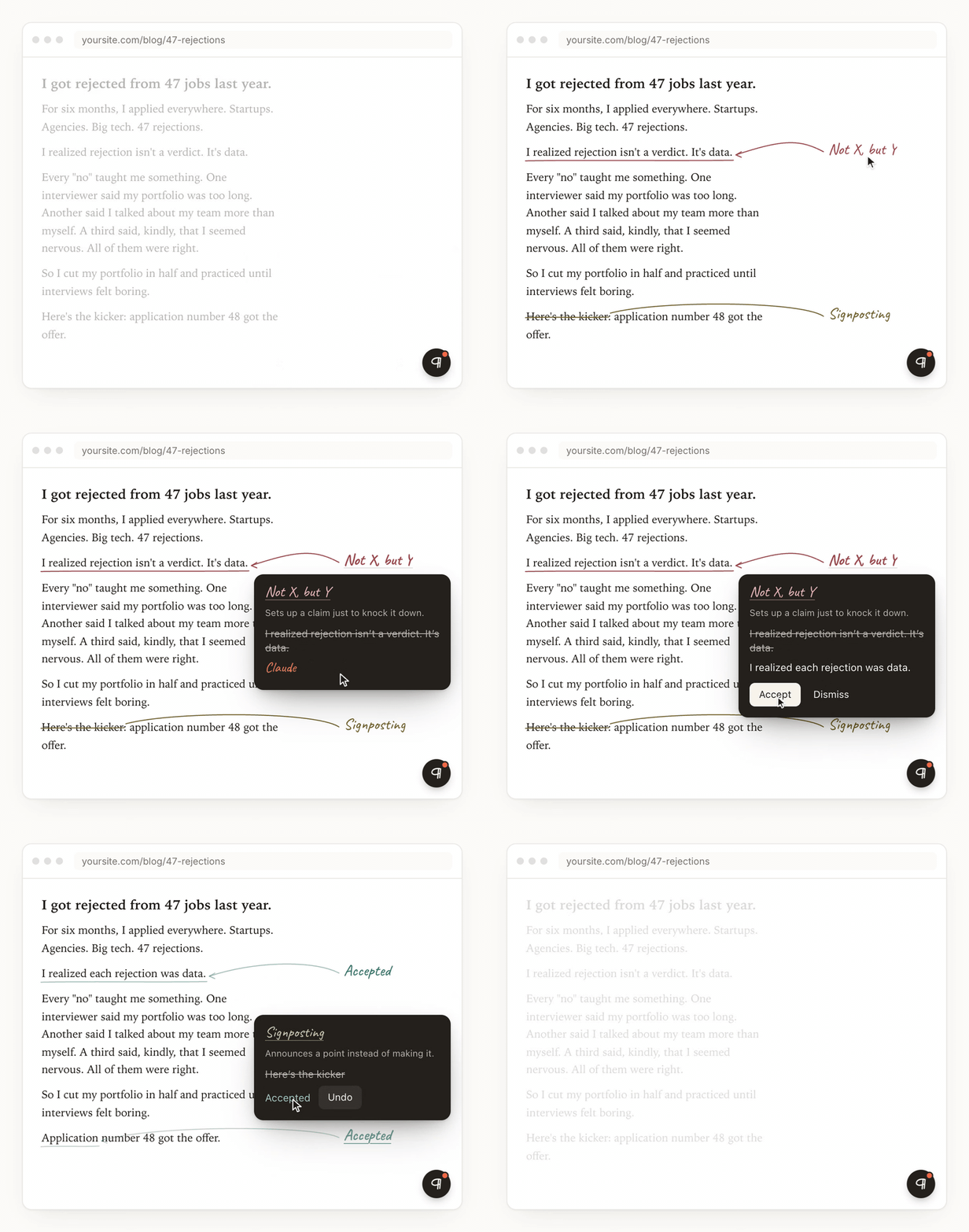
See your writing the way an editor does. Proofmarks marks what reads like AI slop on your page, says why, and rewrites it with the agent you already use. Accept writes the rewrite straight into your source file. See it work on proofmarks.dev.
Quick start
Paste this into your agent, in your site's project:
Set up Proofmarks on this site, so it marks AI-sounding writing on my pages. I'm OK with Proofmarks sending my pages' text to Torta's relay to judge it.

1. Run: npx skills add tortastudios/proofmarks --yes
2. Read the proofmarks skill it installed and follow it. If the install failed, follow https://proofmarks.dev/setup.md instead.
The agent installs Proofmarks, configures it, checks it with proofmarks doctor, and opens your page. There's no key to set up.
Or by hand, with Node.js 22 or later:
npm install --save-dev @tortastudios/proofmarks
npx proofmarks init
npx proofmarks dev --to http://localhost:3000
Open the address dev prints, with ?proof=1 on the end. To look around first, open the gallery: nine kinds of writing, each with a saved review.
No Node? Install Proofmarks with brew install tortastudios/tap/proofmarks, a one-line installer or uv tool install proofmarks, then run the same commands without npx. See Install.
How it works
- Mark. Proofmarks reads the page's source, whether Markdown, MDX, HTML or a template, and checks each passage against 20 rules, from "Not X, but Y" to "Generic voice". Code finds the candidates, and a decision model confirms each one. The marks land in the margin of the page you already have open.
- Rewrite. Select a mark to see why it's there. Ask your agent for a rewrite: it gets the passage, its paragraph and the rule, and the decision model checks its draft before you see it.
- Decide. Accept writes the rewrite into the source file. Dismiss keeps the mark from coming back. Undo restores the original. As you decide, each rule's line moves toward what your site keeps and dismisses.
Ask your agent to "proof this page", and it drafts a rewrite for every mark while you watch; you accept them. In CI, proofmarks check marks a pull request's changed lines without opening the page: see Checking without the page.
The rules: 20 on by default, and 1 you can turn on
| Rule | What it marks | Example |
|---|---|---|
| Inflated word | A fancy word stands in for a plain one. | We leverage customer feedback to shape every release. |
| Filler | Words that delay the point without adding to it. | In order to get started, open the settings page and pick a plan. |
| Brochure verb | A costume for “is” or “has”. | The dashboard serves as a single home for your team's work. |
| Promotional adjective | Praise instead of description. | Our seamless onboarding gets new hires working on their first day. |
| Signposting | Announces a point instead of making it. | Simply put, most teams never read their own documentation. |
| Not X, but Y | Sets up a claim just to knock it down. | It's not a tool. It's a new way of working. |
| List of three | Three items for rhythm, not because there are three. | The new plan is faster, simpler, and more powerful. |
| Stacked hedges | Several hedges in one claim dodge commitment. | This could potentially help some teams in certain cases. |
| Vague attribution | Cites authority nobody can check. | Experts agree that shorter meetings lead to better decisions. |
| Trailing -ing clause | Bolts an unsupported conclusion onto a fact. | Signups doubled in March, highlighting the strength of our brand. |
| Chatbot residue | A conversational leftover that addresses no real reader. | Thanks for reading this far. I hope this helps! |
| False range | “From X to Y” with no real scale between them. | From solo founders to global enterprises, anyone can use it. |
| Puffery | Asserts importance instead of showing it. | The results of this launch speak for themselves. |
| Generic voice | Could describe any company; no specific detail or stance. | Marketing is all about understanding your audience. When you know what your customers want, you can create content that speaks to them. The key is to stay consistent and keep learning. |
| Repetition | Says the same thing again without adding to it. | Our support team answers within an hour, so you never wait long for help. Getting help is quick because the team replies fast, and those fast replies mean nobody is left waiting for an answer. |
| Over-explaining | Explains what the reader already knows. | To send a message, type your words into the box. The box is the white area at the bottom of the screen. When you have finished typing, press Send, and the message is sent. |
| Uniform rhythm | Every sentence has the same length and shape. | We start early. We test everything. We ship on Fridays. We read every reply. We fix what breaks. |
| Em dash | A dramatic pause before a reveal. | The update is small — but it changes how the whole team works. |
| Connecting colon | A colon used as a hinge between claims, not to introduce a list. | The answer was simple: we stopped holding weekly meetings. |
| Bold inflation | Bold used for emphasis instead of scanning. | Our new dashboard is incredibly easy to use. |
Off by default, and turned on in proofmarks.config.json:
| Rule | What it marks | Example |
|---|---|---|
| Title case heading | Title Case headings read like marketing copy. | How We Rebuilt Our Onboarding Flow |
Agents
Proofmarks works with the agent you already use. init connects the ones it finds, and each proof card lets you choose who rewrites.
| Agent | How it takes rewrites |
|---|---|
| Any agent, self-driving | Ask it to "proof this page" (in Claude Code, /mcp__proofmarks__proof). It rewrites every proof, checking each draft with the decision model, while you watch the page. You accept. |
| Claude Code, Codex or pi, with no conversation | Proofmarks runs it for each rewrite, with its tools turned off. There's nothing to start. |
| An agent you're working with | Ask it to "watch Proofmarks" (in Claude Code, /mcp__proofmarks__watch). This works in any MCP client, including the desktop apps, Cursor, VS Code, claude -p and the Agent SDK. |
| pi | Requests arrive in the session on their own, through the Proofmarks extension. |
| Claude Code, pushed | Requests arrive on their own when you start it with claude --dangerously-load-development-channels server:proofmarks, a research preview. |
Privacy
- Your writing leaves your machine only to be judged or rewritten. Judging goes through Torta's relay to Jev, TypeSafe's decision model, and the relay doesn't keep the passages. Rewrites go to the agent you choose.
- Usage counts are off unless you turn them on (
proofmarks telemetry on). If you do, Proofmarks sends counts of the marks you keep or dismiss, never your writing, to tune the rules for everyone. Either way, it tunes its rules to your site on your machine. - No account, no key. Or set your own Jev key (
TYPESAFE_API_KEY), and judging skips the relay.
TELEMETRY.md lists everything Proofmarks sends, and to whom.
Docs
- Install: npm, Homebrew, the installers, uv and pipx, and what
initdoes. - Configuration: documents, write access, rebuilds and private access.
- Agents and MCP tools: self-driving, watch mode, the twelve tools, feedback, pi, push and setting up by hand.
- Integrations: the proxy, the script tag, React, Next.js and the examples.
- Formats: Markdown, MDX, HTML and templates.
- Checking without the page:
proofmarks checkfor CI and bulk runs, on files, folders and URLs. - Judge, privacy and usage counts: Jev, what is sent and kept, opting out, and using your own key.
- FAQ, security and contributing.
License
FSL-1.1-MIT: use Proofmarks for anything except a commercial product or service that competes with it, including on your own sites and your clients' sites. Each version becomes MIT two years after its release. The examples and script-tag snippets are MIT, and the Caveat handwriting font keeps its OFL.
1 maintainer

Metadata
1 maintainer
Release files for proofmarks 0.1.2
For a detailed explanation of source distributions (sdists) and built distributions (wheels), please see the package formats documentation.
Built distributions (wheels)
| File | Actions Reset | |||
|---|---|---|---|---|
| proofmarks-0.1.2-py3-none-win_amd64.whl | Python 3 | none | Windows x86-64 | Details for proofmarks-0.1.2-py3-none-win_amd64.whl |
| proofmarks-0.1.2-py3-none-manylinux_2_28_x86_64.whl | Python 3 | none | Linux glibc 2.28+ x86-64 | Details for proofmarks-0.1.2-py3-none-manylinux_2_28_x86_64.whl |
| proofmarks-0.1.2-py3-none-manylinux_2_28_aarch64.whl | Python 3 | none | Linux glibc 2.28+ ARM64 | Details for proofmarks-0.1.2-py3-none-manylinux_2_28_aarch64.whl |
| proofmarks-0.1.2-py3-none-macosx_13_0_x86_64.whl | Python 3 | none | macOS 13.0+ x86-64 | Details for proofmarks-0.1.2-py3-none-macosx_13_0_x86_64.whl |
| proofmarks-0.1.2-py3-none-macosx_13_0_arm64.whl | Python 3 | none | macOS 13.0+ ARM64 | Details for proofmarks-0.1.2-py3-none-macosx_13_0_arm64.whl |
Total release size: 226.2 MB
Release files / proofmarks-0.1.2-py3-none-win_amd64.whl
| Download URL | proofmarks-0.1.2-py3-none-win_amd64.whl |
|---|---|
| Size | 39.4 MB |
| Tags | Python 3 Windows x86-64 |
|
SHA-256 checksum How to use checksums |
c419a3d6f50705ce7cf9bb3b79e237e636659e52de26584ca6c09f5dd8226c3c
|
|
BLAKE2b-256 checksum How to use checksums |
adda5c3000106187ed24875fafadf420b27bcad805e87e1d20c95adfe8995a08
|
| Upload date | |
|
Uploaded using Trusted Publishing? What is trusted publishing? |
Yes |
| Uploaded via |
twine/7.0.0 CPython/3.13.16
|
Provenance
Provenance describes where a file came from. On PyPI, provenance is shared via attestations, which provide a verifiable record of the build or publishing details. View details, limitations and caveats.


PyPI Publish Attestation
PyPI verified that this artifact, at this checksum, originated from the publisher listed below.
Signed by GitHub Actions, verified by PyPI on Nov 27, 2026.
Transparency logRelease files / proofmarks-0.1.2-py3-none-manylinux_2_28_x86_64.whl
| Download URL | proofmarks-0.1.2-py3-none-manylinux_2_28_x86_64.whl |
|---|---|
| Size | 47.9 MB |
| Tags | Linux glibc 2.28+ x86-64 Python 3 |
|
SHA-256 checksum How to use checksums |
d56106eee70f99a4fb8d38658d9239bf580290fea105fc4777c587e6a117371b
|
|
BLAKE2b-256 checksum How to use checksums |
1c46d4910ff55c42422b5d81713442dda29aa5c3d5dc0206f947ddfa25359008
|
| Upload date | |
|
Uploaded using Trusted Publishing? What is trusted publishing? |
Yes |
| Uploaded via |
twine/7.0.0 CPython/3.13.16
|
Provenance
Provenance describes where a file came from. On PyPI, provenance is shared via attestations, which provide a verifiable record of the build or publishing details. View details, limitations and caveats.
PyPI Publish Attestation
PyPI verified that this artifact, at this checksum, originated from the publisher listed below.
Signed by GitHub Actions, verified by PyPI on Nov 27, 2026.
Transparency logRelease files / proofmarks-0.1.2-py3-none-manylinux_2_28_aarch64.whl
| Download URL | proofmarks-0.1.2-py3-none-manylinux_2_28_aarch64.whl |
|---|---|
| Size | 47.6 MB |
| Tags | Linux glibc 2.28+ ARM64 Python 3 |
|
SHA-256 checksum How to use checksums |
a0e68d3930b8f50712bb1cd7ad0122f8c913638d7e9097af58c82223e3ca5f49
|
|
BLAKE2b-256 checksum How to use checksums |
324cfea2d0dbbd4bc6782ed9ae4ae413077306edbe82f82f9baee183ff4743d2
|
| Upload date | |
|
Uploaded using Trusted Publishing? What is trusted publishing? |
Yes |
| Uploaded via |
twine/7.0.0 CPython/3.13.16
|
Provenance
Provenance describes where a file came from. On PyPI, provenance is shared via attestations, which provide a verifiable record of the build or publishing details. View details, limitations and caveats.
PyPI Publish Attestation
PyPI verified that this artifact, at this checksum, originated from the publisher listed below.
Signed by GitHub Actions, verified by PyPI on Nov 27, 2026.
Transparency logRelease files / proofmarks-0.1.2-py3-none-macosx_13_0_x86_64.whl
| Download URL | proofmarks-0.1.2-py3-none-macosx_13_0_x86_64.whl |
|---|---|
| Size | 46.9 MB |
| Tags | Python 3 macOS 13.0+ x86-64 |
|
SHA-256 checksum How to use checksums |
98f5f5beba34256016a777f9f428cc666a3e14c29c5015a7a1fec9aabcd11d16
|
|
BLAKE2b-256 checksum How to use checksums |
535d1075713761b909bb23364940b642329830755504ff9c3a86c20b8e8426bc
|
| Upload date | |
|
Uploaded using Trusted Publishing? What is trusted publishing? |
Yes |
| Uploaded via |
twine/7.0.0 CPython/3.13.16
|
Provenance
Provenance describes where a file came from. On PyPI, provenance is shared via attestations, which provide a verifiable record of the build or publishing details. View details, limitations and caveats.
PyPI Publish Attestation
PyPI verified that this artifact, at this checksum, originated from the publisher listed below.
Signed by GitHub Actions, verified by PyPI on Nov 27, 2026.
Transparency logRelease files / proofmarks-0.1.2-py3-none-macosx_13_0_arm64.whl
| Download URL | proofmarks-0.1.2-py3-none-macosx_13_0_arm64.whl |
|---|---|
| Size | 44.5 MB |
| Tags | Python 3 macOS 13.0+ ARM64 |
|
SHA-256 checksum How to use checksums |
d4c49658c9a10b225e2070de740d8d920bda8195e45df42f3c8caa8504d89fbd
|
|
BLAKE2b-256 checksum How to use checksums |
443fed0b67e6abd2a37ea20f9edf72562efef1ccc35e6973ef8d007eeabedd21
|
| Upload date | |
|
Uploaded using Trusted Publishing? What is trusted publishing? |
Yes |
| Uploaded via |
twine/7.0.0 CPython/3.13.16
|
Provenance
Provenance describes where a file came from. On PyPI, provenance is shared via attestations, which provide a verifiable record of the build or publishing details. View details, limitations and caveats.
PyPI Publish Attestation
PyPI verified that this artifact, at this checksum, originated from the publisher listed below.
Signed by GitHub Actions, verified by PyPI on Nov 27, 2026.
Transparency logSecurity for proofmarks 0.1.2
Provenance
Provenance describes where a file came from. On PyPI, provenance is shared via attestations, which provide a verifiable record of the build or publishing details. View details, limitations and caveats.
Full provenance
All 5 files in this release have been uploaded with provenance metadata.
Attestation for proofmarks-0.1.2-py3-none-win_amd64.whl
PyPI Publish Attestation
PyPI verified that this artifact, at this checksum, originated from the publisher listed below.
Signed by GitHub Actions, verified by PyPI on Nov 27, 2026.
Transparency logA note on package security
PyPI is a repository for distributing packages, not a service for auditing them. While third-party security researchers and our staff do their best to detect and remove malicious packages, PyPI cannot guarantee the quality, security or suitability of any given package.
To learn more about protecting yourself from malicious actors, visit our package security documentation.














